You sent the module. You sent the reminder. Then a manager pings you because people still ask the same questions the training was supposed to answer.
That's rarely a motivation problem. It's usually a design problem, and it's fixable if you stop treating training videos for employees as content to publish and start treating them as a way to change what people do next.
Table of Contents
- The Familiar Compliance Trap - The Four Moving Parts - Where Video Fits in the Ecosystem - Retention Comes From Structure, Not Format - Scalability Changes the Economics - Compliance Needs an Auditable Asset - Consistency Protects the Message - Onboarding - Compliance - Sales Enablement - Customer Education - Soft Skills and Product Updates - Set Duration by Content Type - Build Retrieval Into the Video - Accessibility Is a Door, Not a Decoration - Close the Transfer Gap on Purpose - What SCORM and xAPI Do for You - Compress the Production to Publishing CycleWhy Most Employee Training Programs Quietly Stop Working
The scene is familiar in most mid-size and enterprise teams. An L&D lead has a stack of policy PDFs, a slide deck from a subject matter expert, and a deadline tied to an audit, a product launch, or a new hiring wave. The content goes into the LMS, the announcement goes out, and the completion report crawls.
Meanwhile the learner is not sitting in a quiet classroom. They're between calls, answering messages, and trying to finish real work. A long recording that asks for passive attention loses that fight almost every time, even when the topic matters.
The Familiar Compliance Trap
Consider the annual compliance rollout. Someone records a presenter reading slides for an hour, adds a final quiz, and calls it training. Employees let it play in a background tab, guess through the questions, and return to work unable to handle the exact scenario the policy describes.
The organization gets a tidy completion record. It doesn't get safer decisions.
Video itself isn't the weak link. A 2019 survey of more than 1,200 full-time employees at U.S. companies with over 500 workers found that 91% of employers used video for at least some training or learning and development activities, 90% of employees had used video to learn a specific skill, and 69% of employees preferred learning a new skill from video rather than a written document.
> Employees aren't rejecting video. They're rejecting videos that ignore how attention and memory work during a busy day.
That's why the shift has to be practical. Move from producing more content to designing learning transfer. Move from arguing about ideal length to applying clear design rules. Move from isolated files to LMS-ready modules, and from generic tips to a production checklist your team can reuse.
What Employee Training Videos Actually Are
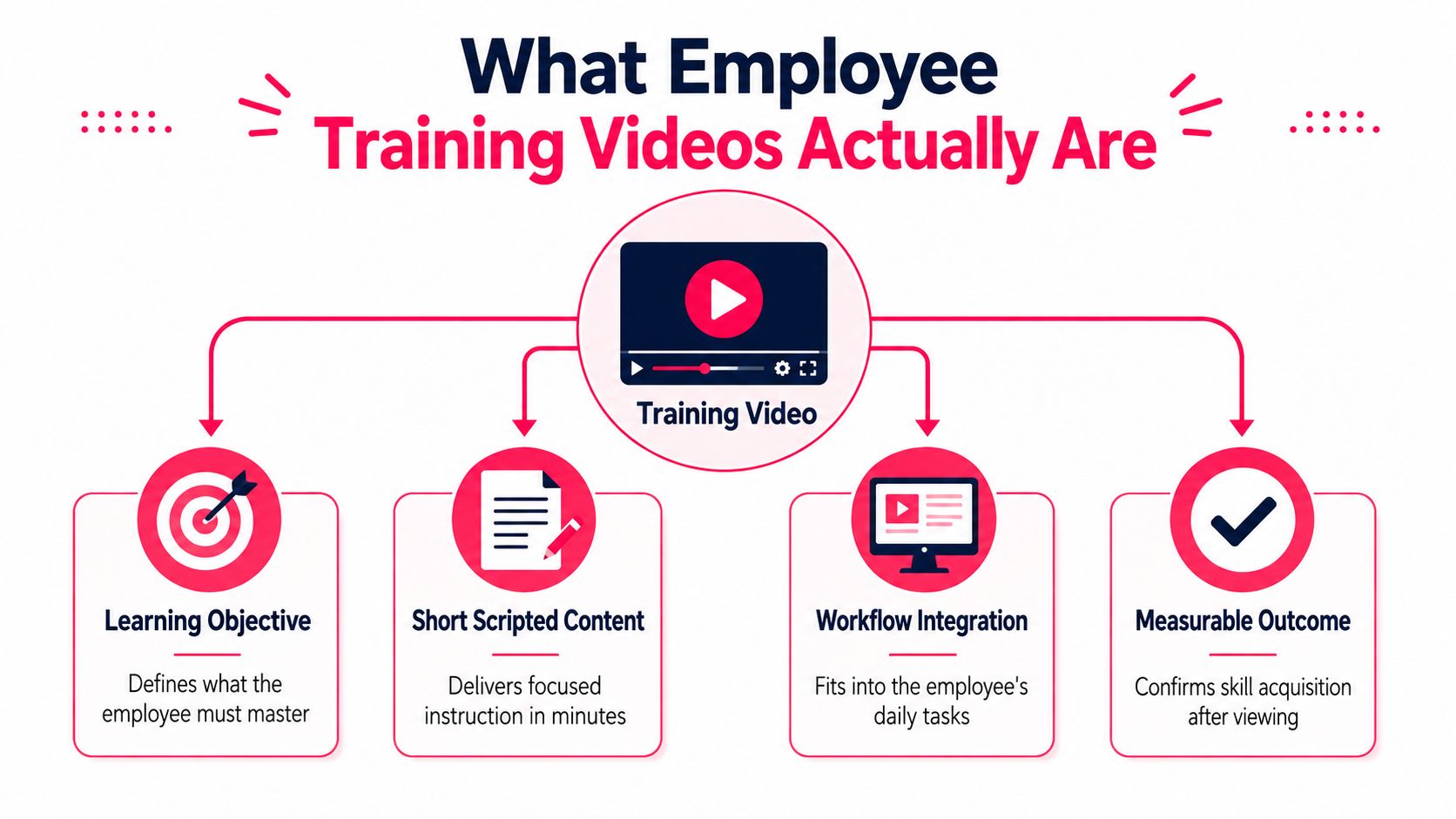
A training video isn't defined by its camera, avatar, or animation style. It's defined by the job it does inside a workflow. In one sentence, it's a short, structured lesson built around one outcome, with a moment that checks understanding and a record that shows what happened.
Think of a flight safety briefing. It doesn't teach aviation theory, and it doesn't try to entertain you for its own sake. It gives you a tight sequence, points to the action that matters, and repeats the same critical steps every time.
The Four Moving Parts
- Learning objective: One specific thing the employee must be able to do, decide, or explain after watching.
- Short scripted content: Focused instruction that teaches only what supports that objective, in plain spoken language.
- Retrieval or interaction moment: A question, decision, or prompt that forces the learner to use the idea instead of just recognize it.
- Measurable outcome: A completion rule, score, or follow-up task that confirms whether the lesson landed.
That structure separates training from lookalikes. A marketing video persuades an outside audience. A recorded Zoom lecture preserves a meeting. A social media explainer chases attention. None of those automatically teach a workplace task or prove that learning happened.
Where Video Fits in the Ecosystem
Training videos for employees shouldn't replace everything else. They work best as one layer beside job aids people can check in the moment, instructor-led practice for complex conversations, and documentation for reference. Video carries the explanation and the example well. The other layers carry practice, feedback, and detail.
AI generation belongs in that same frame. It's a production method for creating narration, visuals, and scenes faster, not a different category of learning. If the objective is vague, an AI-generated video is just a vague lesson produced more quickly.
The Benefits That Actually Move the Needle
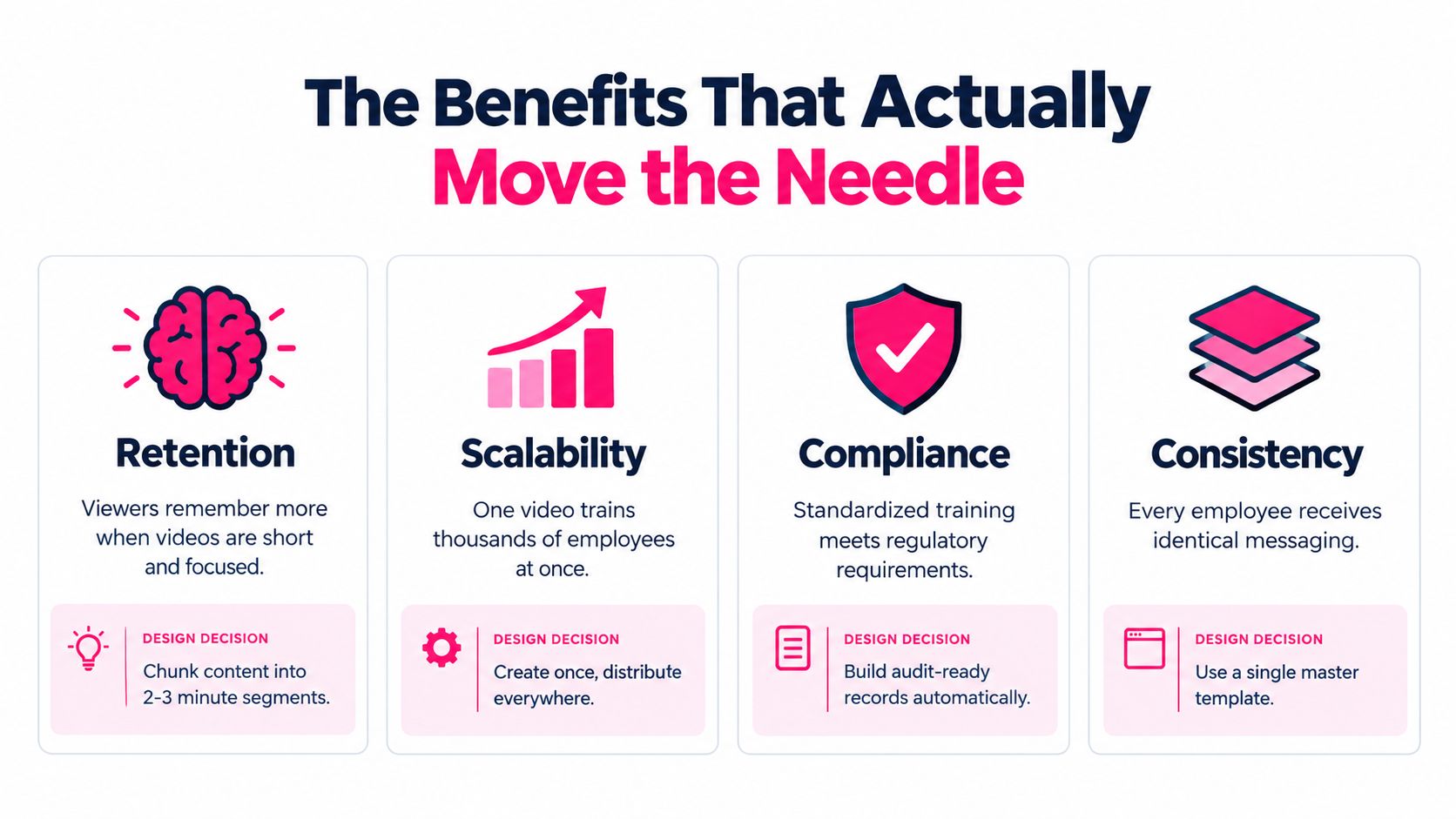
Leaders don't fund video because employees enjoy pressing play. They fund it when it improves retention, reach, audit readiness, and consistency. Each benefit depends on a design choice, and skipping that choice turns the benefit into a slogan.
Retention Comes From Structure, Not Format
Short, segmented lessons give memory something it can hold. That design matters because attention drops quickly in long recordings. In a 2014 analysis of 6.9 million video sessions across four edX courses, researchers found that median viewer engagement was no more than six minutes regardless of total length, and learners commonly stopped before the halfway point when videos exceeded nine minutes.
For your business case, say this plainly: we chunk content and add retrieval because long passive playback wastes the training time we're already paying for.
Scalability Changes the Economics
A well-built source video can serve a new onboarding cohort, a global rollout, and a refresher months later without booking the same expert again. Your team updates the segment that changed instead of rebuilding the whole program. That reuse is what lets a small L&D team support more topics without lowering quality.
Compliance Needs an Auditable Asset
Compliance training has to answer who learned what, and when. Video published through an LMS can produce traceable completion and assessment records tied to a specific version of the content. When an auditor asks for evidence, you're not hunting through attendance sheets and inbox confirmations.
Consistency Protects the Message
Live delivery varies by trainer, location, and day. Video doesn't. Every employee hears the same definitions, sees the same correct example, and gets the same safety or policy language, which matters most in distributed and multilingual teams.
> Business case line: One approved master lesson reduces delivery variation while still letting managers handle local questions and coaching.
The Main Use Cases and How Each One Behaves
These five use cases share a production pipeline, but they don't behave the same way. Treating them as one category is how teams end up with onboarding that feels like compliance and sales training that feels like a lecture.
Onboarding
New hires need orientation, not information overload. A strong first video could walk through the first day in order: where to log in, who to meet, what to complete before the first team meeting, and where to ask for help. The common mistake is cramming company history, tools, policies, and culture into one welcome marathon.
Compliance
Compliance works best in short modules tied to real decisions. Show a questionable gift from a vendor, pause, and ask the learner to choose the correct response before explaining the policy. That proves understanding better than attendance. The usual mistake is reading legal text aloud and assuming exposure equals learning.
Sales Enablement
Sellers need help at specific deal moments. Build a video around one objection, such as a prospect saying your price is too high, and model the discovery question, the proof point, and the next step. Generic pitch deck recordings fail because they don't prepare anyone for the conversation that stalls deals.
Customer Education
Customer-facing teams also train employees to teach customers well. A useful video might show support staff how to guide a new admin through setup in the same order the customer experiences it. Done well, this reduces repeated explanations and gives success teams a shared way to explain value. The mistake is organizing by internal feature names instead of the customer's journey.
Soft Skills and Product Updates
Ongoing training needs spaced return, not a single viewing. A manager feedback video, for example, should be revisited through short scenarios over time, with each one isolating a different hard moment. Product updates follow the same rule: one change, why it matters, and what to do differently.
Training Video Use Cases at a Glance
| Use case | Typical length | Core content | Success signal | |---|---|---|---| | Onboarding | Short welcome sequence | First steps, people, tools | New hire completes setup without chasing help | | Compliance | Short modular lessons | Policy decisions in scenarios | Correct choices and audit-ready records | | Sales enablement | Focused deal-moment clips | Objections, talk tracks, proof | Better handling of live conversations | | Customer education | Journey-based walkthroughs | Setup and adoption steps | Fewer repeated support explanations | | Soft skills and product | Brief recurring lessons | Practice scenarios and updates | Observed behavior change on the job |
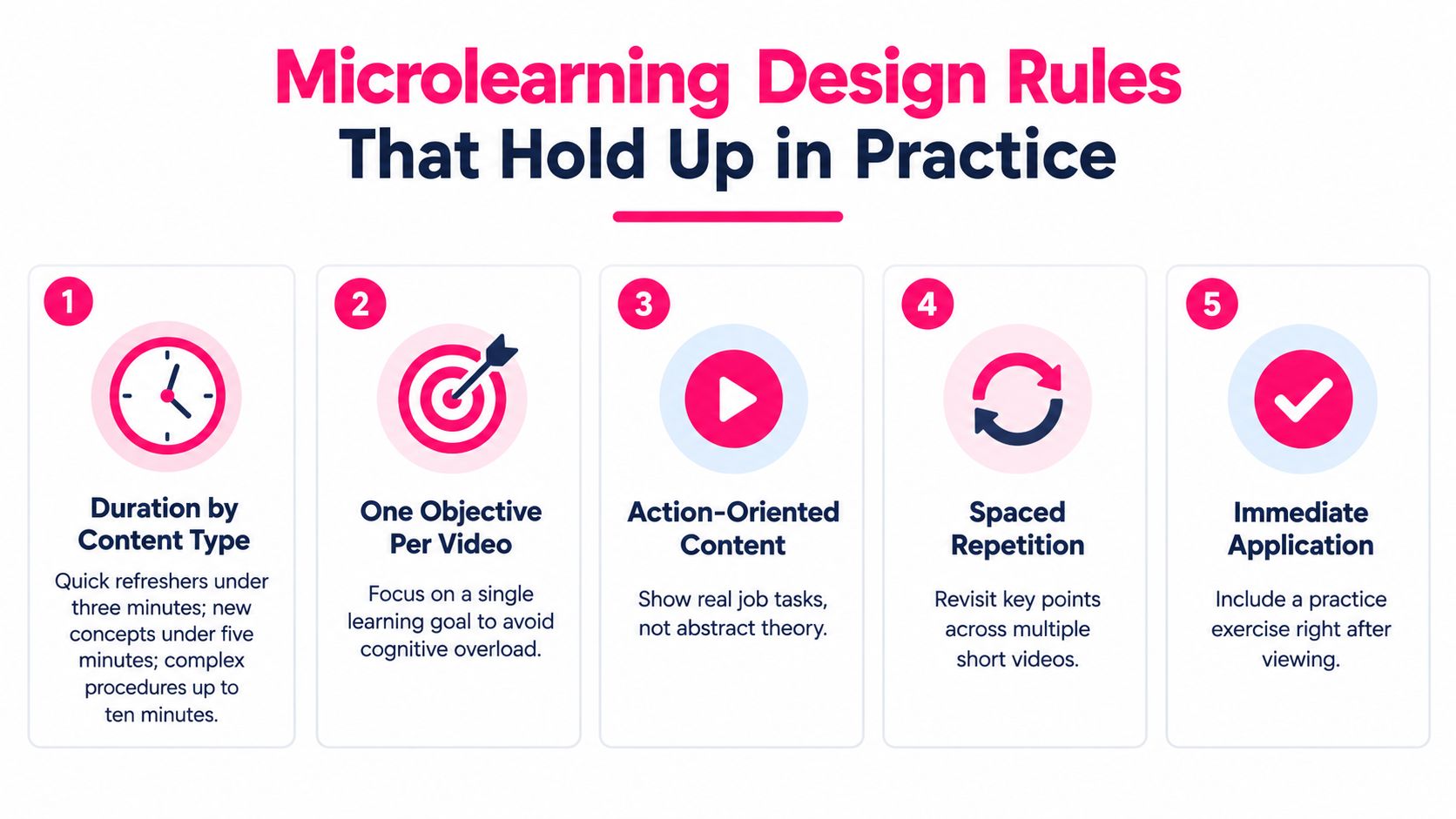
Microlearning Design Rules That Hold Up in Practice
Microlearning isn't magic because it's short. It works when short content is focused, structured, and paired with retrieval. Think of a trail marker: brief, visible, and useful because it points to a specific next step.
Set Duration by Content Type
Use length as a design decision, not a preference. These ranges give your team a starting template they can apply without debating every video from scratch.
- Quick refresher: Under three minutes for one reminder or changed step.
- Single-concept lesson: Around four to six minutes for one idea plus an example.
- Scenario walkthrough: Up to eight or nine minutes when the learner must follow a decision and its consequences.
- Hard ceiling: Split the topic when you approach ten minutes, unless you're deliberately modeling a full process that can't be separated.
State the objective up front in language the learner cares about. "By the end, you'll know how to escalate a billing dispute" beats "Today we'll cover policy section four." Then keep the visuals moving with purposeful changes, such as a screen zoom, a callout, or a new example, so attention has a reason to stay.
Build Retrieval Into the Video
Passive viewing is the weak design. In a randomized workplace experiment involving 99 employees, embedded test questions improved recall by 26% and structured peer discussion improved recall by 25% relative to passive viewing, when memory was assessed 20 to 35 hours later.
Put questions during the video, not only at the end. Ask the learner to recall a step, choose between two plausible actions, or spot the error in a short scenario. Branching works when the topic is a decision. A simple embedded question works when the topic is a procedure.
If you're comparing delivery options for deskless teams, the roundup of best microlearning platforms for frontline from Turn On Work is a useful reference for mobile constraints. For the underlying rationale, our guide to the benefits of microlearning for workplace training connects the format to retention and scheduling.
> Editing screen checklist: One objective, stated early, one example from the real job, one retrieval moment, plain language, visible next step, and nothing that doesn't support the objective.
Accessibility, Localization, and the Transfer Gap
Completion is the easiest number to report and the easiest one to misread. An employee can finish every assigned video and still freeze when a customer, patient, auditor, or new system puts the skill to the test. Watching is not performing.
That gap should make L&D teams uneasy. In LinkedIn's 2025 Workplace Learning Report, 49% of surveyed L&D professionals said executives were concerned that employees lacked skills needed to execute business strategy. The issue isn't content volume. It's whether learning connects to operational capability.
Accessibility Is a Door, Not a Decoration
A building with one narrow door technically has an entrance. It still excludes people. Training works the same way when accessibility is bolted on after production.
Build these requirements into the workflow from the first draft:
- Human-reviewed captions: Automated captions need correction for names, acronyms, and technical terms.
- Downloadable transcripts: Searchable text helps employees review, translate, and learn without audio.
- Searchable chapters: Clear sections let learners return to the exact step they need.
- Playback control: Adjustable speed and clear visual hierarchy support different processing needs.
- Low-bandwidth alternatives: Transcripts and lightweight versions keep field and remote staff included.
- Culturally neutral examples: Localization fails when idioms, humor, or scenarios assume one country or workplace norm.
Test with actual employees who use these supports, not only with automated checkers. Our video accessibility guidelines for training teams can serve as the publishing checklist so these items don't become a separate cleanup project.
Close the Transfer Gap on Purpose
Pair every important video with three things: a do this at work task, a manager coaching prompt, and an LMS assessment tied to the job outcome. If the video teaches a new intake process, the task is completing the next real intake with the new checklist, not writing a reflection paragraph.
Ask one question before publishing: what should this employee do differently tomorrow, and how will we verify it? If nobody can answer, the video isn't ready, no matter how polished it looks.
Distributing, Publishing, and Tracking With an LMS
The last mile is where good lessons often stall. A video sitting in a shared drive can't reliably show completion, score interactions, or feed leadership reporting. Publishing through an LMS turns the same video into a trackable training asset.
What SCORM and xAPI Do for You
SCORM and xAPI are standards that let learning content communicate with an LMS. In practical terms, they help your team record completion, capture scores, and report interaction results across modules. That data matters for compliance audits and for leadership reviews where "we sent it out" isn't evidence.
Use a repeatable publishing sequence your operations partner can follow:
- Export: Package the finished module from your authoring tool in the format your LMS accepts.
- Upload and configure: Add the module, set completion rules, and decide whether a score is required to pass.
- Assign: Target the right roles and due dates instead of sending everything to everyone.
- Test: Check playback, captions, questions, and reporting on mobile and on a slower connection.
- Review the data: Look for questions many learners miss, then revise that segment.
Our overview of learning management system best practices covers the reporting and assignment decisions behind that sequence.
Compress the Production to Publishing Cycle
Templates compress the cycle because your team stops reinventing structure and branding for every module. Options in this space include Synthesia, HeyGen, VEED, and Camtasia, each with different strengths in avatar video, editing, or screen recording. VideoLearningAI is another option that converts existing documents, slide decks, SOPs, and URLs into structured lessons, with templates for onboarding, compliance, sales enablement, and customer education and compatibility with common training standards for LMS publishing.
Judge any tool on the slowest step in your current process. If scripting is the bottleneck, test conversion from source material. If inconsistent quality is the bottleneck, test templates. If publishing is the bottleneck, test the LMS handoff first.
Your Next 30 Days of Training Video Decisions
Week one, audit your library and pick the highest-friction use case. Week two, build one microlearning template with a single objective and a retrieval check.
Week three, produce one pilot and run an accessibility and transfer review with real employees. Week four, publish it in the LMS and measure one operational outcome, not only completion.
Don't skip the accessibility review, retrieval design, transfer task, or LMS reporting. Training videos aren't about making better content. They're about making learning that changes what employees do on Monday morning.
---
Turn one high-friction document, deck, or SOP into a structured, LMS-ready microlearning video with VideoLearningAI, using templates for onboarding, compliance, sales enablement, and customer education. Start with a single pilot, add a retrieval check and a workplace task, and measure whether employees can perform the skill after watching.