Most corporate training videos should run three to six minutes per learning objective, with roughly five minutes as a soft ceiling before engagement tends to drop more noticeably. Go longer only when the learning task depends on continuity, such as watching a complete demonstration or working through a realistic scenario.
That benchmark is a starting point, not a production law. The answer to “how long should a corporate video be” depends on what learners need to do afterward, how much context the task requires, and where they'll watch. Pick the learning objective first, then set the runtime that teaches it without padding or cutting out essential practice.
Table of Contents
- Ask these questions before locking the runtime- What the Engagement Data Actually Shows
- Length Benchmarks by Corporate Video Type
- Scripting and Editing Tactics That Hold Attention
The Short Answer and Why It Depends
When you lack other information, plan a three-to-six-minute video for one discrete learning objective. Treat about five minutes as the point to scrutinize the script, not an automatic cutoff: split the video if it bundles several tasks, but keep it intact when learners need to see a process or scenario unfold.
Duration is a downstream decision. Teams get into trouble when they choose a target runtime first and then force every topic to fit it. A short video can be too brief to explain a safety decision; a longer one can be easy to follow if it shows a complete procedure with a clear payoff.
Ask these questions before locking the runtime
- What must the learner do differently? A focused policy reminder needs less setup than a new-hire workflow that requires learners to make decisions.
- Can the objective stand alone? If a clip can be understood and applied on its own, give it a separate title and place it in the learning path as an independent lesson.
- Where will people watch it? An LMS lesson, a searchable knowledge-base reference, and a message sent during onboarding serve different viewing intentions. The same source material may need different edits for each.
The practical rule is simple: define one observable outcome, write only what supports it, and split the lesson at a meaningful break if the content starts doing another job. Don't cut the scenario, instructions, or example learners need just to hit a number.
> Practical rule: Set the runtime after you can finish this sentence: “After watching, the learner can…”
This approach gives stakeholders a defensible benchmark while leaving room for tasks that need more explanation. It also gives production teams a concrete way to decide whether to shorten, segment, or preserve a continuous lesson.
What the Engagement Data Actually Shows
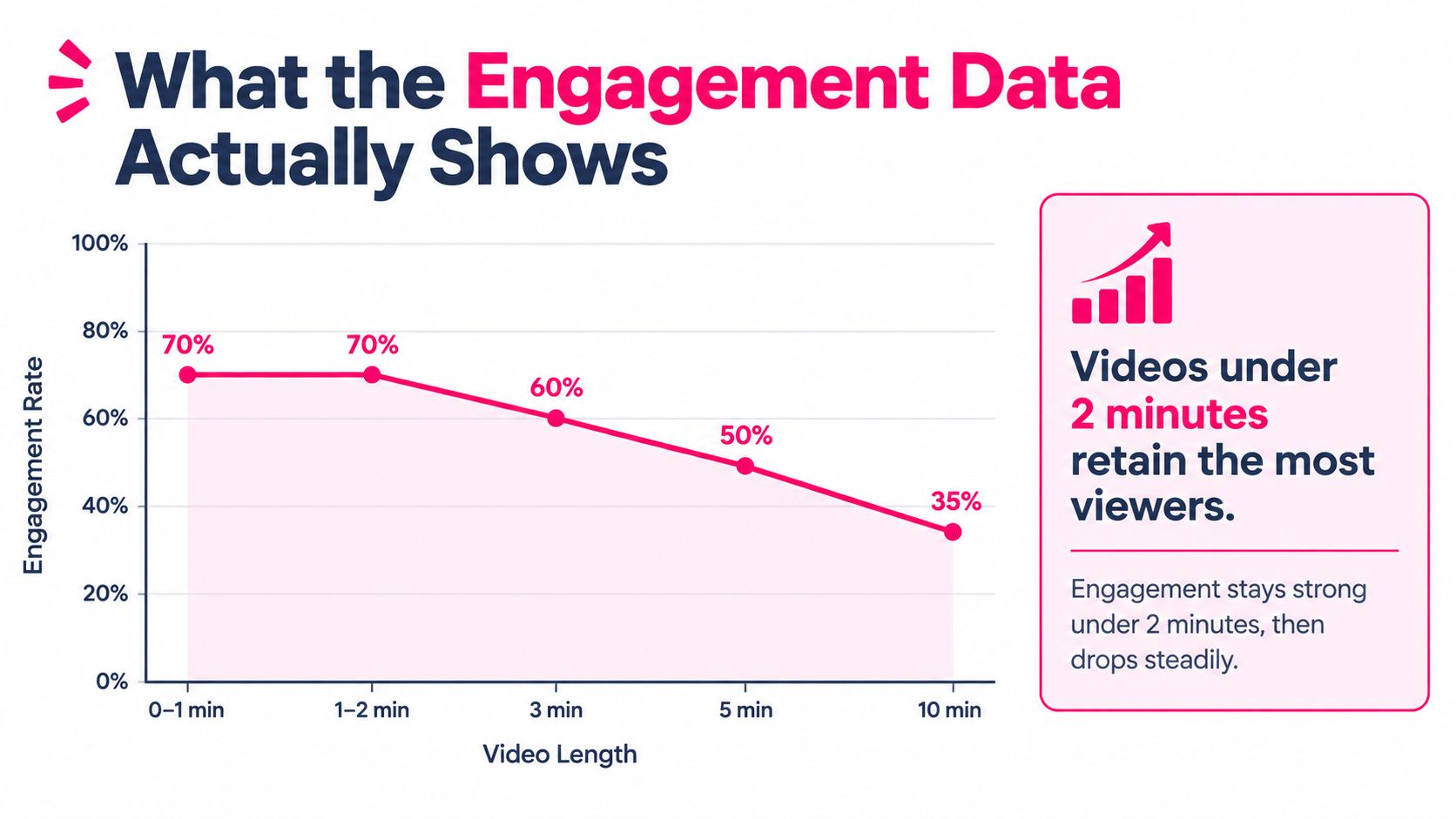
Engagement data supports a short default, but not a universal ideal. Wistia's 2024 State of Video Report analyzed more than 90 million videos and found only minor engagement differences among videos lasting one to five minutes. Engagement declined significantly after the five-minute threshold, while instructional videos generally held attention better as they got longer than comparable promotional videos. (Wistia's 2024 State of Video Report findings)
The difference between purpose and duration is especially clear in the report's three-to-five-minute range. Videos in that range averaged 43% engagement overall, while instructional videos averaged 74% engagement. That 31-percentage-point gap is a reminder that a useful lesson can hold attention where a less relevant video may not. The data support making short, focused lessons the default, but they don't say that a longer lesson is ineffective.
!A line chart demonstrating that video engagement rates decline as the length of the video increases.
A separate study by Guo, Kim, and Rubin analyzed 6.9 million viewing sessions across four edX courses. It found that videos shorter than six minutes achieved median engagement close to 100%, while engagement fell to roughly 50% for videos lasting nine to twelve minutes and about 20% for videos lasting 12 to 40 minutes. Those figures describe viewing behavior and assessment attempts in online courses. They don't prove that a particular runtime causes better long-term retention in every corporate setting. (The edX video-engagement study)
For a stakeholder discussion, separate engagement from learning. A learner who finishes a clip hasn't necessarily learned the procedure, and a longer video can still provide more total viewing time even if a smaller share of it is watched. When you need to assess reach as well as runtime, track views, watch time, and click-through rate alongside learning evidence.
Length Benchmarks by Corporate Video Type
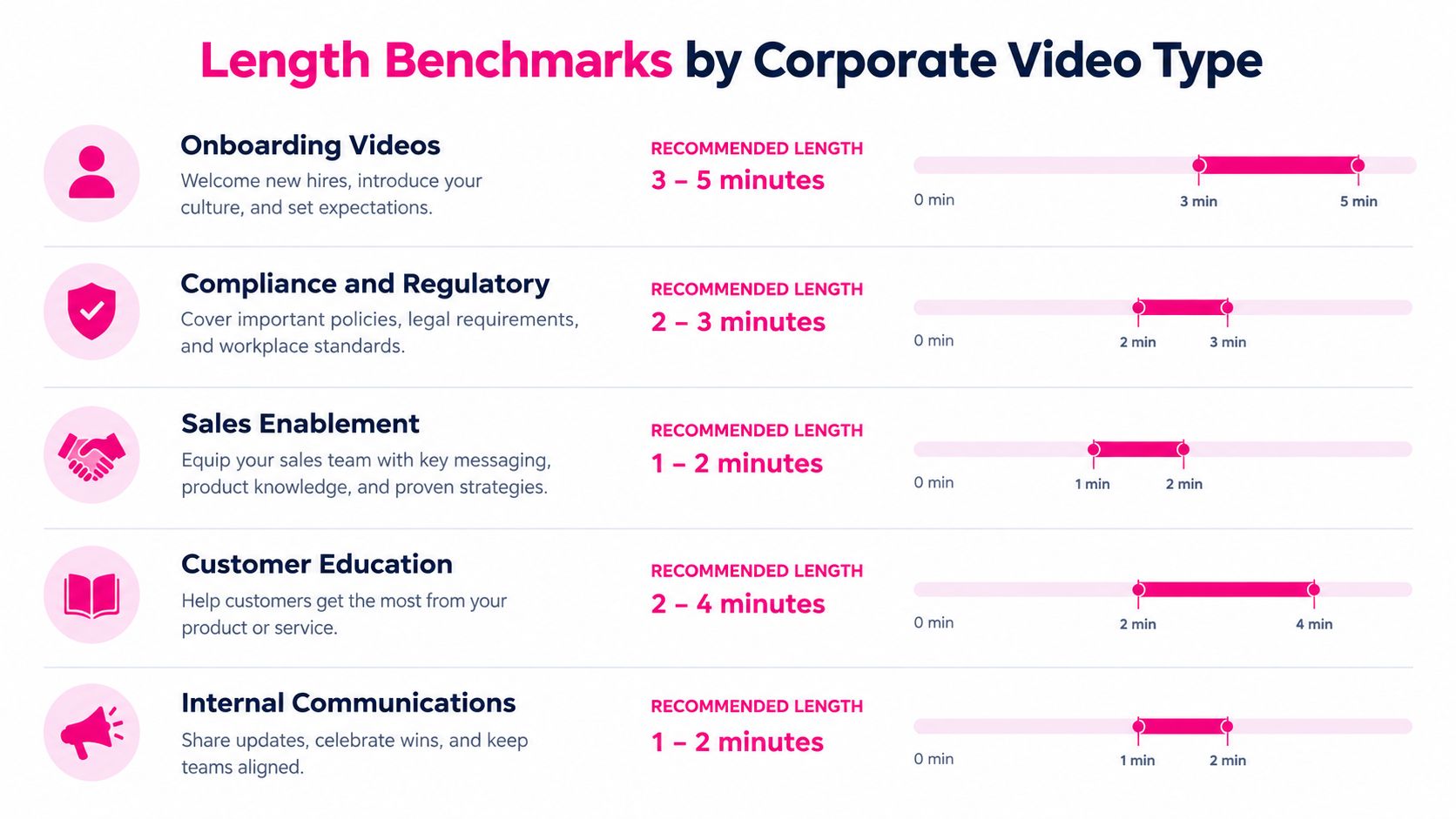
Use video type as a planning shortcut, then check that the draft still serves one clear objective. These are production recommendations, not claims that the same runtime guarantees the same outcome for every audience.
- Onboarding, three to five minutes: Give each clip one practical job, such as submitting an expense, preparing for a first customer call, or finding the right internal resource. Put separate workflows in separate lessons so new hires can return to the relevant task without replaying an entire orientation.
- Compliance and regulatory training, two to three minutes per concept: Keep the policy explanation distinct from prohibited-action examples, reporting steps, and the knowledge check. A learner should be able to locate the part they need to review without scrubbing through unrelated material.
- Sales enablement, one to two minutes for a focused prompt or refresher: Demonstrate a single objection response, product distinction, or conversation opener. If the lesson needs a realistic buyer interaction and practice, treat that as a scenario rather than squeezing it into a short refresher.
- Customer education, two to four minutes for a single feature or task: Show the user how to complete one action, such as configuring a setting. Longer walkthroughs can work when the learner needs to follow connected steps, but add clear chapters or split the workflow where a user can naturally pause.
- Internal communications, one to two minutes for a single update: State what's changing, who's affected, and what action to take. If the message also needs background, separate the explanation from the announcement rather than letting a simple update turn into a general address.
For any category, keep the segment together when splitting would remove context learners need. Otherwise, give each lesson its own title, opening, and purpose. This makes the content easier to assign, update, and find later.
Scripting and Editing Tactics That Hold Attention
A short runtime starts with a narrow brief, not an aggressive edit. Before scripting, write one sentence that names the learner's action. If the sentence contains several unrelated actions, split the concept into separate lessons before production begins.
Build the lesson around the learner's next action
Start with the practical point. Tell viewers what they'll be able to do, then show the process, decision, or example that supports it. A long introduction about why a topic matters delays the useful part and makes a focused lesson feel longer than it needs to.
Write for speech, not for a policy document. Put the spoken explanation beside visual directions in an audio-visual script, so the producer can see whether the screen reinforces the narration. Cut a sentence when the visual already communicates the same information.
Use a visual or conceptual transition every one to three minutes, and place a brief assessment or retrieval prompt at natural unit boundaries. Those are production recommendations for breaking up information, not a promise that a particular edit pattern will improve results. A prompt should ask learners to recall or apply the idea, not confirm that they were watching.
Split where the learning job changes
Keep two adjacent ideas together when one depends on the other. Split when the learner reaches a meaningful decision, procedure, example, or knowledge-check point. A compliance lesson, for example, can present the policy, illustrate a risky action, and explain the reporting route as separate clips if each has its own usable outcome.
If a subject-matter expert insists on including every exception, ask which exceptions change what the learner must do. Put essential exceptions in the lesson, and provide reference material for details that learners can look up when needed. For a more detailed workflow, use this corporate video production guide.
A continuous explanation should run longer when breaking it apart would make the procedure confusing. In that case, add signposts and clear transitions so viewers can follow the steps without mistaking runtime for a reason to remove necessary context.
Microlearning Versus Longer Scenario Formats
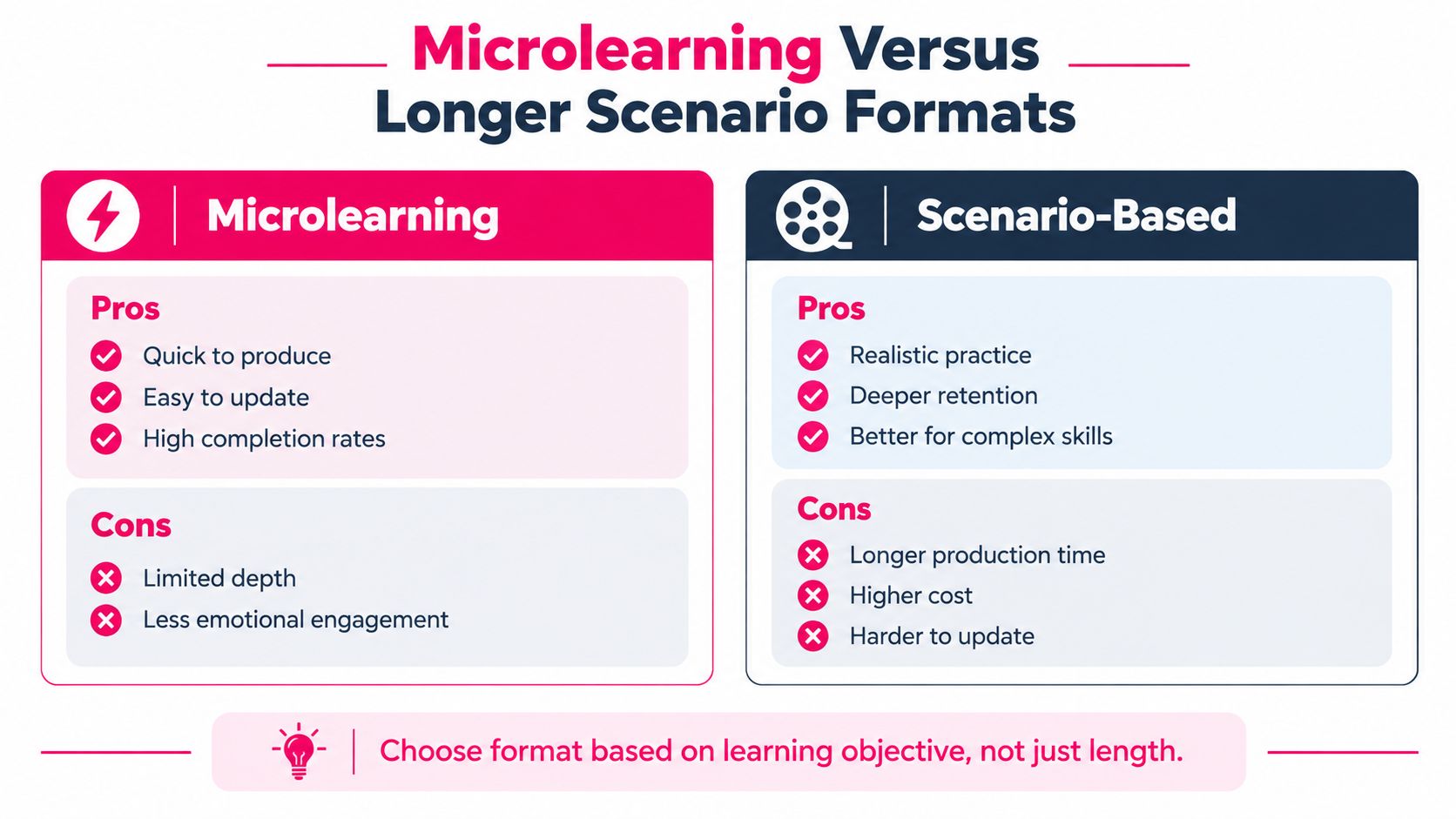
Microlearning is the better choice when each lesson can deliver a complete, standalone outcome. A brief clip works well for a definition, a policy reminder, or a single software action. It's also easier to revise when a process changes, because the team can replace the affected lesson rather than rework a larger program.
A longer scenario is the better choice when learners need to see connected decisions play out. Sales role-play, customer conversations, and procedures with dependencies can lose meaning if the producer cuts between isolated moments. Keep the experience continuous when stopping midway would leave the learner unsure why a choice mattered or what should happen next.
Choose by task, then design the format
A useful decision rule is: if the learner can stop and resume without losing the thread, use microlearning; if a pause breaks comprehension, preserve the sequence. That doesn't mean every scenario should be a single uninterrupted recording. Add chapter markers or divide it at a natural reset point if viewers can return without losing the logic.
Shorter isn't automatically deeper. A study of 623 business-English YouTube videos found that long-form videos generated more content-focused discussion and more positive comments, while short-form videos produced more immediate evaluative reactions. That research concerns video comments, not corporate training outcomes, but it's a useful warning against treating watch-through as proof of learning. (The study of business-English YouTube video discussions)
Build a hybrid program when the skill needs both explanation and practice. Give learners brief lessons for terminology or key rules, then use a longer scenario to let them observe how those ideas work together. Teams building capability around new workplace technologies may also draw on corporate AI training as a structured learning activity, while keeping the video format aligned to what learners need to do.
Distribution Channels and What Length Each Rewards
Choose the destination before finalizing the edit. An LMS module should have a clear learning outcome, useful title, captions, and a sensible place to pause. If the lesson is longer, use chapters so learners can return to a particular topic instead of searching through the whole video.
A knowledge base serves a different purpose. Viewers often arrive looking for a specific answer, so make the video easy to scan and pair it with written instructions or searchable headings. Don't force a complete course into that space when a focused how-to clip would serve the user better.
Executive briefings can retain more context than a quick refresher when leaders need to explain a decision, its implications, and what employees should do. Email-driven onboarding benefits from a sequence of short, clearly named lessons that newcomers can access when the related task comes up. Social snippets should function as introductions or reminders, not substitutes for training that requires demonstration and practice.
Make one source useful across channels
Produce a complete master lesson, then cut channel-specific versions from it. The LMS version can teach the task, while an email or internal feed can carry a short excerpt that directs employees to the full lesson. Keep essential instructions and accessibility features, including captions, in the version learners will use.
For publishing decisions, consider how your organization publishes course videos across platforms and embeds them in an LMS. Check that the chosen player supports the needed captions, chapters, and learning-system tracking before you lock the format. The right runtime is the one that fits both the viewer's intent and the delivery environment.
Measuring Whether the Length Actually Worked
A high completion rate is useful evidence that people reached the end. It doesn't prove that they can apply the lesson. Likewise, a longer video isn't a failure just because viewers don't watch every moment, if learners can find the needed section and perform the task afterward.
Set the success measure before publishing. For a process lesson, check whether learners can complete the workflow. For a policy lesson, test whether they can choose the correct response to a realistic situation. Track completion alongside retrieval performance, application, repeat access, and whether viewers return to a specific part of a longer resource.
> Don't optimize for the shortest video. Optimize for the shortest video that still produces the learning evidence the program needs.
Use LMS records to see who completed the material, then pair them with knowledge checks and, where possible, workplace indicators tied to the intended action. Review search-and-find behavior for longer reference videos: repeated visits to a particular chapter may show that learners use the asset as a job aid, though viewing data alone can't tell you whether they found the answer.
If learners finish but miss the assessment, revise the explanation or add practice. If they succeed but routinely replay one section, improve its clarity or make that step easier to find. A practical content performance tracking approach helps teams evaluate the video as part of the learning experience, not just as a file with a runtime.
---
VideoLearningAI turns existing course materials into structured training videos, with templates for onboarding, compliance, sales enablement, and customer education. If your team is planning a new lesson or breaking up a long recording, visit VideoLearningAI to explore a workflow for creating and publishing bite-sized training content.