Your newest warehouse hire just sat through a forty-minute orientation recording on day one. By the middle of week two, the safety steps and the expense tool are a blur, and the manager is answering the same questions again. The recording wasn't careless. It tried to cover too much, with no check that anything stuck, and no easy way to fix one policy without redoing the whole file.
An onboarding video maker is the practical answer to that pattern. It turns policies, system walkthroughs, and role tasks into short videos a team can review before anyone sees them, then update when the process changes.
Table of Contents
- Why each row shows up in onboarding - The trial test - What leads actually gain- Onboarding Video Makers Compared With the Alternatives
- How to Build a Bite-Sized Onboarding Video in Seven Steps
What an Onboarding Video Maker Does
Say a day-one hire needs to badge in, open the warehouse system, and find the injury-report form. A long orientation mentions all three and then moves on. A useful lesson shows one of those tasks, in order, and lets the person replay the exact click.
An onboarding video maker is software that turns onboarding material into short narrated videos. You start from a prompt, a policy document, or a slide deck. The tool drafts the script, voiceover, visuals, and captions in one pass. Your team edits the wording. You aren't booking a camera or learning a timeline.
Think of a standard operating procedure as a recipe card. A new cook doesn't need the card read aloud for forty minutes. They need a short cooking demo they can pause and replay. The maker is the kitchen that produces that demo from the card.
The workflow has three parts.
1. Source material in. A policy page, a system guide, or role notes go in, with a named owner who will approve the wording. 2. One bite-sized module out. Each video covers one observable task, not the whole first week. 3. Publishing to an LMS. The lesson is exported or embedded so completion can be recorded against a person and a version.
This category is not a film studio, and it isn't a screen recorder built for a one-off product demo. Those tools still have a place. They aren't built to keep a library of policy lessons current.
The gap this category is meant to close is still wide. In 2024, only 20% of surveyed employees received onboarding training, down from 36% in 2022, according to TalentLMS's L&D Benchmark Report.
You now know the fit test. If you repeat the same explanations for many hires, and those explanations change, evaluate import, editing, and LMS publishing before you look at visual style.
Core Features Worth Checking Before You Choose
Polish is the easiest thing to demo and the weakest reason to buy. The features that matter are the ones that survive a policy change, a caption correction, and an audit question about who finished which version.
Use this as a buying checklist, then confirm every red flag against your LMS and your legal review rules.
| Feature | What to Check | Why It Matters | Red Flag | | --- | --- | --- | --- | | Script from existing material | Accepts documents, slides, SOP text or URLs | Turns policies into lessons in minutes | Blank-page only, no import | | Onboarding templates | Welcome, role ramp-up and knowledge-check layouts | Keeps branding and flow consistent across cohorts | Every video built from scratch | | Editable scenes and script | Every line, scene and caption can be changed | Corrections happen before publishing | Locked output with no edits | | Captions and transcripts | Auto captions plus an editable transcript | Supports sound-off viewing and accessibility | Burned-in text only | | Accessible player | Keyboard controls and readable contrast | Learners with disabilities can finish the lesson | Mouse-only player | | Format options | Horizontal, vertical and square exports | Fits LMS pages and mobile viewing | One format only | | LMS publishing and tracking | Export or embed with completion data | Completion reaches HR and L&D reporting | Download-only MP4 with no data | | Version history and approvals | Versions with dates and a review step | Shows which policy version each learner saw | Edits overwrite the previous version | | Embedded knowledge checks | Quizzes or decision points inside the video | Turns watching into retrieval | Passive playback only |
Why each row shows up in onboarding
Import matters because the approved policy already exists. Re-typing it into a blank prompt invites drift. Templates matter because a March cohort and a September cohort should meet the same welcome flow, not a new design each time. Editable scenes matter because a benefits change should mean fixing one scene, not reshooting a module.
Captions are not a nice extra. Many people watch on a noisy floor with the sound off, and some need the text to follow the lesson at all. Burned-in words can't be corrected when the tool mishears a system name. An accessible player fails the same people if they can't reach the next scene without a mouse.
Format options keep the same lesson usable on an LMS page and a phone. LMS publishing is how HR sees completion instead of a file sitting in a shared drive. Version history is how you answer, six months later, which policy text a hire saw. Knowledge checks are how you separate "pressed play" from "could do the step."
The trial test
Ask the vendor to convert one real policy into a three-minute draft during the trial. If time is short, test three things first: import from that document, editing the script and captions, and whether completion data reaches your LMS.
> Practical rule: If you can't correct a wrong line before publish, the tool isn't ready for policy content.
Why HR and L&D Teams Invest in Onboarding Video
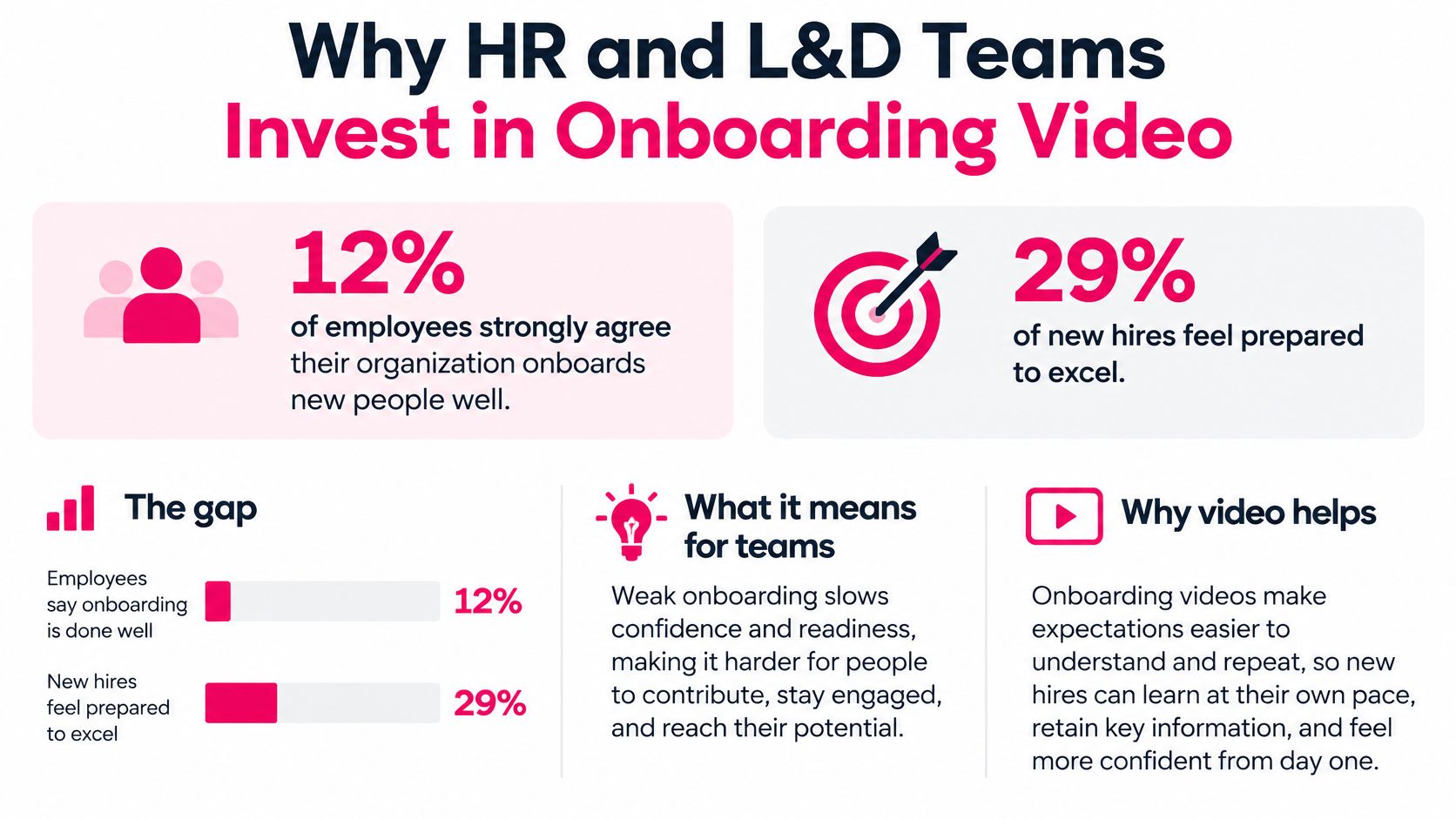
Only 12% of employees strongly agree their organization does a great job onboarding new employees, and just 29% of new hires feel prepared and supported to excel, while turnover can reach 50% in the first 18 months and replacement may cost about six to nine months of salary, according to Gallup findings and SHRM figures on the SHRM onboarding topic page. About 71% of new hires, on that same reading, lack a strong sense of readiness and support.
!An infographic illustrating why HR and L&D teams invest in onboarding video for new employees.
That gap is a consistency problem as much as a content problem. A hire in one site gets a careful manager walkthrough. A hire in another site gets a link and a hope. The second person isn't less capable. They got a thinner version of the same job.
Video addresses that by giving every location and every cohort the same policy explanation, the same system walkthrough, and the same culture message. Nobody waits for the next live session to hear how time-off requests work.
For a closer look at how those pieces fit a full program, see this guide to the digital employee onboarding process.
What leads actually gain
- Faster content updates. When a policy changes, you edit the affected lesson instead of rebooking a trainer.
- Fewer repeat sessions. The stable explanation lives in the video, so managers spend live time on judgment, not on reading a slide.
- Granular completion data. You see who finished the safety module, not only who was marked present for "orientation."
Teams that automate your employee onboarding workflows can attach those lessons to task lists and reminders, so the video isn't a loose file in an inbox.
A short walkthrough of how a measured program is built is worth watching before you scope your own library.
Video standardizes information. It doesn't replace a manager's first-week conversation about how this team works. The measurable aim is narrower and more useful: fewer early questions, a shorter time to the first independent task, and stronger retention in the months when people are easiest to lose.
Onboarding Video Makers Compared With the Alternatives
You aren't really choosing among logos. You're choosing among four ways to produce training video, and they fail in different places.
| Criteria | Onboarding Video Maker | Screen Recorder | Avatar Video Tool | Studio Production | | --- | --- | --- | --- | --- | | Time to first draft | Same day | A few hours of capture and edit | Same day after the script is approved | Weeks | | Editing skill needed | None to basic | Moderate to high | Low | Crew and editor | | Update after a policy change | Edit script and regenerate the scene | Re-record screen and edit timeline | Re-render with new script | Reshoot scenes | | On-camera presenter | Optional AI host or none | Usually none | AI avatar host | Real presenter | | Best fit | Repeated, frequently updated onboarding | Software tutorials where the screen is the lesson | Presenter-led explainers without filming | Flagship executive or brand messages | | Typical cost per video | Monthly plan covering a set of short videos | License plus editor time | Credit or minute subscription | Custom project quote |
Confirm current plan limits with each vendor before you compare invoices. The fit rules below don't depend on this month's price.
Screen recorders, such as Camtasia, win when the screen is the lesson. A click-path through your HR system is clearer as a capture than as an illustrated scene. They lose when the content is a policy paragraph that changes every quarter, because every change means a new recording and a new edit.
Avatar video tools, such as Synthesia or HeyGen, win when a consistent on-camera presenter matters more than how often you revise a scene. They're a poor default for a library you expect to patch weekly.
Studio production wins for a flagship message from an executive or a brand film you will keep for a year. It is the wrong buy for process content that changes every quarter. Reshooting that material is how teams end up with a polished video they are afraid to update.
An onboarding video maker wins when the same process content is repeated for many hires and changes often. VideoLearningAI is one example in that category. Test any tool against the feature checklist, not against the category name on the website.
Length is part of the same decision. A comparison of microlearning and full-length video lessons helps when someone on the team still wants one recording to cover the whole first month.
> A studio-style tool for content that changes every quarter is the purchase teams most often regret.
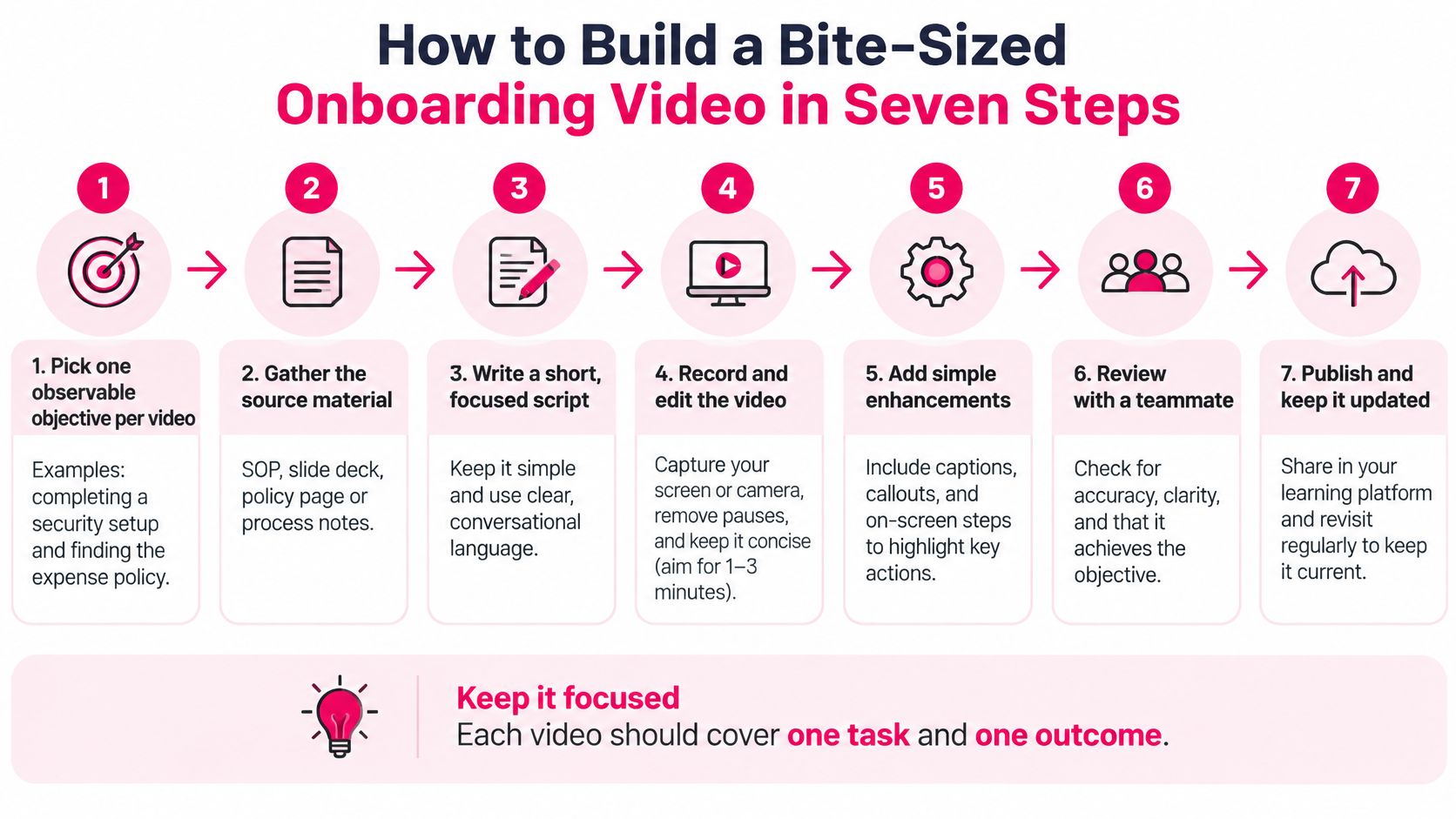
How to Build a Bite-Sized Onboarding Video in Seven Steps
One task, one outcome. If the lesson tries to teach badging, expenses, and the org chart, split it before you generate anything.
1. Pick one observable objective. "Complete security setup" or "find the expense policy" is an objective. "Understand our culture" is not, until you name the behavior you will watch for. 2. Gather the source and name the approver. Pull the SOP, slide deck, policy page, or process notes, and write down which subject-matter expert signs off. A lesson without an owner has no one to call when the wording is wrong. 3. Screen for confidential data before any prompt. Strip names, client details, and credentials. Onboarding text often includes legal, safety, and pay rules that shouldn't sit in a vendor prompt. 4. Generate, then edit every line to the approved wording. Treat the draft as a starting script. Change system names, thresholds, and exceptions so they match the source, not the model's guess. 5. Add one retrieval question or scenario at the end. Ask the learner to choose the next step. Watching isn't the same as being able to do the task on Monday. 6. Review before release, and log the review. The expert checks facts. Someone checks captions, contrast, and keyboard access. If you localize, a reviewer approves the translation. If you add music, use training soundtrack advice from LesFM so the track is properly licensed for training. Record the approved source version, the tool that generated the draft, and the person who signed off. 7. Publish with a version identifier, then schedule the follow-up. Put the lesson in the LMS with that version, not as an unnamed file. Google's onboarding practice uses repeated surveys at 30, 90, and 365 days on tool access, productivity, and ability to contribute. Mirror that pattern against each lesson's objective, and compare early contribution with what the video claimed to teach.
Why the log exists
A 2025 responsible-AI review in Climb's UK and Ireland AI readiness survey found that only 24% of companies had policies for evaluating the training data used by internal or vendor AI systems. The log is how your team stays in the careful minority: source approved, privacy screened, human review recorded, captions corrected, and the published lesson tied to the current policy.
The most common slip is publishing the generated draft with no expert review. An outdated sentence then reaches every new hire with your logo on it.
A finished lesson is small on purpose. One objective, under three minutes, one check, one owner, and one version.
Templates and Use Cases That Speed Up Rollout
Teams don't need a fresh design for every video. Onboarding falls into a few patterns, and a template is only a time-saver if the content inside it has an owner and a review date.
| Use Case | Typical Module Set | Lesson Length | Rollout Window | | --- | --- | --- | --- | | Day-one orientation | Welcome, tool login, policies, who-to-ask | 1-3 minutes each | First week before start date | | Role ramp-up path | 5-8 role tasks, one task per module | 2-4 minutes each | Weeks one to four | | Compliance refresher | Policy point, scenario, knowledge check | 2-3 minutes | Annually or when the policy changes | | Internal knowledge base | Process know-how from experienced staff | 3-5 minutes | Rolling, reviewed monthly | | Customer-facing product training | Feature overview, use-case walkthrough, FAQ | 3-5 minutes | Before product launch |
Strong onboarding can improve new-hire retention by 82% and productivity by more than 70%, and 71% of organizations surveyed said they needed more equitable onboarding for on-site and off-site employees, according to Brandon Hall Group research. Reusable modules are how a small L&D team delivers that same core story without a live session for every start date.
How to sequence the first release
1. Launch day-one orientation first, before the start date, so login and "who to ask" aren't discovered by accident. 2. Add the role path in weeks one to four, one task per module, after the first cohort's questions show the gaps. 3. Schedule compliance for the annual cycle and for each policy change, with a scenario and a check, not a reread of the handbook. 4. Turn experienced staff's know-how into short lessons on a monthly review, so the knowledge base doesn't freeze the week someone leaves. 5. Hold customer-facing product lessons until just before launch, using a feature overview, a walkthrough, and an FAQ.
Reuse one template per use case, and keep one objective per lesson. A set of AI video templates is a reasonable starting shelf if you don't want to design layouts while you're also rewriting policy text. Start with the three use cases that touch the most new hires, which is usually orientation, the top role path, and the compliance item people fail first.
After the first week, a customer onboarding feedback template is a simple way to ask what was unclear, as long as you tie each answer back to a lesson and a version. A template with no review date just spreads an old policy faster.
Run a Two-Week Pilot Before You Commit
Skip the long vendor tour. Pick one track, usually day-one orientation, and run it on at least two tools so the result isn't a single sales demo.
Step one. Convert two or three real policy documents into bite-sized lessons, using the feature checklist, and time the first draft. You want to see import, captions, and an editable script, not a sample video about a fictional company.
Step two. Have two or three new hires, or a buddy standing in for them, finish the lessons and the knowledge checks. Then have the subject-matter expert read the output for accuracy. A clean voiceover can still teach the wrong threshold.
Step three. Compare the pilot with your previous method on time to the first independent task and on the number of early questions. Book the 30-day check before the pilot ends, or it will slip.
Proceed only if three things are true: the first draft arrives within a day, edits and version history fit your review process, and completion data reaches the LMS. If one fails, fix the process before you expand the library.
We offer an Onboarding Training Template with a welcome module, a role ramp-up path, and a knowledge check sequence. Plans are Starter at $59/month (10 videos up to 60 seconds), Pro at $99/month (20 videos up to 2 minutes), and Enterprise at $199/month (50 videos up to 5 minutes). You can launch a first version in days if you reuse templates, keep one objective per lesson, and review engagement data weekly.
Set three things this week. Name the pilot track and its owner. Pick the success metric, either early questions or time to the first independent task. Put the review date on the calendar.
---
VideoLearningAI turns the policies and role tasks you already have into short onboarding videos, with a welcome module, a role ramp-up path, and knowledge checks you can review before anyone starts. Use it to pilot one day-one track, keep a version record, and see whether completion in your LMS lines up with fewer early questions. Visit VideoLearningAI and build the first lesson from a policy your expert already trusts.