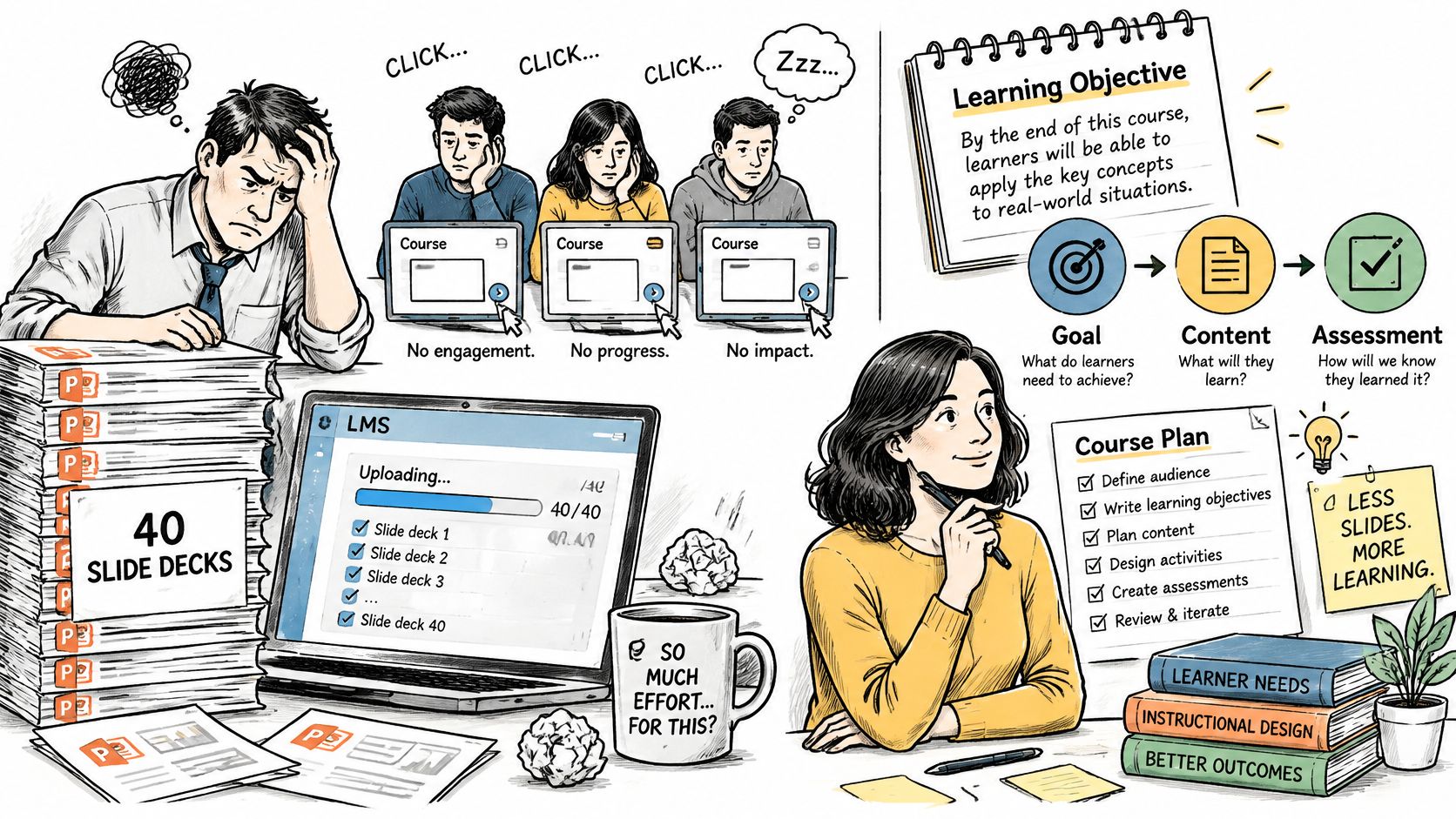
A manager uploads forty slide decks to the learning management system, labels them “New-Hire Training,” and assigns the course to every incoming employee. Learners click through the slides, pass a quick quiz, and still aren't sure what to do when a customer asks a difficult question. The material is online, but the learning experience hasn't been designed.
That gap is the work of instructional design for online learning. The aim isn't to make content look polished on a screen. It's to help learners do something specific, practice it, get useful feedback, and show that they can do it. A platform can host that experience, but it can't design it for you.
Table of Contents
- From uploaded content to designed learning - ADDIE for structure and traceability - SAM for rapid prototyping - Backward Design for performance alignment - Phase 1: Define the outcome - Phase 2: Map content and evidence together - Phase 3: Storyboard the lesson - Phase 4: Produce and pilot - Phase 5: Publish, measure, and revise - Chunk at the point of application - Design quality matters more than format - Make wrong answers informative - Check for starting knowledge and retention - Design alternatives before production - Test the whole learning journey - Connect measures to the job - Treat activity as a clue, not a verdictWhat Instructional Design Means for Online Learning
Instructional design works like architecture. A platform, videos, readings, and quizzes are the building materials. The design is the blueprint: it determines where learners start, what they encounter next, where they pause to practice, and how they know they're making progress. Two courses can use identical materials and produce very different results, because the plan is the variable that decides outcomes.
The designer's decisions include learning objectives, content sequence, chunking, activity types, feedback, assessments, and media format. Those choices should follow from what learners need to do afterward. If a new employee must handle a customer complaint, a course that only asks them to memorize the complaint policy leaves out the actual performance the organization needs.
Online delivery raises the stakes on this planning. Learners study alone, on different schedules and devices, with no instructor nearby to notice confusion or adjust the pace. Online learning had already become a mainstream delivery model before the pandemic pushed it further, which means a course now reaches learners whose contexts the designer may never see. A clear route through the material matters as much as the material itself.
From uploaded content to designed learning
Consider a basic onboarding lesson about handling a customer complaint. In the slide-heavy version, learners read a policy, click through several examples, and answer a few questions about definitions. In a designed version, they first learn the escalation rule, then choose what to say in a realistic complaint scenario, and finally receive feedback explaining why the other responses could create a problem.
The second course works because its objective, practice, and assessment all point toward the same workplace task. That alignment makes it easier for learners to see what they're meant to do. It also gives the team a more meaningful way to check whether the lesson worked: evidence of performance, rather than a quiz score or a completion checkmark.
> Design test: If learners pass the quiz but can't perform the task, the course may be measuring the wrong thing.
For teams that want a practical companion to this planning work, Zemith's guide to actionable best practices for online learning offers useful ideas for shaping the learner experience. The question to keep asking is simple: What makes an online course teach, rather than merely display, its content?
Choosing Between ADDIE, SAM and Backward Design
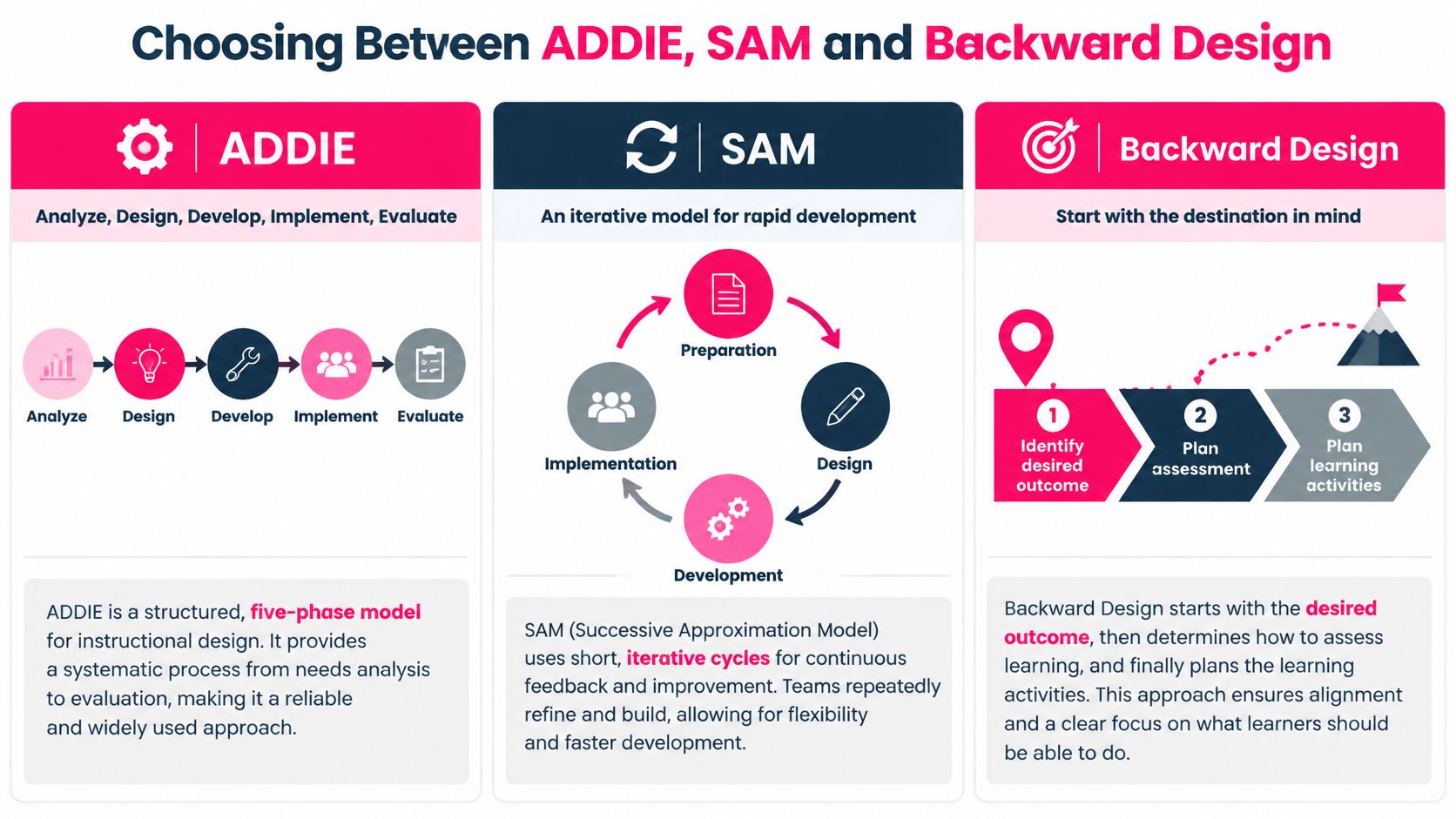
| Model | Core structure | Best fit | Revision style | |---|---|---|---| | ADDIE | Analyze, Design, Develop, Implement, Evaluate | Large, regulated or long-lived courses | Linear, with evaluation mostly at the end | | SAM (Successive Approximation Model) | Preparation, then repeated design, development and implementation cycles | Fast projects where reviewers respond to prototypes | Prototypes and revisions built in from the start | | Backward Design | Desired results, acceptable evidence, then learning experiences | Courses built around measurable performance | Assessments drive revisions to content |
The models differ most in when they settle the course structure and how they handle feedback. A team doesn't need to adopt one model as a permanent identity. It needs a process that fits the project's risks, timeline, reviewers, and expected changes.
ADDIE for structure and traceability
ADDIE moves through five phases: Analyze, Design, Develop, Implement, and Evaluate. Its staged structure helps a team document the audience, requirements, decisions, and evaluation plan before a course reaches learners. That makes it a practical fit for a compliance course with fixed rules, multiple reviewers, or a long shelf life.
The trade-off is that a linear process can make late changes costly. If a subject-matter expert discovers a major content issue after development, the team may need to revisit decisions made earlier. ADDIE can still be iterative in practice, but the team should schedule reviews before implementation rather than treating evaluation as the first serious feedback point.
SAM for rapid prototyping
SAM uses preparation, design, development, and implementation in repeated cycles. Instead of waiting for a complete course before asking for reactions, the team creates a working sample early and uses reviewer feedback to shape the next version. This helps when stakeholders find it easier to respond to a prototype than to a written specification.
A sales-skills launch with a short runway may benefit from SAM. The team can prototype a scenario, show it to a sales manager and a few learners, then revise the dialogue or decision points before building the rest. SAM still needs clear objectives. Fast iteration without a shared target can produce frequent changes that don't improve the learning.
Backward Design for performance alignment
Backward Design begins with the result: What should learners be able to do? The team then decides what evidence would show that they can do it, and only after that selects the learning experiences and content. Writing the assessment before the lesson helps expose mismatches early. If the outcome is “resolve a customer complaint,” a vocabulary quiz alone won't count as adequate evidence.
Choose a model by checking the project's timeline, number of reviewers, compliance requirements, team size, and expected frequency of content changes. A compliance course with fixed rules points toward ADDIE; a sales-skills course with weeks to spare and responsive reviewers points toward SAM; and a course built around measurable job performance points toward Backward Design. Many teams combine approaches, using Backward Design to define objectives and assessment, then SAM to prototype and build.
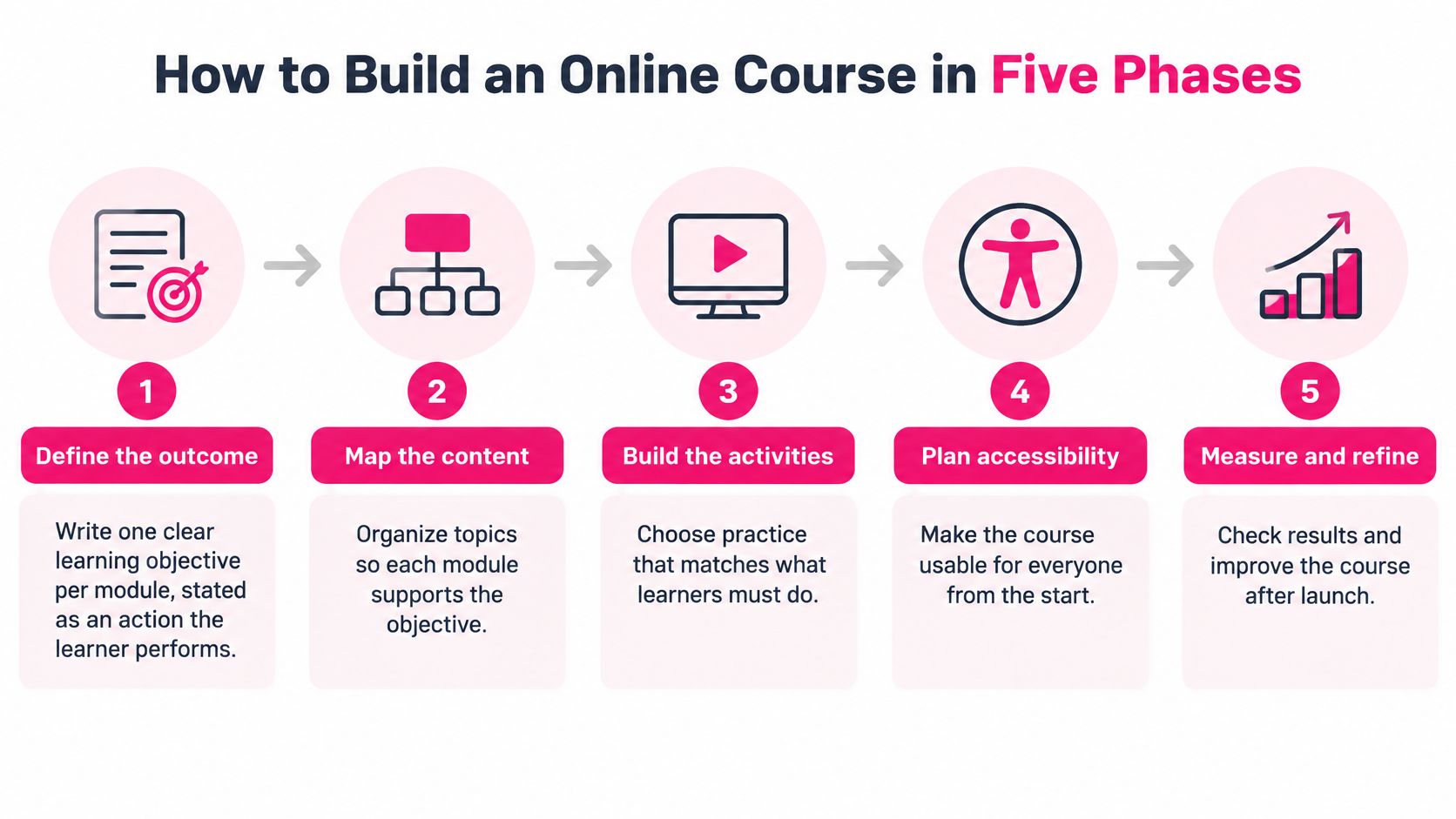
How to Build an Online Course in Five Phases
A course build gets easier when the team makes its decisions in an order that prevents rework. Start by agreeing on what learners should do, then connect the content, practice, and assessment to that outcome. VideoLearningAI's implementation checklist recommends defining one clear learning objective per lesson before production, and standardizing scripts and visual structure so reviewers can approve materials faster.
Phase 1: Define the outcome
Write one objective for each module as an action a learner can perform, such as “Choose the correct escalation for a billing complaint.” The action gives the team a target for practice and assessment; a broad phrase such as “understand the complaint policy” doesn't tell a learner what success looks like. A common mistake is writing objectives after the content already exists, which can lead the team to keep material that doesn't serve the outcome.
For help turning broad goals into observable actions, use this guide to write learning objectives. Ask a subject-matter expert to check that the objective reflects a real task, not just a topic the course happens to cover.
Phase 2: Map content and evidence together
Create a small alignment map with three columns: objective, evidence of success, and the content needed to prepare learners. For example, if the objective is to identify an escalation risk, the evidence could be a case decision with a short explanation. A common slip is teaching background information because it's available, even when learners don't need it to meet the objective.
This map also helps prevent an assessment from appearing out of nowhere. Learners should encounter the rules and examples they need before they're asked to use them.
Phase 3: Storyboard the lesson
Put the script, visuals, prompts, and practice in one repeatable template. A consistent storyboard lets reviewers focus on the lesson rather than figuring out a new format each time. The usual mistake is sending reviewers a block of narration without showing how the visuals and learner activity fit together.
Phase 4: Produce and pilot
Build a first version, then test it with five learners who represent the audience. Watch for where they stall, guess, replay, or skip, and ask what they expected to happen next. Piloting only with the designer or subject-matter expert misses the confusion the test is meant to uncover.
If the course includes a video, place its narration, visuals, and learner prompt in context rather than treating the video as the whole lesson. For example, learners might watch a short demonstration and then make a decision before seeing the explanation.
Phase 5: Publish, measure, and revise
Publish the course in the LMS, check completion and assessment results, and use the evidence to make the next version clearer. Set a review date rather than waiting for complaints to surface. One finished unit should contain one objective, one short practice task, one assessment, and feedback for every wrong answer.
Microlearning Lengths and Chunking That Hold Attention
A five-minute video can waste four of its minutes, while a twelve-minute scenario can hold attention the whole way through. Duration is the container. What happens inside it is the design. The ranges below are a starting point for planning, not a promise that a particular length will produce learning.
| Content type | Typical length | Best use | |---|---:|---| | Single-concept video | 2–5 minutes | Explaining one step, term, or rule | | Scenario decision | 3–6 minutes | Practicing a judgment call with feedback | | Procedure walkthrough | 5–10 minutes | Showing a multi-step task on screen | | Knowledge check | 1–2 minutes | Retrieval practice after a module | | Full lesson | 10–15 minutes | Developing a broader topic that needs narrative |
These ranges work like recipe timings: they tell you roughly how long each format takes, not whether the result will be any good. Microlearning means a focused unit built around one objective. A brief clip that presents information without asking learners to retrieve, apply, or decide may be less useful than a longer scenario that gives them a meaningful choice and explains the result.
Chunk at the point of application
Split content where a learner would naturally pause to use an idea, not when a timer reaches an arbitrary mark. A procedure with several steps might be divided right after a decision point, so the learner can try the step before the lesson moves on. Keep each unit self-contained: a clear opening, one practice moment, and a takeaway learners can use without hunting through other modules.
The key design question is what the learner does during the time, not how long the video runs. A scenario needs enough room to present the context, let the learner decide, and explain why the response works. A knowledge check, by contrast, can serve as a short retrieval prompt after a lesson and needs very little of the learner's day.
Design quality matters more than format
Research comparing online learning with conventional instruction points in one consistent direction: outcomes depend on the design, the implementation, and the support around the learner rather than on the delivery format itself. Online delivery produces weaker results when a course asks learners only to watch, and stronger results when the same material asks them to retrieve, decide, and apply.
A polished video can still fail. It earns its runtime only if it guides attention, connects to the objective, and gives learners a chance to practice before they move on.
Before publishing a microlearning unit, check three things:
- One objective: Does the unit focus on a single action or concept?
- One active response: Does the learner need to answer, choose, explain, or perform something?
- Standalone use: Can the learner use this unit without relying on an earlier module?
Assessments That Prove the Learning Happened
A compliance course can have a perfect completion rate and a passing quiz, yet employees may still make the same mistake on the job. That often happens when the course asks learners to recall policy wording but the job requires them to interpret a situation and choose what to do. An assessment should resemble the kind of thinking or performance named in the objective.
| Objective level | Assessment format | Sample item | |---|---|---| | Recall | Multiple choice or flashcard check | Name the three required parts of a compliance report | | Application | Scenario decision | Choose the correct escalation for a customer complaint | | Analysis | Case-based short answer | Identify the risk in a sample onboarding plan | | Performance | Observed task or simulation | Complete a payroll entry in a sandbox environment |
Read the table as a matching exercise. A recall item can confirm that learners recognize required terms, but it cannot show whether they can act when the cue is buried in a customer message or an incomplete form. If the objective says “choose,” “identify,” or “complete,” the evidence should come from a choice, an identification, or a completed task under conditions that resemble the work.
Make wrong answers informative
A strong distractor reflects a mistake a learner could realistically make. In a complaint scenario, one wrong option might send the issue to the wrong team, while another might promise an outcome the employee isn't authorized to guarantee. Those alternatives help reveal whether learners confuse escalation rules with service recovery.
Feedback should explain the misunderstanding and mark the answer wrong. If a learner chooses the wrong team, explain which signal in the scenario should have guided the escalation. That gives the learner another chance to apply the rule rather than forcing them to guess again. After a pilot run, review which options learners selected most often; a frequently chosen distractor points to a real misconception, while an option nobody picks may show that the question is too easy to parse.
> Practical rule: Write the explanation for each wrong answer before you publish the quiz. If the team can't explain why an option is wrong, the question may not be clear enough.
Check for starting knowledge and retention
A pre-test helps the team see what learners already know and can prevent a course from spending too much time on familiar material. A post-test should use the same objective language as the course goal. If the objective asks learners to choose an escalation, the post-test should ask them to choose one in a relevant situation rather than define the word “escalation.”
A delayed check can reveal whether learners retain and apply the lesson after they've left the course. Use a short question or scenario connected to the same objective, and consider whether the task could be completed in the actual work context. Teams that want to see how practice tests prepare learners for later assessments can also prepare with SAT practice tests, a useful example of structured practice and testing.
For additional question formats, this guide to checks for understanding can help a team choose prompts that test more than recognition. Then make one decision for every course objective: match it to an assessment format in the table, or remove it if the course won't assess it.
Accessible Online Design Beyond Captions
Captions don't make a course inclusive by themselves. They're important, as are transcripts, alt text, and mobile-friendly layouts, but learners also need accessible activities, fair assessment conditions, and ways to reach the same outcome through different tools and formats. Online flexibility may help learners pause, choose when to study, or take breaks, while inaccessible systems, inadequate accommodations, limited support, stigma, or isolation can still create barriers. A systematic review of accessibility and online learning also reports minimal use of Universal Design for Learning in online spaces.
Design alternatives before production
Storyboard visual content with meaningful audio description so that learners who can't see the screen can follow what matters. Offer a downloadable text alternative to video, and create a low-bandwidth path with text-based lesson content that doesn't require uninterrupted streaming. These are backup files. They let learners use a different mode while working toward the same outcome.
Universal Design for Learning asks teams to offer multiple means of engagement, representation, and action and expression. In practice, that can mean explaining a concept with text and audio, offering a choice of relevant practice examples, and allowing a learner to demonstrate the same skill through an accessible response method. Avoid time-dependent assessments when speed isn't part of the job requirement, especially when assistive technology or extra processing time may be needed.
For a practical checklist of accessible video considerations, see these video accessibility guidelines. The team should decide what equivalent success looks like before choosing media, rather than treating accessibility as a final production pass.
Test the whole learning journey
Use a repeatable check for each module:
- Keyboard navigation: Complete the module using only a keyboard, including menus, controls, and assessments.
- Screen-reader pass: Use a screen reader to check that headings, controls, instructions, and feedback make sense in sequence.
- Visual and caption review: Check contrast and caption accuracy against WCAG 2.2 AA.
- Learner pilot: Ask two learners with disabilities to complete a module and describe where they encountered friction.
Then check whether the accommodations work in practice. Compare completion time and assessment scores for learners who use the text alternative or extra time against the course baseline, and record what the two pilot learners report at the end. That information can point to an accommodation that's technically present but difficult to find or use.
The important question isn't whether a video has captions. It's whether every learner can reach the same learning outcome through a different mode, device, or pace.
Measuring Real Learning Instead of Platform Activity
Views, completions, and discussion posts are easy to count, but they don't tell the whole story. A learner might watch a lesson, take notes, and apply the skill at work without generating many platform events. Conversely, a learner might click through every activity without being able to perform the task. Recent work on online engagement describes this as a gap between platform activity and learning outcomes, and cautions that measures such as watch time and reading duration are proxies that still need validation against actual results in this analysis of engagement measurement.
| Measure | What it shows | When to collect | |---|---|---| | Pre and post assessment on the same objectives | Gain in knowledge or skill | Before and after the course | | Delayed check | Retention over time | Two to four weeks after the course | | Scenario decision | Application to realistic judgment | During the course and at review | | Manager observation | Transfer to the job | Weeks after completion | | Job performance metric | Error rates or time to competence | Tracked against a baseline | | Watch time, replays, and reading duration | Passive engagement as a proxy only | Ongoing, validated against outcomes |
Connect measures to the job
Start with the objective and ask what evidence would show that the learner can perform it. A matching pre- and post-assessment can show a change in answers on the same objective, while a delayed scenario can check whether learners still make the relevant decision after time has passed. Manager observations add a view of transfer: can the employee use the skill during normal work?
A job performance metric can add context when it connects directly to the task, such as errors in a process or time to competence. Compare it with a baseline and interpret it carefully, because changes in staffing, tools, or work volume can affect the result too. The point isn't to claim that training caused every change, but to find evidence that supports or challenges the course's design assumptions.
Treat activity as a clue, not a verdict
Watch time, replays, and reading duration can help a team spot places where learners pause or revisit material. But long watch time doesn't prove comprehension, and a learner who generates few clicks may still understand and apply the lesson. Don't assume that the most visibly active learners are learning more.
Review the evidence together. If a group performs poorly on a scenario but completes the lesson, inspect the practice and feedback. If performance improves but learners report that the text alternative was hard to find, improve access without changing the objective. VideoLearningAI's implementation checklist recommends publishing, measuring completion, and iterating every two weeks. A fixed review cadence helps teams respond to evidence instead of relying on whichever opinion is loudest.
Pick Your First Design Step This Quarter
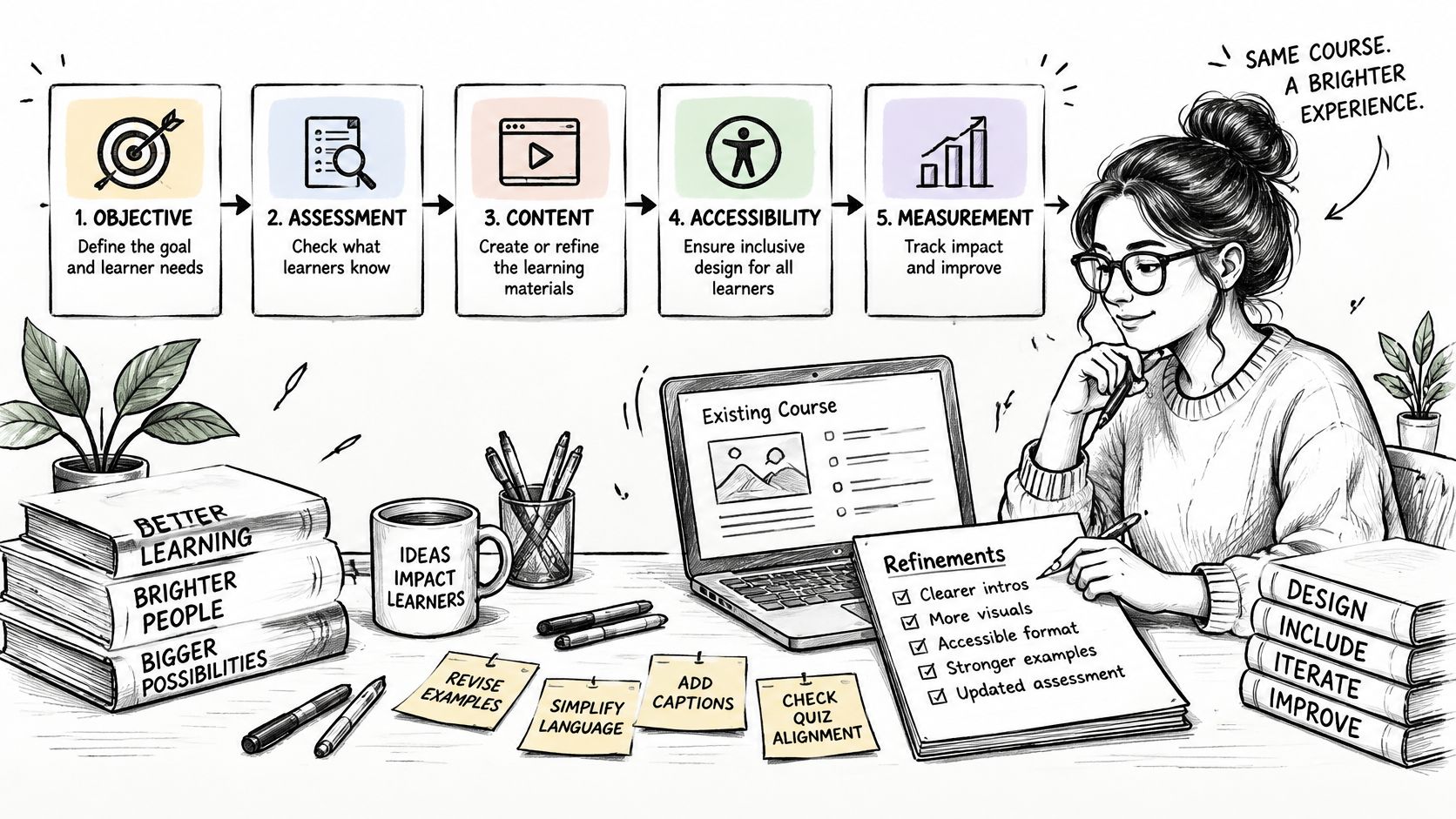
A reliable course follows a connected chain: define the objective, choose evidence that matches it, select the content and practice learners need, make the experience accessible, and measure whether the learning transfers. If the objective changes, the assessment may need to change too. If learners can't access the activity, the course can't fairly measure what they know.
Choose one existing course or module to improve this quarter, not the whole catalogue. First, rewrite one objective as an observable action. Next, replace one recall-only quiz question with a scenario decision that matches that action. Then schedule a delayed check for two to four weeks after the course ends.
Before rewriting the lesson, check that it addresses real learner needs. A guide to analyzing reader needs and expectations can help your team ask whose experience the course is designed around and what learners need to do. Pilot the revised module with five people from its actual audience; their points of confusion can be more useful than a long internal review that never puts the lesson in front of learners.
If you need production support after the design decisions are settled, VideoLearningAI includes features for creating training videos from course material, building microlearning videos, and publishing to an LMS. The workflow can help a team produce a consistent format, but it won't replace the work of deciding what learners should do or how to assess it.
Choose the module, write its objective, and put the first review date on your team's calendar.
---
VideoLearningAI helps educators, course creators, and L&D teams turn existing material into structured training videos and microlearning lessons, with LMS publishing options including SCORM and MP4 exports. If you've defined the learning objective and want support producing the lesson, visit VideoLearningAI to explore the platform.