The popular advice about AI video templates is backwards. Many start by comparing avatar realism, voice libraries, and visual effects. Enterprise training fails for different reasons: an inaccurate script reaches publication, captions obscure a required warning, a translation changes a procedural meaning, or a polished video won't behave properly inside the LMS.
A useful template isn't merely a faster way to make a video. It is a production-control layer. It locks the parts that must remain dependable, including lesson flow, visual hierarchy, captions, branding, knowledge checks, and export settings, while AI handles the variable material. That distinction changes how L&D leaders should select tools, design workflows, and approve content.
Table of Contents
- From experimental generation to controlled production - Where the workflow improves - Microlearning - Onboarding - Compliance and regulated training - Sales and customer education - A five-stage implementation workflow - Human review should follow risk - Store accessibility with the scene - Design for varied access needs - Evaluate the production system - Measure learning and operational fitRedefining AI Video Templates for Enterprise Learning
Enterprise learning teams do not need more visual freedom. They need tighter control over what can change, what must stay fixed, and what has to pass review before a lesson reaches the LMS.
An AI video template earns its place when it answers a governance question first: which decisions can the system handle safely, and which decisions stay under human control? In practice, that means the template defines the parts that protect instructional quality and compliance. A reusable onboarding format can always open with the objective, place the presenter consistently, introduce one procedure at a time, show a worked example, and end with a knowledge check. A compliance format can reserve space for disclosures, require a source field, and prevent publication until a subject-matter expert approves the script. The topic changes. The control structure does not.
Prompt wording alone cannot reliably enforce readable captions, consistent scene timing, approved terminology, or a valid publishing package. A structured template can. That matters even more in regulated or multilingual training, where one caption treatment, one pronunciation rule, or one export setting can affect comprehension, accessibility, and audit readiness.
From experimental generation to controlled production
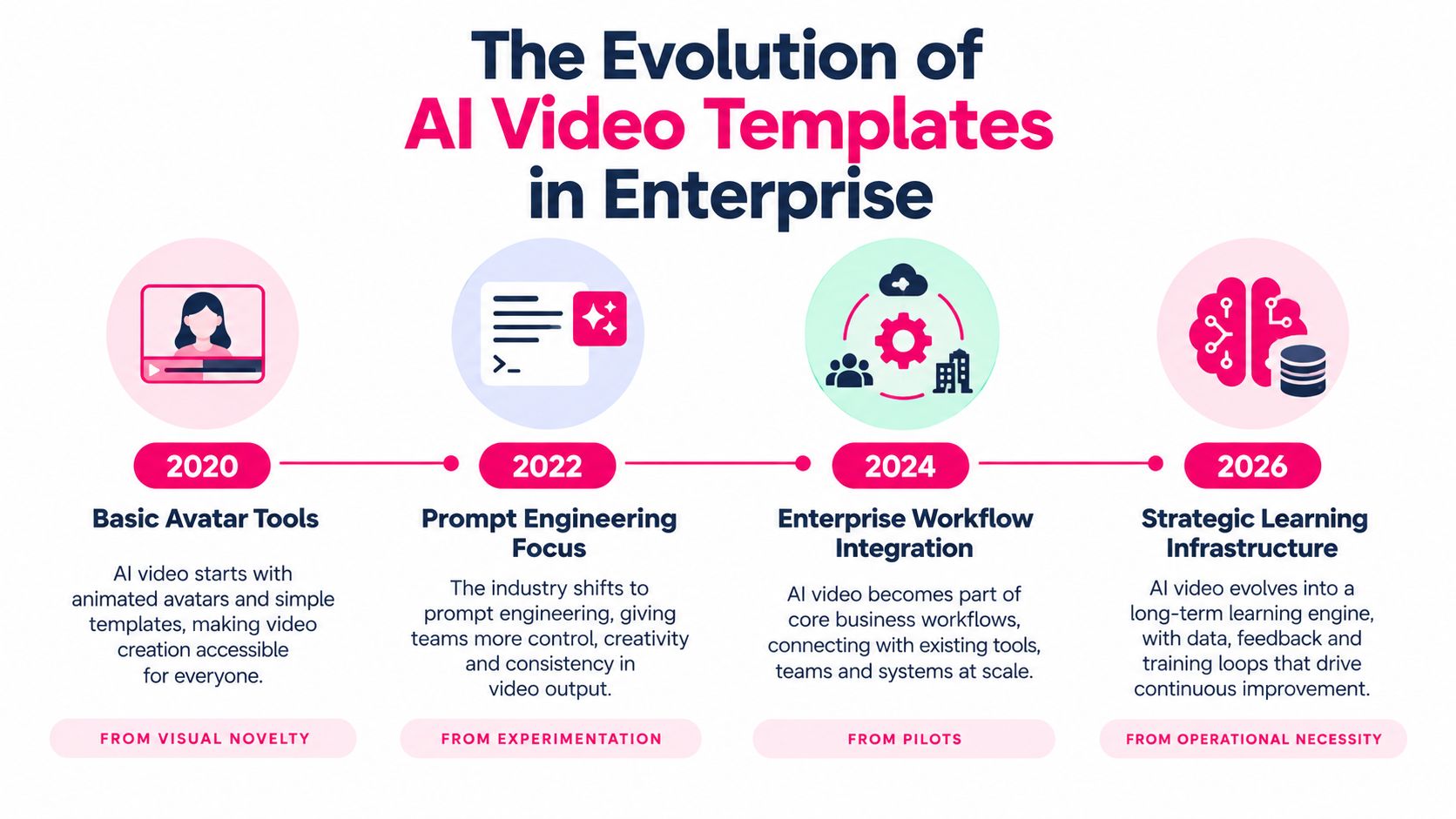
The technology matured in a way that makes this template-first approach practical. Early GAN-based work on video generation appeared in 2016. Text-to-video research advanced through work on generating video from textual descriptions in 2018. In 2022, video-diffusion models extended diffusion methods from images to temporally coherent video synthesis. The field then reached 145 publications in 2024, the highest annual total reported for 2020 to 2025, and diffusion models overtook GANs in 2023, with 44 papers compared with 25 GAN-related papers, according to the research overview of video generation. Those milestones do not guarantee that every commercial product is dependable. They do explain why generation is now capable enough to sit inside a controlled production workflow instead of remaining a lab exercise.
!A timeline graphic showing the evolution of AI video templates in enterprise from 2020 to 2026.
For L&D teams, the practical distinction is simple. The model generates variable material such as scripts, examples, narration, illustrations, or translations. The template holds the recurring rules: presenter placement, scene sequence, visual hierarchy, caption fields, review checkpoints, and output settings.
That shift changes how enterprise teams should evaluate tooling. A polished avatar demo can hide weak controls around terminology, source traceability, accessibility fields, or LMS packaging. Strong corporate video templates behave more like production standards than design presets.
The objective is building a repeatable content engine, not just making videos faster. Teams can define approved scene types, allowed media, voice and pronunciation rules, brand tokens, review gates, and LMS outputs before generating the first lesson. If a template speeds up production but makes errors harder to spot, it is not ready for enterprise learning.
> Practical rule: Automate variable content inside a controlled structure. Keep the controls that protect accuracy, accessibility, and regulatory meaning in human hands.
Operational Benefits for L&D and Course Creators
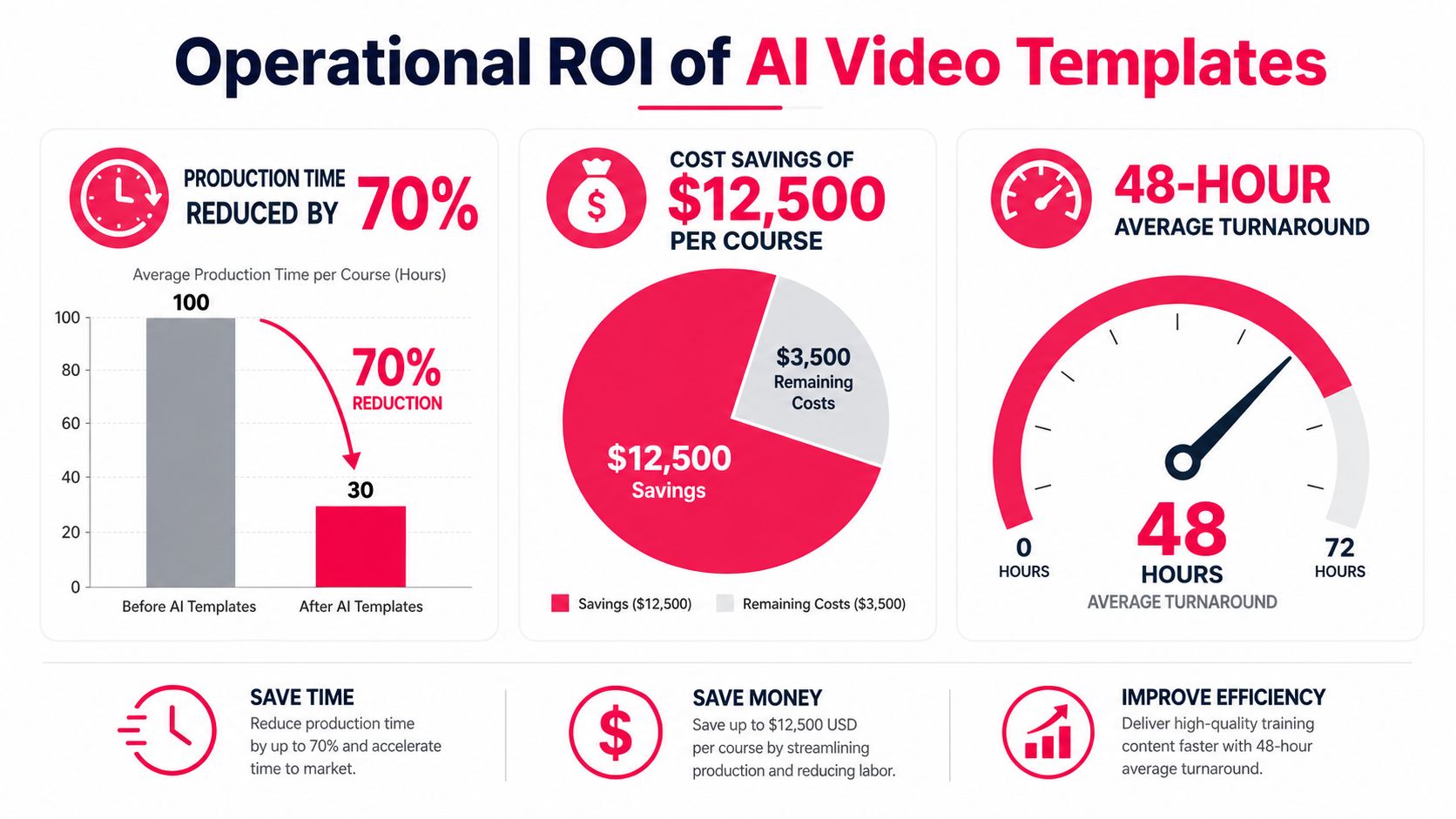
Templates earn their keep after the script is approved. In enterprise learning, savings come from reducing avoidable handoffs, keeping approved language intact, and making outputs easier to review, localize, and publish at scale.
Traditional production splits ownership across too many steps. An SME drafts content, a designer builds scenes, a presenter records, an editor assembles, and an LMS administrator packages the file. Each transfer adds delay. It also creates more places for terminology, disclaimers, captions, or assessment wording to drift away from the approved source.
A well-structured template cuts that operational drag. The SME stays focused on the subject matter. The system applies the opening pattern, scene order, caption styling, visual rules, and output format automatically. Human review still matters, but it is reserved for the decisions that affect accuracy, accessibility, and compliance.
According to an industry summary of video-based training, 85% of organizations used video-based training lessons, 90% of learning-and-development professionals said video improves engagement or retention, and one market summary citing McKinsey research noted that 65% of organizations were regularly using generative AI in at least one business function in early 2024. The same summary also placed the global AI-video market at approximately $11.2 billion in 2024, with a projected compound annual growth rate of 36.2% through 2034. Those figures are useful as context. They do not replace a workflow review.
Where the workflow improves
The strongest gains show up in repeatable production environments.
- Brand application: Approved logos, colors, typography, intros, and closing screens stay consistent across modules.
- SME participation: Subject experts can review scripts, examples, and terminology without recording every lesson or learning editing tools.
- Localization: Teams can keep the same lesson structure while changing language, narration, examples, and on-screen text.
- Content maintenance: When a process changes, teams can update the affected scene or segment instead of rebuilding the entire lesson.
- Publishing discipline: Standardized captions, transcripts, metadata, and packaging reduce LMS cleanup at the end of production.
There is a governance benefit here that teams often miss. If every department builds its own scene logic, caption treatment, and approval path, output volume may increase while maintenance gets harder. A shared template library with named owners, approved use cases, and version control gives L&D a production standard, not just a faster design method.
For teams comparing methods, a process built around automated video production is useful only when approval steps, accessibility requirements, and LMS packaging are built into the workflow. Speed alone just pushes risk downstream.
Strategic Use Cases Across the Organization
A single universal template is usually a warning sign. Different learning objectives need different pacing, evidence, and review requirements. A microlearning lesson should make one idea easy to retrieve, while compliance training must make obligations and consequences unambiguous.
The table below provides a starting point for matching structure to purpose.
| Use Case | Template Focus | Key Structural Elements | |---|---|---| | Microlearning | One concept, one action | Objective, short explanation, example, recap, retrieval question | | Employee onboarding | Belonging plus operational clarity | Welcome, role context, systems walkthrough, first-week actions, support route | | Compliance training | Accuracy, traceability, and confirmation | Policy source, required behavior, scenario, disclosure, knowledge check, approval record | | Sales enablement | Conversation readiness | Customer problem, positioning, objection handling, approved claims, practice prompt | | Customer education | Task completion | User goal, interface demonstration, common error, next step, searchable transcript |
Microlearning
Microlearning templates work best when they resist scope creep. A scene should earn its place by helping the learner understand or perform the target action. Decorative avatar movement, lengthy introductions, and multiple unrelated examples dilute the lesson.
Use a consistent pattern: state the objective, explain the concept in plain language, show it in context, then ask the learner to retrieve or apply it. The AI can draft examples and narration, but an instructional designer should decide whether the sequence supports the learning outcome.
Onboarding
Onboarding needs more than a branded welcome. New employees need cultural context, role expectations, systems access, and a clear route to help. A useful template separates those layers so a future update to a tool demonstration doesn't require rewriting the entire welcome experience.
Keep policy statements source-grounded. Let the template handle the reassuring, consistent delivery, while HR or the relevant process owner validates every current instruction.
Compliance and regulated training
Compliance templates should look deliberately restrained. They need room for required disclosures, source references, version labels, and a knowledge check that confirms the learner encountered the obligation. Realistic avatars and cinematic transitions add little if the learner can't identify what action the policy requires.
Approval thresholds should differ by risk. A low-risk refresher may need an instructional review, while medical, financial, safety, or regulatory content should require documented SME approval before release.
Sales and customer education
Sales enablement benefits from scenario structures, approved claims, and objection handling. Customer education benefits from task demonstrations, searchable transcripts, and a clear recovery path when the user makes an error.
Creators developing paid learning products can also connect production choices to a broader course revenue roadmap. The commercial model shouldn't dictate pedagogy, but it can clarify which lessons deserve frequent updates, localization, or stronger support materials.
From Source Material to LMS Publishing
A template can't rescue an uncontrolled source document. Start with the material that carries authority, then decide what the AI may transform and what it must never reinterpret.
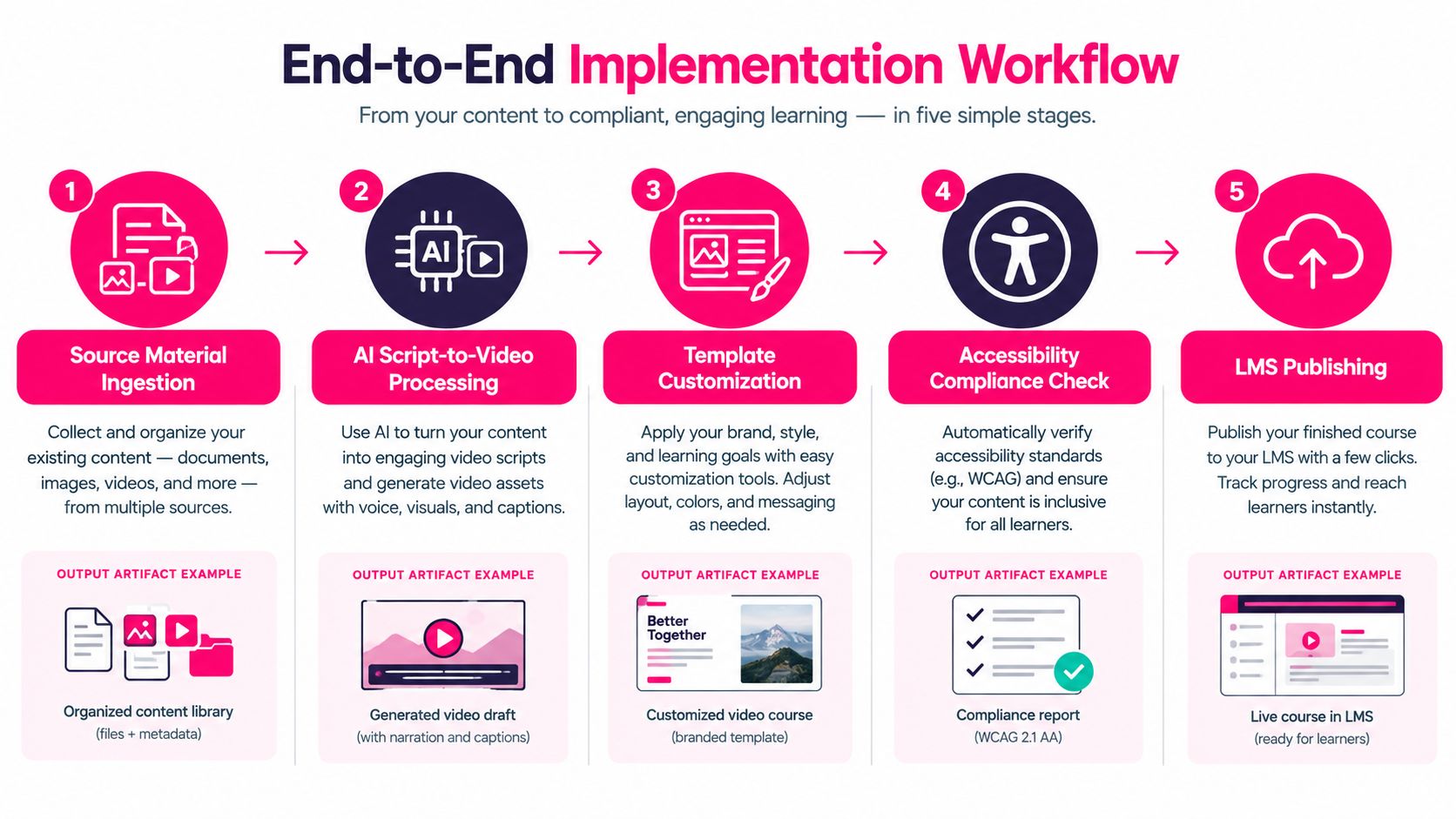
A five-stage implementation workflow
1. Ingest and classify the source. Gather the approved SOP, policy, slide deck, product documentation, or course manuscript. Record its owner, version, effective date, and intended audience. Separate authoritative instructions from examples, commentary, and obsolete material.
2. Create a source-grounded script. Ask the system to extract learning objectives, key terms, procedural steps, and knowledge-check ideas. Don't let it fill gaps with plausible-sounding information. If the source is silent, mark the gap for a human rather than allowing the model to improvise.
3. Apply the template. Select the structure that matches the objective. Map fields for title, objective, narration, on-screen text, visual asset, caption track, transcript, and assessment. Lock brand rules and safe areas before rendering.
4. Review the draft before final production. An SME checks technical meaning, legal claims, dates, terminology, and examples. A language reviewer checks translations and pronunciation. A production reviewer checks layout, timing, captions, audio quality, and whether the avatar or voice creates an unintended impression.
5. Publish and retain evidence. Export the video, captions, transcript, metadata, and approval record. Test playback in the target LMS, confirm completion behavior, and keep the source-to-version relationship available for future audits.
Research on AI-generated instructional video identifies benefits such as scalability, personalization, accessibility, and engagement, but also risks involving unreliable content, privacy, bias, copyright, ethics, and inauthenticity. A 2025 faculty study found that 40.7% of respondents doubted the reliability of AI-generated information, while 35.8% cited insufficient guidance on responsible and ethical use, according to this research on AI-generated instructional video governance.
Human review should follow risk
Don't assign the same approval path to every video. A low-risk orientation may use a lighter check, while a safety procedure or regulated claim requires source comparison, SME sign-off, and retained evidence.
> Approval threshold: The more costly an error would be, the less freedom the template should give the generator.
Keep a change log that identifies the source version, prompt or generation inputs where relevant, reviewer, approval date, voice or avatar used, translation status, and published asset. This record turns a fast production workflow into an auditable one.
Teams combining PDFs, slides, images, and video may find practical guidance in this resource on how to create an all-in-one slideshow. For enterprise delivery, packaging matters as much as rendering. Review learning management system integration for the technical checks that sit between an approved video and a learner's actual experience.
Designing for Accessibility and Inclusion
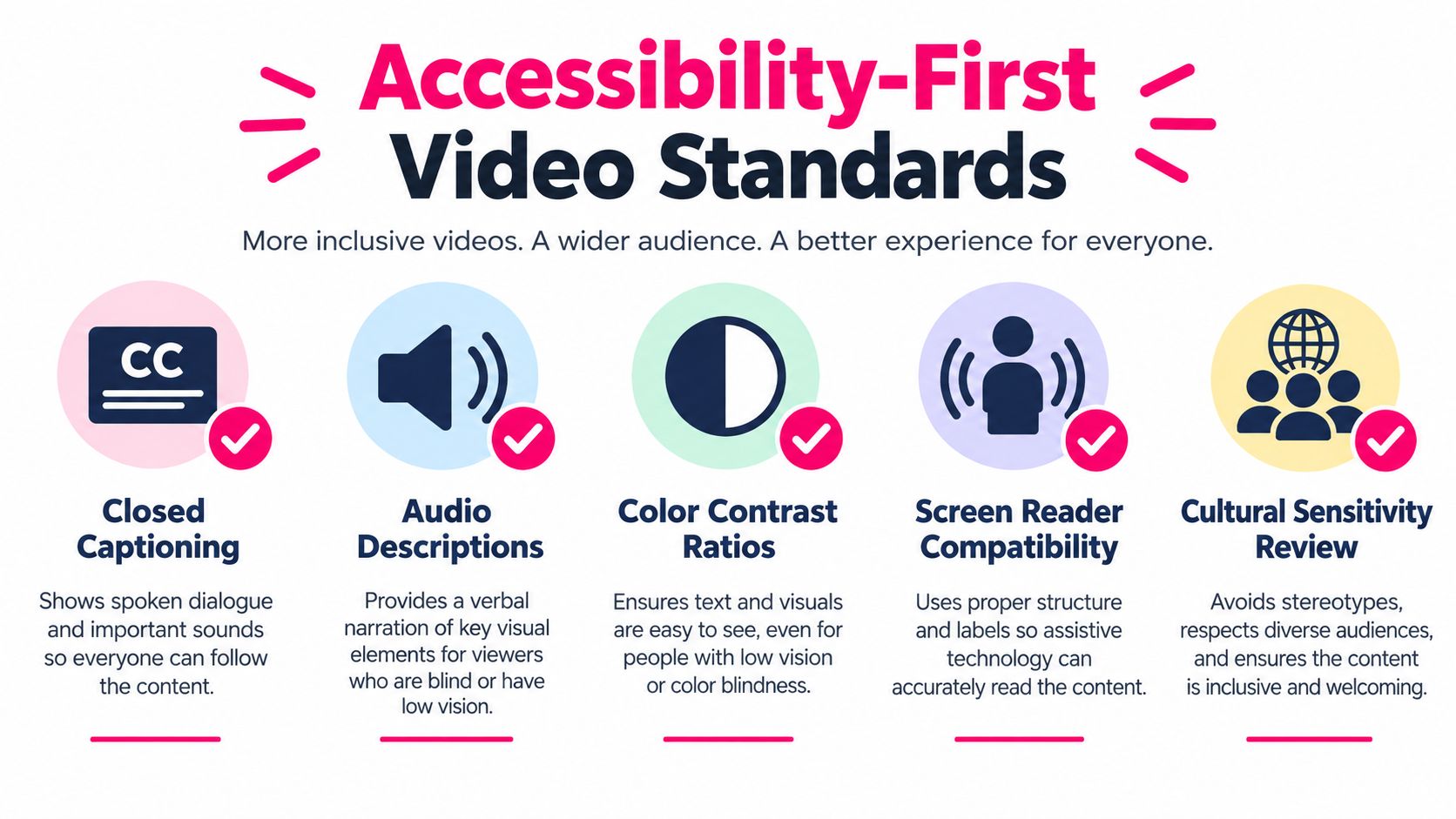
Accessibility has to be built into the template system itself. In enterprise learning, that means the rules for captions, descriptions, layout, and playback are part of the production layer, not a cleanup task after rendering.
Under WCAG 2.2 media guidance, prerecorded synchronized video that includes necessary speech or audio requires captions at Level A. Those captions need to cover speech and meaningful non-speech audio. Transcripts and audio descriptions serve different jobs, helping learners access information delivered through both sound and visuals.
Store accessibility with the scene
Well-structured templates keep accessibility metadata attached to each scene. That approach scales better than storing requirements in a separate document that reviewers have to reconcile later. Useful fields include:
- Captions: Timecoded text, speaker identity, and labels for meaningful sounds.
- Transcript: A searchable text record that preserves the lesson's instructional sequence.
- Visual description: Notes covering diagrams, demonstrations, or interface states a learner may not be able to see.
- Layout constraints: Reserved screen areas so captions do not obscure diagrams, controls, or legal disclosures.
- Playback requirements: Toggleable WebVTT or equivalent tracks, plus keyboard-accessible controls.
Automated speech recognition can generate a starting point. It cannot be the final pass. Human review still needs to check timing, punctuation, speaker attribution, terminology, and non-speech cues, because a caption can match the audio and still fail instructionally if it misses a warning tone or assigns a statement to the wrong person.
In practice, templates stop being a design shortcut and start acting like production controls.
Design for varied access needs
Readable contrast, legible typography, sensible pacing, and visual redundancy all affect whether a lesson works for a broader set of learners. Required status information should not rely on color alone. Instructions should not live only in avatar narration when the same information can be shown on screen or preserved in the transcript. In software demos, describe the result of the action, not only the cursor movement.
Inclusion also requires cultural and linguistic review. Synthetic voices can mispronounce names, acronyms, and regional terminology. Translation can preserve words while altering procedural meaning. Regional reviewers need a defined checkpoint in the workflow, especially for onboarding and customer education delivered across countries.
A 2025 state of video accessibility survey of more than 600 educators found that 57% had increased their use of video, 47% had added no audio descriptions, and 41% identified lack of time or staff support as the biggest obstacle. The operational lesson is clear. Accessibility improves when the template carries reusable rules, assets, and review steps, so teams are not rebuilding support for every lesson under deadline pressure.
Evaluating Vendors and Measuring Training Impact
Start vendor evaluation from the learner's delivery environment. The avatar gallery can wait. A polished generator that drops captions, breaks LMS tracking, or leaves no approval trail adds operational risk instead of reducing production effort.
The practical test is simple. Ask the vendor to show the full path from source document to published lesson, then make a reviewer change late in the process. That demo reveals more than a style showcase ever will.
Evaluate the production system
Use the evaluation to check whether the platform can hold up under real enterprise conditions:
- LMS compatibility: Confirm the formats, completion behavior, metadata, and tracking methods your environment requires, including SCORM or xAPI where applicable.
- Identity and security: Check SSO, permissions, data retention, tenant controls, and how source materials and generated assets are handled.
- Template governance: Verify whether administrators can lock brand rules, approved scenes, terminology, accessibility fields, and publishing settings.
- Editability: Make sure reviewers can correct scripts, captions, pronunciation, visuals, and timing without rebuilding the lesson.
- Evidence retention: Ask whether the platform can preserve versions, approvals, source relationships, and publication history.
- Localization controls: Test how the system handles translated captions, narration, speaker changes, and region-specific disclosures.
VideoLearningAI is one option for teams that want to transform existing course materials into structured, bite-sized training videos, with templates for onboarding, compliance, sales enablement, and customer education. Its workflow supports choices such as visual style, AI avatar host, voice, script, narration, captions, visuals, and LMS-oriented publishing. Each organization still needs to validate those capabilities against its own security, accessibility, and approval requirements.
Measure learning and operational fit
Views show that a file opened. They do not show whether someone can perform the task correctly, complete a required process, or avoid a support failure.
Define the outcome before choosing the dashboard:
- For onboarding, track progression toward role readiness and recurring help requests.
- For compliance, examine knowledge-check performance, overdue completion, and audit evidence.
- For sales enablement, connect lesson use with approved-message adoption and manager observation.
- For customer education, monitor task completion and changes in avoidable support questions.
- For content operations, track review turnaround, update effort, localization readiness, and publishing defects.
Accessibility also needs its own QA record. As the 2025 educator survey noted earlier showed, time, training, and uncertainty created larger barriers than cost. That matters in vendor review. A platform that makes captions, transcripts, descriptions, keyboard access, and readable layouts explicit in the template and approval flow removes more friction than one that mainly improves visual effects.
Learner analytics and campaign analytics should stay related but separate. Teams may use resources covering tracking clicks, dwell time and referrers for learner-facing links, while keeping marketing attribution distinct from learning evidence. The business case is stronger when it connects production efficiency to learner performance, support reduction, audit readiness, and update control.