Only 19% of new hires said their onboarding apps or software were very helpful in the 2024 Enboarder employee onboarding survey. That's not a software problem on its own. It's what happens when a digital employee onboarding process is a library nobody owns, instead of a workflow with dates, deliverables, and proof that a person can do the job.
Table of Contents
- Digital Onboarding Workflow by Phase - Target Lesson Length and Format by Onboarding Topic - Where the Rules Stop Working - A Five-Part Lesson Script - Reinforcement and Personalization - LMS Publishing Options Compared - Setup Checks Before You Assign Anything - Onboarding KPIs, Timing and Warning Signs - Why the Pilot Must Look Past Six MonthsThe 90-Day Digital Onboarding Workflow at a Glance
In a 2025 BambooHR and TalentLMS survey of 1,156 U.S. employees hired within the previous 12 months, 73% of hybrid-onboarded employees said the process helped them contribute faster, versus 61% onboarded fully remotely, according to ProProfs Training's summary of onboarding statistics. Self-service content works best when paired with human contact.
Digital onboarding often breaks in a familiar way. HR uploads documents, L&D adds videos, IT works from a separate ticket queue, and the new hire gets a long list with no sequence. Nobody can tell what is late, who fixes it, or whether finishing the list means the person is ready.
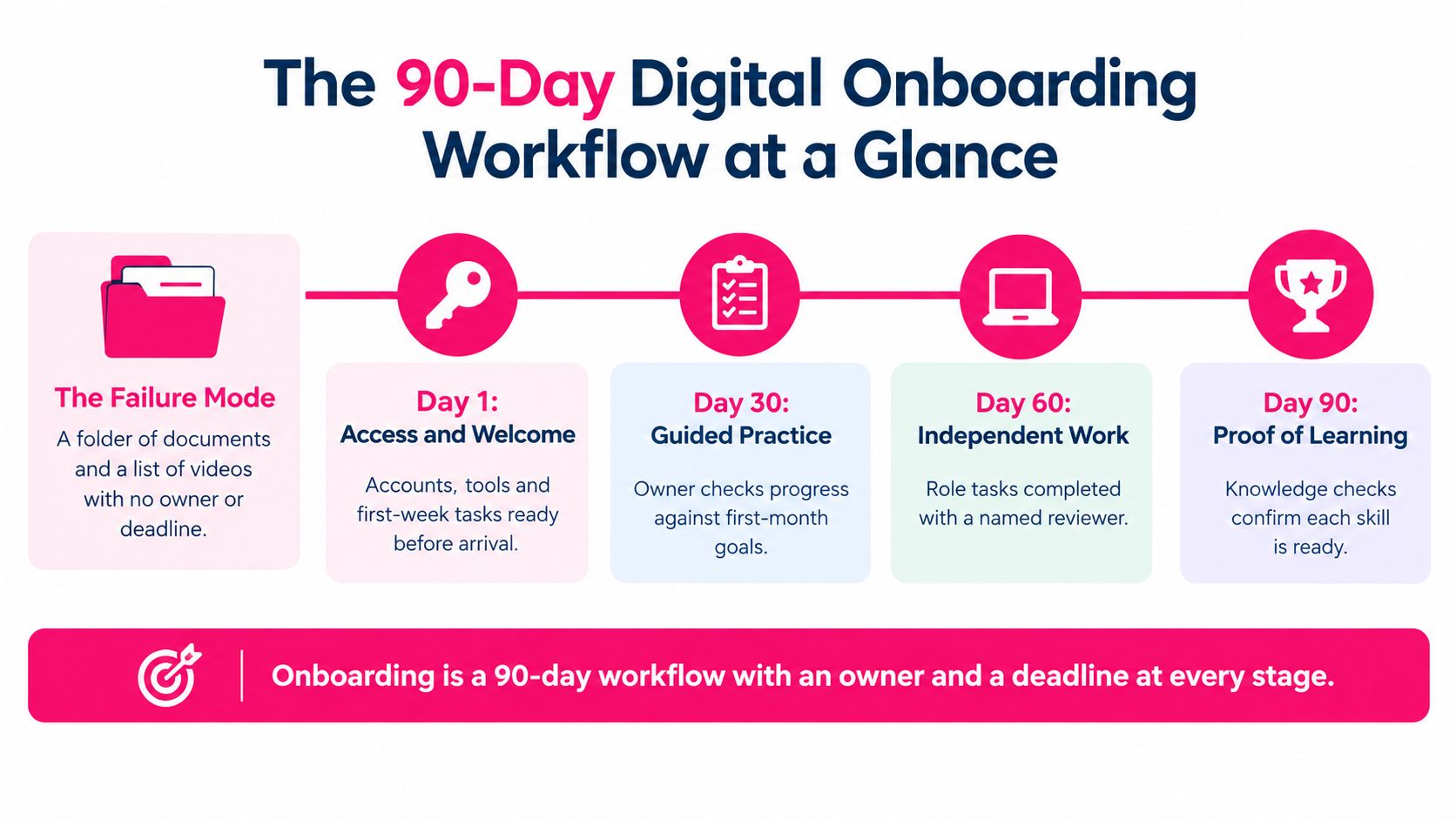
The fix is to treat onboarding as a 90-day workflow that starts before day one. Each phase has one named owner, one trackable deliverable, and one date counted from the start date. Supporting work stays separate: IT owns provisioning, L&D owns publishing, and the buddy owns the first-week introduction, each with its own deadline.
Digital Onboarding Workflow by Phase
| Phase | Timing | Core tasks | Format | Owner | |---|---|---|---|---| | Preboarding | Days -14 to -1 | Identity, payroll, security and equipment requests; system access; welcome message | Checklist plus short welcome video | HR operations | | Week one | Days 1-7 | Company context, first logins, role microlearning, first system simulations, buddy introduction | Short modules and guided simulations | Manager | | Days 8-30 | Weeks 2-4 | Role procedures, supervised practice, scenario checks | Lesson sequence with knowledge checks | Manager | | Days 31-60 | Weeks 5-8 | Independent task work and refreshers on weak topics | Spaced refreshers and reference videos | Manager | | Days 61-90 | Weeks 9-13 | Milestone review, goal setting, feedback on the onboarding itself | Check-in meeting and short survey | Manager |
Read each row as an audit line. Can you open one system and see whether the deliverable happened? If not, the phase is an intention rather than a workflow. Teams comparing approaches can also scan digital onboarding insights from FLYP for other ways practitioners sequence these stages.
Set manager check-ins at days 7, 30, 60 and 90 as fixed calendar events, created when the offer is accepted. Don't leave scheduling to the new hire.
> Week one is the densest phase by design. After that, content gets shorter, practice gets heavier, and supervision fades only when work quality holds.
How to Design the Onboarding Path Step by Step
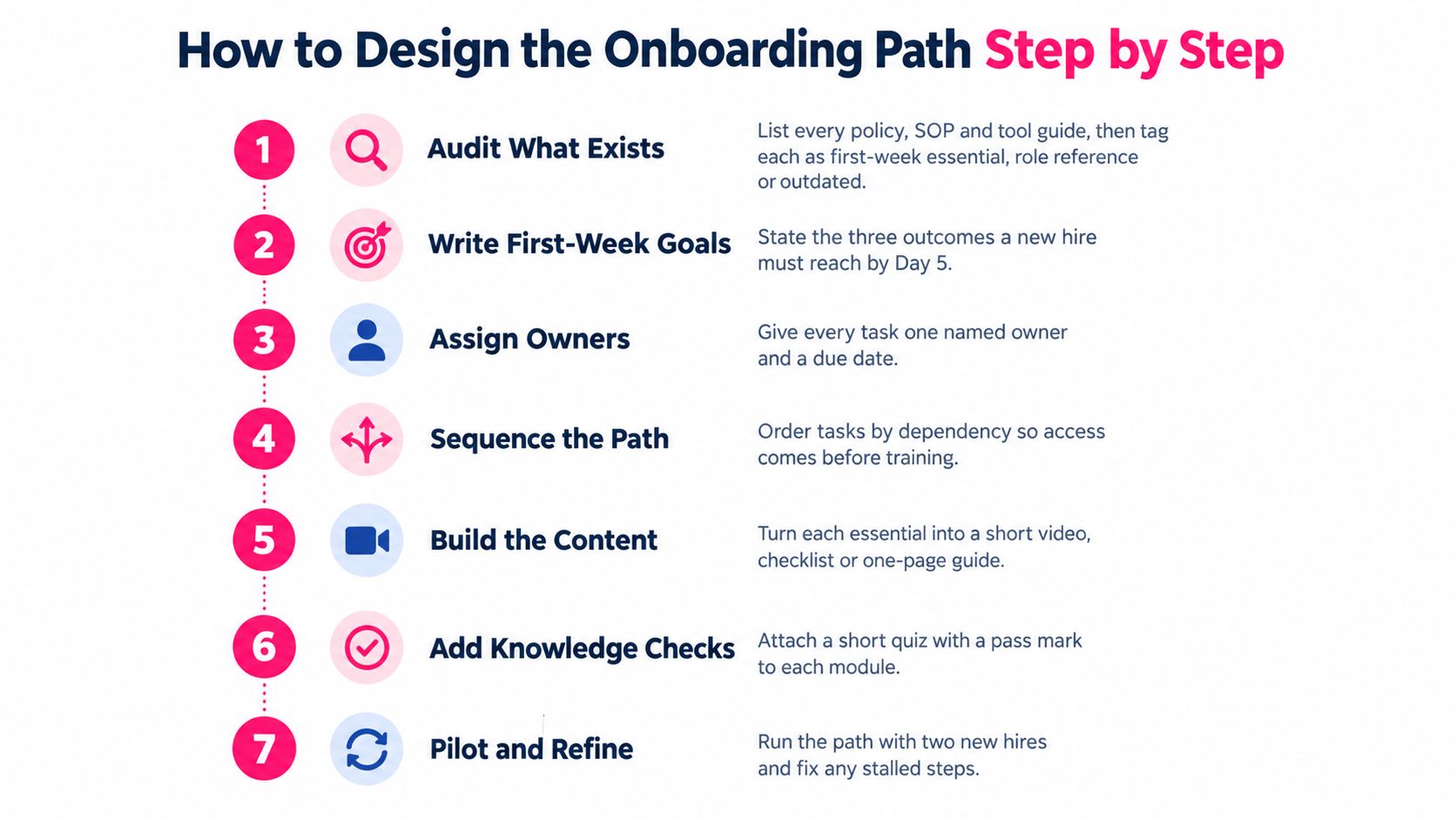
Start with the path on paper before you produce a single lesson. The seven steps below prevent the usual breakage, where polished content sits waiting for access nobody requested.
1. Audit what exists. List every policy, SOP, slide deck, and tool guide a new hire currently receives. Tag each item as first-week essential, role reference, or outdated. Delete or archive the third group before you convert anything, or you'll digitize clutter.
2. Write role outcomes. For each role, write three to five tasks the hire must complete alone by day 30, and a harder set by day 90. Say a support hire must resolve a billing query unaided by day 30, and handle an escalated complaint by day 90. Every lesson you build should point at one of these outcomes.
3. Map dependencies. Name what must happen before learning can start: device delivery, account provisioning, policy acknowledgment, production access. Put a person, not a team, next to each one, plus the lead time they need.
4. Sequence the content. Move from company context to role procedure, then supervised practice, then independent execution. A hire who understands what good service looks like learns the ticket workflow faster than one who starts with button clicks.
5. Pair each phase with human contact. Add a manager meeting, a buddy introduction, and a live troubleshooting slot to week one. This isn't decoration: the LinkedIn onboarding research guide reports that a buddy system increased new employees' internal network size by 30%, and that structured onboarding is associated with employees being 69% more likely to remain for up to three years.
6. Assign one owner and one due date per step. Count dates from the start date, so the path rebuilds automatically for every hire. "Due in week one" isn't a date. "Due day 3, owned by the hiring manager" is.
7. Set intervention thresholds in advance. Decide now what triggers a manager call: a failed knowledge check, a simulation error, a missed check-in. If you invent the threshold after someone fails, intervention feels like blame.
The short walkthrough below shows how a path built this way looks from the learner's side.
Frame the business case candidly when you pitch this work. Strong onboarding is associated with higher retention and productivity, but those are associations, not a promise that any single program will hit a headline number. I'd anchor the pitch on your own baseline: current time to first independent task, and how much of it is waiting.
The most common mistake is building every lesson before mapping dependencies. You end up with a finished course and a new hire who can't log in until Thursday.
Lesson Length and Format for Each Onboarding Topic
Length follows the decision load, not a house style. A single policy rule with one example takes two minutes. A procedure with branch points, where the hire must judge which route applies, needs longer and needs pauses. Forcing both into the same template length pads the first and starves the second.
Target Lesson Length and Format by Onboarding Topic
| Lesson type | Target length | Best format | Check at the end | |---|---|---|---| | Policy or compliance explainer | 2-3 minutes | Slides or talking head with one rule and one example | One scenario question | | Tool walkthrough | 4-6 minutes | Screen recording with one task per video | Perform the task in a sandbox | | Role procedure | 5-8 minutes | Step-by-step demo with pauses at decision points | Three questions on the decision points | | Team or culture introduction | 3-4 minutes | Short intros from three or four colleagues | Discussion prompt for the manager | | Scenario decision | 3-5 minutes | Realistic customer or colleague situation | Choose-the-response question with feedback | | Reference answer | 1-2 minutes | FAQ-style answer with a searchable title | None; linked from the related lesson |
Three rules make those lengths work in practice.
- One objective per video. If you can't state it in one sentence starting with a verb, the lesson is two lessons. "Understand the CRM" fails. "Log a returned order and trigger the refund" works.
- Split at a decision point. Anything running past eight minutes should break where the work itself branches, not at an arbitrary timestamp. The hire can then rewatch only the branch they got wrong.
- Title lessons as questions. Write the title the way a new hire would search at 4 p.m. on a Friday. "How do I request time off" beats "Leave Policy Overview" every time, because nobody searches for an overview.
Where the Rules Stop Working
Safety-critical and equipment-heavy roles break the video-first model. Watching someone isolate a machine or fit protective equipment doesn't prove the hire can do it. Pair the video with a supervised session and a sign-off from the person who watched, and keep the video as pre-work so supervised time goes on practice, not explanation.
Captions and transcripts aren't optional extras. They serve remote hires in noisy homes, multilingual hires reading at their own pace, and everyone searching inside the LMS later. A transcript is also what makes a two-minute reference answer findable six weeks in.
Use viewing data as an editing tool. If learners consistently stop at the same second, don't add a reminder email. Cut before that point, or put a check there and find out what's unclear.
Templates and Knowledge Checks That Prove Learning
Templates exist so reviewers stop debating format and start checking accuracy. When every lesson follows the same shape, a subject expert can approve content in one pass, and a new hire learns where to find the recap without thinking about it.
A Five-Part Lesson Script
- Hook. Open with a situation the hire will face on the job. "A customer says the invoice is wrong" earns attention faster than a module title.
- Objective. One sentence stating what they'll be able to do afterward.
- Three content beats. No more. If a fourth beat matters, it belongs in the next lesson or a reference video.
- Recap. Restate the decision rule, not the whole lesson.
- Knowledge check. End with a question that requires using the rule, not recalling a phrase.
Our implementation checklist recommends standardizing script and visual structure so reviewers can approve faster, and the same logic applies to checks. Use three questions, make at least one a scenario, set a pass mark such as 80%, and build the retake from different questions. A retake with identical questions measures memory of your answer key, not learning. You can lift the structure directly from an onboarding training template rather than designing the skeleton from scratch.
Reinforcement and Personalization
Re-ask the core question at day 14 and again at day 45, either as a short quiz or a manager prompt. Give managers prompts that produce evidence, such as "Show me how you would handle a late supplier order," with a notes field for what the hire really did.
The case for this restraint is clear in BambooHR's onboarding benchmarking guide, where 52% of employees believe onboarding overemphasizes administration instead of role training, 42% of new hires say onboarding gives them too much content at once, and 24% cite insufficient follow-up after initial training. Separate first-week essentials from reference material so day one stays light, and let the spaced checks do the reinforcing.
That same source reports 23% cite inadequate personalization, so tag every lesson by role and location, and let experienced hires test out of modules they've already passed. Forcing a veteran hire through basics teaches them to click through everything, including the parts they need.
> Practical rule: a finished lesson is not a competent employee. Pair each module with a check or a manager conversation, and judge it by time to role milestones, not views.
LMS Publishing Formats and Tracking Setup
Fix naming before you publish anything. A pattern like role, week, topic, version in every file name, plus metadata fields for owner, phase, and next review date, keeps the library usable when the person who built it leaves. Without an owner and review date, outdated lessons stay assigned for years.
LMS Publishing Options Compared
| Publishing option | What it reports | Best use | Limitation | |---|---|---|---| | Embedded MP4 in a course page | Views or a basic completion flag | Short videos inside a course | Little evidence of what was learned | | xAPI statements to a learning record store | Detailed activity records from any tool | Simulations, mobile use and cross-system tracking | Needs a learning record store and setup per activity | | LTI-launched tool | Score and completion passed back to the LMS | Hosted simulations or external quizzes | Depends on the LMS supporting LTI | | Public link or untracked embed | Nothing beyond views | Optional reference videos | Cannot prove completion for compliance |
If you're still selecting a platform, browsing options such as UI Lib Mentor LMS downloads helps you compare what tracking you get out of the box before you commit. Our own LMS video publishing guide covers the export side of that decision.
Setup Checks Before You Assign Anything
1. Test with a learner account. Admin previews hide permission errors. Log in as a new hire would and finish the lesson end to end. 2. Set a real completion rule. Require watching plus passing the check. A completion flag triggered by opening the page is worse than useless, because it looks like evidence. 3. Enable captions and a transcript, then confirm playback on a phone, since many hires do preboarding tasks on mobile. 4. Assign automatically by role and start date. Manual enrollment is the step HR ends up chasing, which is the exact problem you're removing. 5. Archive old versions instead of overwriting them. Overwriting destroys the record of what past learners saw, which matters the first time compliance asks.
Choose the format last. Define the data you need to make a decision, then pick the lightest option that reports it. A reference video that only needs a completion flag doesn't justify an xAPI build, and a compliance scenario that needs an auditable score can't ride on a public link.
KPIs That Show Whether Onboarding Works
Timing is the trap. Enboarder reports that 86% of new hires decide how long they intend to stay with a company within their first six months, while 31% of new hires consider onboarding complete within one day and 62% within one week, according to Chanty's roundup of onboarding statistics. If you measure only week one, you're measuring the part employees think is already over, and missing the window where they decide to leave.
Onboarding KPIs, Timing and Warning Signs
| KPI | How to measure it | Check at | Warning sign | |---|---|---|---| | Time to first independent task | Days from start to the first unassisted task signed off by the manager | Day 30 | Longer than the previous cohort for the same role | | Role milestone completion | Share of required milestones signed off by the manager | Days 30, 60 and 90 | Milestones signed off without evidence | | First-attempt check pass rate | Share of knowledge checks passed on the first try | Each lesson | High pass rates with errors in live tasks | | Role clarity score | Five-point survey item, I know what good work looks like in my role | Days 30 and 90 | Average below 4 | | Early attrition | Share of hires who leave within 90 days | Day 90 | Exit reasons citing unclear role or expectations | | Colleague connections | Number of named colleagues the hire has worked with | Day 60 | No named colleagues by day 60 | | Assigned lesson completion | Share of assigned lessons finished | Weekly | Completion high while milestones lag |
Three habits keep these numbers honest. First, run one cohort as a baseline before you change anything, or you'll never know whether the new path helped. Second, segment every metric by role and location. A company average can look healthy while one site's hires wait a week for equipment. Third, always read completion next to milestone sign-off. High completion with lagging milestones means content is being watched but not used, and the fix is practice design, not more content.
Report at three levels: a one-page dashboard per manager showing their hires against milestones, a monthly summary for HR, and a quarterly review of which lessons produce the most failed checks. That quarterly list is your revision queue. For a deeper method, see our notes on training effectiveness measurement, and for the wider change effort behind new habits, building lasting change across teams is a useful companion read.
> Completion is a hygiene metric. It tells you the system works. Milestones tell you the onboarding works.
Run a Two-Week Pilot Before You Scale
Don't rebuild onboarding for the whole company at once. Pick one role with steady hiring volume and a manager who will run the check-ins in earnest, then apply the full design method to that role alone. A pilot with a disengaged manager tests nothing except your patience.
Keep the pilot deliberately small. Build five to eight lessons from policies and procedures you already have, schedule a manager meeting in week one and a live troubleshooting session by day 14, and review the data every two weeks, fixing stalled steps before adding new lessons. That publish, measure, iterate cycle every two weeks is what separates a pilot from a slow rollout.
Why the Pilot Must Look Past Six Months
Early results can flatter a weak program. A large Ericsson HR-data analysis found that employees onboarded remotely had a lower resignation risk during their first six months, with a hazard ratio of 0.56, but a substantially higher risk over the following 2.5 years, with a hazard ratio of 1.80, as reported in the arXiv study of remote onboarding outcomes. Convenience early can mask integration problems that surface much later.
So watch the failure points that produce that delayed effect: short onboarding windows, weak social integration, delayed access, and no verification that learning turned into performance. Track colleague connections and belonging alongside task milestones from the first pilot cohort, not as an afterthought once attrition data arrives.
Starting small is realistic. VideoLearningAI's Onboarding Training Template includes a welcome module, role ramp-up path, and knowledge check sequence, and many teams can launch a first version in days if they reuse templates, keep one objective per lesson, and review engagement data weekly. Speed matters here because a pilot that takes a quarter to build gets judged as a finished product.
Apply one decision rule at the end. Scale only if role clarity and milestone sign-off improve against your baseline cohort, and time to first independent task is no longer than before. If completion rises but milestones don't move, you've built a better library, not a better digital employee onboarding process, and the right move is to fix the pilot rather than roll it out.
---
Turn your existing policies, SOPs, and checklists into a 90-day onboarding path of short, trackable video lessons with knowledge checks built in, using VideoLearningAI. Start with the onboarding template, launch your two-week pilot this month, and judge it by milestones instead of views.