Your training team signed the contract in March. By June, the first video is approved, but nobody can show a completion record in the learning management system (LMS). The sponsor wants a launch date. The creator thinks production is finished. IT is still asking how the lesson will report learner activity.
That's a hypothetical scenario, but it's a useful way to examine your own process. Before blaming production, check whether anyone agreed on the learning outcome, named the final approver, validated the source material, or tested publishing. A finished video doesn't resolve those dependencies.
The commercial consequences of slow onboarding are visible beyond training. A global banking survey found that 67% of banks had lost clients because onboarding was slow or inefficient, according to Fenergo's research on client losses and onboarding friction. That's banking evidence, not an L&D benchmark, but it reinforces a practical priority: manage the client's path to value, not just your internal deliverables.
> Practical rule: Account access is a starting condition. Onboarding is working when the client can create, publish, track, and maintain useful training.
This client onboarding checklist runs from contract readiness through the first LMS publish and the 30/60/90-day review. Give every step a named owner, required input, target date, and done-when test. Keep the evidence beside the task so nobody has to reconstruct approval decisions from email.
Table of Contents
- Establish the launch boundary - Give each handoff an accountable person - Test the distribution route before production expands - Audit for action, not document volume - Separate fixed standards from editable choices - Teach the work people must perform - Require evidence at the publishing boundary - Bring evidence that supports a decision- How each onboarding step differs in focus, deliverable, and success measure
- Start With the Kickoff Questionnaire This Week
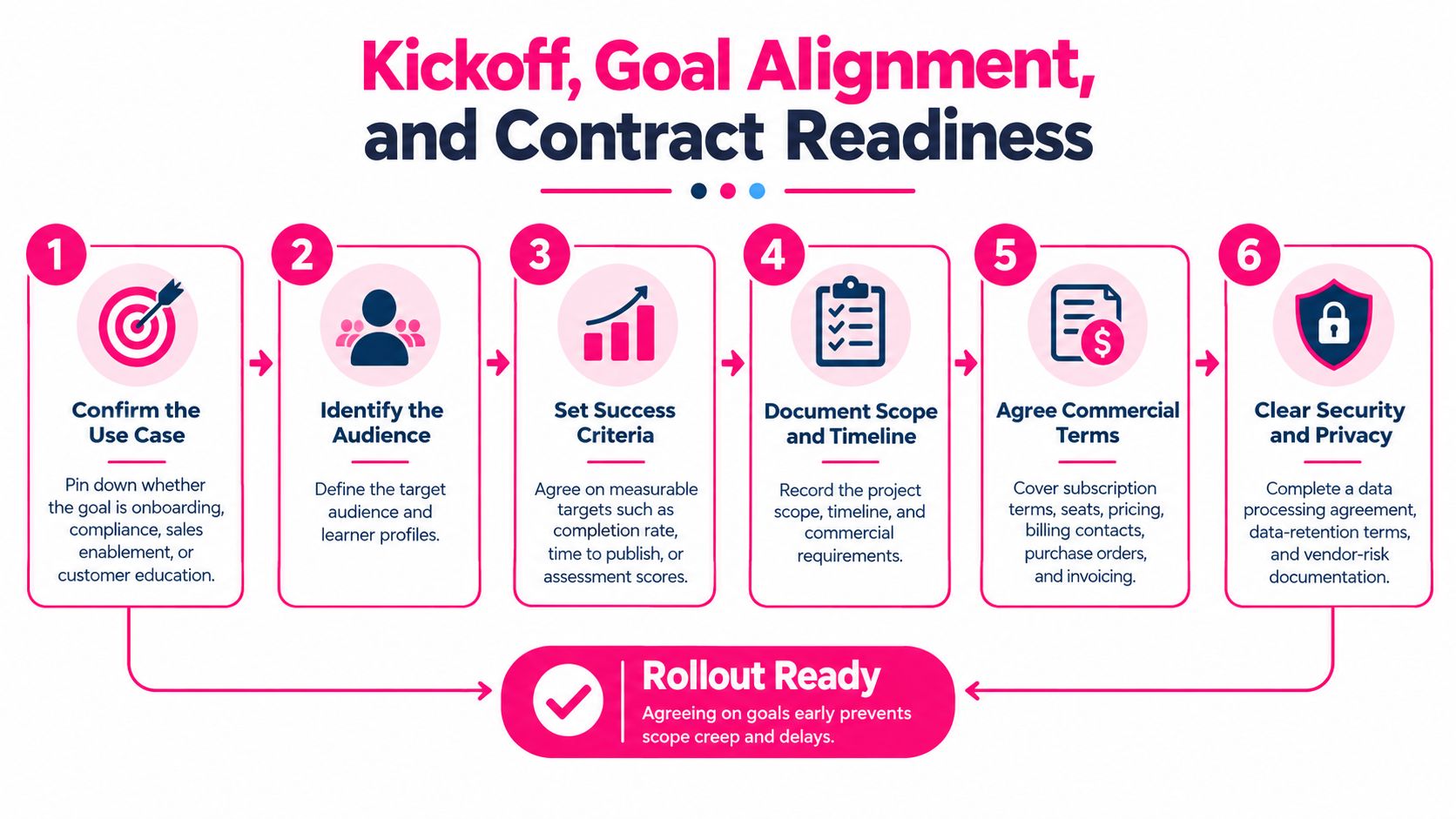
1. Kickoff, Goal Alignment, and Contract Readiness
Start the kickoff with the business problem, not a platform tour. Ask what learners need to do differently and what evidence would convince the sponsor that training helped. For a new-hire program, that might mean performing an assigned workflow independently rather than merely watching the welcome content.
Send a pre-kickoff questionnaire covering the audience, existing materials, LMS, accessibility needs, approval chain, and intended outcome. Ask the sponsor what should be different by the final success review. If nobody can answer, narrow the program before committing production capacity.
Use this process overview to organize the commercial and delivery conversation.
Establish the launch boundary
The project lead should turn the discussion into a short agreement that includes:
- Outcome and baseline: Define the learner behavior and how the team will compare results.
- Scope: Name the initial program, deliverables, exclusions, and change-request owner.
- Commercial readiness: Confirm agreements, billing responsibilities, procurement contacts, and outstanding approvals.
- Data clearance: Document which materials may be uploaded and which require security or legal review.
For example, a compliance team could select its updated privacy procedure as the pilot. The compliance owner approves the source, procurement clears the agreement, and the project lead records the evidence required before internal documents enter the production workspace.
Don't wait for perfect certainty on every future program. Resolve the conditions necessary for the pilot and log remaining questions with owners and deadlines.
Done when: The sponsor approves the scope and success definition, required commercial and security clearances are recorded, and every unresolved dependency has an accountable person.
2. Stakeholder and Roles Mapping
A reviewer comments on a script. A manager requests another review. The creator waits because nobody knows whether either person can approve publication. Adding more reminders won't fix an undefined decision.
Make the distinction between contributing, approving, and publishing explicit. A subject-matter expert may verify accuracy without owning brand decisions. An LMS administrator may publish the approved lesson without having authority to change its content.
This illustration is a useful prompt for discussing how different contributors participate in production.
Give each handoff an accountable person
Use a RACI-plus record rather than a detached list of job titles. Beside each milestone, record the accountable person, contributor, required input, system of record, deadline, exit criterion, and escalation contact.
In a customer-education scenario, product marketing could own the lesson's message, support engineering could verify troubleshooting instructions, and customer success could own distribution. The client's LMS administrator remains responsible for confirming that assigned learners can access it. Those are separate responsibilities, even if someone holds several roles.
> A department name isn't an owner. Put a person's name beside the action and name a backup for critical approvals.
The coordination problem is measurable: 45% of teams reported struggling with information scattered across tools in Rocketlane's customer onboarding research. Keep approval evidence in the project's agreed system instead of expecting contributors to search chat, email, and document comments.
Limit required approval to people who can identify a material problem. Broader consultation can remain optional, with a clear cutoff.
Done when: Every critical handoff has an owner and backup, reviewers understand their authority, and the team knows who resolves a stalled decision.
3. Account Setup, User Provisioning, and LMS Integration
Treat setup as an access-and-reporting test, not an invitation campaign. An administrator receiving a welcome email doesn't prove that creators can work or learners can reach the published course.
Have the client's administrator configure the workspace, role permissions, and required authentication. Test with the intended roles rather than relying on administrator access, which may conceal restrictions that ordinary users will encounter.
Test the distribution route before production expands
Document the actual route from approved content to learner record. Use the LMS integration planning guide to structure that discussion, but verify the route against the client's own environment and requirements.
- Delivery method: Establish whether the workflow uses an uploaded video, embedded content, a public link, or a supported learning package.
- Tracking requirement: Specify the required completion status, assessment result, learner identity, and report destination.
- Permission boundaries: Confirm who can create, review, publish, assign, and retrieve results.
- Recovery ownership: Record administrator recovery contacts and the escalation route for access failures.
For example, a sales-enablement client may require authenticated access and completion records in its LMS. The implementation lead should test that entire path with sample content before the team converts its training library. Don't assume a video export carries the tracking behavior of a learning package.
Use the supplied walkthrough as a discussion aid, then perform the test in the client's environment.
Record what worked, what failed, and which configuration the administrator used. Screenshots and report extracts are more useful than an unchecked statement that integration is ready.
Done when: Intended users can access the required tools, sample content reaches the LMS, and the administrator can retrieve the agreed test result.
4. Existing Content Audit and Source Material Migration
Don't convert an outdated procedure into a polished video. Approve the source before polishing its presentation.
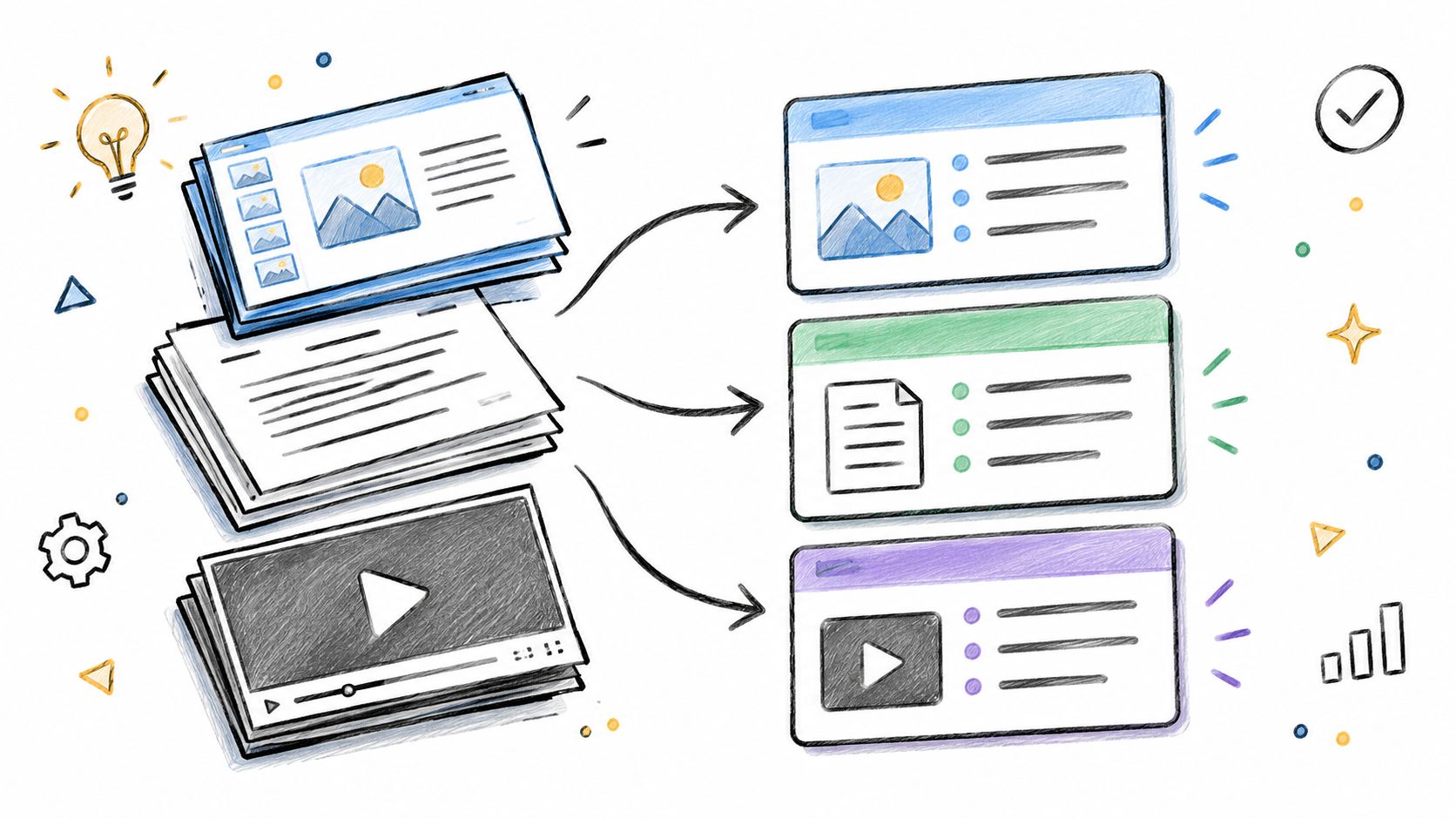
Begin with an inventory of slide decks, PDFs, procedures, webinar recordings, and help articles. Ask the content owner to classify each asset as approved for conversion, requiring revision, or retired. Keep unresolved material outside the production queue.
The organization pattern below can help separate source assets from production-ready material.
Audit for action, not document volume
Evaluate accuracy, learner relevance, demand, and the consequences of getting the instruction wrong. A frequently used procedure with an outdated screenshot deserves attention before a low-priority presentation that's already accurate.
For a hypothetical HR program, the content owner might discover that a welcome deck combines company history, benefits enrollment, and tool access. Don't reproduce that structure automatically. Separate the material around the actions learners need to perform, using the workflow for turning course material into short learning videos.
- Source authority: Record who approved the material and which version applies.
- Learning objective: State the action the learner should perform after the lesson.
- Missing information: Flag unexplained jargon, ambiguous instructions, and absent examples.
- Maintenance trigger: Identify the policy, product, or process change that should prompt review.
Preserve a reference to the original source even after the script is approved. Otherwise, the next policy update becomes a search through disconnected videos and drafts.
There's a trade-off between completeness and launch speed. Audit the pilot thoroughly, then prioritize the remaining library by need and risk rather than delaying everything for a full archive cleanup.
Done when: Pilot sources are approved, obsolete versions are excluded, and every planned lesson has an objective and a content owner.
5. Brand Setup and Template Selection
Brand setup should reduce recurring decisions, not create a design project that postpones the pilot. Approve a reusable visual and script structure, then test it with real content.
A customer-education team, for example, could use a walkthrough layout for product demonstrations and a separate policy layout where disclaimers need prominence. The important distinction is instructional purpose, not decoration. A template that suits a welcome message may not suit a procedural demonstration.
Separate fixed standards from editable choices
Document what creators must preserve and what they can change. Our implementation checklist recommends standardizing script and visual structure so reviewers can approve faster. That means agreeing on the lesson's organization as well as its colors and typography.
Use the brand consistency guide to support a practical style reference covering:
- Approved assets: Logos, colors, terminology, and the location of current files.
- Instructional structure: How to introduce the task, demonstrate it, and prompt practice.
- Readability and accessibility: Caption treatment, contrast, on-screen text, and pronunciation review.
- Editable elements: Examples, screenshots, role-specific wording, and contextual instructions.
Don't force every lesson into an identical scene pattern. Standardize the decisions that protect quality while allowing creators to explain different tasks clearly.
> Design checkpoint: Review the template with difficult source material, not just a short welcome script.
A dense compliance passage can expose problems with text length, disclaimers, and pacing that a simple introduction won't reveal. Resolve those issues before creators copy the template across a program.
Done when: The designated brand and learning owners approve a representative sample, the current assets are accessible, and creators know which elements they may edit without another design review.
6. User Training and Creator Enablement
A creator may understand the tool and still produce a lesson that fails review. Test readiness through the work itself: creators build a lesson from approved material, reviewers complete a real review, and publishers rehearse their assigned handoff.
Train each role on its own tasks. Creators structure scripts, choose layouts, check narration, and prepare materials for handoff. Reviewers verify accuracy and give specific, actionable feedback. Publishers learn the agreed distribution process and reporting route.
Teach the work people must perform
For an HR onboarding pilot, ask a creator to turn an approved procedure into a draft. The reviewer checks it against the source, the creator resolves comments, and the publisher prepares it for the LMS. Keep the exercise within each person's actual permissions.
- Creator evidence: A draft with one clear objective, accurate instructions, and an action prompt.
- Reviewer evidence: Comments that separate required corrections from preferences.
- Publisher evidence: A completed handoff through the agreed delivery and reporting route.
- Support evidence: A named internal champion and an accessible troubleshooting guide.
Put short walkthroughs beside the task they support. Someone preparing a script should find script guidance without searching through a full workshop recording. This keeps support useful at the moment of need and reduces time spent looking for answers.
Keep enablement focused on observed gaps. The Moxo study reported by Wallowa reports that 55% of customers identified excessive paperwork as a major onboarding frustration. For creator training, the practical lesson is to provide guidance where people get stuck, rather than add forms that do not help them complete the work.
Define one clear learning objective before production, then apply the same discipline in creator training. Teach the task, watch the person perform it, and address the specific gap. A short practice task often reveals whether the person needs help with scripting, review decisions, or the handoff.
Done when: Assigned users demonstrate their workflows without the facilitator taking over, and every unresolved capability gap has an owner and a follow-up action.
7. First Video Launch and Publishing Workflow
The first launch is where content approval becomes a learner experience. Keep content-to-LMS handoff as a named checkpoint, with a publisher responsible for receiving the approved version and verifying its behavior.
Use a controlled pilot before broad announcement. In a compliance-training scenario, representative learners should access the lesson through the intended assignment route, complete the required activity, and appear correctly in the administrator's report.
Review the experience from the learner's position, not only from the creator's preview.
Require evidence at the publishing boundary
The creator should hand over the approved version, source reference, intended audience, learning objective, and required completion behavior. The publisher should return the live location and evidence that access and reporting work.
- Content checks: Verify captions, narration, instructions, disclaimers, and working links.
- Learner checks: Test access, navigation, and the required action or knowledge check.
- Tracking checks: Inspect the learner record and the report the program owner will use.
- Release checks: Record approval, version, launch communication, and correction ownership.
Define the value event before measuring launch speed. Intellum's guidance on customer onboarding metrics supports pairing time-to-value with activation and completion, rather than treating a fast initial action as sufficient evidence of adoption.
For this workflow, generating a draft may be progress, but publishing an approved lesson that learners can access and the administrator can track is a more useful first-value milestone. Keep the start event consistent when comparing projects.
Done when: The approved lesson is live, representative learners can complete the intended workflow, reporting is verified, and the program owner accepts the launch evidence.
8. 30/60/90-Day Success Review and Scaling Plan
Don't turn the success review into a production-count presentation. Compare learner behavior and operational results with the outcome agreed at kickoff.
At the early review, inspect access and adoption barriers. At the middle review, examine whether learners can apply the instruction. At the final review, decide whether the program is ready to maintain, revise, or expand.
Bring evidence that supports a decision
Use LMS records alongside assessments, manager observations, and learner feedback. If the baseline is missing or reporting is incomplete, say so. A confident narrative won't repair an unreliable comparison.
For example, a customer-education team might find that learners finish a walkthrough but still need help performing the task. That's a reason to inspect the demonstration and practice activity, not just increase reminder emails.
- Keep: Identify lessons, templates, and workflows that meet the agreed standard.
- Change: Name the specific content, access, approval, or reporting problem and its owner.
- Expand: Select the next program only when the current workflow is repeatable.
- Maintain: Assign responsibility for source updates, lesson revisions, and report review.
Completion can be useful without proving competence. An onboarding benchmark reported 32% lower 90-day churn among the top completion quartile than the bottom quartile, as described in RetentionCheck's onboarding and churn analysis. Treat that as an association and directional signal, not a promised result for a training program.
> A completed implementation proves delivery. Independent performance and reliable records provide stronger evidence that the client can keep using it.
Before closing onboarding, introduce the ongoing program owner and transfer configuration notes, open issues, support routes, and the maintenance schedule. Don't leave that knowledge with the implementation lead alone.
Done when: The sponsor accepts the outcome review, remaining issues have owners, and the client has an agreed maintenance and scaling plan.
How each onboarding step differs in focus, deliverable, and success measure
Use the table to check the evidence each step must produce. The success measure should match the step's done-when test, not just describe activity.
| Item | Primary Focus | Key Deliverable | Success Measure | |---|---|---|---| | Kickoff, Goal Alignment, and Contract Readiness | Set the approved scope, learner audience, goals, and readiness conditions before work starts | Sponsor-approved scope, project requirements, and recorded commercial, security, and privacy clearances | The sponsor approves the scope, and required clearances are recorded | | Stakeholder and Roles Mapping | Name each owner, approver, and backup, including who resolves review delays | Role assignments and an approval path with named backups | Every decision and review has a named owner and backup | | Account Setup, User Provisioning, and LMS Integration | Confirm access and test the full handoff from content creation to LMS tracking | Provisioned accounts, a sample lesson in the LMS, and a retrievable test result | The sample reaches the LMS, learners can access it, and the test result can be retrieved | | Existing Content Audit and Source Material Migration | Check source accuracy, permissions, ownership, and suitability for focused lessons | Prioritized source materials with content owners and permission status recorded | Each selected source is current, authorized for use, and assigned to an owner | | Brand Setup and Template Selection | Set the approved visual and script structure before creators build lessons | Approved brand guidance and reusable lesson templates | A reviewer can confirm the sample follows the approved script and visual structure | | User Training and Creator Enablement | Prepare creators, reviewers, and administrators to complete their assigned tasks | Role-specific practice materials and documented workflows | Each role completes its workflow, including review and approval, without an unassigned step | | First Video Launch and Publishing Workflow | Verify approval, learner access, reporting, and acceptance of the LMS handoff | An approved video, learner-access evidence, a reporting check, and program-owner sign-off | Learners can access the video, reporting is verified, and the program owner accepts the launch evidence | | 30/60/90-Day Success Review and Scaling Plan | Compare progress with kickoff goals and decide what to maintain, change, or expand | Outcome reviews, assigned follow-up actions, and a scaling plan | The sponsor accepts the review, unresolved issues have owners, and maintenance and scaling plans are agreed |
Start With the Kickoff Questionnaire This Week
Pick a program, send the pre-kickoff questionnaire, and book the kickoff call. Choose material with a reachable content owner, a real learner need, and an available LMS administrator. Don't choose the entire training library just because it's waiting for an update.
Ask the sponsor to describe the intended change in observable terms. Ask the content owner which source is authoritative. Ask the publisher what evidence will demonstrate a successful LMS handoff. These answers give you a pilot you can evaluate rather than a collection of activities you can mark complete.
Put the finish line beside the task
Copy the steps into the project system your team already uses. Beside each task, record the owner, input, deadline, done-when test, and evidence location. Use dependencies to distinguish work that can proceed in parallel from work that must wait for approval.
- Before production: Resolve scope, permissions, source accuracy, and the pilot's learning objective.
- Before launch: Confirm approval, learner access, and the reporting behavior in the target environment.
- Before expansion: Review learning evidence, maintenance ownership, and unresolved operational problems.
Keep the checklist lean enough that people will use it during the work. If a task doesn't protect quality, resolve a dependency, or provide evidence of value, question whether it belongs. More boxes aren't automatically better control.
If you want to test the creation workflow before committing budget, VideoLearningAI gives new accounts 100 free credits, with no credit card required. Use the trial to prepare a representative sample lesson, then test the intended handoff in your own LMS environment. Don't assume that creating or exporting content automatically satisfies your reporting requirements.
Make the pilot reveal the difficult parts
Use real source material and the actual approval chain. A polished demonstration built outside the client's normal permissions won't tell you whether the operating workflow is ready. A pilot should expose missing access, unclear ownership, and reporting gaps while the project is still manageable.
When something stalls, identify the unresolved decision before adding another meeting. Does the reviewer lack authority? Is the source outdated? Has the publisher received the wrong version? Fix the dependency and update the checklist so the next project doesn't repeat it.
Send the questionnaire this week with the sponsor, content owner, and LMS administrator included. Book the kickoff around their answers, assign the first deliverables, and use the done-when tests to decide when the team is ready to move forward.
---
VideoLearningAI helps training teams turn existing course material into bite-sized videos using AI-assisted scripting and ready-to-use training templates. Visit VideoLearningAI to create a sample lesson, then use this checklist to validate approval, publishing, and the LMS handoff before expanding your program.