You're the compliance manager, and a refresher video is due Friday. The policy document is ready, but you don't have a studio, an editor, or spare weeks to organize a shoot. You need something employees can understand, your subject-matter expert can approve, and your learning system can deliver.
AI video creation software can help with the production work. The buying decision, though, shouldn't stop at whether a tool makes an attractive video. For training, you also need to know how you'll correct it, verify it, publish it, and update it when the underlying guidance changes.
Table of Contents
- Start with the teaching job - Separate production from instructional judgment - Give the crew a usable brief - Choose a visual approach deliberately - Match capabilities to learning tasks - Choose presentation and delivery controls - Corporate teams can standardize routine production - Course creators can reorganize existing teaching - Compare the complete workflow - VideoLearningAI plan limits compared - Keep the source and approval trail - Apply review effort according to risk - Prioritize what deserves to move - Test access as carefully as productionWhat AI Video Creation Software Is and Why It Matters
AI video creation software uses artificial intelligence to generate or assemble video from a topic, script, or existing material. For workplace learning, think of it as a way to turn approved knowledge into narrated scenes with visuals and captions.
The category isn't uniform. A tool that creates an imaginative visual clip serves a different purpose from a tool that assembles an instructional lesson. Your starting material and publishing requirements matter more than an impressive demonstration.
Start with the teaching job
Consider a hypothetical refresher about reporting a workplace incident. The important outcome isn't that employees admire the presenter. It's that they recognize a reportable situation, know where to report it, and understand what information to provide.
A useful production tool helps you explain that sequence without requiring you to become a video editor. In our workflow, users provide their script or ideas, and the AI handles visuals, voiceovers, timing, and rendering.
Different readers will have different priorities:
- Corporate L&D teams need lessons that fit established learning programs and approval processes.
- HR managers need clear onboarding guidance that employees can revisit.
- Course creators need manageable ways to turn their teaching material into focused lessons.
- Compliance leaders need wording that stays faithful to authoritative requirements.
Separate production from instructional judgment
Automation can assemble the presentation. You still decide what learners should do, which examples are appropriate, and what evidence would show understanding.
> Buying principle: Choose the tool that helps you maintain an approved lesson, not just create an attractive first draft.
That distinction is especially important for high-stakes content. A polished video isn't proof that a statement is correct, and a completed video isn't proof that someone can perform the task. Treat software as a production assistant within your learning process, not as the authority behind it.
How AI Video Creation Software Works Behind the Scenes
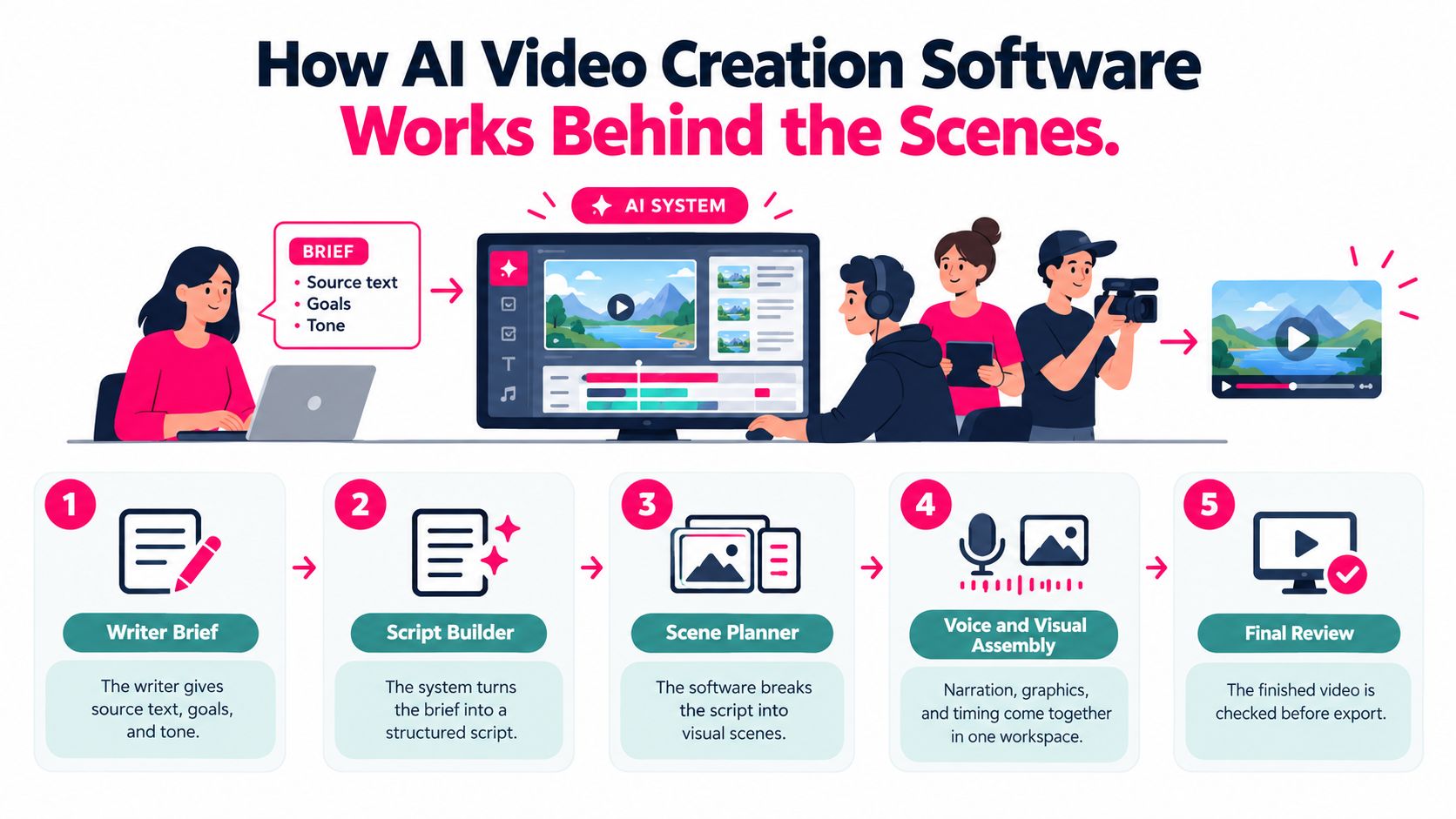
Think of the software as a production crew compressed into a workspace. You supply the brief, while connected functions handle writing, scene planning, narration, visual assembly, and rendering.
This workflow shows where those production tasks fit together.
Give the crew a usable brief
Start with the audience, the learning goal, and the source material. A broad request about workplace safety leaves too much room for interpretation. A brief explaining the approved procedure, intended audience, and required terminology gives the system clearer boundaries.
Choose the topic, host, voice, and visual style. Our platform generates the script, voiceover, visuals, and captions in a single pass, without timeline editing, and the resulting content is editable.
The production sequence typically involves these tasks:
- Script building turns the brief into spoken explanations.
- Scene planning divides those explanations into visual segments.
- Assembly brings narration, imagery, captions, and timing together.
- Rendering produces the playable video for review and export.
The distinction between assembly and rendering can be confusing. Assembly is arranging the ingredients; rendering is producing the finished file. Neither step establishes that the ingredients are factually correct.
Choose a visual approach deliberately
Our visual options include Photo, for a realistic look; Illustration, for an animated or cartoon style; and 3D, for playful dimensional characters. An avatar host is a synthetic presenter who delivers the lesson on camera, rather than a visual style for every scene.
Use these choices to support the explanation. An illustrated conversation might suit a customer-service scenario, while an exact operational procedure may require approved reference imagery rather than an invented depiction.
Generation technology has also become faster. Reported text-to-video generation times moved from approximately 2–10 minutes per clip in 2024 to roughly 30 seconds–2 minutes in the first half of 2025, according to the review of AI video-generation developments. Those are historical category-level figures, not a promise for a particular project.
For repeatable instructional segments, faster rendering can make revision more practical. It doesn't remove the time needed to check a procedure, correct terminology, or secure approval.
Use the accompanying video as a prompt for your evaluation: identify where you would pause to inspect the script and scenes.
Quality settings introduce another trade-off. More detailed output may require more production time, so review content decisions before spending effort on final visual polish.
Core Features to Look for in AI Video Tools
A useful feature list starts with the work your training program requires. Prompt generation, avatars, and export settings matter only when they solve a specific teaching or delivery problem.
Match capabilities to learning tasks
Script generation from a one-line prompt can help you begin a draft. For substantive training, pair that prompt with approved material rather than expecting the software to supply your organization's rules.
Course-material conversion matters when your starting point is an existing lesson. Our course-to-video and Microlearning Video Creator features support turning learning material into shorter video lessons. Your instructional task is to preserve the meaning while reducing unnecessary detail.
| Training need | Capability to prioritize | What to inspect | |---|---|---| | Onboarding | Reusable lesson structure | Can a newcomer follow the explanation? | | Compliance | Editable scripts | Can reviewers correct precise wording? | | Customer education | Focused task explanations | Does each lesson answer a real user question? | | Mobile learning | Suitable output format | Are text and captions readable on the intended screen? |
Editable scripts deserve particular attention. A subject-matter expert may need to distinguish between a recommendation and a requirement. If that correction is difficult, a convenient first draft can become an awkward maintenance task.
Choose presentation and delivery controls
Avatar hosts and voice selection affect how the lesson feels, but prioritize clarity over novelty. During a trial, listen for unfamiliar terms, distracting pronunciation, and pacing that gives learners time to interpret the visuals.
Our quality controls offer Low, which is fast; Medium, which balances speed and detail; and High, which is slower but most detailed. Use a lower setting when checking structure, then choose the appropriate finish for the final lesson.
We also support horizontal (16:9), vertical (9:16), and square (1:1) exports. Match the layout to the viewing environment rather than forcing the same composition into every channel. For lessons that will also appear in swipeable learning content, the video carousel tips from Coachful provide a related resource to consult while planning that format.
Sort your requirements before a vendor conversation:
- Must-have features determine whether you can teach, review, and deliver the lesson.
- Nice-to-have features make production more convenient without determining suitability.
- Not-needed features add little value to your actual program.
For example, a compliance team might place script correction above presenter variety. A course creator publishing across several channels might put more weight on layout flexibility. Neither should assume that a generated voice and captions alone guarantee accessibility.
Benefits for Corporate L&D Teams and Course Creators
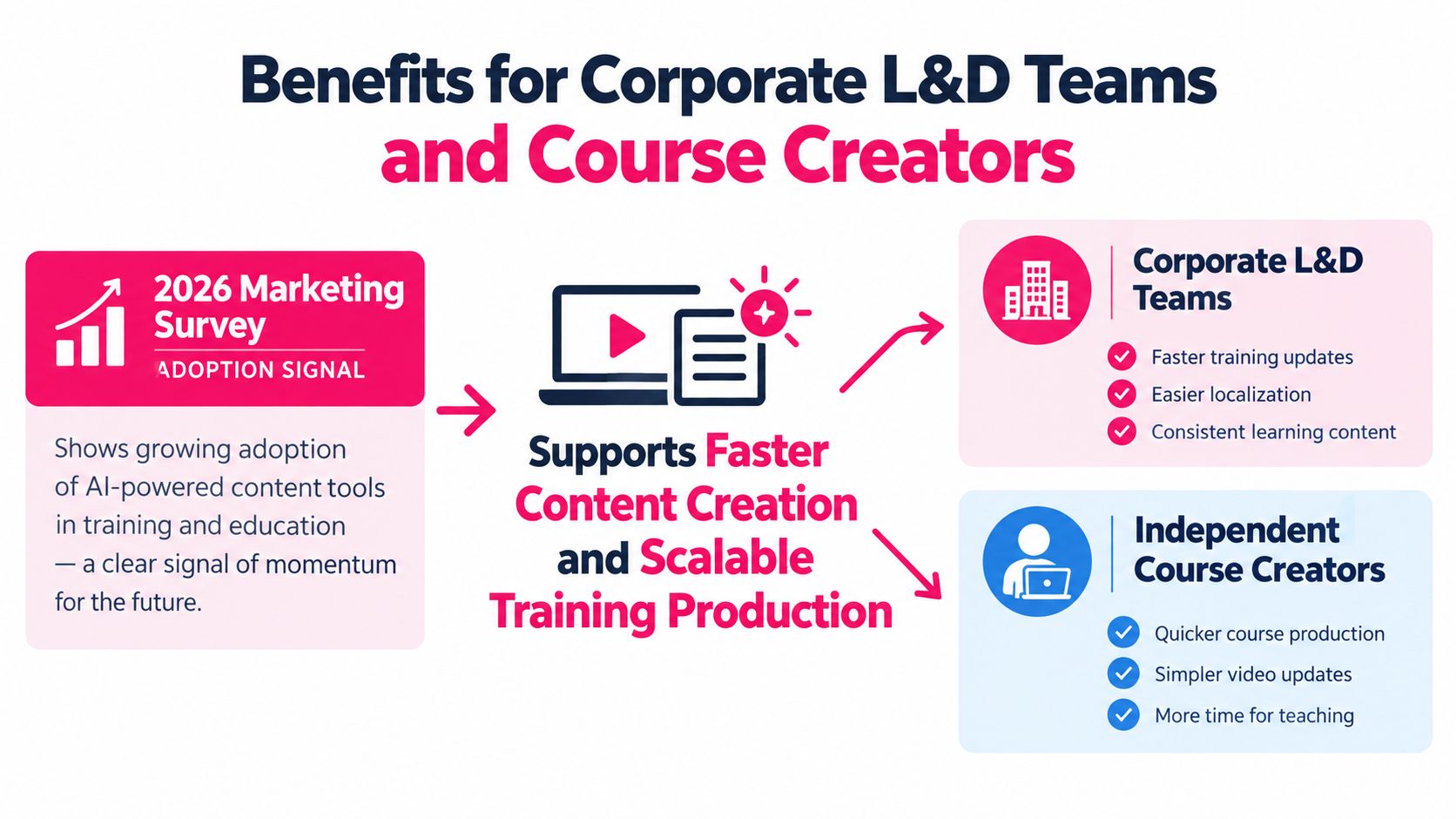
The adoption signal is meaningful, but it needs context. A 2026 survey of 266 video marketers found that 63% had used AI to create or edit video, compared with 51% the previous year, as reported in the AI video adoption statistics summary.
That survey measures marketers, not corporate L&D teams. It also includes AI-assisted editing and other production tasks, so it shouldn't be interpreted as evidence that fully generated training videos improve learning.
The practical opportunity differs by audience.
Corporate teams can standardize routine production
For L&D teams, the appeal is often the work between knowing what needs to be taught and having something ready for review. Templates give authors a starting structure instead of asking them to design every lesson from a blank page.
Our templates cover onboarding, compliance training, sales enablement, and customer education. Treat them as production scaffolding, not preapproved teaching content. The team still supplies the appropriate objectives, examples, and organizational requirements.
An internal knowledge base offers another useful application. Our knowledge-base use case converts tribal knowledge and process know-how into structured video lessons. For example, a process owner could explain how an internal handoff works, then help turn that explanation into an approved resource colleagues can revisit.
The important step is separating established procedure from personal habit. Ask the process owner which actions are required, which depend on context, and which are merely their preferred approach.
For broader program planning, our guide to AI in corporate training is a companion resource.
Course creators can reorganize existing teaching
An independent educator may already have useful explanations buried inside a long course. Rather than recording everything again, they can identify distinct learner questions and build focused lessons around them.
A lesson library should have a deliberate structure:
- Orientation lessons explain the purpose and expected outcome.
- Task lessons demonstrate a specific action or decision.
- Support lessons address common misunderstandings learners encounter during practice.
This isn't just a cutting exercise. A short segment taken out of context may lose the prerequisite explanation that made it understandable. Add enough context for the lesson to stand on its own, or clearly identify what learners should complete first.
> Faster production is useful only when someone can keep the resulting library accurate and usable.
For both audiences, the strongest business case is operational: less manual assembly can leave more room for instructional design, review, and learner support. Don't assume that production savings automatically translate into knowledge transfer. Test whether learners can apply the explanation, not merely whether they liked the presentation.
Evaluating Tools and Choosing the Right Plan
Compare tools using the same approved source material and publishing task. A polished demonstration won't reveal whether your team can correct a script, deliver the result through its LMS, or replace an outdated lesson safely.
Compare the complete workflow
Different production approaches suit different starting points. A generation-led workflow may suit a new explanation, while an editing-led workflow may suit existing recordings. A training-oriented workflow should also be assessed against your review and delivery requirements.
Use a practical acceptance checklist:
- Source handling should preserve necessary qualifications and exceptions when adapting existing material.
- Revision controls should let your reviewer correct wording and inspect the resulting changes.
- Template coverage should match your recurring training needs rather than unrelated presentation styles.
- Microlearning support should help authors create coherent short lessons, not arbitrary fragments.
- Security review should establish who can access uploaded material, how it is handled, and whether your organization permits its use.
- Learning-system testing should confirm that exported content behaves as required in your environment.
We offer MP4 export and SCORM packages for learning management systems. Those are different publishing options, not interchangeable assurances about tracking. During your test, confirm that the package reports the completion information your LMS administrators expect; our learning management system integration guide can support that discussion.
Also clarify what your organization means by alignment with training standards. File compatibility, accessible delivery, internal approval, and regulatory suitability are separate acceptance criteria.
If your source material lacks a teaching structure, consider Teacher Planner's lesson creation tool while preparing the outline. Establish what learners need to understand before asking a video tool to present it.
VideoLearningAI plan limits compared
| Plan | Monthly price | Videos included | Maximum length per video | |---|---|---|---| | Starter | $59/month | 10 | 60 seconds | | Pro | $99/month | 20 | 2 minutes | | Enterprise | $199/month | 50 | 5 minutes |
Our editable generation workflow lets users revise the generated content. During evaluation, make an intentional correction and follow it through to the exported lesson. That exercise is more informative than approving an untouched draft.
Map the plan to your expected workload, including the duration of lessons that need a longer explanation. Don't shorten essential safety context just to fit a subscription limit.
> Plan-sizing rule: Choose for your longest expected video, not your average one.
Then check the proposed purchase against your migration workload and review capacity. Paying for output your reviewers can't approve won't help you publish responsibly.
Building a Repeatable Workflow and Verifying Accuracy
For high-stakes training, human approval is part of production, not an optional final courtesy. Our AI-generated videos may not be factually accurate and shouldn't be relied upon as a source of truth. Users are solely responsible for reviewing, editing, and validating every generated video before use.
A realistic presenter doesn't solve that problem. A European Parliament briefing reports average synthetic-media detection performance near 50%, illustrating how difficult authenticity judgments can be in the briefing on detecting AI-generated media769494_EN.xml).
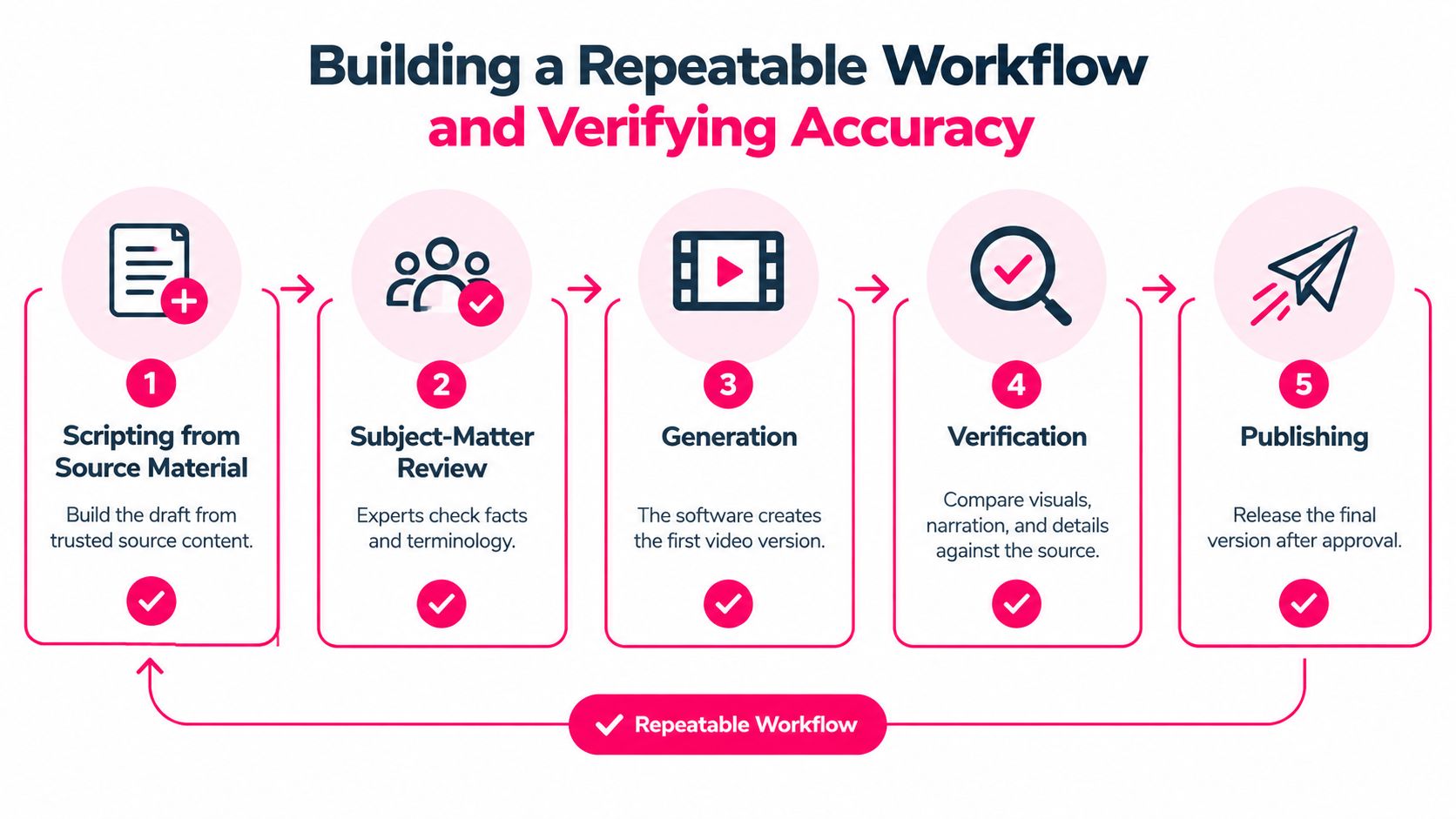
Use a documented production checklist rather than relying on whether a video feels convincing.
Keep the source and approval trail
1. Script from trusted material. Record the source document, its owner, and its current status. Flag gaps instead of asking the generator to fill them with plausible guidance. 2. Obtain subject-matter review. Have the responsible expert approve terminology, requirements, exceptions, and examples before production. 3. Generate the lesson. Our Training Video Workflow feature supports a repeatable process for scripting, production, publishing, and optimization. 4. Verify the rendered output. Compare narration, captions, visuals, and on-screen wording with the approved script. Check whether a visual implies something the source never says. 5. Publish with version tracking. Preserve the approved script, reviewer, source reference, release record, and location of the published lesson.
Label synthetic presenters clearly, and identify the responsible content owner. Learners should know where to verify guidance and how to report an apparent error.
Apply review effort according to risk
A general office orientation tip can follow a lighter approval process than a regulatory obligation or equipment-safety instruction. For higher-risk lessons, require documented sign-off and define what will trigger revalidation, such as a policy revision or changed procedure.
Keep a review schedule, but don't rely on the calendar alone. The document owner should notify the training owner when authoritative guidance changes.
For distributed organizations, content policies that protect franchise brands are a useful adjacent resource when considering ownership and approval consistency. Translate your own rules into practical quality assurance procedures that reviewers can follow.
A useful record answers a simple question: Who approved this explanation, against which source, and what would make that approval expire? If you can't answer it, the lesson isn't ready for high-stakes use.
Migrating Legacy Content and Taking the Next Step
Start migration with an audit, not a batch conversion. Gather existing slide decks, standard operating procedures, and recorded lectures, then identify which materials are still authoritative.
An old presentation may include useful knowledge alongside superseded instructions. Converting it unchanged would preserve the problem in a more polished format.
Prioritize what deserves to move
Rank material by its value to learners, how often it changes, and the consequences of an error. Choose stable, useful content for the initial pilot so you can evaluate production without simultaneously resolving disputed policy.
| Legacy material condition | Recommended action | |---|---| | Current and frequently needed | Consider for the pilot | | Useful but outdated | Correct and approve before conversion | | Duplicated across several sources | Establish an authoritative source | | High risk or disputed | Resolve ownership and requirements first |
Preserve important context when reorganizing a lecture or deck. A standalone lesson may need an explanation of when the procedure applies, what learners must already know, and where to find the full reference.
Test access as carefully as production
Shorter videos don't automatically remove learning barriers. The workforce-access findings discussed alongside workplace learning and generative-AI research include a substantial gap: 51% of non-managers, compared with 72% of senior executives, said they had the resources needed for learning and development.
Your pilot should therefore include the people expected to use the lesson in ordinary working conditions:
- Device access means checking the actual screen and connection learners will use.
- Accessible presentation means testing captions, readable text, and suitable supporting material.
- Time and reinforcement mean confirming that managers allow learning time and support application.
- Learner feedback means asking what remains unclear, not just whether playback worked.
Our videos can be downloaded as MP4 files or shared through a public link. Use a distribution method your organization approves, especially when the source material is internal.
Begin with the free trial, which gives every account 100 free credits with no credit card required. Convert a legacy module into a short lesson, run the approval workflow, and test it with a small learner group before expanding the migration.
---
VideoLearningAI offers editable AI-generated training videos, microlearning features, and MP4 or SCORM export for learning delivery. Visit VideoLearningAI to start your free trial and test an approved legacy module from source material through review and publishing.