A training video can look polished, play without errors, and still fail an audit. The failure usually appears in the evidence: the approved transcript differs from the published captions, the LMS marks a learner complete before the attestation is stored, or the exported record omits the version that the reviewer signed.
That's why quality assurance procedures for training videos need to do more than collect approvals. They must connect the source material, production decisions, review gates, learner activity, and final records into one inspection-ready chain. The practical test is simple: can someone who wasn't involved in the launch reconstruct what was approved, by whom, against which source, and what the learner completed?
Table of Contents
- Six anchors for an executable procedure - Link each gate to system evidence - Gate one belongs to the producer - Gate two requires an independent instructional designer - Gate three is the SME verification - Gate four combines accessibility and compliance validation - Gate five is a publishing dry run - The validation decision should appear in the procedure - Package and media checks - Rules and learner routing - The procedure should behave like a workflow - Days 1 through 30, document the current state - Days 31 through 60, pilot the review cycle - Days 61 through 90, measure and expandWhen a Course Launch Almost Fails an Audit
A compliance team is preparing a bloodborne pathogens refresher for release. The narration is finished, the animation is clean, and the course owner has approved the final cut. During a last-minute review, an L&D operations lead notices that the video doesn't include the required OSHA refresher cue contained in the authoritative handout. The omission is small in runtime but significant in compliance context.
A second issue appears in the LMS. The course records completion after the learner watches the video and passes the quiz, but the attestation field is mapped to a separate activity. Some test learners show a completion timestamp without a corresponding attestation record. The course can't launch until both problems are resolved, and the regulatory deadline is now close enough that every correction creates pressure elsewhere.
The missed controls weren't mysterious. Four review gates should have caught them:
- Subject matter walkthrough: The SME should have verified the script against the current training requirement, not just reviewed the general accuracy of the narration.
- Caption diff: The captions should have been compared line by line with the approved transcript and authoritative handout, including the missing refresher cue.
- LMS completion-rule alignment: The publishing operator should have tested whether video viewing, quiz success, and attestation storage produced the intended learner state.
- Evidence export: The team should have exported the approval record, transcript, caption file, package metadata, and learner-path results before release.
> Practical rule: An approval without the artefact it approves is only a statement of intent.
The result is measured in hours. The producer reopens the edit, the SME repeats the review, the LMS administrator rebuilds the completion rule, and QA regenerates the evidence package. A launch that looked finished becomes a controlled rework cycle.
A useful audit trail requirements guide can help teams think beyond sign-off emails. The objective is an evidence chain where each decision points to a versioned file and each learner outcome can be traced back to the published package. That structure also makes exceptions easier to explain because the team can show where the process stopped, who owned the decision, and what changed before release.
What a Training Video QA Procedure Actually Contains
A workable procedure tells a producer exactly what to check, a reviewer exactly what to approve, and an auditor exactly where to find the proof. It should be written around the training video workflow, not copied from a generic manufacturing SOP.
Six anchors for an executable procedure
Scope statement. Define which content the procedure covers, such as compliance videos, onboarding modules, narrated slide lessons, captions, quizzes, and LMS packages. State what falls outside the procedure, because unclear scope creates silent exceptions.
Versioned source artefacts. Identify the authoritative handout, regulation, policy, script, storyboard, transcript, caption file, media export, quiz bank, and LMS package. Each file needs a stable version identifier. A reviewer shouldn't have to guess whether “final transcript” means the file approved before or after the narration edit.
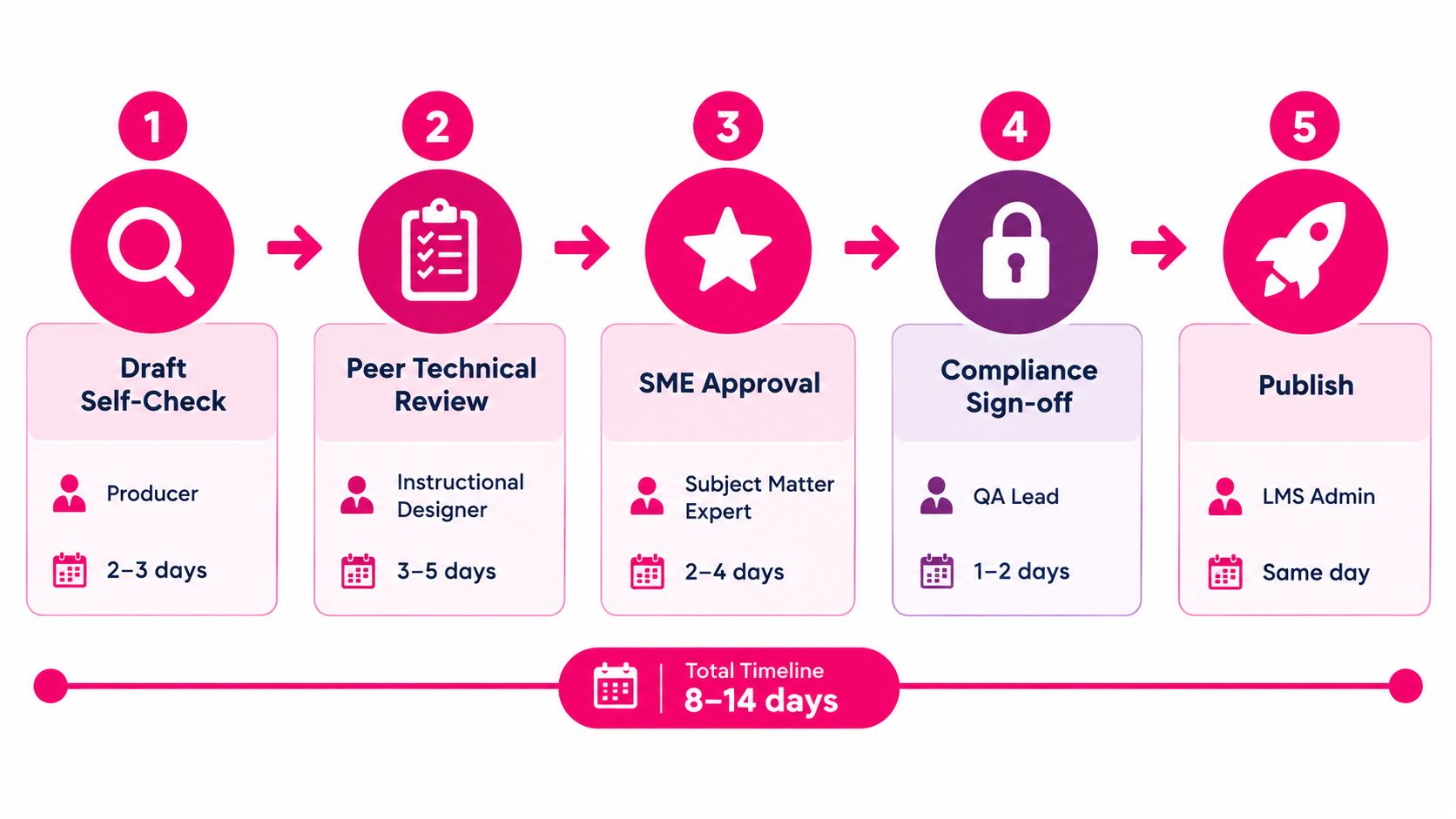
Named ownership. Assign one owner to every gate. The producer owns the self-check, a second instructional designer owns technical review, the SME owns subject accuracy, the QA lead owns compliance release, and the LMS administrator owns publication evidence. Shared responsibility often means nobody can explain the decision later.
Pass or fail criteria. Replace “review the video” with observable language. For example, “all required source topics appear in the script,” “captions match the approved transcript,” or “the learner cannot receive completion until the attestation is stored.” If timing matters, define the tolerance, such as transcript alignment within two seconds of slide transitions.
Evidence capture rules. Specify what gets retained and where. Useful artefacts include a signed comment thread, comparison export, caption accuracy report, package manifest, screenshots of LMS rules, test-learner records, and the final approval log. A PDF export is only useful if it remains legible and includes the relevant version and timestamp.
Exception handling. A failed gate should generate a disposition, not disappear into a chat thread. Record the defect, owner, severity, corrective action, retest result, and release decision. If the team accepts residual risk, the approver should state why.
The workflow can be visualized as five practical gates:
Link each gate to system evidence
The LMS should carry more than a completion flag. Capture package version, course version, learner identity, activity status, quiz result, attestation status, completion timestamp, and any recurrency or due-date state that affects compliance reporting. Store the approved transcript and caption export with the same release identifier as the package.
Production quality also starts before formal QA. Teams creating training videos can use practical content creation tips for YouTube to improve recording, visuals, audio consistency, and editing discipline. Those production habits don't replace compliance review, but they reduce avoidable defects that consume reviewer attention.
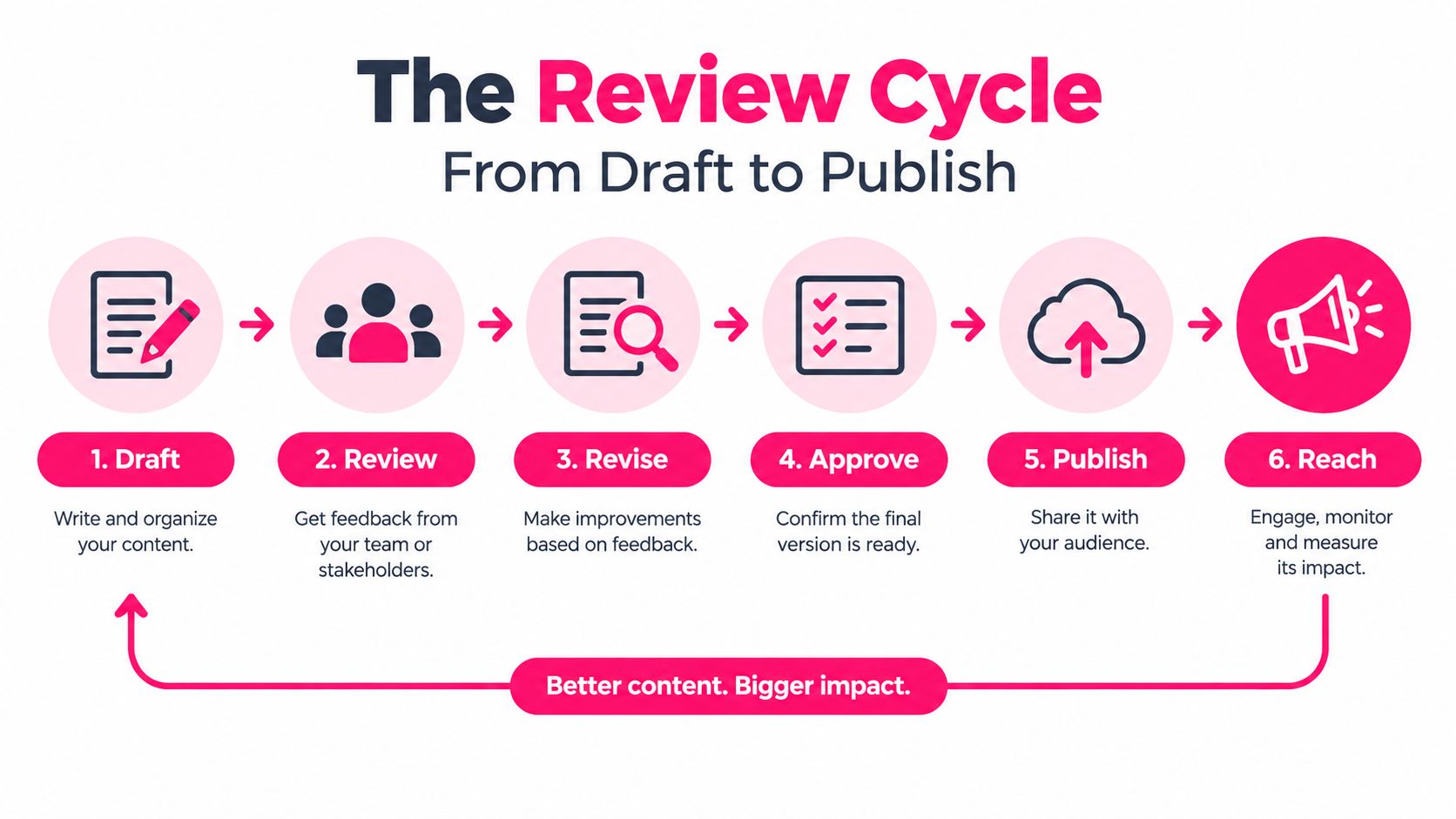
The Review Cycle From Draft to Publish
The review cycle works when each gate has an entry artefact, a named reviewer, a clear acceptance decision, and a record that survives handoff. The sequence below is deliberately controlled. A failed gate sends the work back to the owner of the defect, not forward with a note to “fix later.”
Gate one belongs to the producer
The producer starts with the script, storyboard, media files, transcript, quiz, and source register. The self-check confirms that every planned scene exists, narration matches the script, on-screen text is readable, required references are present, and the quiz tests the intended objectives. The evidence is a completed checklist linked to the draft version, with defects fixed before peer review.
This gate is inexpensive because the producer still knows the material and can correct source-level mistakes quickly. It fails when the producer treats the rendered video as the only object under review and ignores captions, quiz logic, or metadata.
Gate two requires an independent instructional designer
A second designer reviews the instructional flow, pacing, learner directions, visual consistency, audio quality, and interaction logic. Independence matters. The reviewer should not be the person who made every production decision, because familiar errors are easy to overlook.
Acceptance criteria might include consistent terminology, no unexplained abbreviations, a visible objective, logical transitions, and a complete transcript. The reviewer's comment thread becomes the evidence trail. Resolved comments should remain available rather than being deleted after approval.
Gate three is the SME verification
The SME compares the content with the controlling policy, source regulation, or approved technical handout. The SME checks required language, role-specific instructions, prohibited claims, examples, and any conditions that change the learner's required action.
A signed approval should identify the source version reviewed. “Looks accurate” isn't sufficient for regulated content because it doesn't show what the expert checked or which reference governed the decision.
Gate four combines accessibility and compliance validation
The QA lead verifies caption completeness, transcript alignment, audio and visual equivalence, keyboard access, focus order, quiz behavior, attestation capture, and required learner evidence. If the course is regulated, the QA lead also confirms that the final package matches the approved export.
Gate five is a publishing dry run
The LMS administrator uploads the package to a controlled test area and follows the learner path with a test account. The operator checks launch, playback, completion, failure, retry, reporting, and export behavior. Evidence includes the package manifest comparison, test record, screenshots or exports of key settings, and the final release approval.
Teams that need a deeper workflow reference can use this content approval process to formalize the relationship between authoring approval and package validation. A normal cycle may take several working days, with the exact duration determined by content risk, SME availability, accessibility complexity, and the number of corrections. The important point is that the schedule includes re-entry time when a gate fails.
Compliance Validation for Regulated Training
Not every training video needs the same level of control. A general onboarding overview can use a light-touch review if the consequences of an error are limited. A pharmaceutical GMP refresher, OSHA course, SOX training module, or financial-services conduct lesson needs traceable evidence tied to the learner and the released version.
The difference is not bureaucracy for its own sake. It's the difference between proving that content was reviewed and proving that the right learner received the right approved content, completed the required activity, and generated the required record.
| QA Element | Light-Touch Review | Compliance-Grade Validation | |---|---|---| | Source review | Check the script for clarity, accuracy, and audience fit. | Compare the script with the controlled policy, regulation, or authoritative handout and record the source version. | | SME involvement | Optional review by a knowledgeable stakeholder. | Named SME verifies role-specific requirements and signs an approval log. | | Transcript and captions | Correct obvious wording and timing errors. | Retain version-locked transcript, caption file, comparison result, and accessibility findings. | | Learner proof | Record course completion and, where appropriate, quiz status. | Capture quiz scoring, attestation status, learner identity, completion timestamp, retries, and required recurrency state. | | Publishing test | Confirm the course launches and plays. | Run the full learner path, validate completion rules, test failure and retry behavior, and compare the LMS package with the approved export. | | Release evidence | Keep the final file and approval message. | Retain signed approvals, package metadata, caption accuracy report, LMS settings, test records, exceptions, and final disposition. |
The validation decision should appear in the procedure
A procedure can state the rule plainly: “Compliance-grade validation is required when the training supports a regulated obligation, records a learner attestation, affects role authorization, or must be produced during an audit.” That sentence gives reviewers a decision point instead of leaving risk classification to habit.
For a GMP refresher, the SME should verify the procedure against the current controlled source, the QA lead should check the final narration and captions, and the LMS administrator should prove that the learner record includes the required completion and attestation evidence. For a sales-tooling overview, the same team might check instructional quality and basic accessibility without retaining the full regulated evidence set.
The right procedure remains compact. It names the risk trigger, required gates, retained artefacts, exception owner, and release authority. It doesn't require a binder of disconnected forms that nobody can reconcile later.
LMS Publishing Checks Before You Hit Go
Publishing is a controlled release, not an upload task. The operator should be able to run the checks below without asking what “verify the course” means.
Package and media checks
- Package integrity: Upload the SCORM or xAPI package to the test environment and confirm it launches without errors. Fail the release if the manifest references missing files, incorrect identifiers, or an unintended version.
- Media encoding: Play the video from the beginning, middle, and end on the supported desktop and mobile paths. Fail if playback stalls, audio drops, the duration differs from the approved export, or the media uses an unsupported format.
- Caption presence: Confirm the closed-caption file is attached to the published media and can be enabled by the learner. Fail if captions are missing, incomplete, out of sync, or different from the approved caption version.
- Transcript alignment: Check narration, on-screen text, captions, and quiz timestamps against the approved transcript. Fail when the learner reaches an interaction before the relevant instruction appears.
Rules and learner routing
- Audience assignment: Confirm that the intended role, department, location, or learner group is selected. Fail if a test account outside the audience can access the course or an intended learner is excluded.
- Due date and recurrency: Verify the assigned due date, renewal rule, effective date, and time zone. Fail if the course creates an incorrect deadline or fails to assign the expected recurrence.
- Completion rule: Use a test account to complete the required video, quiz, and attestation steps. Fail if the LMS records completion before all required conditions are met.
- Failure and retry path: Submit an unsuccessful quiz attempt and confirm the configured response. Fail if the learner is incorrectly marked complete, cannot retry when policy allows it, or is redirected to the wrong activity.
- Deeplink behavior: Open the assigned course from the learner dashboard and a direct link where supported. Fail if authentication breaks, the course opens in the wrong window, or the learner loses progress.
- Reporting mapping: Compare the learner activity with the LMS dashboard and exported report. Fail if identity, status, score, timestamp, attestation, or package version is blank or mapped to the wrong field.
Store the test results with the authoring approval, not in a separate publishing mailbox. Guidance on video version control is useful here because the LMS file, approved export, transcript, captions, and release record must point to the same version.
A publishing operator can use tools such as an LMS staging environment, SCORM Cloud, browser accessibility checks, spreadsheet-based source registers, or automated media validation. The tool matters less than the evidence relationship. A successful test that can't be tied to the released package doesn't close the gate.
Why More Documentation Does Not Mean Better QA
A bloated QA system often reveals itself through paperwork. There are several sign-off forms, an old revision log, contradictory reviewer comments, and a final PDF that doesn't match the file stored in the authoring folder. An auditor looking at that package has to decide which record is authoritative, whether the approvals refer to the same version, and whether the team followed its own procedure.
That ambiguity is the defect. Documentation should reduce uncertainty, not create another reconciliation exercise.
The verified audit set discussed in the FDA Group's Q1 2026 findings recorded documentation, data integrity, and inspection readiness in 78% of audits, while change control and procedural governance appeared in 33%. Those findings point to a practical problem: teams may document activity extensively while still failing to preserve reliable evidence across electronic records and exported files.
The procedure should behave like a workflow
A lean procedure makes every action executable:
- A checklist item points to an artefact: “Verify caption completeness” links to the caption file and comparison result.
- A sign-off creates a timestamped record: The approver, version, decision, and date remain attached to the release.
- An exception has a disposition: The defect, corrective action, retest, owner, and risk decision are recorded together.
- A change has an impact review: The team identifies whether a script edit requires new SME approval, caption regeneration, quiz review, or LMS retesting.
- An export remains usable: The PDF or report is legible, complete, searchable where required, and clearly tied to the released version.
More pages don't automatically create stronger control. The ISO quality assurance guidance emphasizes measurable objectives, alignment with business processes, performance review, and recurring audits. It also describes a closed-loop approach that defines objectives, assigns responsibility, collects data, analyzes results, and revises targets. That model is more useful than adding another approval form because it connects procedure design with review and improvement.
The historical development of QA makes the same point. Statistical quality control moved organizations away from relying only on final inspection, and later standards shifted attention toward documented, process-based control, as outlined in this history of quality management systems. Training teams should apply that lesson directly: don't wait until the published video is the only thing left to inspect.
The right size for a QA procedure is long enough to defend a decision, but short enough that a new owner can run it on the first day without a translator. If an operator needs a meeting to interpret each step, the procedure is probably describing intent instead of controlling work.
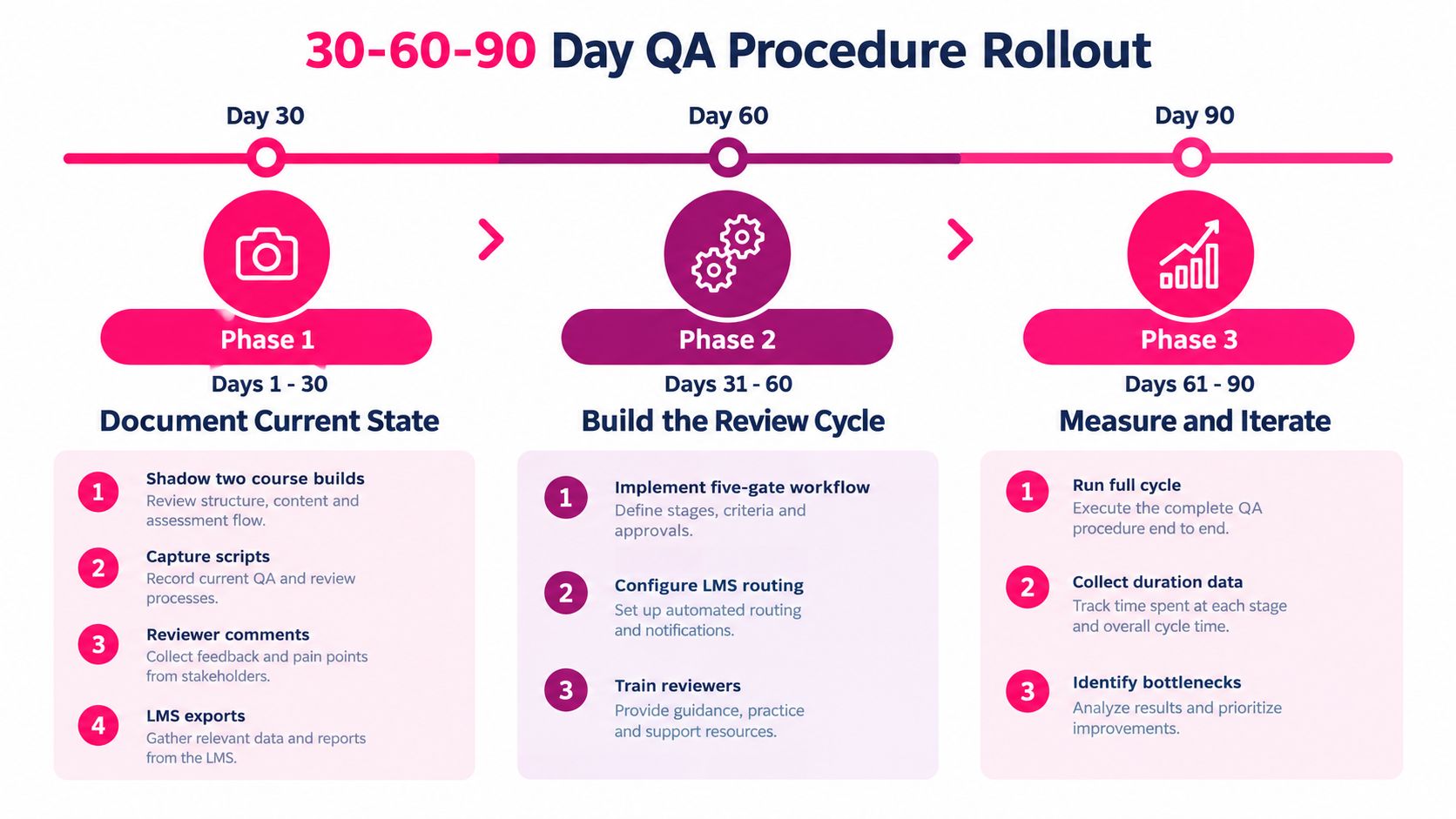
Your 30-60-90 Day QA Procedure Rollout
A rollout succeeds when it produces a repeatable operating habit, not another document stored in a shared drive. Start with the work your team already ships and capture the evidence it creates.
Days 1 through 30, document the current state
Shadow two real course builds from script intake through LMS release. Don't observe only the formal meetings. Capture the actual script, source references, reviewer comments, caption changes, export files, LMS settings, test-learner results, and sign-off messages.
Put those artefacts into one evidence folder or controlled workspace. Then draft version one of the checklist from observed failure modes. If reviewers repeatedly lose track of caption versions, add a caption comparison gate. If the LMS completion rule is unclear, add a required test path and an export check.
Your exit measures should include a documented current cycle, an identified owner for each handoff, and a baseline for cycle time, escaped defects, and trace completeness. Avoid setting arbitrary targets before you know how the process behaves.
Days 31 through 60, pilot the review cycle
Choose one new training video with enough complexity to exercise every gate. Run the producer check, peer review, SME verification, accessibility validation, and LMS dry run in sequence. Record the start and finish time for each gate, every re-entry, and every missing artefact.
Run a mock compliance walkthrough using the publishing checks above. Ask someone outside the build team to retrieve the approved transcript, prove the package version, locate the learner test record, and explain any exception. Their ability to reconstruct the release is more informative than a completed checklist.
At the end of this phase, revise unclear criteria, remove duplicate fields, and retrain reviewers on named-owner handoffs. The procedure should become easier to execute after the pilot, not longer by default.
Days 61 through 90, measure and expand
Run the procedure across three concurrent builds, adapting the workflow to your team size and tooling. Add automated validation where it removes repetitive manual work, such as checking video codec, duration, file presence, transcript completeness, and package contents.
Use the results to identify bottlenecks. Track cycle time, defect escape rate, and audit-trace completeness as separate measures. A faster cycle is not a success if defects escape into production, and a complete trace is not a success if the procedure takes so long that reviewers bypass it.
Retire the legacy SOP only after the new workflow has owners, evidence storage, exception handling, and a review cadence. ISO guidance notes that organizations should review performance and re-audit when needed, with procedures aligned to business processes. Treat the first ninety days as the start of that feedback loop, not the finish line.
---
VideoLearningAI helps teams turn existing training materials into structured, bite-sized training videos and supports workflows for drafting, reviewing, and publishing content for LMS delivery. If you're rebuilding quality assurance procedures around version control, captions, approval gates, and learner evidence, use VideoLearningAI to standardize video creation while keeping your review and release controls visible.