A compliance video gets updated after legal changes one sentence in the script, one subtitle, and one on-screen example. The editor uploads a replacement, the subject matter expert reviews a downloaded copy, and a regional trainer forwards a file named Compliance_Final_v2_REAL_final.mp4. Later, nobody can say with confidence which cut was approved, whether the subtitles match it, or which version is currently published in the LMS.
That situation isn't a naming problem. It's a governance problem created by multiple branches, review states, and deliverables moving through the same workflow without a reliable history.
Table of Contents
- The asset is more than the export - Why file naming falls short - Four layers that make the system usable - Branches need relationships, not just folders - Separate the asset classes - Govern branches by purpose - Use a controlled review cycle - Make approval states unambiguous - Treat generation as a production stage - Protect learner records during updates - More versions don't automatically mean better quality - Tool-first thinking leaves the process untouchedUnderstanding Video Version Control Fundamentals
Modern video version control keeps every revision as a distinct, restorable version under one asset. A replacement doesn't erase the previous cut. Instead, the system records a new version, exposes its position in the history, and lets an authorized user restore an earlier cut without destroying the record of what happened.
Vimeo's documented version workflow illustrates the model clearly. Replacing a video creates a new recorded version, the interface can show an indicator such as V5, and restoring an earlier cut creates another active version, such as V6. The important point isn't the label. It's the preserved chain of decisions.
The asset is more than the export
A corporate training asset usually includes more than an MP4. It may have a script, storyboard, voice track, music, captions, translations, thumbnails, source footage, review notes, approval decisions, and an LMS publishing package. Treating only the exported video as versioned leaves the surrounding evidence exposed to confusion.
A useful asset record answers five questions quickly:
- What is this content? The course, lesson, policy topic, audience, and language should be identifiable.
- Which cut is active? “Latest uploaded” isn't always the same as “approved for learners.”
- What changed? Reviewers need a concise change note, not a filename puzzle.
- Who approved it? The responsible subject matter, compliance, and publishing roles should be visible.
- What can be restored? Earlier approved and rejected cuts should remain available according to retention rules.
Why file naming falls short
Names still matter, but names can't enforce workflow. A filename can say V3_approved, while another team member uploads a newer draft into the same LMS course. A folder can contain a master, a regional variant, and a client-safe deliverable without showing how they relate.
Structured history turns production into a traceable sequence of milestones. That makes it easier to distinguish a draft from a reviewed cut, an approved version from the most recent edit, and a retired asset from one that may still be used in a parallel branch. For L&D teams, that distinction protects both day-to-day publishing and later audit work.
Core Mechanics of Non-Destructive Video Asset Management
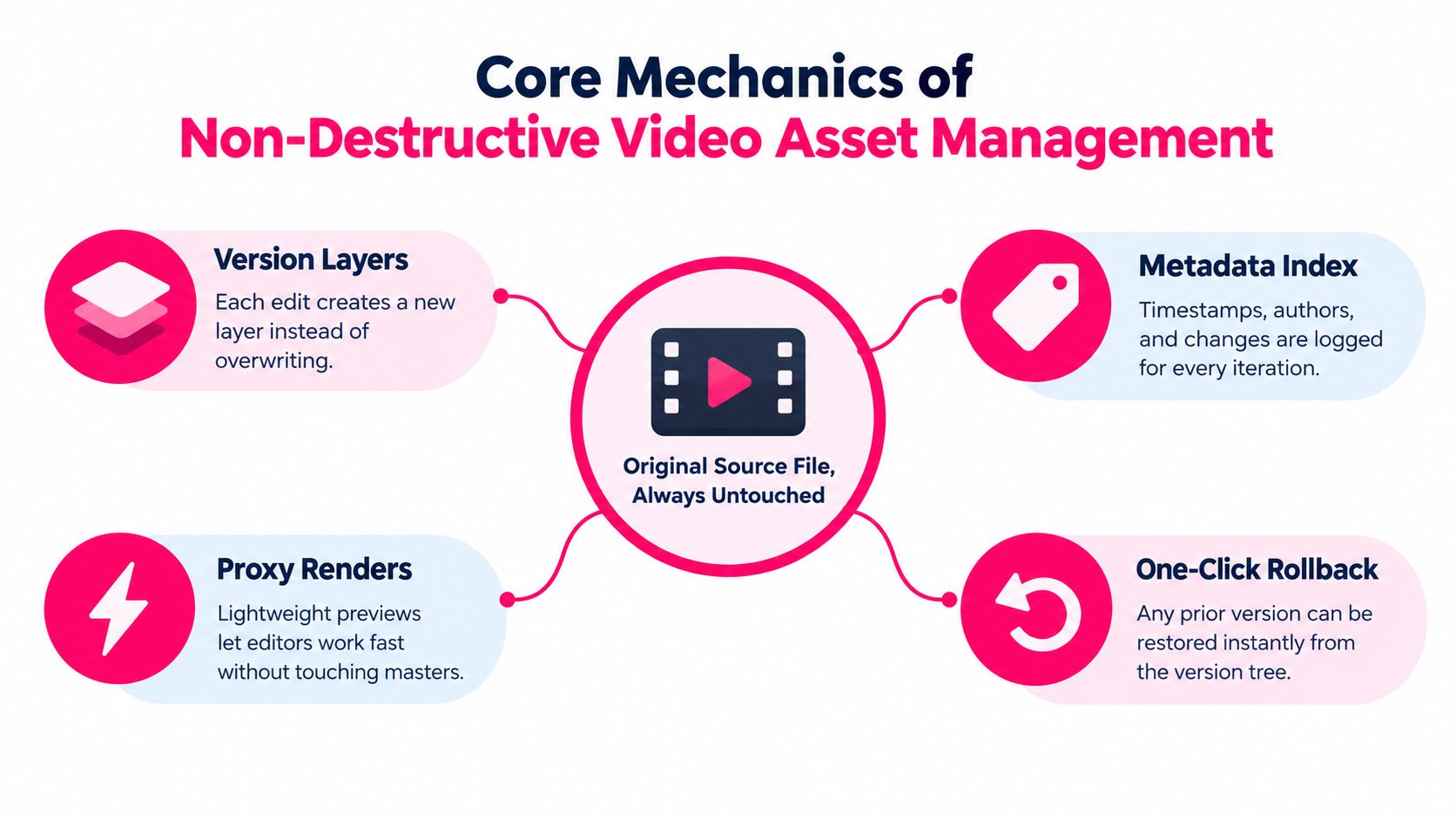
The technical foundation is non-destructive editing. In a non-destructive system, an editor changes timeline instructions rather than altering the original media. The source clip remains intact while the project describes which portions appear, where they begin, what audio is layered over them, and which graphics or captions are applied. The U.S. Department of Veterans Affairs technical reference describes this general editing approach as preserving original media while applying changes through the project or timeline.
That distinction matters because rollback is safe only when the underlying source remains available. If an editor overwrites the only copy of a clip, version history can't reconstruct what was lost. If the project stores edit instructions and the asset system preserves each revision, the team can compare, restore, or branch without damaging the master media.
Four layers that make the system usable
Version layers represent each meaningful revision. A new cut should carry its own identifier, change note, creator, and timestamp. Small corrections don't always need a new editorial branch, but any change that affects review, approval, captions, or learner interpretation should be visible in the history.
The metadata index makes the history searchable. Useful fields include course code, policy owner, audience, language, jurisdiction, content status, reviewer role, effective date, and related LMS package. Without metadata, a platform can preserve every version and still force staff to hunt through an opaque archive.
Proxy renders let reviewers and editors work with lightweight previews while protecting high-value masters. They support quicker review without changing the relationship between the working copy and the source. The operational rule is simple: convenience files must never become the unofficial master.
Rollback restores a known earlier state while preserving the action itself. A rollback shouldn't replace the current version without notice. It should create a visible event, identify the restored source, and trigger a fresh review when the content has compliance or policy implications.
Branches need relationships, not just folders
Parallel variants should inherit from a defined parent. An internal version might include confidential process details, while a client-facing version removes them. A role-specific lesson might retain the same policy explanation but change the examples and assessment prompt. Those aren't unrelated files. They're branches with shared lineage.
Teams should record the parent asset, branch purpose, audience, locale, and divergence rules. A branch can share a script segment or source clip, but its approval status must remain independent. That prevents a reviewer from approving an internal cut and accidentally treating the client-facing cut as approved too.
Version control works at the asset and project layer because the media itself should remain stable. The system then records which instructions, components, and outputs belong to each revision, giving L&D operations a controlled map rather than a directory full of ambiguous exports.
Why Corporate L&D Teams Need Strict Versioning Governance
Variant proliferation creates more operational risk than ordinary revision work. A single training concept may become a short lesson, a mobile crop, a subtitle set, a regional adaptation, a role-specific example, and an AI-assisted rewrite. Each output can be useful, but each one introduces another approval path and another opportunity for an outdated component to survive.
Recent workflow guidance argues that teams should plan for more versions, not fewer, because aspect ratios, clips, and AI-generated variants increase the number of files requiring review. DAM guidance also emphasizes version history, check-out controls, and secure distribution as core safeguards. The Fast.io guidance on video asset management is useful background for separating masters, deliverables, and source files rather than treating them as interchangeable.
Separate the asset classes
A governance policy should distinguish at least three categories:
- Master files: the authoritative project or high-quality source used to create approved outputs.
- Deliverables: learner-ready exports such as LMS videos, mobile versions, or regional cuts.
- Source files: scripts, recordings, graphics, audio, subtitles, and other components used to build the project.
The approval state belongs to the deliverable, but it should remain connected to the master and the source components used to produce it. Otherwise, a subtitle revision can be approved independently while the video still contains the old spoken wording.
Govern branches by purpose
Every branch needs an owner and a reason to exist. “Client version,” “manager version,” and “mobile version” are meaningful only when the team defines what may differ and what must remain synchronized. A policy lesson might allow local examples to change, while the legal statement, terminology, and assessment requirement must match the approved master.
That rule should be written before production begins. It reduces debate during review and gives editors a clear answer when a stakeholder requests a change that would create a new branch.
> Governance rule: A variant isn't complete when it renders successfully. It's complete when its relationship to the parent, audience, reviewer, and publication channel is recorded.
For compliance-heavy programs, auditability should be designed into the record rather than reconstructed from email. A practical reference is this guide to audit trail requirements for training content, which aligns version history with reviewer actions and publication evidence.
Strict governance doesn't mean every small edit needs a committee. It means the team decides which changes require a new version, which require renewed approval, and which can be handled as internal production work. That balance keeps control without turning routine editing into an administrative bottleneck.
Designing Review and Approval Workflows for Video Iterations
Review fails when stakeholders comment on different cuts. One reviewer watches a draft in a platform, another marks up a downloaded file, and a third replies to an email thread that doesn't identify the timestamp or version. The editor then has to reconcile contradictory instructions without knowing which feedback is still valid.
A workable process gives every review action a version boundary. Industry workflow guidance from PlayPause describes version control as the foundation for knowing which cut is current, reviewed, approved, and different from its predecessors. The same source reports an average of 2.24 uploaded versions per reviewed file and 4.42 comments per file across platform usage from September 2024 to September 2026. Those figures show why a casual review process breaks down quickly when comments aren't attached to a specific cut.
Use a controlled review cycle
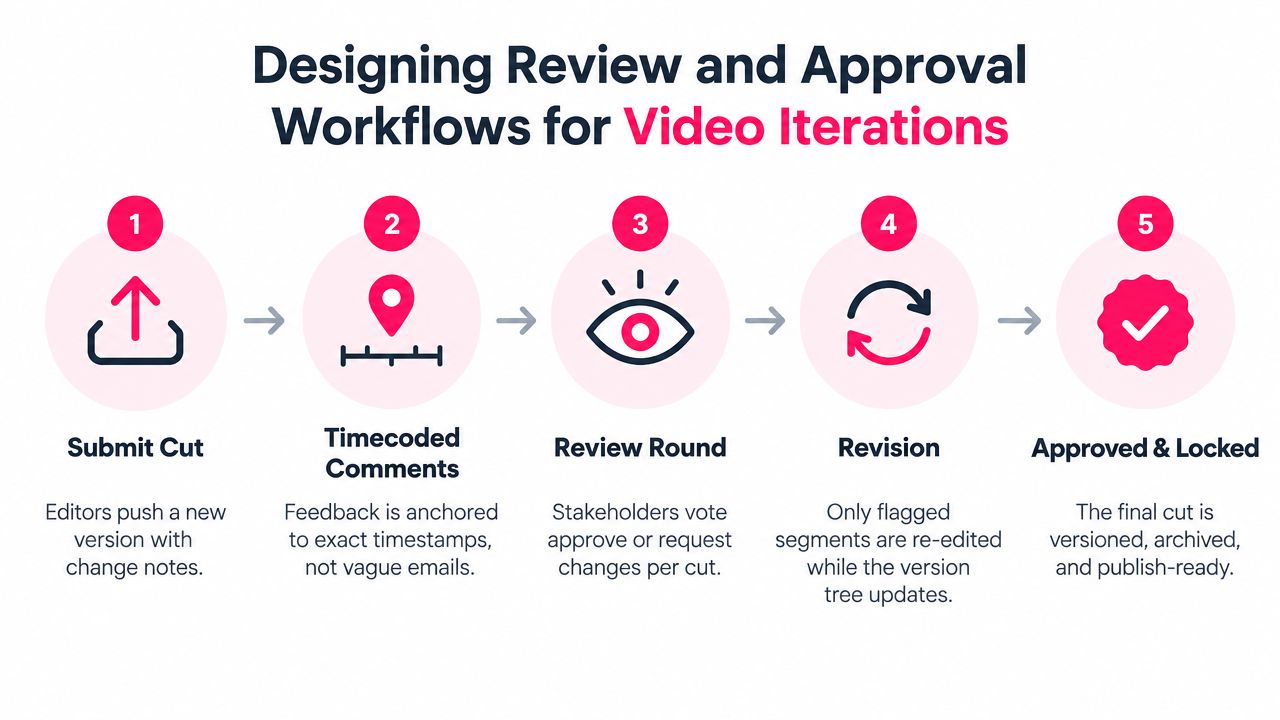
1. Submit one named cut. The editor uploads the new version with a change note that identifies what changed and why. The submission should include the intended audience and review deadline.
2. Anchor comments to timecodes. A reviewer should identify the exact point in the video, the issue, the requested action, and the reason. “The policy section is confusing” isn't actionable. “At 01:42, replace the obsolete reporting route in the spoken line and subtitle” is.
3. Keep decisions on the cut. Stakeholders should approve or request changes against the submitted version, not against a general asset record. A later upload must open a new review round.
4. Create the next version after revision. The editor should preserve the reviewed cut, apply accepted changes, and document unresolved items. Rejected suggestions should remain visible rather than disappearing into an email thread.
5. Lock the approved deliverable. Once the required roles approve it, mark the cut as approved, restrict editing, archive the review evidence, and send only that deliverable to publishing.
Make approval states unambiguous
“Approved” should mean something different from “latest,” “reviewed,” or “ready for export.” A useful state model might include draft, internal review, subject matter review, compliance review, approved, published, and retired. Teams can use different labels, but they shouldn't use one label to represent several decisions.
Side-by-side comparison is valuable when a reviewer needs to confirm that a requested change was made without introducing a new issue. Keep the earlier cut read-only, show the current cut prominently, and preserve the comments associated with each. For teams formalizing broader content governance, these visual content calendar approval steps offer a transferable model for assigning reviewers and making approval ownership visible.
The content approval process for training video should also connect the video to its script, captions, reviewer comments, decision record, and publication package. That prevents a technically approved export from becoming an operationally incomplete release.
Integrating VideoLearningAI with LMS Publishing Standards
AI-assisted production changes the speed and shape of L&D work, but it doesn't remove publishing controls. A platform can help turn course material into structured, bite-sized lessons, yet the resulting video still needs an owner, an audience, a review state, and a relationship to the LMS package that learners receive.
Treat generation as a production stage
Templates for onboarding, compliance, sales enablement, and customer education can standardize the starting point. They don't determine whether a generated lesson is publishable. The team still needs to verify policy language, narration, visuals, captions, accessibility, audience restrictions, and links to the governing source material.
A safe sequence looks like this:
- Create the lesson draft: Generate the script and initial video from approved source material.
- Assign lineage: Link the lesson to the course, policy, audience, language, and parent asset.
- Review the content: Route the cut to the right subject matter and compliance reviewers.
- Package the release: Produce the required video, captions, metadata, and LMS-compatible package.
- Publish the approved version: Update the intended LMS object and record the publication event.
This approach separates content generation from content authority. An AI-produced draft can move quickly through production, but it can't become the current learner-facing version until the defined gate is complete.
Protect learner records during updates
An LMS may track completion against a course, activity, package, or item identifier. Replacing content without understanding that relationship can create confusing learner experiences, especially when a revised lesson is treated as a new object when it should have been an update, or refreshed without warning when policy requires a new assignment.
The VideoLearningAI LMS publishing workflow is relevant here because publishing should be treated as a controlled handoff, not a final download. Record the source version, package version, publication date, target LMS location, and rollback plan before release.
When a core policy changes, don't search manually for every derivative. Use the parent asset and branch metadata to identify affected lessons, language versions, captions, and channel-specific outputs. Then decide which assets need revision, which need retirement, and which remain valid because their content doesn't depend on the changed rule.
The best integration pattern keeps the LMS as the learner delivery system and the asset workflow as the production and evidence system. The LMS should expose the approved learning experience. The version record should explain how that experience was created, reviewed, and replaced.
Common Pitfalls in Enterprise Video Asset Management
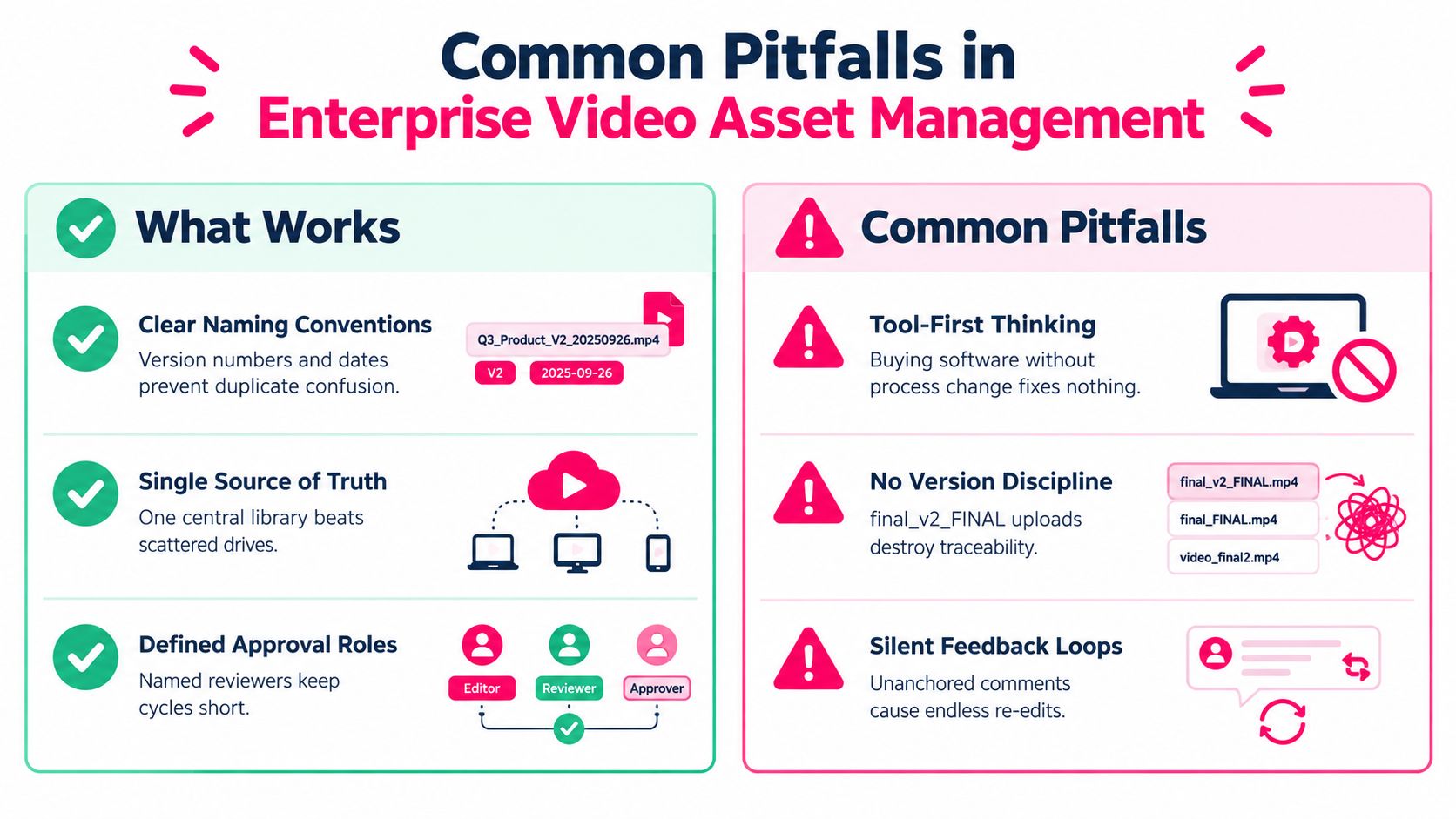
Buying a video platform doesn't create governance. It can centralize files while leaving the underlying behavior unchanged, which produces a cleaner interface around the same confusion. The failure usually appears when a reviewer asks for the approved cut and the team can find several recent exports but can't prove which one was authorized.
More versions don't automatically mean better quality
Iteration improves quality only when the team can tell what changed and why. Unmanaged iteration creates duplicate reviews, repeated corrections, and accidental publication of a branch that never completed approval. Variant proliferation also consumes attention from the people who must check every caption, translation, policy phrase, and visual example.
The common warning signs are easy to recognize:
- Final-file inflation: Names such as
final_v2_FINALsignal that the filename is compensating for missing system state. - Detached components: Scripts, subtitles, audio, and graphics have their own versions but aren't linked to the video cut.
- Email-based decisions: Approval exists in a mailbox rather than beside the asset and its exact revision.
- Unclear latest status: Staff use the newest upload as a proxy for the approved version.
- Unowned branches: Regional or role-specific variants continue to circulate after the parent changes.
Tool-first thinking leaves the process untouched
A platform can't decide who may approve compliance language, which variants inherit a policy change, or when a published lesson must be retired. Those are operating rules. Before selecting an enterprise video platform, document the asset types, branch logic, approval roles, retention expectations, and LMS handoff. Then test whether the tool supports those rules without forcing staff to maintain a second shadow register.
> Operational test: Ask a reviewer to identify the current approved cut, its parent, its open comments, and its publication destination without opening email. If the answer takes a long search, the workflow still has a control gap.
Another failure is silent feedback. A stakeholder may mention a change during a meeting, an editor may apply it to a different branch, and the official review record remains unchanged. Require decisions to return to the versioned asset, even when the conversation starts elsewhere. That small discipline gives the team one defensible record and makes future maintenance far less dependent on individual memory.
Your Video Version Control Implementation Checklist
Start with one active training program and audit it from source to learner. Don't try to fix every historical asset before testing the operating model. The goal is to prove that a team can identify lineage, manage a revision, complete approval, and publish the intended cut without relying on personal knowledge.
Use this checklist:
- Map the asset family: Identify the master, source files, deliverables, variants, captions, translations, and LMS package.
- Define version rules: Decide which edits create a new version, which create a branch, and which require renewed approval.
- Name accountable owners: Assign production, subject matter, compliance, accessibility, and publishing responsibilities.
- Record metadata: Capture audience, language, policy owner, status, parent asset, change note, and publication destination.
- Anchor review evidence: Require comments and decisions to reference the exact cut and timecode.
- Separate latest from approved: Make the approved learner-facing version visible and keep drafts from accidental distribution.
- Test rollback: Restore an earlier cut in a controlled environment and verify that the history remains intact.
- Check the LMS handoff: Confirm that the package, captions, metadata, tracking behavior, and publication record match the approved deliverable.
- Retire deliberately: Mark superseded variants as obsolete and remove them from active publishing paths while retaining required history.
- Review the branch policy: Confirm that internal, client, role-specific, regional, and channel variants have clear inheritance and ownership rules.
A good policy makes the safe action the easy action. Editors shouldn't need to invent filenames, reviewers shouldn't need to reconstruct decisions from email, and LMS administrators shouldn't need to guess which export belongs in production.
---
VideoLearningAI turns course materials into structured training videos and supports workflows for review, version tracking, and LMS publishing. If your team is dealing with growing variants or approval uncertainty, visit VideoLearningAI to evaluate how it could fit into your governed production process.