A 200-person onboarding cohort is waiting for its next lesson while one instructional designer updates six versions of the same module. The subject-matter experts are busy, the LMS contains outdated material, and managers want new hires productive faster without adding another production cycle.
That's the unglamorous starting point for AI in corporate training. The value isn't that a model can produce another course in minutes. The value comes from connecting content, learner data, delivery, practice, and measurement into a workflow that gives each employee the right support for the work they need to perform.
The market reflects that shift. The AI-powered corporate training market was valued at USD 6.27 billion in 2025, reached USD 7.49 billion in 2026, and is projected to reach USD 18.19 billion by 2031, at a 19.43% CAGR, according to Mordor Intelligence's AI-powered corporate training market analysis. That growth makes sense because AI is moving from isolated experiments into enterprise learning infrastructure.
The leadership challenge is clear. Don't use AI to generate more generic content. Use it to build role-specific, governed, reinforced learning workflows that improve what employees do after training.
Table of Contents
- Why AI Is Reshaping Corporate Training Right Now
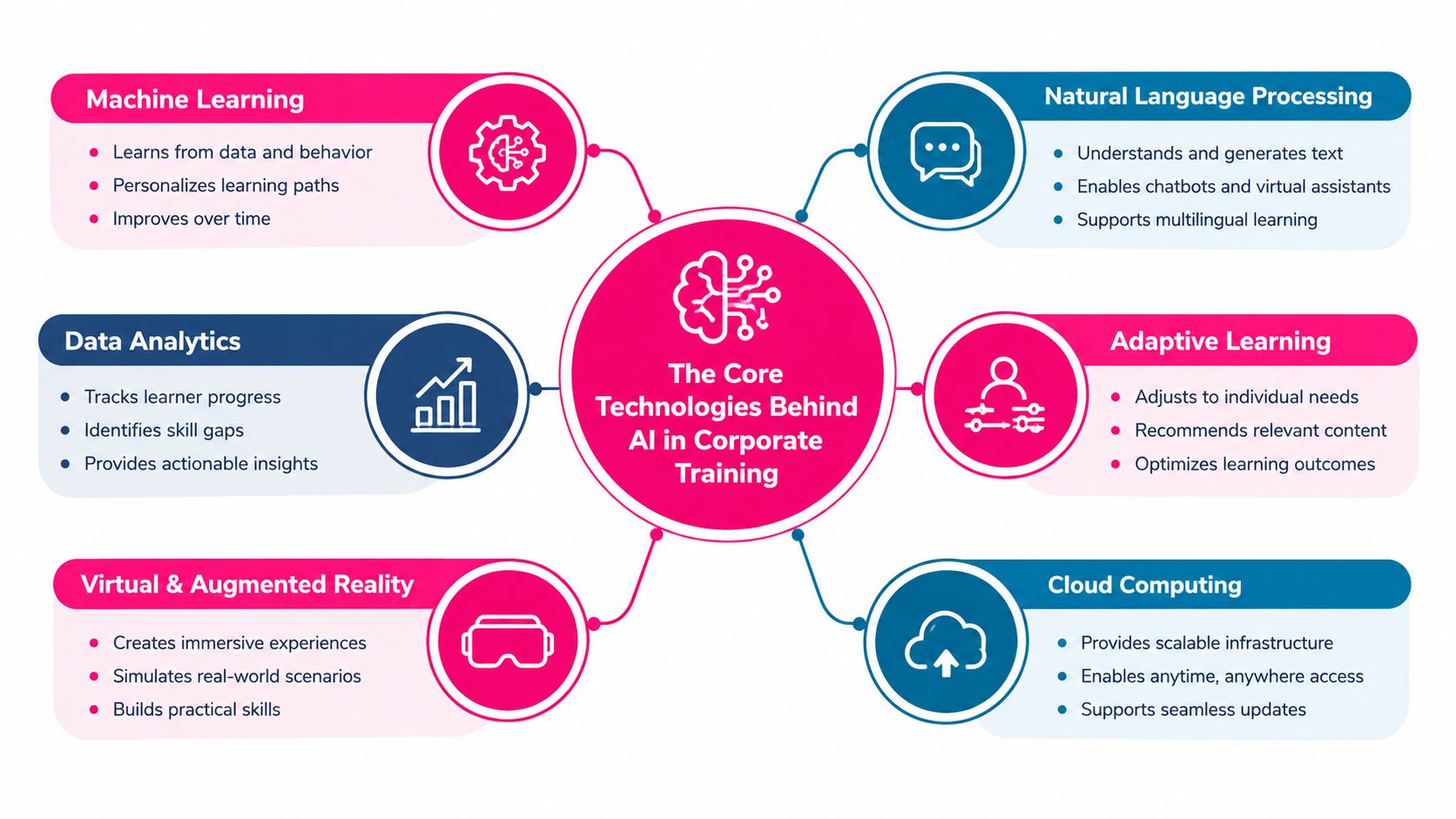
- The Core Technologies Behind AI in Corporate Training
- Measuring ROI and Proving the Value of AI Training
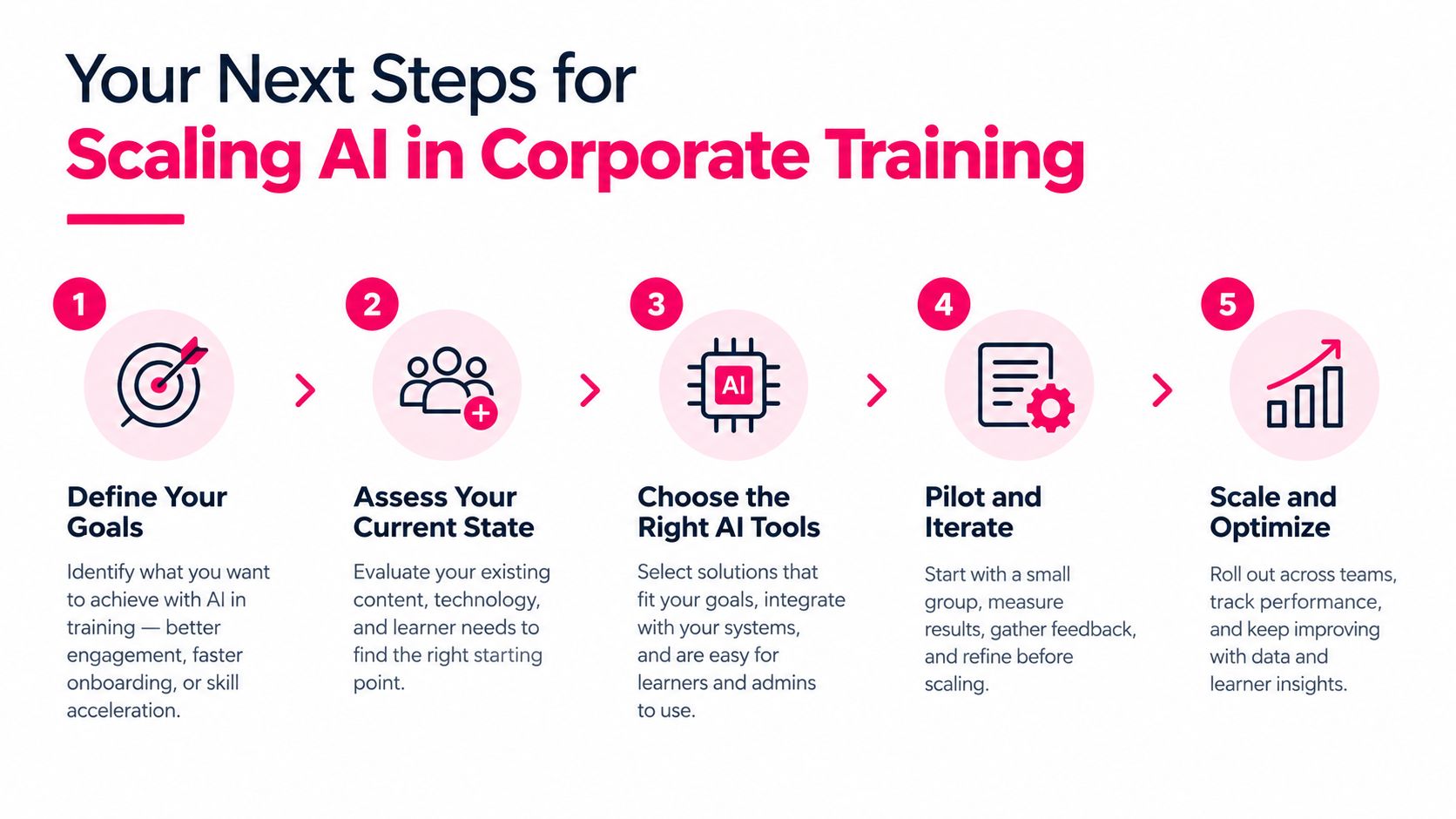
- Your Next Steps for Scaling AI in Corporate Training
Why AI Is Reshaping Corporate Training Right Now
Corporate learning teams are under pressure from several directions at once. Employees need to learn new tools, policies, and procedures quickly. Roles change faster than traditional course catalogs. Business leaders expect onboarding, compliance, and enablement programs to respond to operational needs without a matching increase in instructional design capacity.
AI changes the production model by working across the entire learning workflow. A large language model can help draft a lesson, but that's only one part of the system. Recommendation logic can route a learner to the next activity, natural language processing can search approved policy material, and analytics can identify weak topics that need reinforcement.
The old model assumes that a fixed course can serve a broad audience. A finance analyst, account executive, customer support specialist, and field technician may all need to understand the same company policy, but they won't apply it in the same way. A useful AI workflow adapts examples, assessments, difficulty, and timing to the employee's role and demonstrated performance.
Organizations are already responding. A 2026 global study reported that 62% of firms had provided AI training to their workforce in the past year, while 47% offered training specifically to help employees use AI tools, an increase of 7 percentage points from 2024, as reported in coverage of the corporate AI training study. The same source notes that 74% of leaders and workers used generative AI in learning and development, while 40% said GenAI was already integrated into L&D.
> Practical rule: Treat AI as a workflow layer across content, delivery, and measurement. A content generator alone won't fix a weak learning system.
The implementation priority should be behavior change. Define what employees must do differently, identify the role conditions that shape that behavior, and then use AI to make practice and support more relevant. Otherwise, the organization will produce faster versions of the same broad courses that employees already ignore.
The Core Technologies Behind AI in Corporate Training
L&D teams don't need to become machine-learning engineers, but they do need to understand what each capability contributes.
Large language models act as content co-authors. Given an approved policy, product guide, or expert interview, they can draft outlines, scenario questions, knowledge checks, summaries, and role-specific variants. They still need human review because fluent wording doesn't guarantee accurate interpretation.
Recommendation engines provide the personalization layer. Their logic resembles a streaming service suggesting the next video, except the inputs include role, competency status, assessment performance, previous activity, and business priorities. The system can recommend remediation instead of sending every employee through the same sequence.
Natural language processing supports policy search, document classification, and compliance workflows. It can identify relevant sections in standard operating procedures, connect policy changes to affected courses, and help learners find approved answers without searching across disconnected repositories.
Speech and vision AI support video production, transcription, captions, translation, document interpretation, and accessibility. These capabilities make it easier to turn a recorded SME interview, slide deck, or product demonstration into a structured learning asset.
The capabilities work best as a stack. NLP retrieves the approved source, a language model drafts the lesson, speech tools produce narration and captions, recommendation logic assigns the content, and analytics records what the learner can or can't do. Teams exploring that production layer can review AI-powered content generation for learning workflows, but the technology should follow the operating model, not define it.
What L&D should evaluate before buying
Ask vendors and internal stakeholders practical questions:
- Source control: Can the system identify which approved document informed an answer?
- Role segmentation: Can admins assign content by job, region, proficiency, or workflow?
- Human review: Can SMEs approve, edit, and version generated material?
- Learning records: Can the platform pass completion and assessment data into the existing LMS or learning record store?
- Accessibility: Does generated content include captions, transcripts, and readable visual structure?
If the answers are unclear, the platform may create attractive assets without creating a defensible learning process.
The Three Biggest Benefits for L&D Teams
Personalization, automation, and microlearning video are often marketed as separate benefits. In practice, they form one operating system for modern L&D.
Personalization determines what an employee should learn next. It uses role information, competency data, assessment results, and activity signals to move beyond a fixed curriculum. A new sales representative who struggles with discovery questions shouldn't receive another generic product overview. The system should route that person toward relevant examples, practice, and feedback.
Automation reduces the manual production tax. An SME interview can become a searchable transcript and draft outline. A policy document can become scenario questions for review. A master lesson can produce variants for managers, frontline employees, and customer-facing roles. The instructional designer's job shifts from repetitive formatting toward architecture, quality control, and learner experience.
Microlearning video makes the resulting content easier to use inside the workday. A long procedure can become several short lessons, each focused on one decision or task. Video can show a workflow, model a customer interaction, or explain a policy change with narration, captions, and visual cues.
The three capabilities reinforce one another. Automation creates enough role-specific material to support personalization. Personalization decides which short lesson matters now. Microlearning makes reinforcement practical when employees can't leave their workflow for a long course.
| Benefit | What It Delivers | L&D Pain It Solves | How It Connects | |---|---|---|---| | Personalization | Role- and performance-relevant learning paths | Generic curricula and irrelevant assignments | Selects the next lesson or practice activity | | Automation | Faster drafting, adaptation, and content maintenance | Repetitive production work and slow updates | Creates variants from approved source material | | Microlearning video | Short, focused instruction for real work contexts | Low completion and poor post-course access | Delivers the selected content in a usable format |
That system also supports broader employee engagement strategies for HR leaders, especially when learning feels connected to an employee's actual responsibilities rather than added as an administrative obligation.
The trade-off is governance. Faster production can overwhelm learners with duplicate, inconsistent, or poorly prioritized content. Set a content taxonomy, define ownership, and retire obsolete assets before increasing generation volume.
Where AI in Corporate Training Delivers Real Results
AI delivers the most value when the job is repeatable, content-rich, and sensitive to timing. Four use cases consistently fit that profile, but each needs a different design target.
Onboarding should route people to productive work
The target outcome is not course completion. It's the new hire's ability to perform the first meaningful tasks correctly. AI can use role, location, department, and prior knowledge to present relevant systems, policies, scenarios, and manager guidance.
The common failure is building one onboarding journey for everyone. Give a new customer support representative simulated ticket scenarios, while a sales representative practices discovery and CRM workflows. Add adaptive refreshers when assessments or manager observations show a weak area.
Compliance needs continuous control
Compliance teams should use AI to turn dense policies into scenario-based lessons, searchable explanations, and documented assignments. When a policy changes, the workflow should identify affected learner groups, update the relevant material, and trigger retraining or recertification based on the change.
The verified enterprise use case described by the Association of Corporate Counsel's compliance-training resource shows how generative AI can synthesize privacy and trade-compliance material into bespoke employee courses. Related compliance commentary reports that AI integration can reduce administrative workload by 30–50%, reduce compliance lapses by up to 65%, and strengthen audit outcomes through tracking and documentation. Those figures should be treated as reported use-case outcomes, not a guarantee for every deployment.
Sales enablement should use approved practice data
The desired outcome is better execution in customer conversations. AI can analyze approved call transcripts, identify missed discovery opportunities, and recommend playbook-based practice. It can also create role-specific simulations for different products, markets, or buyer objections.
The danger is allowing the model to coach from uncontrolled material. Ground every recommendation in current, approved playbooks, and require sales leaders to review examples before they become training content.
Customer education belongs near the product
Customer education should connect release notes, workflow changes, and support patterns to just-in-time learning. A user encountering a changed feature should find a short explanation or guided lesson inside the product experience, not a generic course buried in a portal.
The risk is producing content that explains features without helping customers complete a task. Design every asset around a job, such as configuring a workflow, resolving an error, or adopting a newly released capability. Teams also need to preserve distinctly human skills, including judgment, empathy, and collaboration, as illustrated by the discussion of corporate challenge events focused on AI skills.
| Use Case | Target Outcome | AI Capability | Key Risk | |---|---|---|---| | Onboarding | Faster role readiness | Adaptive paths and scenario generation | One-size-fits-all journeys | | Compliance | Documented, current policy behavior | NLP, policy mapping, automated assignment | Unapproved interpretation | | Sales enablement | Better customer conversations | Transcript analysis and grounded coaching | Coaching from stale playbooks | | Customer education | Successful product adoption | Contextual recommendations and microlearning | Feature explanation without task support |
Use shared role tags, competency definitions, and measurement standards across all four. Fragmented pilots create fragmented data and make it harder to understand what works.
A Practical Roadmap to Roll Out AI in Your L&D Stack
Rollout should happen in sequence. Each stage produces an artifact that the next stage needs, so skipping ahead to a vendor demonstration creates avoidable risk.
Stage one starts with strategy
Choose one business problem, not an abstract AI ambition. Define the behavior employees need to demonstrate, the population affected, and the executive sponsor who owns the business outcome. A strong starting point might be onboarding for a role with frequent procedural errors or compliance training with a clear documentation burden.
The stage is complete when the team has a written problem statement, target audience, behavior definition, sponsor, and decision criteria.
Stage two makes the data usable
Audit role definitions, competency models, content ownership, learner records, access controls, and source-document quality. Fix inconsistent job titles and missing metadata before an AI system uses the information to personalize learning.
> Governance checkpoint: If you can't explain who owns a source document, which roles it applies to, and when it expires, don't automate the workflow yet.
Stage three connects the learning stack
Integrate AI with the LMS and surrounding systems instead of assuming the LMS must be replaced. Use existing standards and interfaces such as SCORM, xAPI, SSO, and content APIs where they fit. Preserve learner records, permissions, reporting, and audit trails.
This stage should answer a simple operational question: where will assignments, completions, assessment results, and evidence live after the AI-generated lesson is delivered?
Stage four establishes the content workflow
Create a human-in-the-loop process. SMEs review factual accuracy, L&D reviews instructional quality, legal or compliance owners approve sensitive material, and administrators version and retire content. Define who can publish, who can edit, and what happens when the source policy changes.
For teams producing training video, automated video production workflows can reduce manual assembly, but automation shouldn't remove review gates.
The video below can help teams think through the operational side of implementation.
Set a go or no-go review between every stage. If the role taxonomy is incomplete, stop before personalization. If access controls are weak, stop before connecting sensitive data. Sequencing isn't bureaucracy. It's how L&D prevents a fast demo from becoming a slow governance problem.
Why Most AI Training Programs Fail to Change Behavior
A sales representative receives an AI-generated negotiation lesson built for the entire commercial team. The lesson is accurate, polished, and irrelevant to the representative's next customer call. A service agent receives the same material despite using different systems, policies, and escalation rules. Employees complete the content, then return to the workflow that shaped their habits in the first place.Content generation is rarely the limiting factor. Role segmentation, governance, practice, and reinforcement determine whether AI training changes performance. McKinsey reports that almost all companies are investing in AI, yet only 1% describe themselves as mature, while 46% of leaders identify workforce skill gaps as a major adoption barrier, according to McKinsey's workplace AI research. L&D leaders should treat those findings as an operating-model problem, not a request to produce more courses.
Generic instruction produces limited performance
AI can generate clear explanations, summaries, translations, and recall questions quickly. Those outputs help with orientation. They do not prepare an employee to negotiate under pressure, troubleshoot a customer issue, apply a policy to an unusual case, or make a leadership decision with incomplete information.
BCG's 2025 workplace research found that only 36% of employees said they had received training on the skills required for AI work. The research also identified at least five hours of instruction, in-person sessions, and coaching as important elements of effective training. BCG's research on workplace AI skills supports a practical design rule: match instruction to the decisions and tasks attached to each role.
Start with a performance map. Define what a new hire, account executive, analyst, manager, or compliance specialist must do differently. Then use AI to generate role-specific scenarios, vary the difficulty, provide immediate feedback, and identify recurring errors. The system should support practice inside the employee's workflow, not add another module to the LMS.
Reinforcement determines whether learning survives
A single course rarely changes a routine. Employees need scheduled retrieval, realistic application, feedback from managers, and prompts that appear close to the moment of need. Without those supports, a polished AI lesson becomes an isolated event.
Research summaries cited in the discussion of AI-supported training report eLearning retention at 25% to 60%, compared with 8% to 10% for classroom training, and associate spaced repetition and contextual reinforcement with 40% to 60% higher retention than single-session formats. Those figures appear in the AI versus traditional corporate training analysis, which should inform reinforcement design rather than serve as a justification for producing more content.
Schedule knowledge checks at 30, 60, and 90 days. Use weak-topic results to assign targeted refreshers, then connect those refreshers to actual work. A manager should see the same performance gap that the learning system detects and coach the employee on the relevant behavior.
Governance gaps can erase training gains
Employees also need clear rules for using AI at work. ISACA reported that 59% of organizations permit generative AI use, while only 28% have a formal AI policy, as covered in ISACA research on AI use and training gaps. Training that teaches prompts without defining approved data, review responsibilities, escalation paths, and prohibited use leaves employees to make policy decisions themselves.
The same failure pattern appears in execution programs. Leaders examining why most OKR rollouts fail will recognize the problem: a framework or tool cannot replace clear ownership, repeated practice, manager follow-through, and visible consequences for missed commitments.
AI should sit inside that operating system. Configure it to deliver the right practice for the right role, record evidence of performance, trigger reinforcement, and route high-risk decisions to a human reviewer. That workflow layer changes behavior. A larger content library does not.
Measuring ROI and Proving the Value of AI Training
Course completions are easy to report, but they do not prove business value. Measure whether employees retain the material, perform the target behavior, and need less manager intervention over time.
Set three measurement anchors:
- Retention: Run knowledge checks at 30, 60, and 90 days, then compare weak-topic patterns across cohorts.
- Compliance control: Track compliance lapses, recertification gaps, and audit findings against the training intervention.
- Time to competency: Measure how quickly new hires or newly enabled sellers demonstrate the required behavior.
Retention schedules and adaptive reinforcement work only when the measurement design is disciplined. Establish a baseline, compare an AI-supported cohort with a suitable control or prior cohort, define the attribution window, and record changes in manager support, tools, staffing, and policy. AI-generated content can increase reporting volume without improving performance, so segment results by role and connect learning evidence to workflow outcomes.
| Metric Category | Vanity Metric Avoid | Leading Indicator Use | How to Measure | |---|---|---|---| | Engagement | Video views | Retrieval and assessment performance | Compare checks across follow-up intervals | | Completion | Course completion rate | Demonstrated task proficiency | Use manager observation or workflow evidence | | Compliance | Assignment completion | Lapses and audit gaps | Compare findings before and after intervention | | Onboarding | Days enrolled | Time to role competency | Define observable readiness criteria |
Use this practical guide to measure training effectiveness to set baselines, select evidence, and report results. Give the CFO a defensible model tied to behavior and operational outcomes, not an inflated promise.
Your Next Steps for Scaling AI in Corporate Training
A useful next-week plan doesn't require a procurement cycle. It requires a narrow problem, clean evidence, and a team willing to inspect its current workflow.
Start with four workstreams:
- Audit content readiness: Identify duplicate modules, outdated policies, missing role variants, unclear ownership, and content that lacks an assessment.
- Map data flows: Document how HRIS roles, LMS records, competency data, access permissions, and manager feedback move through the current stack.
- Select one pilot: Choose a high-friction use case such as onboarding or compliance. Define the target behavior before selecting a model or video tool.
- Set three indicators: Choose measures for retention, operational performance, and time to competency. Agree on the baseline and review schedule before launch.
!A five-step infographic guide titled Your Next Steps for Scaling AI in Corporate Training.
If your team needs to turn source materials into structured, bite-sized training videos with narration, captions, visuals, and reusable formats, VideoLearningAI is one option to evaluate alongside your existing LMS and governance process. Start by auditing one workflow, define the role segments and review gates, then visit VideoLearningAI to assess whether its video-generation workflow fits the pilot.