A training program can look healthy in the LMS while failing everywhere that matters. Enrollment is high, completion dashboards are green, and the launch deck is polished. Then a manager says employees still make the same mistakes, search for the same answers, and avoid the new workflow whenever production pressure rises.
That gap usually isn't caused by one bad lesson. It comes from weak handoffs between the training process steps. Needs analysis becomes a formality, subject matter experts disengage, content grows beyond what anyone can use, and evaluation stops at quiz scores. A stronger process treats training as a behavior-change system, with checkpoints that test whether each decision still supports the action people must perform at work.
Table of Contents
- The signals of a stalled initiative - A practical discovery sequence - What discovery should produce - The five production handoffs - Configure the learning journey - Make the pilot deliberately uncomfortable - Three layers of evidence - The three review gates - Use AI as a review assistantWhen a Training Program Quietly Stalls
An L&D lead takes over a half-finished program after its owner leaves. The LMS shows steady completion, several modules are published, and the enrollment list looks healthy. On the floor, new hires still escalate routine issues, supervisors see little change, and employees cannot find the job aid when production pressure rises.
Start with a short triage audit before rebuilding anything. In 30 minutes, pull the last 20 support tickets, tag errors connected to the target behavior, and compare that error pattern with LMS completion for the same cohort. Add a small sample of quality findings or manager observations if available. The result separates a delivery problem from a workflow, access, or manager-support problem.
The signals of a stalled initiative
Three signals often appear together:
- Activity without application: Learners open modules and pass knowledge checks, yet the process does not appear in live work.
- Content without reference value: The course is complete, but employees cannot locate a specific answer quickly enough to use it while working.
- Expertise without ownership: SMEs reviewed early drafts, then stopped responding because approval requests continued without a clear connection to performance.
Scope drift is another warning. The team keeps adding examples, policy notes, and edge cases because nobody has agreed on the few decisions employees must make reliably. The course becomes a record of organizational knowledge instead of a tool for handling real work.
Production volume can hide the problem. A team may publish more modules while leaving the workflow, job aids, permissions, or manager prompts untouched. Add two checkpoints before launch: confirm that any AI-assisted draft matches approved procedures and has a named human reviewer, then test the LMS package, search terms, access rules, and mobile or in-workflow experience with real users.
A complete training workflow can span many weeks before certification and recertification. One implementation guide maps needs analysis, design, development, LMS setup, pilot delivery, revision, rollout, certification, and recertification, with separate time allowances for each phase (employee training program timeline). Early checkpoints protect the remaining recovery budget. Waiting until launch makes weak alignment expensive to correct.
> Practical rule: At every training process step, name the evidence that will confirm the target behavior is supported in the flow of work.
The seven phases are discovery, design selection, content chunking, production, LMS and pilot operations, behavior-centered assessment, and continuous iteration. Treat the sequence as a set of decision gates, not a one-way handoff. Each gate should be allowed to stop, narrow, or redirect the build.
Front-End Discovery That Prevents Wasted Build
Discovery is not a kickoff meeting followed by a request for learning objectives. It is a short investigation into why performance is falling short, who owns the problem, and whether training is the right intervention.
Start by mapping the stakeholders. Include the business sponsor, operations owner, frontline manager, representative learners, compliance or quality partners, the LMS administrator, and the SME who understands the work in detail. Ask the sponsor what business outcome must change, ask managers what behavior they can observe, and ask learners where the process breaks down under normal workload.
A practical discovery sequence
Frame the performance gap. Define the current behavior, the desired behavior, and the cost of the difference. “People need better communication” is not useful. “Service agents need to confirm the customer's problem before proposing a resolution” is testable.
Mine the work itself. Pull support tickets, quality audits, manager one-on-one notes, procedure documents, call recordings, and existing job aids. Look for repeated decisions, frequent rework, risky exceptions, and points where experienced employees rely on judgment that new hires haven't developed.
Interview learners separately from SMEs. SMEs describe the ideal process. Learners reveal the actual process, including workarounds, confusing system labels, missing permissions, and information they can't access when a customer is waiting. Both perspectives are necessary, but they shouldn't be blended into one polite meeting where disagreement disappears.
Validate the task inventory. Group the work into critical tasks, supporting knowledge, and nonessential context. Then ask which tasks carry the greatest error cost and which decisions employees must make without help.
Write a performance hypothesis. State the likely cause in plain language. For example, “New supervisors understand the escalation policy but fail to apply it because they lack practice recognizing the trigger during live conversations.” That hypothesis points toward scenario practice and manager coaching, not another policy presentation.
What discovery should produce
A focused discovery sprint should end with four artifacts:
- A validated performance hypothesis: The team knows whether the gap comes from knowledge, skill, tools, process design, incentives, or manager follow-up.
- A learner profile: The team understands role, prior experience, work environment, access constraints, and moments when the training must be available.
- A curated task inventory: Each proposed lesson connects to a decision, action, or observable standard.
- A go or no-go recommendation: The team can pause the build when training won't solve the underlying problem.
Write objectives only after this work. The guidance in how to write learning objectives is useful at this point because an objective should describe an action learners can demonstrate, not a topic they can recognize.
SHRM's four-step guidance follows the same logic: identify the business need, perform a gap analysis using records, surveys, interviews, and observation, assess training options, and report recommendations (SHRM-informed training guidance). The deliverable isn't a larger content brief. It's enough evidence to decide what must be built, what should be fixed elsewhere, and what success will look like after launch.
Choosing the Right Training Design Approach
The design format should follow the behavior, not the production habit of the L&D team. A department that has always built long courses will often create another long course, even when employees need a searchable answer inside a workflow. A video-first team can make the opposite mistake by turning a complex judgment task into a sequence of attractive clips with no practice.
Use three criteria before selecting the format:
1. Behavior criticality: What happens if the learner gets the decision wrong? 2. Reuse frequency: How often will people need the knowledge or skill? 3. Time to apply: How quickly must the learner use it in live work?
| Dimension | Linear Course | Modular Microlearning | In-Flow Learning | |---|---|---|---| | Core shape | A sequenced experience with a defined start and finish | Short, focused lessons organized around discrete tasks | Guidance, practice, prompts, and coaching placed inside daily work | | Best fit | Compliance-heavy or foundational content that benefits from controlled progression | High-volume process knowledge that employees need to revisit | Behavior-heavy skills where context and feedback matter more than recall | | Build cost relative to reach | Higher upfront production effort, with efficient delivery once approved | Moderate effort per asset, with strong reuse when modules are searchable | More integration and workflow design, often involving managers and systems | | Main strength | Consistency, traceability, and clear completion records | Fast access, manageable cognitive load, and easier updates | Strong connection between learning and performance | | Main risk | Learners finish without transferring the behavior | Fragmentation, weak context, or a collection of disconnected clips | Operational complexity and dependence on manager follow-through | | Evidence to collect | Assessment results, completion, and demonstrated understanding | Retrieval, confidence, practice quality, and repeated use | Observed behavior, workflow artifacts, coaching notes, and business outcomes |
Linear courseware wins when learners must complete a controlled sequence and the material doesn't change often. It works well for a formal policy orientation, provided the course also explains what employees must do differently in real situations.
Microlearning wins when the content can be reduced to one decision or procedure at a time. Research cited by Training Magazine reported an 83% completion rate for a 10-minute microlearning course, compared with 20% to 30% for standard courses, and reported that self-paced microlearning produced 23% more retained information than group sessions of the same length (microlearning completion and retention research). Those findings support short, purposeful lessons, not the indiscriminate slicing of a long lecture into smaller files.
In-flow learning wins when the learner must notice a condition, choose an action, and execute it under pressure. A manager prompt before a difficult conversation, a searchable troubleshooting guide, or a coached scenario can outperform a polished course because the support arrives at the moment of application. The correct pipeline then becomes obvious. The chosen format determines the script, practice design, LMS architecture, analytics, and manager role.
Chunking Content and Producing It Fast
Chunking fails when teams confuse shorter content with smaller learning. A five-minute video can still contain six concepts, multiple decisions, and no clear action. The useful unit is a learning nugget tied to one behavior and one decision point.
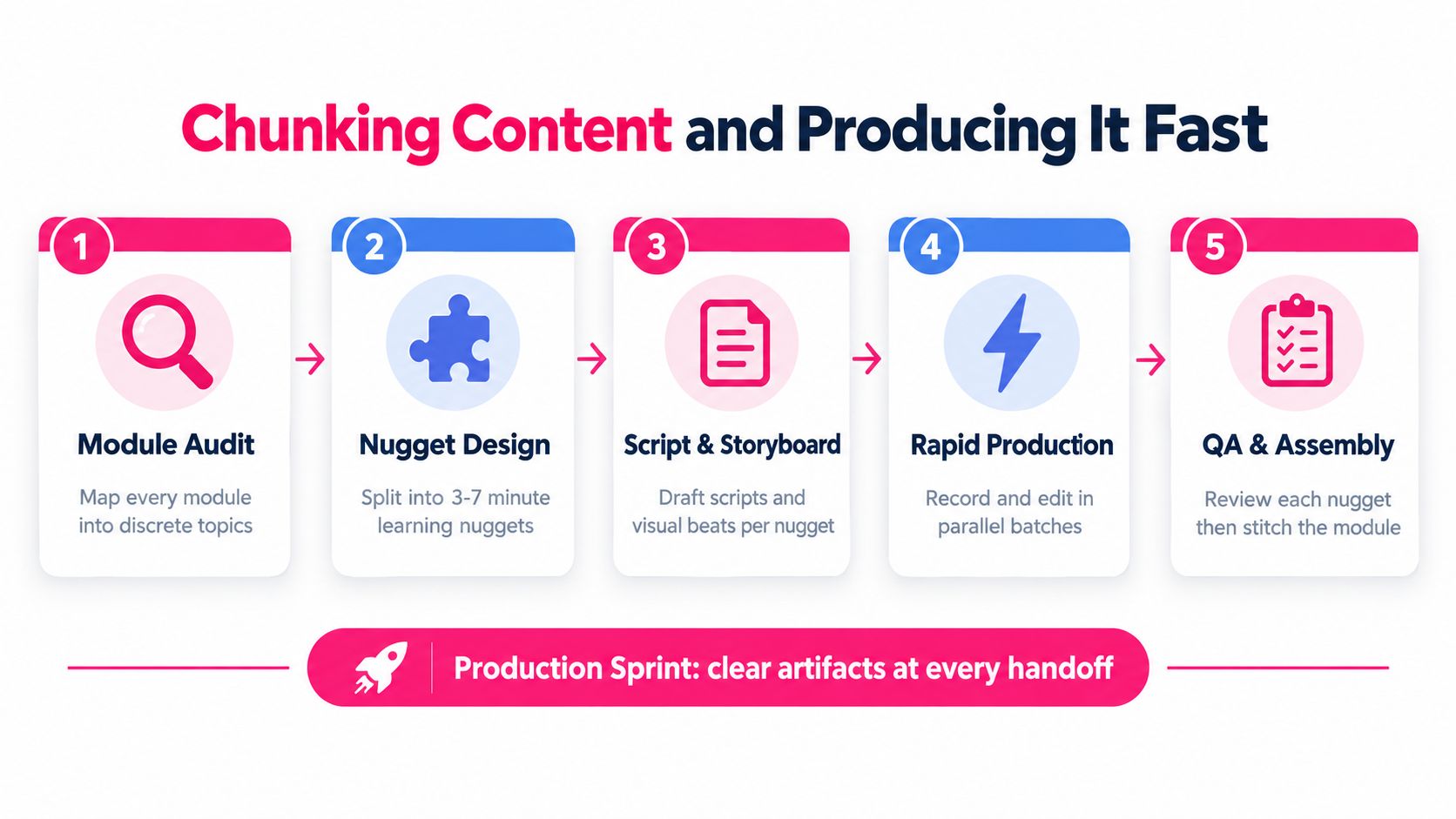
For a production sprint, begin with a module audit. Mark every topic, example, instruction, and assessment prompt on separate cards. Remove information that doesn't support the target behavior, then redesign the remaining material into nuggets that can usually be completed in three to seven minutes. Each nugget needs a clear purpose, a practical example, and a visible knowledge check.
The five production handoffs
Map the nuggets. Use sticky notes or a shared board to show the sequence. If a card contains multiple behaviors, split it. If a card has no observable action, challenge its place in the module.
Draft with the SME. Record one focused working session instead of exchanging long documents. Ask the SME to explain the decision, demonstrate a common mistake, and describe what an experienced employee notices first.
Build the storyboard. Pair each spoken line with a visual beat, screen capture, example, or prompt. A storyboard exposes vague narration before the producer spends time editing it.
Produce in parallel. While one asset is being reviewed, the producer can record or assemble the next. Keep scripts, source files, captions, and approvals in a predictable folder structure so the team doesn't lose time locating the latest version.
Run accessibility and learning QA. Check captions, transcript accuracy, alt text, contrast, keyboard access, playback, and the knowledge check. Accessibility isn't a final decoration. It affects whether the lesson works for the people who need it.
A small team can set a sprint target of six to ten polished microlearning assets plus one scenario branch per week, as long as the scope is controlled and the SME is available. The number matters less than the handoff discipline. A team that produces more assets by skipping scenario design or review has increased its inventory, not its capability.
Use two gates before an asset earns a build slot:
- The one-minute test: A manager can describe the target behavior and the situation that triggers it in one minute.
- The decision test: The learner must answer or perform something that reveals whether the behavior is understood.
AI-assisted production can accelerate script variations, visual planning, transcript cleanup, and first-pass quality checks. It shouldn't decide whether a procedure is correct, whether an example is safe, or whether a scenario reflects the actual job. The SME and operational owner still approve meaning, risk, and relevance.
Publishing to the LMS and Running the Pilot
Publishing and piloting are one operational step. A course isn't ready because the video files play in an authoring tool. It's ready when the right cohort can access the right sequence, the completion data reaches the right place, and the team has a recovery plan when learners encounter friction.
Configure the learning journey
Set up the LMS around how employees will consume the program. Name the cohort clearly, assign start and end dates where appropriate, enforce prerequisites, map certificates to competency records, and verify that completion events reach the HRIS or manager dashboard. If employees need a job aid after the course, place it where they will search for it rather than burying it in a final resources screen.
Before publishing, confirm the technical path:
- Package behavior: Test SCORM or xAPI packages, including bookmarking, completion status, quiz reporting, and resume behavior.
- Device access: Verify mobile playback and the experience employees receive on the devices used in their role.
- Accessibility evidence: Attach the accessibility statement and confirm that captions, transcripts, controls, and alternative text work as intended.
- Reporting: Confirm which event means started, completed, passed, or demonstrated competency.
- Rollback: Document how to withdraw or replace the content if a defect causes confusion or completion problems.
The LMS integration guide can help teams think through the connection between content, learner records, and downstream reporting before launch.
Make the pilot deliberately uncomfortable
Run the pilot with a mixed audience of novice, tenured, and returning employees. A homogeneous pilot often produces false confidence because everyone shares the same assumptions. Include people who have never seen the process and people who have learned an informal workaround.
Use three feedback channels. Collect a short confidence pulse before learning begins, prompt in-app feedback after each nugget, and ask the manager to conduct a check-in around day ten. Also run a dry test with three real learners before the wider pilot. Watch where they hesitate, what they skip, and what they interpret differently from the SME.
The pilot should answer operational questions, not just gather opinions. Can learners find the course? Do prerequisites behave correctly? Does the lesson fit the workday? Can managers see what follow-up is required? Does the scenario resemble the decisions employees make?
Treat pilot feedback as evidence for revision, not as a vote on whether people enjoyed the content. A learner may dislike a demanding scenario because it exposes a real skill gap. That is more valuable than positive feedback on a lesson nobody needs to use.
Rethinking Assessment Beyond Quiz Results
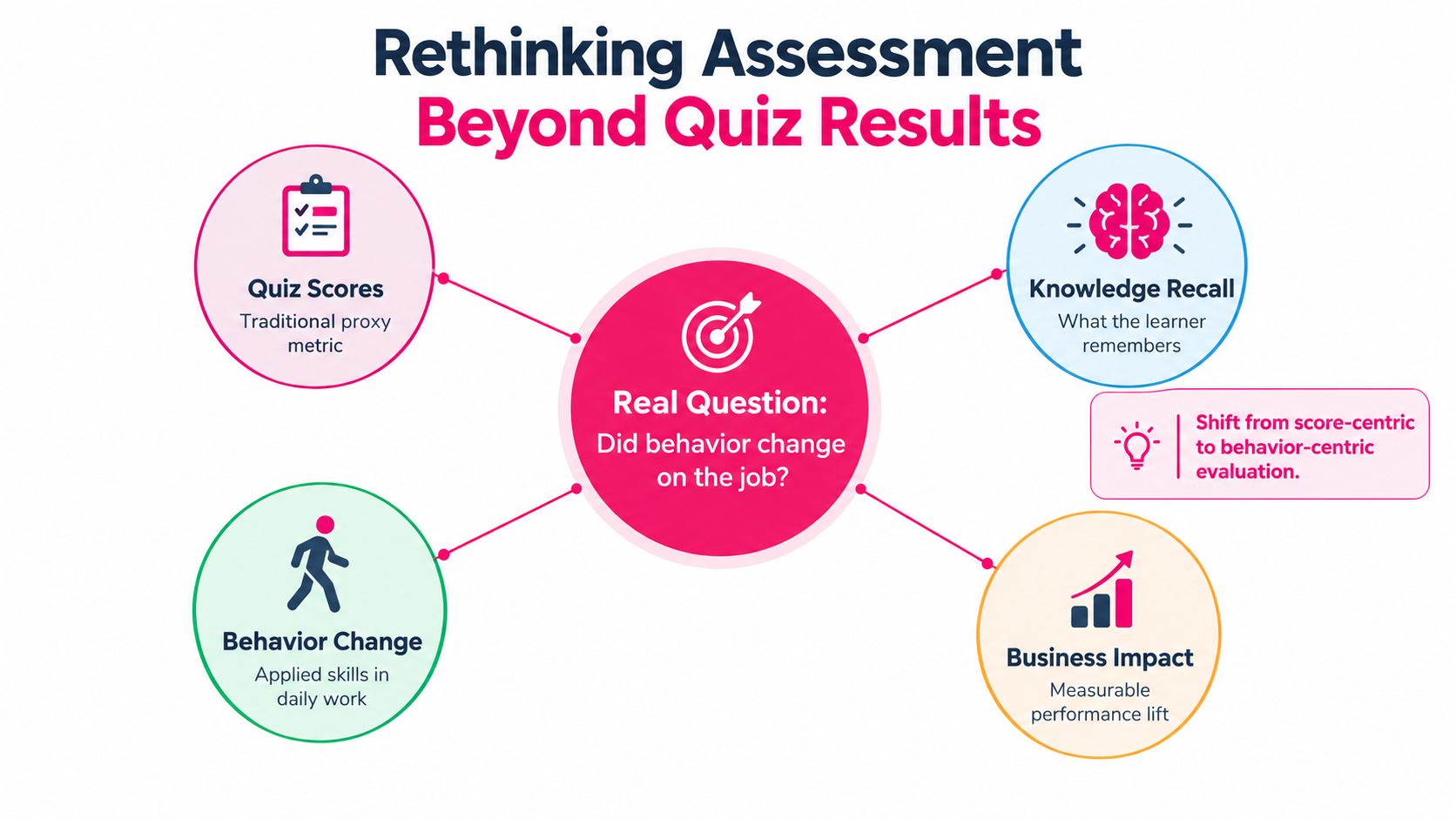
A learner can score well on a quiz and still miss the trigger, choose the wrong action, or abandon the process during a busy shift. Quiz results show controlled recall. They do not show whether the required behavior appears when the work gets difficult.
Assessment should therefore follow three connected layers. The first checks early behavior, the second tests performance through structured practice, and the third connects that performance to the operational need that justified the training.
Three layers of evidence
Layer one is observation in the workflow. Use in-flow nudges, manager prompts, quality reviews, and short follow-up questions while learners are expected to apply the skill. Ask managers to record the behavior they saw, including the missed step or successful choice, rather than rating whether the course was good.
Layer two is structured practice. Give learners a realistic scenario, role-play, recorded response, or workflow artifact. A useful artifact is a 3-minute recorded customer response scored against a 4-point checklist covering trigger recognition, correct sequence, tone, and next step. Manager comments within 48 hours turn the exercise into feedback rather than another completion event. The task should reproduce the job's decision pressure and constraints closely enough to reveal hesitation and incorrect sequencing.
Layer three is business alignment. Return to the original needs analysis and identify the operational measure connected to the performance gap. Review it at 30, 60, and 90 days, alongside manager observations and learner evidence. The aim is to check whether the expected behavior appeared and whether the surrounding conditions supported it, not to claim that training caused every change.
Manager follow-up matters because reinforcement, coaching, and accountability influence whether learning transfers to work (behavior transfer and manager follow-up guidance). The manager is therefore part of the assessment process, not merely the recipient of a completion report.
Replace one post-course quiz with a manager-led coaching conversation. Give the manager three prompts: What behavior should be visible? What did you observe? What will the employee practise next? Teams can explore formative assessment examples and adapt suitable activities to the actual workflow.
> The useful question isn't “Did learners finish?” It is “What did they do differently, and what evidence supports that conclusion?”
Keep quizzes for recall checks, misconception screening, and compliance records. Use them as one evidence point, not as proof that behavior has transferred to the job.
Iteration Rhythm That Keeps Training Alive
A training program needs an operating rhythm after launch. Without one, content becomes stale, managers stop reinforcing it, and the LMS preserves an inaccurate version of the work long after the process has changed.
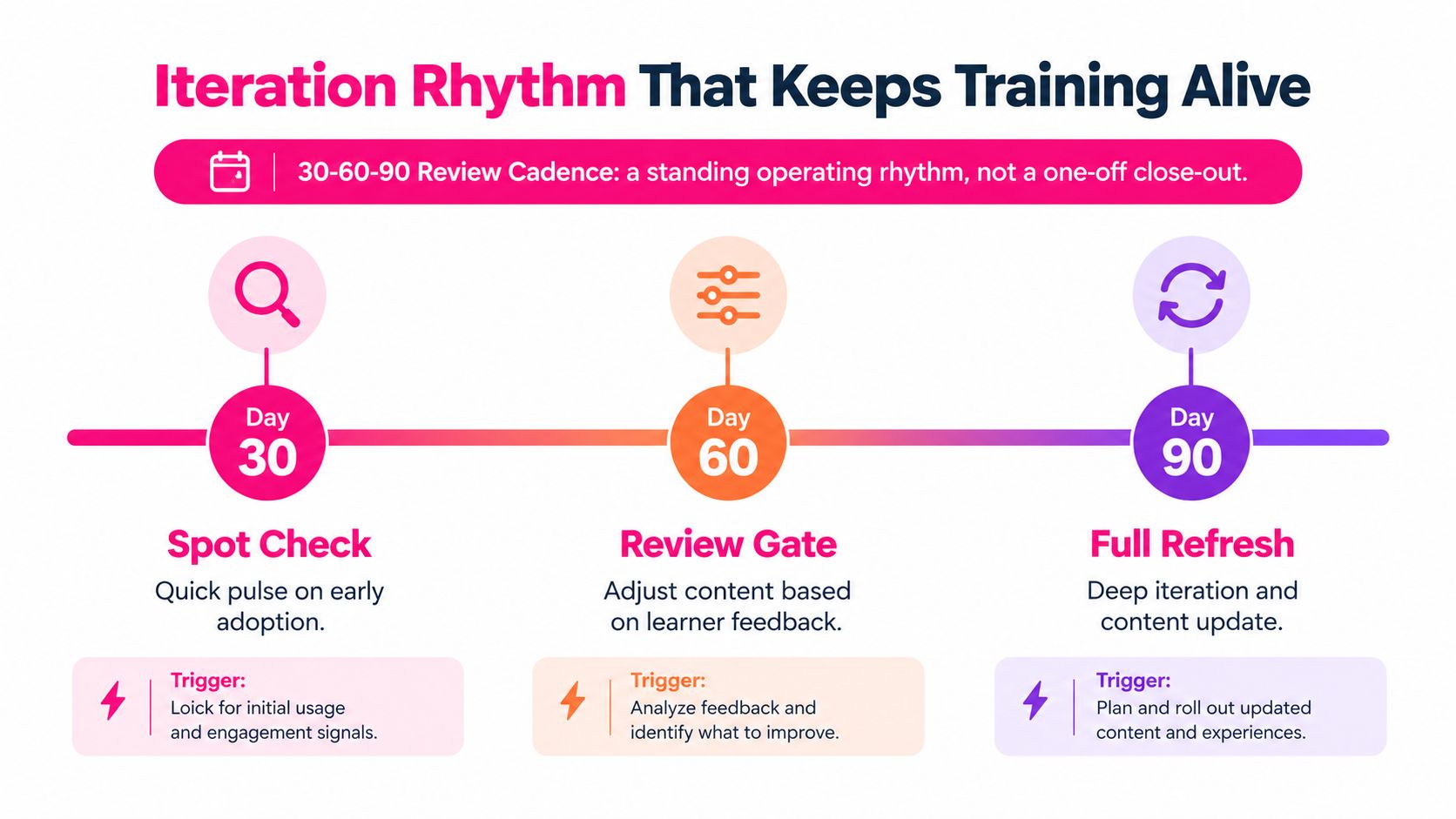
The 30-60-90 cadence creates three decision gates with named owners. It also prevents the common mistake of waiting for an annual review to discover that the program stopped matching the job.
The three review gates
Day 30 belongs to the L&D lead. Run a spot check on completion, early behavior signals, learner friction, and manager participation. Produce a short retrospective that separates content problems from access, workflow, and reinforcement problems.
Day 60 belongs to the SME reviewer and manager sponsor. Pull the relevant business measure, review examples of learner work, and inspect the scenario bank for gaps. The output should be a targeted content or practice update, not a general request to “refresh the course.”
Day 90 belongs to the operations partner. Decide whether the content should remain active, receive a deeper revision, move into a different format, or trigger recertification. Create the update ticket, assign an owner, and record the reason for the decision.
Recertification should follow risk and change, not a calendar ritual. A stable, low-risk reference may need light review, while a procedure affected by regulation, product changes, or customer risk may need a faster review and a stronger demonstration of competence.
Use AI as a review assistant
AI can compare a script with an approved procedure, flag inconsistent terminology, identify repeated explanations, suggest alternative scenarios, and summarize learner feedback. Those checks are valuable because they reduce mechanical review work and make the backlog easier to sort.
Human reviewers must still approve the source of truth, the safety of examples, the fairness of scenarios, and the operational consequences of a recommendation. AI can surface a discrepancy. It can't own the decision to change a policy or certify that a learner is competent.
Organizations moving toward continuous learning in 2026 are placing more emphasis on learning in the flow of work, modular content, and ongoing practice. That shift only works when the operating model assigns ownership for maintenance. A content library without review gates is an archive, not a learning system.
Use continuous improvement methods to formalize the backlog, but keep the backlog connected to observed work. Each ticket should identify the behavior, evidence, owner, priority, and next review date.
Training is a product with a backlog, not a deliverable with a sign-off. Build the first version to learn from it, measure application rather than activity alone, and give managers a clear role in keeping the behavior alive.
---
VideoLearningAI helps L&D teams turn existing materials into structured, bite-sized training videos, with workflows for scripting, visual production, LMS publishing, and iteration. Use VideoLearningAI to build focused lessons faster, then connect them to the behavior checks and review cadence that make training useful on the job.