A polished corporate video can still fail if the script asks the audience to admire the message instead of doing something with it. The strongest corporate video script example starts with one audience, one behavior or decision, and one observable outcome. Format comes later. A brand film, onboarding lesson, product launch, and policy update may all use video, but they need different script architectures.
The eight blueprints below are adaptable rather than finished copy. Each one is annotated for audience, objective, narrative structure, visual treatment, delivery format, adaptation notes, and next-step action. That approach keeps the script useful to marketing, sales, L&D, HR, compliance, and customer education teams. A clear audio-visual script also helps production teams align narration, shots, graphics, and approvals before filming, as explained in this scriptwriting guide from Storyloft.
VideoLearningAI is one relevant option for turning existing training or communication materials into consistent bite-sized video variations. The tool matters less than the workflow: define the behavior first, then choose the format that makes that behavior easiest to understand and perform.
Table of Contents
- Adaptation notes - Where it can fail - Production blueprint - Microlearning adaptation - Delivery decisions - Adaptation notes - Production blueprint - Adaptation notes1. Brand Story Script
A brand story should answer a question that a product page often can't: why does this organization exist? It isn't a company history presented in chronological order. It's a focused narrative that connects an origin, a meaningful challenge, a point of view, and evidence of the values in practice.
Audience: Prospective customers, employees, investors, or partners. Objective: Create recognition and emotional alignment. Structure: Origin, tension, belief, action, invitation. Format: Founder interview, employee-led film, documentary voiceover, or a hybrid.
Open with a concise mission statement, then show the problem that made the mission necessary. A founder can explain the original frustration, while employees or customers demonstrate how the organization behaves today. Apple's “Think Different” campaign, TOMS Shoes' social-impact origin story, Slack's culture-focused videos, and Patagonia's environmental storytelling illustrate different ways to build identity around a belief rather than a feature list.
The script should include specific challenges and concrete examples, but don't force numbers into the story merely to make it sound credible. Authentic voices usually work better than generic narration, especially when the speaker can describe what changed in their own words. Visual metaphors can help, but they should clarify the values rather than decorate the film.
Adaptation notes
Create separate versions for employees, customers, and investors. The central belief can stay consistent, while the examples and final action change. For employees, end with a behavior that reflects the values. For customers, connect the belief to a problem the company helps solve.
Avoid turning the film into a polished list of corporate adjectives. The script works when viewers can identify what the company chose to do, not just what it claims to value.
2. Explainer Script
An explainer script earns attention by resolving a problem the audience already recognizes. It should make a complex product, workflow, or concept easier to understand without flattening important distinctions.
Audience: Prospects, new users, customers, or internal teams learning a system. Objective: Help viewers understand a process and take the next step. Structure: Familiar problem, three key ideas, worked example, action. Format: Screen recording, animation, product demonstration, or narrated slides.
Start with a daily frustration. A Grammarly browser extension explainer might begin with uncertainty about tone, while a Stripe API walkthrough might begin with the work required to connect a payment flow. Asana onboarding tutorials, HubSpot feature walkthroughs, and DocuSign process videos can all use the same underlying principle: show the user's situation before introducing the interface.
Use simple language and let the visuals carry information that doesn't need to be spoken. A screen recording should highlight the exact button, field, or sequence being discussed. An animation should represent a relationship or process, not merely place colorful shapes behind narration. Define necessary technical terms, and test the draft with a non-expert before production.
For a practical production workflow, use this guide on how to make explainer videos to align the script with the visual sequence.
Where it can fail
The common failure is feature accumulation. The script tries to explain every capability, so the viewer finishes with awareness but no clear task to perform. Limit the primary lesson to the most important steps, then link to deeper documentation or a follow-up lesson.
Add a post-video quiz, guided practice, or short task. A viewer who can repeat the next action has learned more than a viewer who only recognized the product interface.
3. Testimonial and Customer Success Script
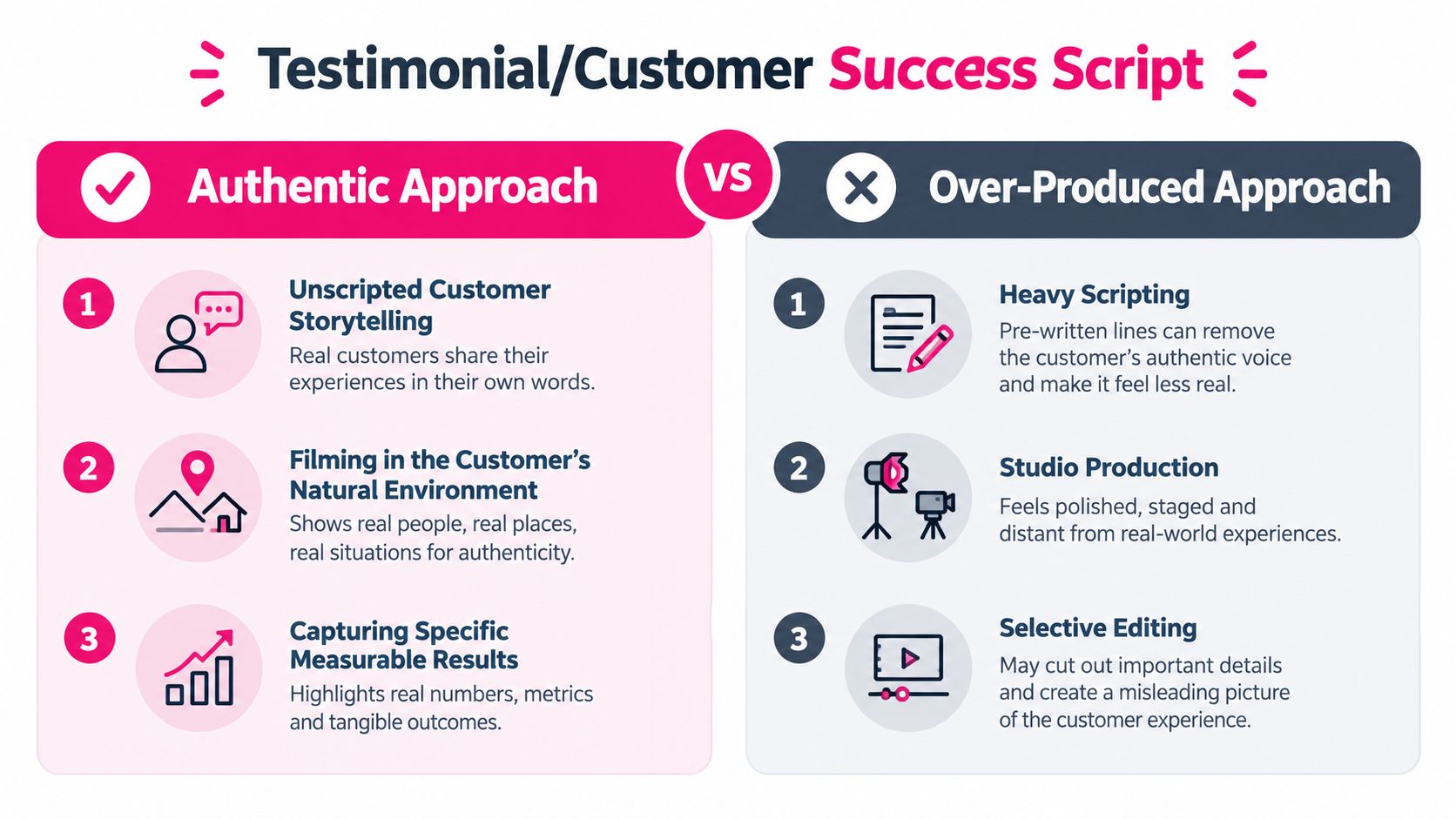
A testimonial works when the customer remains the main character. The company provides context and a solution, but the customer should describe the original situation, the decision, the implementation, and the practical result in language that sounds like them.
Audience: Prospects evaluating a purchase. Objective: Reduce perceived risk and provide credible evidence. Structure: Before, decision, experience, after, recommendation. Format: Customer interview supported by product footage and workplace B-roll.
Choose a customer with a specific problem and a clear account of what changed. A Salesforce customer story, a HubSpot interview, a LinkedIn Learning creator testimonial, a Coursera learner story, or a Notion user story can all become stronger when the viewer sees the person in a real environment rather than in an anonymous studio.
Ask open questions instead of handing the customer a paragraph to memorize. Useful prompts include: What was difficult before? What alternatives did you consider? What did implementation look like? Which part of the workflow changed first? What would you tell a team facing the same problem?
Production blueprint
Use a lower third with the customer's name, role, and organization when the customer has approved that identification. Capture B-roll of the person using the product, teaching a class, reviewing a workflow, or collaborating with colleagues. Those shots give the editor options without interrupting the interview.
Request usage rights before recording, and confirm which outcomes may be named publicly. If the customer has approved measurable results, show them on screen alongside the relevant moment in the interview. If not, use a precise qualitative description rather than inventing a metric.
> Practical rule: Don't script the customer's personality. Script the questions, the proof points to verify, and the story order.
A compilation can combine several short customer perspectives, but it shouldn't become a sequence of generic compliments. Each speaker needs a distinct role in the argument, such as problem definition, implementation experience, or user outcome.
4. Training and Instructional Script
A training script should be designed around a learning objective, not a topic. “Understand data security” is too broad to guide a useful scene. “Choose the correct action when a customer requests access to restricted information” gives the writer a behavior to demonstrate, practice, and assess.
Audience: New hires, employees completing compliance training, managers, or customers learning a product. Objective: Change a job-related decision or action. Structure: Objective, realistic scenario, decision point, explanation, practice, next action. Format: Instructor-led lesson, screen demonstration, scenario video, or microlearning episode.
A strong instructional sequence introduces one operational objective, presents a realistic situation, asks the learner to decide, explains the correct action, and checks recall. The script should distinguish must-know information from useful context, then connect the lesson to a job aid, checklist, or later assessment.
Corporate video learning has a practical attention problem. A 2019 enterprise survey of more than 1,200 employees reported that 91% had received at least some training through video, 90% had watched a video to learn a specific skill, and 69% preferred video for learning a task over a written guide or manual. The same research found that more than 66% sometimes skimmed training videos, watched without sound, or listened while multitasking, while over 6% said they never paid attention to work-related training videos. Those findings support short sections, strong openings, on-screen text, captions, and repeated action points.
Microlearning adaptation
For a single-task episode, use the training video script template as a starting point. A practical sequence runs from a problem statement at 0:00–0:20, to a worked example at 0:20–2:00, a branching scenario at 2:00–4:00, and a recap with a knowledge check at 4:00–5:00, as outlined in the available benchmark guidance for microlearning programs.
Keep each scene responsible for one idea, one visual cue, or one decision. The lesson isn't successful because it is short. It works when the learner rehearses the target behavior and receives a clear next step.
The following video illustrates the kind of instructional presentation that can be adapted into a more scenario-led script.
5. CEO and Leadership Message Script
A leadership video has one job before it has many details: make the priority understandable. Employees should know what is changing, why leadership made the decision, and what they should do next.
Audience: Employees, managers, customers, or external stakeholders. Objective: Establish direction and prompt aligned action. Structure: Why, what, impact, support, next conversation. Format: Direct-to-camera address, supported by a few graphics or cutaways.
The CEO's voice needs to sound like the CEO, not like a communications department. Satya Nadella's transformation messages, Sundar Pichai's strategic announcements, and Marc Benioff's stakeholder-focused statements show why leadership communication depends on a recognizable point of view. A remote-first policy announcement also needs a human explanation of the business rationale before it presents procedures.
Start with the reason for the message. Then state one primary point, explain how it affects people, address the most likely concern, and identify the next forum for questions. A town hall, manager briefing, Q&A channel, or listening session can carry the discussion that the video can't resolve.
Delivery decisions
Keep notes minimal enough for natural eye contact. Use a teleprompter if necessary, but write for speech, with short sentences and pauses. Support the speaker with only the graphics that improve comprehension, such as a timeline, a definition, or a small number of implementation steps.
Executives often want to include every detail. That instinct weakens the message. Put operational specifics in an accompanying FAQ, manager guide, or policy document, then use the video to explain the decision and the human implications. This guide to preparing a speech executives respect reinforces the importance of audience, purpose, and delivery rather than corporate phrasing.
Distribute the approved version consistently across the channels employees use. If managers receive information before their teams, give them a briefing pack and talking points so they can answer predictable questions without creating conflicting interpretations.
6. Product Launch Script
A product launch video should begin with the customer's problem, not a dramatic reveal of the product. Excitement matters, but the audience also needs to understand what changed, who benefits, and what action is available now.
Audience: Prospects, existing customers, sales teams, partners, or the press. Objective: Create understanding and move the right audience toward adoption. Structure: Problem, new possibility, demonstration, differentiation, next step. Format: Product demonstration, founder presentation, motion graphics, or short social cutdown.
A launch for a new Figma feature, Slack update, Notion template, or Loom iteration could open with the work users currently find slow or confusing. Show the old approach briefly, demonstrate the new workflow, and explain the benefit in terms the user recognizes. Feature labels should support the explanation, not replace it.
Use separate scripts for separate channels. A short version can establish the problem, show one benefit, and direct viewers to a demo or trial. A longer version can include setup, configuration, edge cases, and sales enablement details. Don't force every audience into the same edit.
Adaptation notes
Include pricing or commercial terms early when they are central to the buying decision and have been approved for publication. Address “why now?” and relevant competitive questions without making unsupported claims about competitors. If beta users or early customers appear, clarify their role and obtain the necessary permissions.
The final scene should contain one clear next action, such as starting a trial, requesting a demo, reading the release notes, or contacting an account team. Synchronize publication with the press release, product documentation, sales assets, and support readiness. A launch video creates confusion when the promise is live before the product or help content is ready.
!A hand-drawn sketch of a new product announcement featuring a pedestal, a rocket, and a megaphone.
The best launch script is less theatrical than it is useful. It gives viewers enough context to decide whether the change applies to them.
7. Recruitment and Employer Brand Script
Recruitment videos often fail by presenting an idealized workplace that candidates can't evaluate. A credible employer brand script shows how people work, learn, collaborate, and handle trade-offs in the actual organization.
Audience: Prospective applicants and passive candidates. Objective: Help suitable candidates recognize a credible fit. Structure: Employee perspective, work in practice, growth evidence, honest expectations, invitation. Format: Multi-voice interviews, workplace observation, role-specific cutdowns, or a day-in-the-life format.
Feature employees from different roles and levels of seniority. A software engineer, team lead, customer support specialist, and new manager will describe the employee experience differently. Google's “Life at Google” series, GitLab's remote-first culture content, Salesforce employee stories, Patagonia's values-led recruitment content, and Buffer's transparent culture materials demonstrate why people and working practices matter more than slogans.
Show the workplace as it is. If employees work remotely, explain how collaboration happens. If the role includes on-call work, travel, targets, or a steep learning curve, don't hide those conditions behind upbeat music. Candidates need useful information, not just reassurance.
Production blueprint
Ask employees to describe a real project, a difficult moment, a source of support, and a skill they've developed. Pair each answer with footage of actual work rather than staged gestures. Include career development examples such as mentorship, certifications, or changes in responsibility only when they can be described accurately.
Create role-specific edits for the careers page, LinkedIn, and job boards. The central values can remain stable, while the script changes the examples and call to action. Review the video regularly as hiring needs, policies, and team structures change.
The final action might invite candidates to read a role description, meet the team, submit an application, or ask a question. A recruitment video should help people self-select. Attracting every viewer isn't the goal. Helping the right candidates understand the opportunity is.
8. Internal Communications and Change Management Script
A change-management video must answer the questions employees ask privately: Why is this happening? What will change for me? When does it happen? Where can I get help? A polished announcement that ignores those questions creates more work for managers.
Audience: Employees, managers, affected departments, or external stakeholders during an organizational transition. Objective: Explain the change and support adoption. Structure: Rationale, impact, timeline, support, feedback route. Format: Leader announcement, animated process guide, manager-led follow-up, or a series of short updates.
Use the “why” before the policy or procedure. A new system implementation, benefits update, restructuring, merger integration, safety requirement, or remote-work policy needs a clear explanation of the business context and the practical consequence. Acknowledge uncertainty without minimizing it. Employees can handle difficult information more effectively when leaders state what is known, what remains undecided, and when further information will arrive.
Adaptation notes
Put deadlines, implementation dates, ownership, and support resources on screen. Follow the video with an FAQ, quick-reference guide, webinar, survey, or manager discussion. Different employees may need different formats, so the video shouldn't carry every definition and exception by itself.
Create a short version for busy employees and a fuller version for affected teams. The internal communication video resource can help teams think through message structure and distribution. Publish through the channels people already use, such as email, intranet, LMS, or a town hall recording.
Managers should receive their own briefing before general distribution when they must answer team-specific questions. After launch, monitor recurring questions and update the supporting materials. Change communication is a living system, not a single upload.
8 Corporate Video Script Types Compared
| Script Type | 🔄 Implementation Complexity | ⚡ Resource Requirements | 📊 Expected Outcomes | 💡 Ideal Use Cases | ⭐ Key Advantages | |---|---:|---:|---|---|---| | Brand Story Script | High, deep narrative development and production | Medium–High, creative team, interviews, quality video | Emotional engagement, stronger brand loyalty | Employer branding, investor relations, awareness campaigns | Builds purpose-driven differentiation and internal alignment | | Explainer Script | Low–Medium, clear stepwise scripting and SME review | Low, script, screen recordings or simple animation | Improved comprehension and reduced support queries | Onboarding, product feature walkthroughs, microlearning | Efficient knowledge transfer; easy to scale and measure | | Testimonial / Customer Success Script | Medium, sourcing participants and verification | Low–Medium, on-site shoots, editing, legal releases | High conversion uplift and trust via social proof | Sales enablement, decision-stage marketing, case studies | Strong credibility and relatable validation from real users | | Training / Instructional Script | High, instructional design, learning objectives, assessments | Medium–High, SMEs, designers, LMS integration | Measurable learning outcomes and behavior change | Compliance, structured onboarding, skill development programs | Optimized retention and scalable enterprise training | | CEO / Leadership Message Script | Low–Medium, concise strategy-focused scripting & approvals | Low, executive time, minimal production | High organizational alignment and credibility | Major announcements, strategy updates, company-wide communications | Highest authority impact; clarifies priorities quickly | | Product Launch Script | Medium, coordinate product details, positioning, demos | Medium–High, product visuals, B-roll, higher production value | Awareness, excitement, and adoption at launch | New product/feature announcements, media and sales enablement | Drives buzz and consistent market positioning | | Recruitment / Employer Brand Script | Medium, authentic employee story curation | Medium, employee shoots, editing, role-specific variants | Improved talent attraction and cultural fit | Careers pages, campus recruiting, social hiring campaigns | Differentiates employer brand; reduces hiring friction | | Internal Communications / Change Mgmt Script | Medium, stakeholder coordination and timing | Low–Medium, comms team, leadership input | Reduced uncertainty and consistent message cascade | Policy changes, restructures, tool rollouts | Ensures clarity, supports manager-led follow-up and adoption |
Turn One Script Into a Reusable Video System
The best corporate video script example isn't a paragraph that another team copies word for word. It's a repeatable framework that can survive a new audience, a changed policy, a revised product, or a different distribution channel. Build the framework so your team can update the parts that change without rewriting every scene from the beginning.
Start with the audience and desired action. Name the person who will watch, the situation they face, and the behavior or decision you want after viewing. A new hire may need to complete a process, a customer may need to configure a feature, and a prospect may need to request a demo. Those outcomes require different openings, examples, and calls to action.
Then match the architecture to the job:
- Brand story: Use origin, belief, evidence, and invitation when the audience needs context and affinity.
- Explainer: Use problem, steps, demonstration, and action when the audience needs clarity.
- Testimonial: Use before, decision, experience, and outcome when the audience needs confidence.
- Training: Use objective, scenario, decision, feedback, and practice when the audience needs behavior change.
- Leadership message: Use rationale, priority, impact, and conversation when the audience needs direction.
- Product launch: Use problem, demonstration, differentiation, and next step when the audience needs adoption context.
- Recruitment story: Use employee voice, working reality, growth, and invitation when candidates need fit.
- Change communication: Use why, impact, timing, support, and feedback when employees need help navigating uncertainty.
Separate must-know from nice-to-know before writing narration. Every extra detail competes with the action the viewer must remember. Put supporting explanations in an FAQ, job aid, product document, manager guide, or follow-up lesson rather than forcing one video to answer every possible question.
Write visuals and accessibility cues into the script. Specify what appears on screen, when a caption is needed, how a diagram supports the narration, and which information must remain understandable without sound. A two-column audio-visual format can keep the spoken line and visual action aligned, while a simpler single-column format may suit a direct-to-camera announcement. The choice should reflect production complexity, not habit.
Secure subject matter expert review for technical content and legal or compliance review where the risk requires it. Reviewers should confirm accuracy, required language, examples, and effective dates. They shouldn't add every preference to the spoken script. Assign one person to resolve conflicting feedback and lock the version before production.
Create short and long versions for the channels that matter. A microlearning episode can isolate one job task, while a longer lesson can provide context, examples, and assessment. A product launch may need a short social cutdown and a fuller sales version. A change announcement may need a concise employee update alongside a manager briefing.
Measure more than completion. For training, compare pre- and post-assessment results, delayed retention, observed workplace behavior, and business indicators such as error rates, productivity, support tickets, or time-to-competency. Training video measurement guidance also recommends examining play-rate loss, segment drop-offs, rewatch patterns, and control-group comparisons where appropriate. The point is to connect the script to an outcome rather than treating views as proof of learning.
VideoLearningAI can support this reusable approach by turning existing materials into structured scripts and bite-sized videos for onboarding, compliance, sales enablement, and customer education. Teams can adapt approved content into consistent variations, then review the narration, captions, visuals, and follow-up action before publishing to their learning workflow. The tool doesn't replace audience decisions or subject matter expertise. It can reduce the production friction involved in maintaining a library of useful video lessons.
Choose the script before you choose the format. When each scene gives the audience something to notice, decide, practice, or do next, the video becomes more than a polished communication asset. It becomes a maintainable part of the way your organization teaches, sells, supports, and changes.
---
VideoLearningAI helps teams turn existing training and communication materials into structured, bite-sized videos for onboarding, compliance, sales enablement, and customer education. Use VideoLearningAI to develop adaptable script variations, refine them with your subject matter experts, and create a more consistent video workflow for the audiences you serve.