You've got a slide deck, a willing subject expert, and a deadline to prepare your next group of trainers. Recording the presentation looks like the quickest route. But the test comes later, when someone has to explain the procedure, handle a difficult question, and coach a learner without the expert beside them.
A train the trainer video should prepare someone to teach a behavior, not just describe it. Treat the recording as part of a transfer system: a demonstration, a chance to practice, feedback, and a workplace check. Production decisions become easier when you judge them by what the trainer can do afterward.
Table of Contents
- Fix the design, not the instructional judgment - Give the viewer something to do - Approve the storyboard before recording - Choose the question for the job - Match the package to the reporting need - Score the teaching, not the confidenceThe Seven-Stage Workflow at a Glance
How long should you allow? Set the schedule around review availability, not camera time. For a hypothetical three-minute pilot, you might reserve a few weeks for production and approval, then run a separate measurement window. That's a planning allowance, not a universal turnaround benchmark.
Start by booking the subject expert and the experienced trainer who will approve the work. An available editor can't compensate for an unresolved policy question.
Use this planning sheet to assign owners and handoffs. The timing column gives proposed working allowances for that pilot, not measured industry averages.
Production stages, outputs and completion checks
| Stage | Main output | Typical time | Done when | |---|---|---|---| | Define the behavior | One objective and one audience | Before the production kickoff | Objective names a visible trainer action | | Choose a template | Locked structure and branding | Before scripting begins | Template is fixed before scripting starts | | Script the segment | Storyboard with seven moves | Proposed allowance of 2–3 days | Every move has an on-screen action and a spoken line | | Record or generate | Raw takes or generated video | Proposed allowance of 1–2 days | Pilot segment runs under four minutes | | Review with experts | Signed-off script and video | Proposed allowance of 2–3 days | A subject expert and a trainer both approve | | Export and publish | MP4 or SCORM package live in the LMS | Proposed allowance of 1 day | Test launch passes on a learner account | | Measure and iterate | Three outcome scores | Proposed initial window of 2 weeks | Next revision is planned from the results |
Our implementation checklist recommends one clear learning objective per lesson before production. For example, prepare a supervisor to facilitate a new-hire feedback exercise, rather than asking the segment to cover all of onboarding.
Each output supplies the next stage. Without an approved objective, the writer can't decide what to cut. Without a signed-off storyboard, the producer risks recording material that reviewers will replace.
> Production rule: A missing approval is a stopped handoff, not an editing problem.
For tracking those handoffs, freispace's guidance on post-production workflow KPIs is a useful companion to the learning measures. Fill in the planning sheet before opening an editing tool.
Build a Reusable Segment Template
Lock the template before writing the series. Reviewers should spend their attention on instructional accuracy, not debate a different caption treatment in every lesson.
Build a master file around these reusable fields:
- Title and objective cards: Name the observable behavior and the audience. Use an action such as facilitating a first-week check-in, not a topic such as communication.
- Model frame: Reserve space for the demonstration and commentary. A split screen works when the viewer needs to inspect an example while hearing why the trainer chose it.
- Check card: Label the prompt as recognition, decision, or scenario recall so writers know what kind of response they're requesting.
- Worked-example panel: Show the task and make room for annotations that expose the reasoning.
- Practice and feedback cards: Include an explicit pause instruction, an answer space, the expert response, and the criterion used to judge it.
- Closing action card: Leave space for the workplace task, follow-up prompt, and manager observation checklist.
Fix the design, not the instructional judgment
Standardize fonts, colors, caption placement, transcript layout, and navigation. Keep the structure flexible enough to show a screen recording for software instruction or a conversation for facilitation training.
Don't force everything into talking-head footage. If the trainer must notice a learner's incomplete answer, show that answer. If they must demonstrate a workflow, show the interface. The example should carry the teaching; branding should stay out of its way.
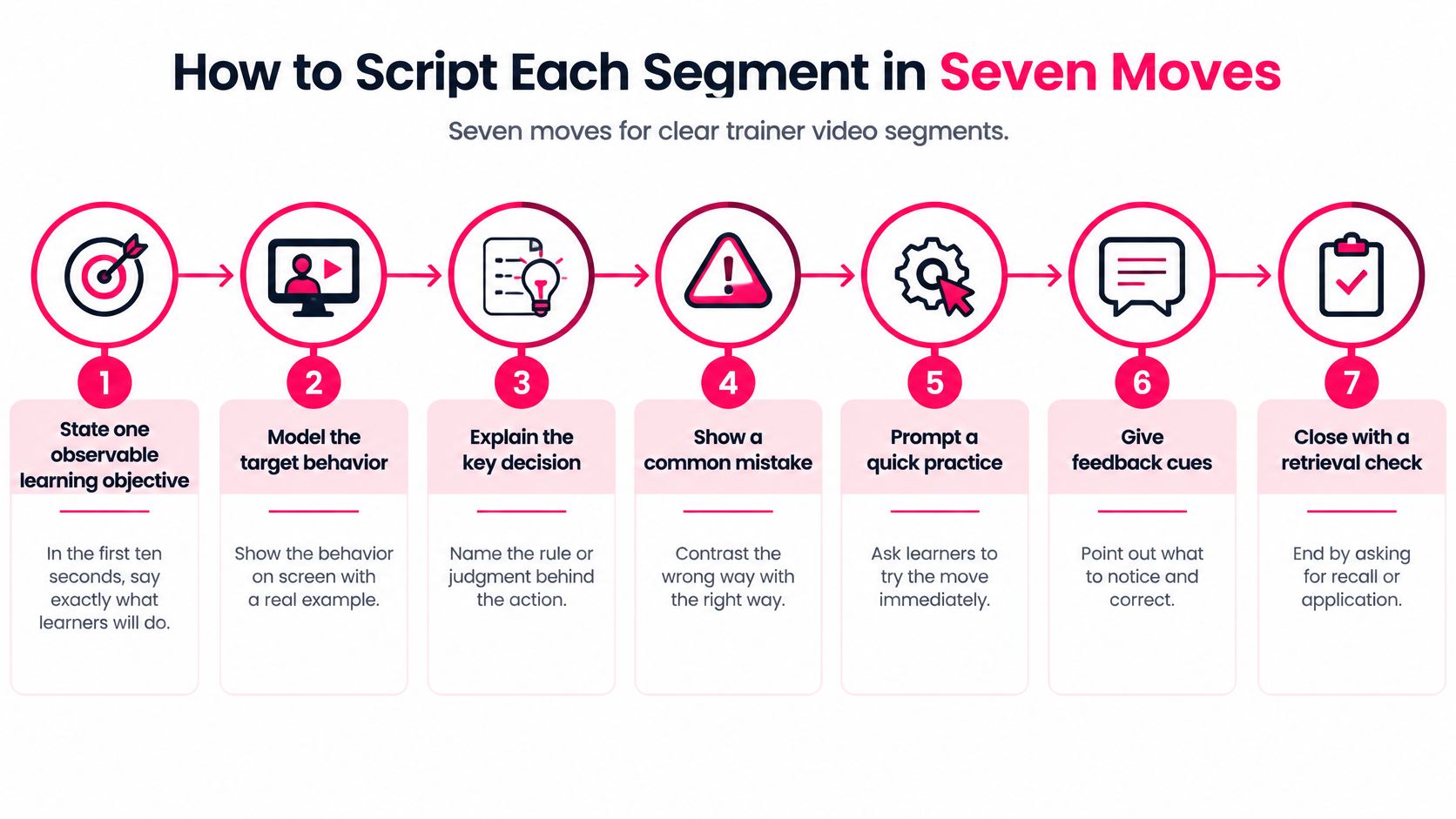
How to Script Each Segment in Seven Moves
Write the script around learner actions rather than slide transitions. A systematic review of 18 train-the-trainer studies associated interactive, multifaceted approaches and supporting materials more consistently with improved outcomes than single-method delivery, while noting substantial variation and moderate risk of bias.
That supports a practice-centered design, not a guarantee that a particular script formula will work everywhere.
Give the viewer something to do
1. State an observable objective. Tell the viewer what they'll demonstrate, such as asking open questions before correcting a learner. Avoid verbs like understand, which don't specify a visible performance.
2. Model the target behavior. Show a facilitator responding to an incomplete answer, including the learner's reply. The common slip is explaining a rule without showing anyone use it.
3. Pause for retrieval or a decision. Stop before the expert response and ask what the facilitator should do next. Don't let the narration reveal the answer while the viewer is still considering it.
4. Provide a worked example. Explain why the chosen response fits, then contrast it with a plausible mistake. Replaying the demonstration doesn't expose the judgment behind it.
5. Require practice. Ask the viewer to draft a response or run a role-play before continuing. Give them an output to produce, not an invitation to think about the topic.
6. Give structured feedback. Reveal an acceptable response and name the criterion it meets, such as checking the learner's reasoning before correcting them. Avoid praise that doesn't tell the viewer what to retain or change.
7. Schedule delayed performance. Tell the viewer what they'll be asked to demonstrate after returning to work. Don't end with a knowledge question and assume that proves they can facilitate.
Approve the storyboard before recording
Use a two-column storyboard: on-screen action beside spoken line. Put pauses, response fields, and feedback reveals in the action column so they don't disappear during editing.
Our implementation checklist recommends standardizing script and visual structure to help reviewers approve faster. Ask reviewers to flag both factual errors and moments where the viewer has no opportunity to act.
For presentation and distribution ideas, Carlos Alba Media's guidance on editing and promoting social video tutorials provides an adjacent production perspective. Keep the distinction clear: attracting attention isn't the same as preparing someone to teach.
Build Retrieval Checks Into Every Segment
Place a check at a meaningful decision point, not wherever the timeline happens to look empty. Keep each segment focused on a behavior so the viewer can retrieve the relevant rule without sorting through unrelated material.
For a hypothetical short pilot, try a check after the first demonstration and another before the closing practice. Adjust placement when testing reveals that viewers lack enough information to answer.
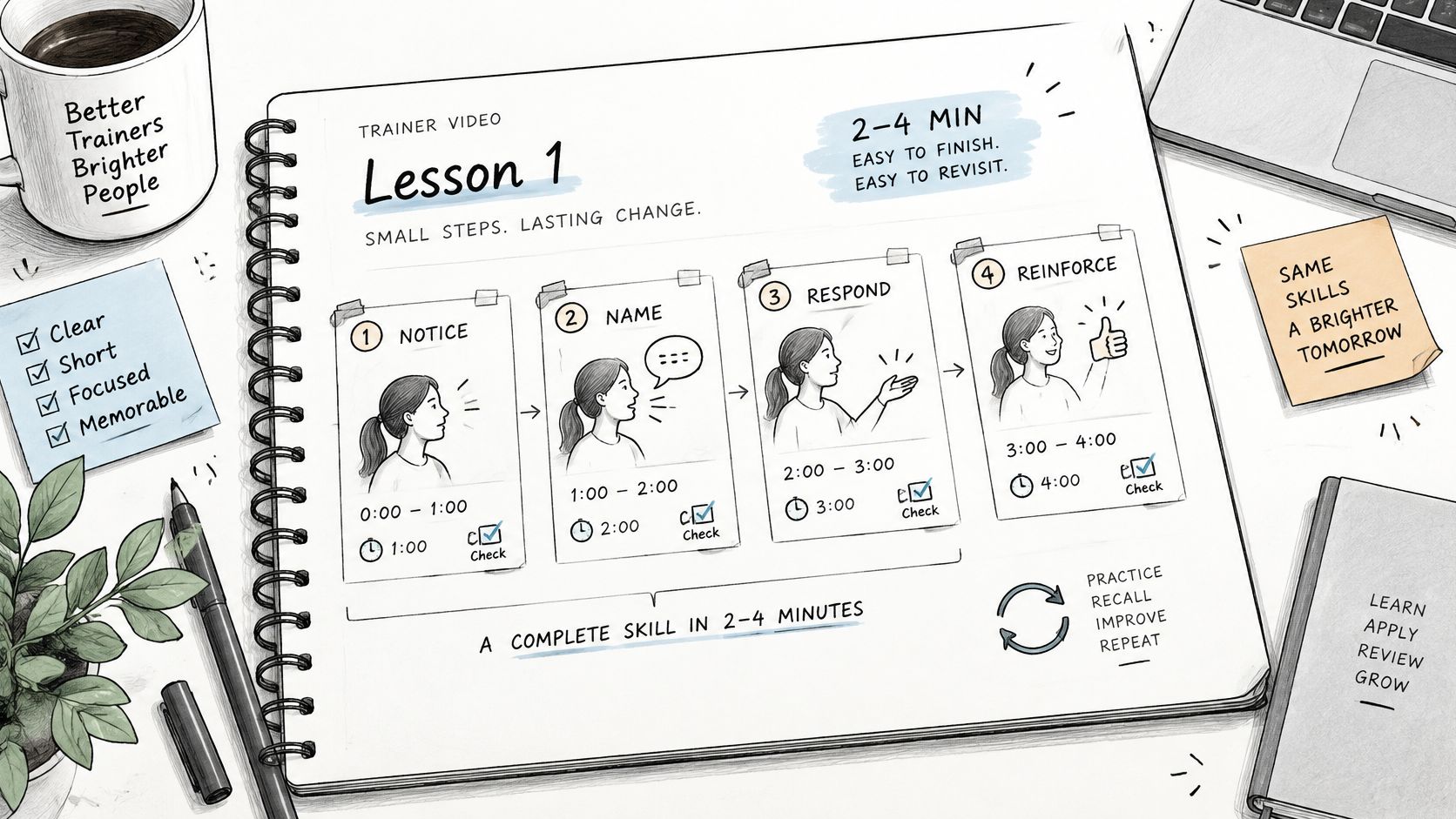
!A hand-drawn illustration showing the four steps of a short, effective trainer video lesson process.
A 2018 workplace study of 99 employees tested recognition memory 20–35 hours after viewing and found that embedded-question participants remembered 26% more content than ordinary viewers, while structured discussion participants remembered 25% more; unguided discussion produced no significant improvement. The finding supports guided responses over uninterrupted viewing, but it measures retained content, not facilitation competence.
Choose the question for the job
- Recognition: Ask which phrase matches the policy when precise wording matters.
- Decision: Ask what the trainer should say next when learners need to exercise judgment.
- Scenario recall: Ask what the manager noticed when relevant details determine the response.
Say a compliance segment models how to handle a data request. Teach the decision rule, show the request, and ask the viewer to choose a compliant response. Then explain why an attractive alternative fails.
> Ask for an answer before showing the answer. Otherwise, you're demonstrating agreement, not retrieval.
Keep the explanation focused on the decisive distinction. Our guide to checks for understanding can help you design prompts that reveal misconceptions rather than reward guessing.
How to Produce, Review and Publish to Your LMS
1. Create the draft. Record the approved demonstration with a camera and screen capture, or generate a draft from the source material. Use sanitized examples rather than exposing employee or customer information.
2. Apply the template. Check the demonstration, annotations, question cards, and captions together. A caption can obscure the exact interface control the viewer needs to see.
3. Validate every claim. Have the subject expert compare statements with current policy and the experienced trainer check whether the modeled behavior is teachable. Our AI-generated videos may be inaccurate and aren't a source of truth; users are responsible for reviewing, editing, and validating them before use.
4. Add accessible alternatives. Provide corrected captions and a transcript. Include meaningful visual information in the narration or an accessible text alternative, rather than assuming captions alone make the demonstration accessible.
5. Select the delivery format. We support MP4 and SCORM exports. Choose based on the records you need, not just the file that's easiest to upload.
6. Test as a learner. Launch from a learner account, answer incorrectly, retry, and finish. Confirm that the LMS reports the intended completion status and question results.
Match the package to the reporting need
Say a sales team publishes objection-handling practice as SCORM to capture the objection-question score. It also places an MP4 in its wiki for quick reference. Those versions serve different purposes, so don't compare their viewing figures as if they measured the same outcome.
Publishing formats and what they track
| Format | Best for | LMS records completion | Question scores | |---|---|---|---| | MP4 file | Embedded refreshers and wiki pages | No, not from the file alone | No | | MP4 wrapped in a quiz | Short knowledge refreshers | Yes, if the wrapper is tracked | Yes, if the quiz is in the LMS | | SCORM package | Mandatory training with records | Yes, when configured | Yes, when configured to report them | | Hosted link | Quick reference, optional viewing | No, not from the link alone | No |
A SCORM export doesn't prove that every interaction is reported. Check the authoring settings and inspect an actual LMS report using our learning management system integration guidance.
For the production handoff itself, use the video production insights from Advisor Momentum to inform your review checklist. Skip decorative editing until audio, factual approval, accessibility, and reporting work.
Measure Learning Beyond Completion Rates
Completion is an administrative record, not proof of competence. Separate what the trainer remembers, what they can demonstrate, and what they apply at work.
Use the following as a proposed pilot measurement plan. The warning thresholds are review triggers you set locally, not validated universal benchmarks.
Three outcome measures and their warning signs
| Outcome | How to collect it | When | Warning sign | |---|---|---|---| | Immediate knowledge | Question-level LMS results | End of segment | Quiz passes without the behavior being shown | | Observed facilitation | Scored microteaching recording against four criteria | After the practice task | Two raters differ by more than one rubric point | | Delayed transfer | Scenario check or manager observation | Proposed check one week after practice | Correct answers right after, weaker later | | Viewing and completion | LMS completion report | Ongoing | High completion treated as proof of skill |
A systematic review and meta-analysis of trainer-learning interventions found a statistically significant knowledge improvement, with standardized mean difference 0.58, but very high heterogeneity and no included study measuring trainers' ability to deliver the program. That doesn't justify a universal training success rate.
Score the teaching, not the confidence
Build the microteaching rubric around accuracy, sequencing, questioning, and feedback quality. Write observable descriptions for each rating, such as whether the trainer probes the learner's reasoning before supplying an answer.
Have raters score the same sample independently, then discuss disagreements. If they interpret the criteria differently, fix the rubric before judging the trainer.
> Measurement safeguard: Don't rewrite a lesson to fix a scoring problem.
Our implementation checklist recommends publishing, measuring completion, and iterating every two weeks. At each review, identify the weakest demonstrated behavior and inspect the corresponding model, prompt, and feedback before changing the entire series.
Use training effectiveness measures to organize the evidence. A low workplace score might require a clearer example, but it might also reveal that the trainer never had permission or an opportunity to practice.
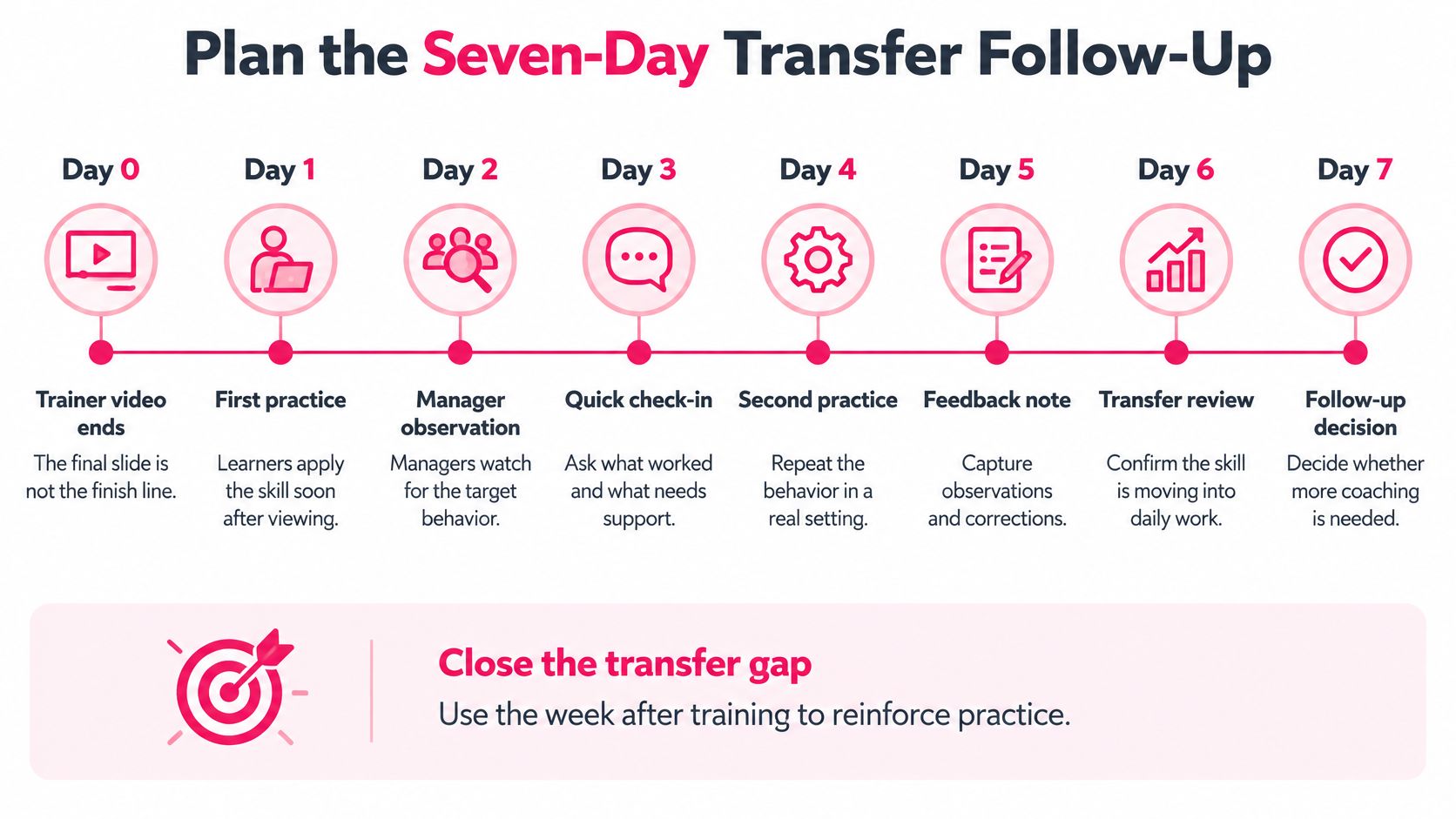
Plan the Seven-Day Transfer Follow-Up
Don't assume managers will supply informal reinforcement. In LinkedIn's 2025 Workplace Learning Report, only 15% of employees surveyed said their manager helped them build a career plan during the previous six months. That finding concerns career planning, not video follow-up, but it's a reason to assign support explicitly rather than presume it will happen.
End the video with an unfinished teaching task. Ask the trainee to adapt the demonstrated activity to an upcoming session, then submit the prompt they intend to use.
Seven-day transfer timeline
| Day | Touchpoint | Owner | Evidence | |---|---|---|---| | Day 0 | Video ends on an unfinished task | Trainee | Task started in the session | | Day 0 | Same-day practice task tied to a real session or ticket | Trainee | Task log entry | | Day 7 | Prompt by message with a short scenario | Trainer | Reply or completed scenario | | Day 7 | Three-item manager observation checklist | Manager | Checklist returned | | Day 14 | Data review and rewrite decision | Named reviewer | Decision recorded |
This is a proposed operating schedule, not a claim about the optimal interval for every skill. If the trainee won't facilitate a real session during that window, schedule a rehearsal instead.
Keep the manager checklist observable: did the trainer model the behavior, invite learner practice, and give criterion-based feedback? Send the follow-up scenario by message so another login doesn't become the task. Name the reviewer before launch, and provide an experienced facilitator as backup when the manager can't observe.
Publish a Pilot Segment This Month
Choose a frequent teaching behavior that someone can observe, such as facilitating a first-week check-in exercise or delivering a policy update with learner practice. Don't begin with the most politically sensitive topic or the largest slide deck.
Give the pilot a narrow acceptance checklist:
- Storyboard approved: A subject expert and an experienced trainer agree on the demonstration, task, and feedback.
- Package tested: A learner account can launch, respond, complete, and produce the intended report.
- Follow-up assigned: The trainee, observer, and reviewer know what they owe and when.
- Rewrite trigger recorded: Specify what evidence will prompt a change, such as repeated omission of the modeled questioning technique.
Before release, check every storyboard move and template field. An empty practice card is a more serious defect than an awkward transition.
VideoLearningAI states that teams can launch a first version in days when they reuse templates, keep one objective per lesson, and review engagement data weekly. Treat that as a reason to keep the pilot manageable, not to bypass sign-off. Publish when the segment is accurate, usable, and assessable, then improve it from observed performance.
---
VideoLearningAI offers training video generation, reusable templates, and MP4 or SCORM publishing to help you turn approved material into a train the trainer video. Visit VideoLearningAI to try the free trial with a pilot storyboard, then validate the finished segment and its follow-up before launch.