SCORM is supposed to be the legacy option, the standard everyone claims to have moved past. Then the launch data lands. In 2025, SCORM courses accounted for 92% of all course launches on SCORM Cloud, counting SCORM 1.2 and SCORM 2004 editions together, according to Rustici Software's analysis of its own platform data. Whatever is meant to be replacing SCORM hasn't replaced it yet.
Which leaves the export-time question that stalls more publishing projects than any other. The SCORM 1.2 vs SCORM 2004 question rarely turns on features, even though most comparisons answer it with a feature list and the line that 2004 is newer. That framing sends teams the wrong way, because the version number is the easy half of the decision.
What determines whether a learner receives module three or a locked screen is whether the LMS on the other end implements the sequencing the package declares. The same package can behave differently on two systems, and the fix never lives in the content.
So the working order is this. Choose the version the course's behaviour requires, then prove the LMS delivers it before anything ships.
Table of Contents
- The one rule that decides the version - The three-behaviour test - Where sequencing support actually breaks - A three-module test you can run this week - Better data model, not better telemetry - A worked example - Define completion before you package anything- LMS Support Checks Before You Commit
- How to Migrate a Course from SCORM 1.2 to 2004
- Pick the Right SCORM Version for Your Training Situation
SCORM 1.2 vs SCORM 2004 at a Glance
Seven rows carry every difference that changes a build. Read them before any vendor page, because most vendor pages stop around row four and never mention the ones that decide the project.
Core differences between SCORM 1.2 and SCORM 2004
| Feature | SCORM 1.2 | SCORM 2004 | | --- | --- | --- | | First release | October 1, 2001 | First edition January 2004; final fourth edition 2009 | | Runtime API | Eight core calls, including LMSInitialize and LMSCommit | Renamed calls such as Initialize and Commit | | Suspend data limit | 4,096 characters | 64,000 characters (third edition onward) | | Sequencing and navigation | Not defined; left to the LMS | Dedicated specification with prerequisites, branching and roll-up rules | | Navigation requests | Handled by the LMS | continue, previous, exit and abandon, processed against the activity tree | | Backward compatibility | Accepted by most LMSs, including 2004-capable ones | Requires an LMS that implements SCORM 2004 | | Best fit | Linear lessons and broad LMS reach | Conditional, multi-module learning paths |
Two figures in that table need their provenance stated. SCORM 1.2's release date and its eight-call runtime API come from ADL's own version history, and the jump from 4,096 to 64,000 suspend characters in the third edition, roughly 15.6 times the room, comes from Rustici Software's comparison of the two standards.
The history explains why 1.2 refuses to die. ADL released it on October 1, 2001, after the 1.0 and 1.1 specifications, and it became the first broadly adopted SCORM version because packaging, metadata and runtime communication were simple enough to implement. Its eight core JavaScript calls, LMSInitialize, LMSGetValue, LMSSetValue, LMSCommit and LMSFinish among them, let a learning object swap completion, score, suspend and interaction data with an LMS. What it never had was a formal sequencing-and-navigation model, which is why a 1.2 course works as a broad-compatibility baseline rather than as a controller of its own path.
The one rule that decides the version
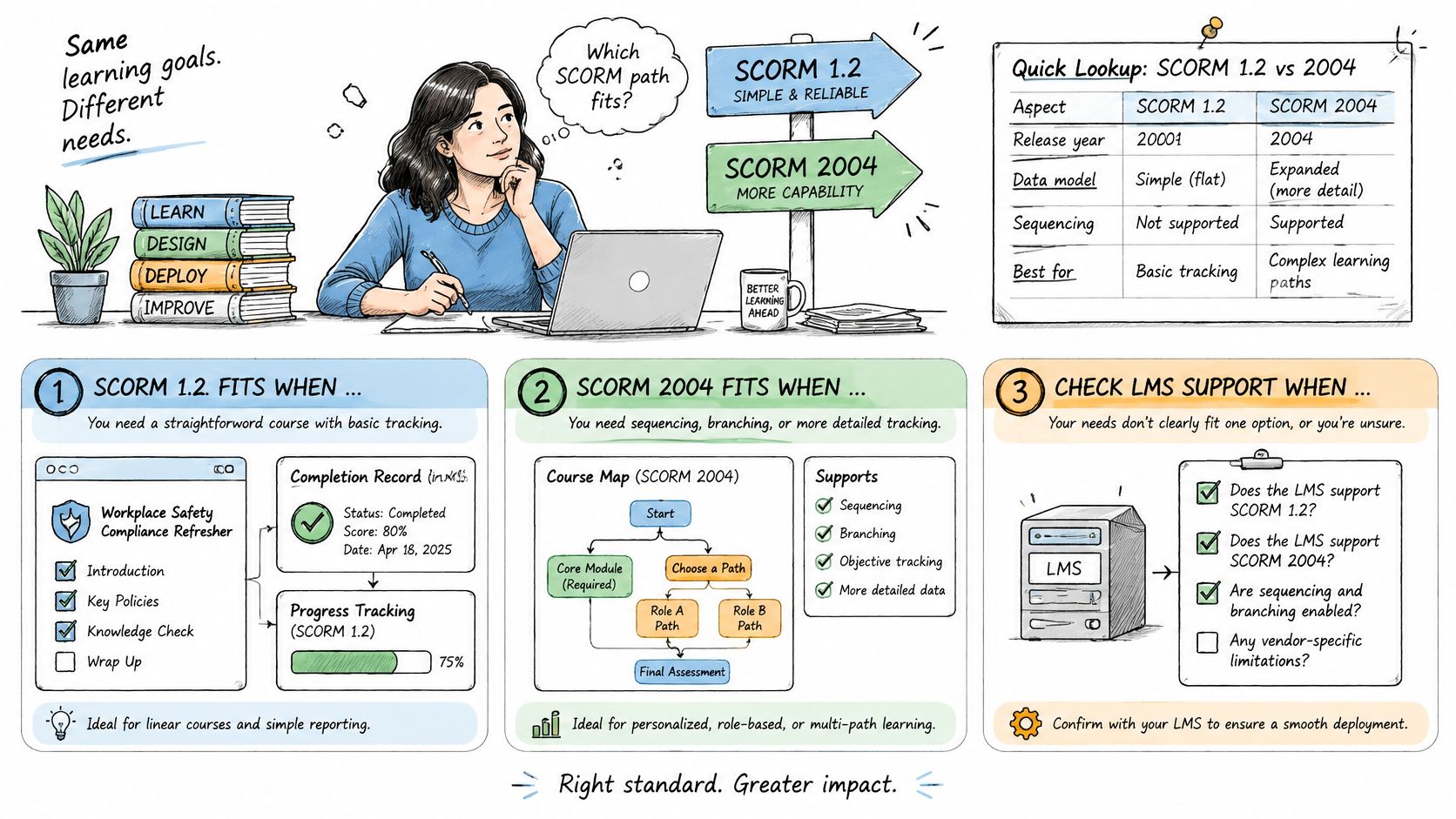
A linear lesson can run on either version, and nothing about the learner's experience will differ. A course whose order depends on learner results needs SCORM 2004 plus an LMS that implements it.
That sentence resolves most arguments. The version isn't a quality tier; it's the mechanism for gating, branching and roll-up. If the course doesn't gate anything, 2004 adds packaging complexity and buys nothing.
> Field rule: if you can describe the course as "watch these five videos, then answer five questions", publish SCORM 1.2 and spend the saved effort on the video.
Splitting a course into many granular SCOs only pays off when the player around them stays obvious. Simple interface design for online learning is the constraint sequencing projects forget, because learners meet the navigation controls long before they meet the rules behind them.
The three-behaviour test
Before opening any authoring tool, write down the three behaviours that matter most for this course. "Records completion" and "records a passing score" are behaviours. So are "locks module 3 until module 2 is passed" and "sends a failed learner to remediation". Mark each one as either expressible inside the package or dependent on the LMS. Anything in the second column is a question for whoever administers the LMS, not a reason to pick a version.
If the acronyms blur at this point, our SCORM glossary covers the terms in plain language.
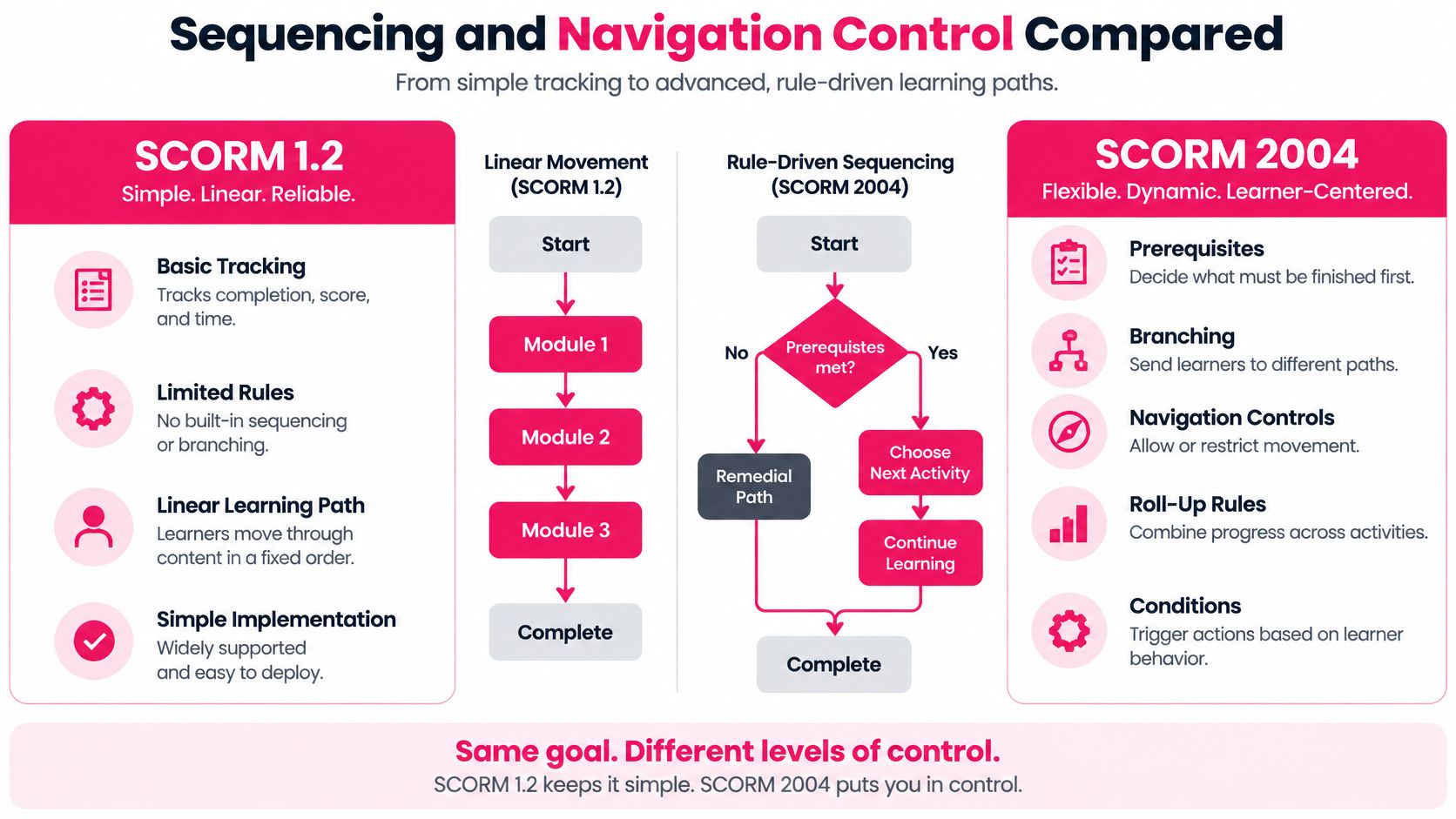
Sequencing and Navigation Control Compared
Say a compliance course runs three modules with a knowledge check at the end of module 2. Module 3 should stay locked until that check is passed, and a fail should route the learner into a short remediation branch before the retry. That flow is a sequencing requirement rather than a content requirement, and it's the cleanest dividing line between the two versions.
SCORM 2004 handles it because it adds a separate Sequencing and Navigation specification on top of the runtime API and data model. That layer lets a package declare activity-tree rules inside imsmanifest.xml: prerequisites, branching, learner- or system-initiated navigation, and conditions deciding which SCO is delivered next. A 1.2 package has no equivalent, so it leans on whatever navigation and roll-up behaviour the LMS happens to provide.
Here is the visual version of that difference, with the rule types 2004 adds on one side and 1.2's simpler path on the other.
The practical consequence shows up in structure. Without a sequencing model, a 1.2 course tends to arrive as one large shareable content object, because the only reliable way to control order is to control everything inside a single SCO. SCORM 2004 lets the same course ship as separate objects with declared relationships, which is what makes gated curricula, remedial branches and onboarding paths with dependencies possible at all. The runtime matches that: 2004 accepts explicit navigation requests, continue, previous, exit and abandon, and a sequencing engine evaluates each one against the current activity-tree state before anything is delivered.
Where sequencing support actually breaks
The specification is one thing; the LMS implementation is another. An LMS can accept a SCORM 2004 package, pass validation, and still implement only part of the sequencing behaviour. The upload looks clean and the failure appears later, as a gate that never locks, a remediation branch that never fires, or a roll-up that reports the curriculum complete while a module sits unopened. Rustici Software's SCORM reference poster sets out which behaviours belong to the package and which belong to the LMS, a split that isn't obvious from reading the manifest.
> Judgement call: treat a vendor's "SCORM 2004 compatible" line as a starting point for testing, never as a delivery guarantee.
A three-module test you can run this week
Build one package with a single gate and a single branch, then launch it on the target LMS and confirm every path.
1. The gated path: attempt module 3 before module 2's assessment is passed, and confirm the LMS blocks it. 2. The branch path: fail module 2 deliberately, and confirm the remediation content loads instead of the next module. 3. The roll-up path: complete everything, and confirm the curriculum reports complete at the top level.
Any path that misbehaves tells you more about your LMS than any specification document will.
Tracking Data and Suspend Limits in Practice
Does either version solve modern microlearning tracking? Not fully, and that answer belongs before any technical detail. Both SCORM 1.2 and SCORM 2004 are browser-based packages built around a session with an LMS, and their data models describe course status, scores, time, location and suspend data. That's a narrow vocabulary for a team that wants to know which video segment got replayed.
The suspend allowance is the part teams ask about first. SCORM 2004's third edition raises how much learner state a course can keep well past what 1.2 allows, and that capacity is useful for multi-step simulations, branching scenarios and long forms where a learner's position has to survive a closed tab.
Better data model, not better telemetry
The claim that 2004 is automatically better for detailed tracking needs qualifying. It's better for structured course state and navigation rules. It isn't better for learning-activity telemetry, and the gap shows the moment a stakeholder asks which segments learners skip. Granular video analytics such as replayed, skipped, abandoned or revisited segments are awkward to represent reliably in either version, because nothing in the data model was designed for them. SCORM's runtime environment documentation lists what a course can write, and segment-level video behaviour isn't on it.
Two conversations get blurred. Completion tracking answers a compliance question: did this person finish and pass? Learning analytics answers a design question: where did attention break? They need different plumbing, and no version number fixes that.
> Architecture decision: use SCORM for enrollment, completion and compliance records, and add an event-oriented layer such as xAPI for richer activity data. Keep each system's job separate instead of stretching the package.
A worked example
Take a four-minute lesson that counts as complete only when the learner passes a three-question check, with replays of section 2 logged separately. In either SCORM version, the package writes a completion status and a score, stores the learner's video position and answer state in suspend data so a relaunch resumes correctly, and sets an exit. Those writes are enough for the LMS to report completion.
The replay of section 2 has nowhere to go. Representing it means emitting an event when the learner scrubs back, carrying the lesson ID, the segment, the timestamp and the learner ID, and sending it somewhere built to receive events. Design the player to emit that event and the analytics question becomes answerable. Skip it, and no choice between 1.2 and 2004 will produce the answer later.
Define completion before you package anything
Most migration failures start here. Three fields settle it, and everyone who signs off on compliance should agree on all three before a package is built.
- What counts as complete: video playback reaching the end, a knowledge check passed, a minimum watch time accrued, or supervisor approval recorded.
- The minimum watch time: whether the lesson requires the full runtime or a proportion of it, and whether seeking forward counts toward it.
- The approval step: whether a manager, assessor or system confirmation closes the record, and what status the LMS shows while that's pending.
Without those definitions, moving from 1.2 to 2004 adds packaging complexity while leaving the analytics and compliance teams unable to answer the questions they ask.
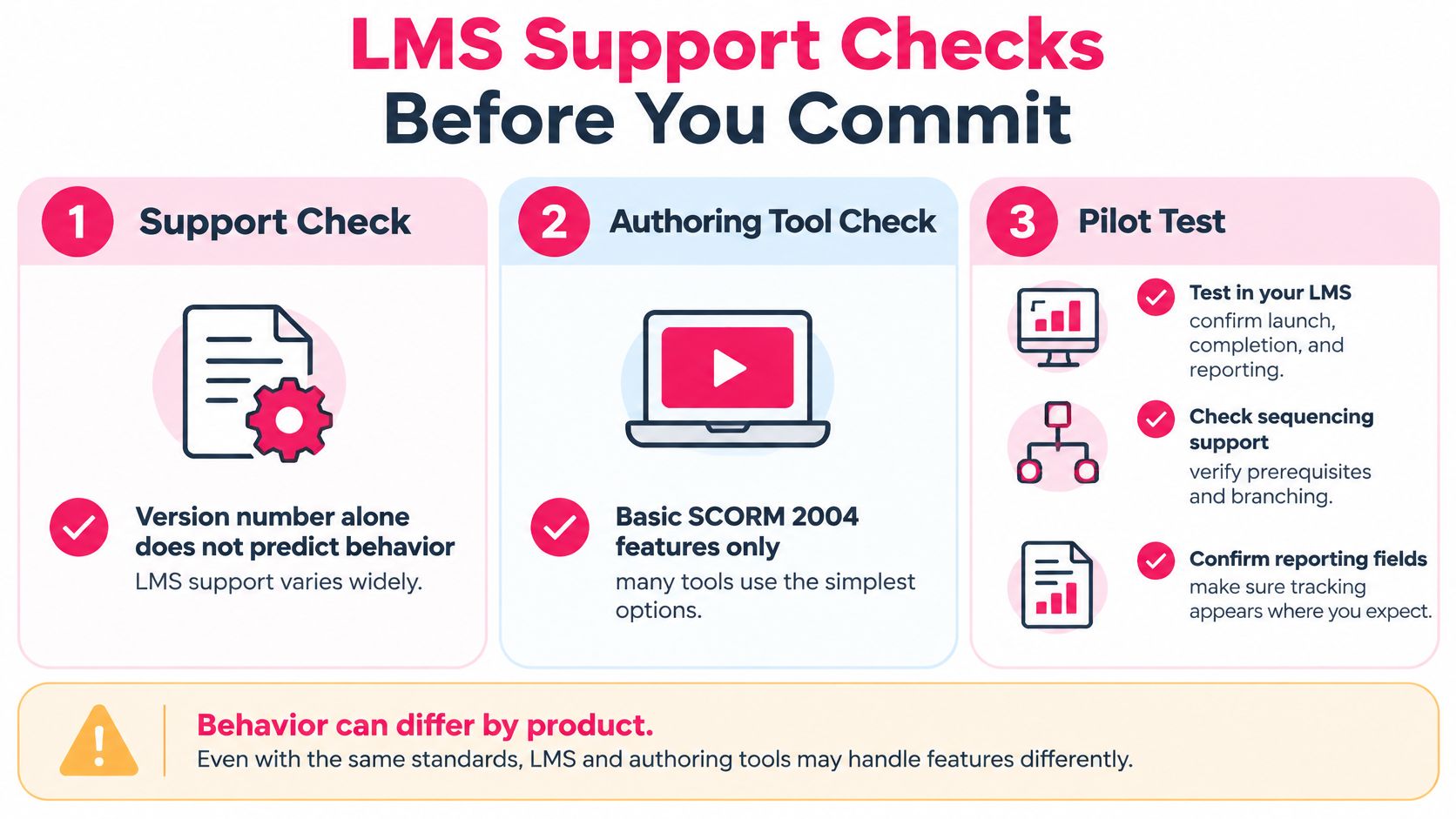
LMS Support Checks Before You Commit
Version numbers don't predict behaviour. Implementation varies widely across LMS products, and plenty of authoring tools expose only the basic SCORM 2004 options, so a package can validate cleanly and still fail to deliver the flow it describes.
Testing settles that in an afternoon. The image below maps the three places support usually breaks down: the LMS, the authoring tool, and the pilot itself.
1. Confirm the edition, not just the standard. Check that the LMS documentation names the SCORM edition you plan to publish. Expected result: a specific version, not a page that says "SCORM compatible" and stops there. 2. Launch a three-module test package. Use the gated package you built for the sequencing test and confirm the LMS records completion and score per module. Expected result: three rows of data, each carrying status and score. 3. Try to break the gate. Attempt module 3 before module 2's assessment is passed. Expected result: access blocked with a message a learner can understand, not a blank frame. 4. Test resume with real data. Exit mid-module, close the browser, relaunch, and check that suspend data restores the right position and answer state. Expected result: the learner lands where they left and stored answers survive. 5. Check the reporting fields. Open the LMS report and confirm score, time and status land in the columns your compliance team uses. Expected result: values in the expected fields, not blank cells beside a completed flag. 6. Ask about xAPI if the requirement runs deeper. If reporting has to cover behaviour rather than course status, confirm the platform accepts statements from an external source before promising it.
When the decision is which platform will run these courses for the next five years, it's worth taking time to compare types of technology partnerships before the contract is signed, because LMS support is a relationship question as much as a technical one. Our own guide to learning management system integration covers the publishing side of the same handshake. VideoLearningAI supports SCORM and xAPI for LMS publishing, so the test package for all six checks can be exported from the platform rather than assembled from scratch.
The test result decides the version, not the vendor's claim. If sequencing fails on the target LMS, publish SCORM 1.2 and handle the flow with the LMS's own structures, whether it calls them learning plans, prerequisites, groups or curriculums. A working 1.2 course beats a 2004 course whose gates don't close.
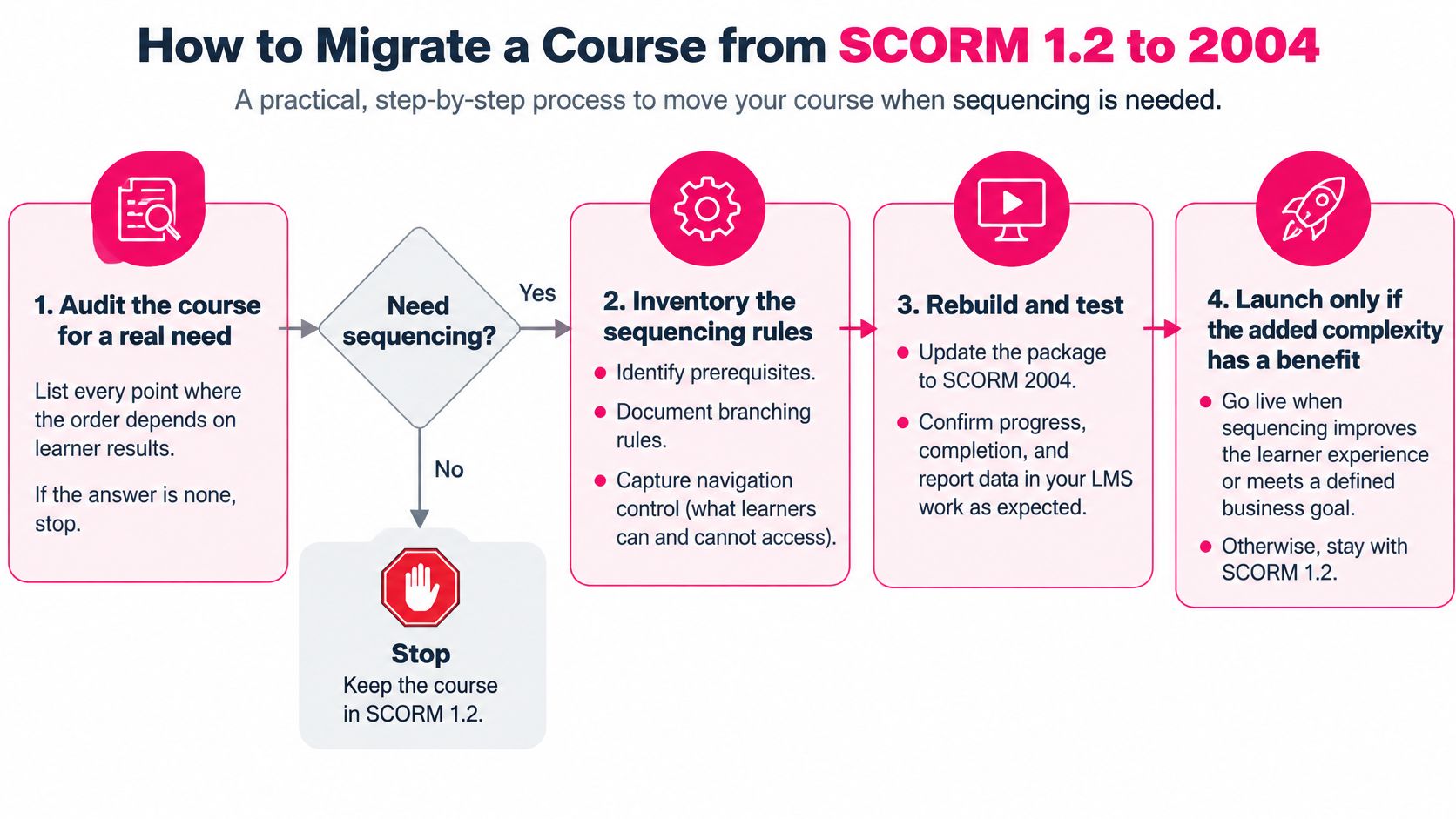
How to Migrate a Course from SCORM 1.2 to 2004
Migration is worth doing only when the course needs behaviour 1.2 can't express. Work the steps in order and stop at the first one that tells you not to proceed.
The flowchart carries the short version: audit, inventory the rules, rebuild and test, then launch only if the added complexity buys something.
1. Audit for a real need. List every point where the order of content depends on learner results. If the answer is none, stop. Migrating a linear course adds packaging work and changes no learner outcome.
2. Inventory the data the course stores. Open the current package's suspend data and interaction records and see what a learner's state holds. Most linear lessons fit comfortably; a long branching simulation is the case worth measuring before committing, and the common slip is assuming it won't fit.
3. Confirm the target LMS passes the sequencing test. Repeat the gated three-module check on the platform you plan to deploy to. A migration onto a system that ignores the rules produces a worse course than the one you started with.
4. Rebuild the manifest or re-export. Declare prerequisites, branching and roll-up rules in the manifest, or re-export from the authoring platform instead. VideoLearningAI exports SCORM packages, so re-exporting and retesting is the reliable route, and hand-editing imsmanifest.xml is the single most common source of broken packages. Our guide to SCORM packaging covers what belongs inside the zip.
5. Replace the runtime calls. LMSInitialize becomes Initialize, LMSGetValue becomes GetValue, LMSSetValue becomes SetValue, LMSCommit becomes Commit, and LMSFinish becomes Terminate. Then confirm status and score map onto the 2004 data model, including the separate completion and success fields, so a passed quiz doesn't report as an incomplete course.
6. Run three learner paths on the test LMS. Complete and pass, fail and remediate, then exit and resume. Each path exercises a different branch of the rules, and a path you skip is the one a learner finds first.
7. Roll out gradually and keep the 1.2 build alive. Hold the original package for any LMS that fails the checks, so nobody loses access while the new build settles. Retire it only after the 2004 version has run a full reporting cycle.
> The step people skip: step six. A migration that isn't tested across pass, fail and resume paths will break in production on the path nobody tried.
Pick the Right SCORM Version for Your Training Situation
Most of this decision collapses into a lookup once the course's behaviour is written down. Find the closest row, use the version it names, and treat anything that doesn't match as a case for the sequencing test rather than a debate.
Recommended SCORM version by training situation
| Situation | Version to choose | Reason | | --- | --- | --- | | Linear compliance refresher with one completion record | SCORM 1.2 | Simple tracking works on nearly every LMS | | Onboarding path where module 2 unlocks after module 1 | SCORM 2004 | Prerequisites belong in the manifest, if the LMS supports them | | Remediation branch after a failed knowledge check | SCORM 2004 | Branching and conditional navigation | | Short customer education videos shared widely | SCORM 1.2 | Maximum deployment reach and low risk | | Detailed replay or skip analytics | Either, plus an analytics layer | Neither version records segment-level activity reliably | | LMS version unknown | SCORM 1.2 until tested | Confirm 2004 support before committing |
The comparison below is the same decision in visual form, useful when you have to explain it to someone who signs the invoice rather than the manifest.
The linear compliance refresher
A short annual refresher with one completion record is SCORM 1.2 territory, and reaching for 2004 there is the most common way to make a simple job hard. The course has one path, the LMS needs one status, and nearly every platform handles that without argument. Spend the saved time on the video itself, on a tight script and a knowledge check that separates people who watched from people who clicked through. The version contributes nothing to either.
The onboarding path with a gate
When module 2 opens only after module 1 is finished, the prerequisite belongs in the manifest rather than in a note to the administrator. That's SCORM 2004 work, and it pays off only on an LMS that passes the gate test. If it doesn't, the alternative is usually better than forcing it: publish one 1.2 course and let the LMS's own learning plan or prerequisite settings control the order. Administrators then manage access where they can see it, and the content stays portable across systems.
The remediation branch after a failed check
Branching after a failed knowledge check needs conditional navigation, which means SCORM 2004 on a target that honours conditions. Design the branch before the manifest: what the learner sees, how many attempts they get, and what happens on the final fail. A branch that loops back to the same assessment with no new content is a delay, not remediation.
The replay and skip question
If the key requirement is knowing which segments learners rewatch, pause on, or abandon, neither version addresses it. Choose either one for the LMS record and add an analytics layer for behaviour. That choice is independent of the version argument and usually the more valuable one.
When nobody knows the LMS version
Default to SCORM 1.2 until a test package proves otherwise. Publishing 2004 to a platform that accepts the file but ignores the sequencing doesn't produce a partial feature; it produces a course whose declared order doesn't apply. That's a publishing failure, not a learner error, and it lands on whoever signed off on the upload.
> Decision rule: publish SCORM 1.2 for short linear lessons where broad reach and simple completion tracking matter most. Publish SCORM 2004 only when order or access must be controlled inside the package and the target LMS has passed the sequencing test. Newer isn't a reason.
The next step isn't a strategy document. Take the next course on your roadmap, list whether it needs gating or branching, run the three-module test on the LMS it will live in, and write the result somewhere the team can find it. That record, version plus test outcome, is the decision you now own.
Every VideoLearningAI account starts with 100 free credits, and no credit card is required, which is enough to build a test lesson, export the package, and put it through these checks before committing to a production build.
---
The version question gets settled by a package that survives a real LMS, not by a spec sheet. VideoLearningAI turns existing course material into short training videos and lets you export them as MP4 files or SCORM packages, with SCORM and xAPI supported for LMS publishing. Build one lesson, export it in the format you're considering, and run it through the gate, branch and resume checks before your next rollout. Visit VideoLearningAI to start building.