A rep has five minutes before a high-stakes customer call. The product deck is open, but the relevant objection-handling lesson is buried in a shared folder. The rep remembers the classroom discussion vaguely, searches for the approved pricing language, and finally relies on a teammate's old recording. The training existed. It wasn't findable, current, or practiced at the moment of need.
That situation is why sales training video software deserves a closer look. The valuable platform isn't merely the one that produces polished videos quickly. It helps L&D teams turn sales knowledge into reusable lessons, give reps a safe place to practice, and show whether the training changed a selling behavior.
The most useful mental model is simple: a training video is an intervention in a sales workflow. It should help a rep perform a specific action, such as asking a stronger discovery question, positioning a product accurately, or confirming a next step. It should also remain governed and searchable after launch. For teams tackling sales enablement challenges, that distinction separates a growing video library from a trusted enablement system.
Table of Contents
- Consistency under pressure is the actual problem - From classroom instruction to reusable learning units - Microlearning with a clear job - Creation tools that protect quality - Practice and feedback - Publishing and analytics - Run the same test with every vendor - Ask the uncomfortable questions - Build the lesson around a sales moment - Add governance before publishing - Keep the library alive - Turn common calls into practice - Use microlearning for compliance without treating it as a checkbox - Build a behavior evidence chain - Choose the platform that supports the evidenceWhy Sales Teams Forget Training Right Before the Call
A new representative completes product training, takes notes, and passes the required module. Weeks later, a buyer asks, “Why should we choose this over the alternative?” The rep knows the product, yet gives a vague answer, listing features instead of connecting them to the buyer's stated problem.
Motivation is rarely the issue; the distance between learning and retrieval is. A workshop can introduce a framework, but the rep must recall and apply it during a live conversation while listening, taking notes, using a CRM, and handling unexpected pushback.
The gap grows across distributed teams. One manager may teach discovery differently from another. A product update may reach one group in a live meeting and another in a message. A compliance phrase may change while old recordings remain in circulation. Without an owned source of truth, each rep creates a personal version of the sales process.
Consistency under pressure is the actual problem
Video supports consistency because it preserves a demonstration for repeated use. A manager can model a discovery call once, then let new hires revisit the relevant segment before their first customer conversation. A product specialist can explain a changed feature without repeating the same presentation across every time zone.
Watching alone does not create a dependable skill. Passive viewing may produce recognition without usable recall. The lesson becomes more useful when the rep answers a question, selects a response, records a role-play, or receives feedback after viewing.
A searchable library also needs governance. Reps should find the current lesson quickly, trust its guidance in a live deal, and avoid outdated recordings that conflict with approved messaging. For teams tackling sales enablement challenges, that control links content management to behavior change.
> Practical rule: If a lesson cannot name the behavior a rep should perform differently afterward, it is not ready for a training library.
Sales training video software works best as part of a behavior-change workflow. Its value reaches beyond video starts: the content should remain findable, current, practiced, and connected to the actions reps take with buyers.
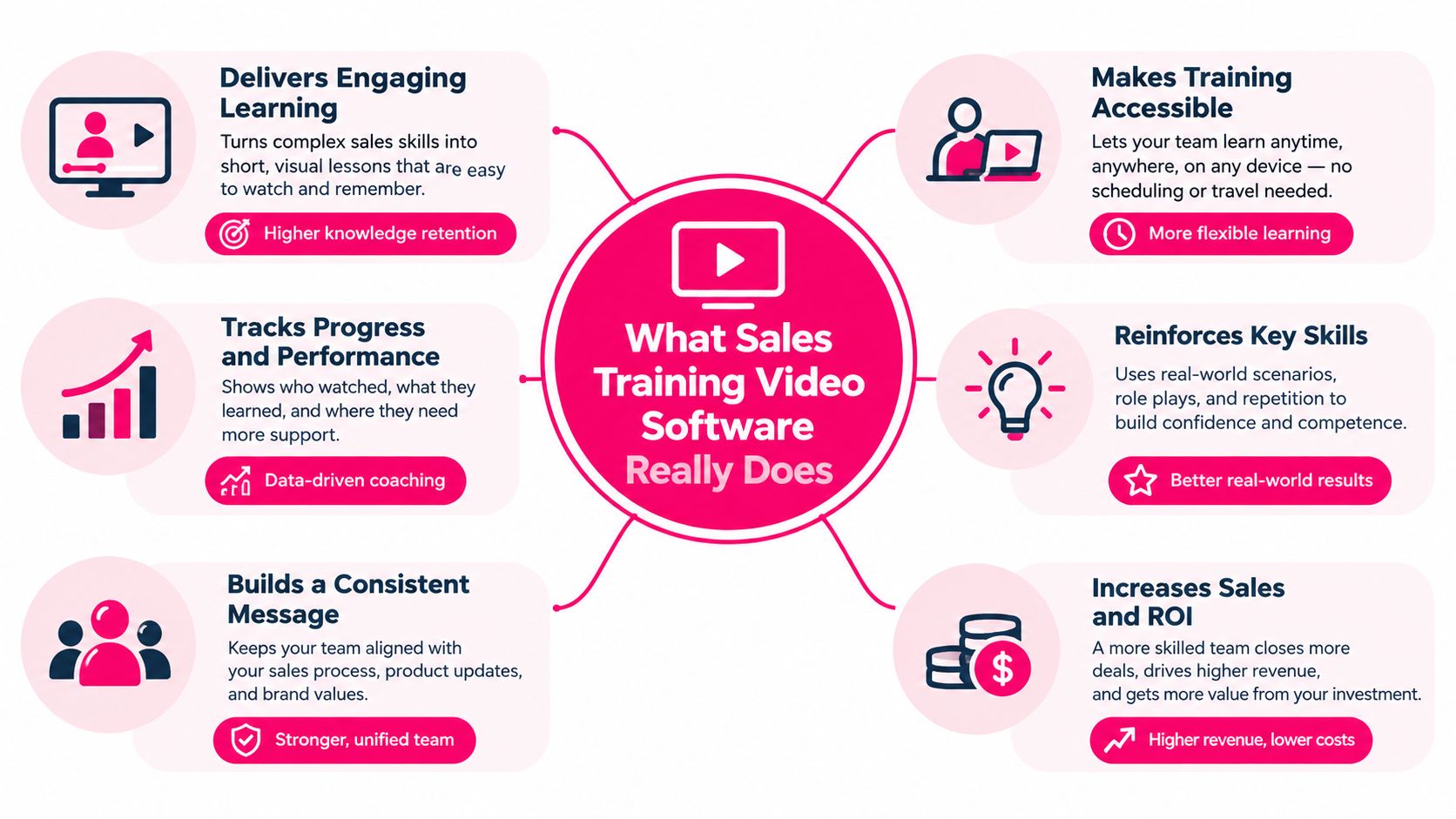
What Sales Training Video Software Really Does
Sales training video software combines video creation, instructional structure, publishing, and learning data in one workflow. A generic video editor helps someone cut footage. A training platform should help an L&D team turn source material into a lesson with an objective, a demonstration, a practice activity, and a record of completion or assessment.
The category makes more sense when viewed historically. Sales instruction predates modern e-learning and video software by more than a century. Formalized instruction was documented as early as the 1870s, when subscription-book sellers received a program called “Sales Talk.” In the United States, Larry Wilson founded Wilson Learning in 1965, and the company later became the country's second-largest training company. By 2007, corporate sales training was described as a roughly $4.3 billion industry in this history of sales training.
The underlying objective stayed consistent, even as delivery changed. Early programs standardized scripts and instructor guidance. Modern platforms extend that objective through reusable digital assets that teams can distribute across roles, regions, and time zones.
From classroom instruction to reusable learning units
A useful platform usually supports several connected jobs:
- Create: Convert a script, slide deck, product document, or recorded explanation into a structured lesson.
- Standardize: Apply templates for onboarding, product education, compliance, objection handling, or customer conversations.
- Publish: Deliver the lesson through a portal, LMS, or another approved learning channel.
- Practice: Add questions, scenarios, role-play prompts, or assignments that require the learner to do something.
- Track: Capture completion, assessment results, replay behavior, and other signals that help managers diagnose gaps.
- Maintain: Update, approve, localize, and retire content as products and claims change.
The distinction from a generic editor is important. A polished presenter or attractive animation can improve attention, but it doesn't solve version control, findability, practice, or evidence of transfer. Likewise, an LMS may record completion without giving reps a useful demonstration or a way to rehearse the conversation.
Sales training video software therefore sits between content production and sales enablement operations. The strongest implementation treats each video as a governed learning asset, not as a standalone media file.
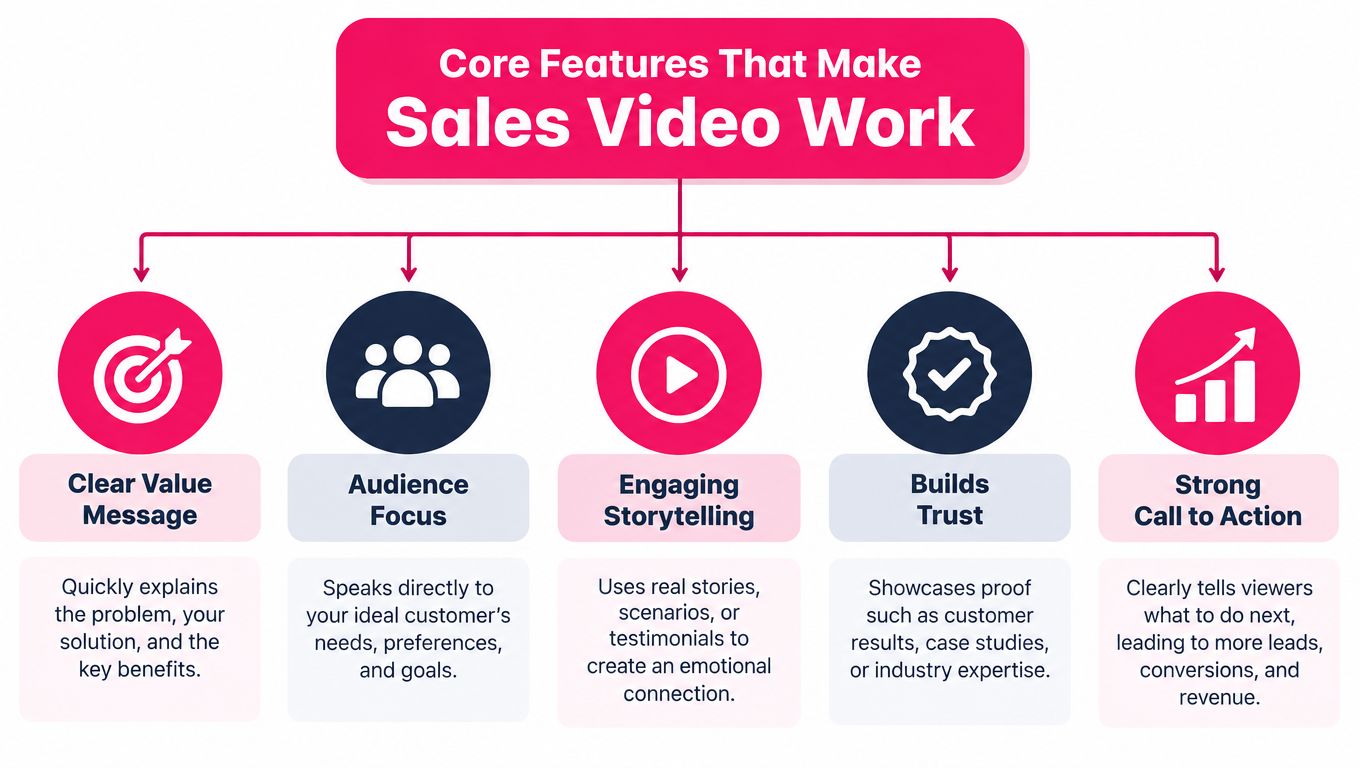
Core Features That Make Sales Video Work
A platform can advertise avatars, templates, AI narration, and analytics without supporting effective learning. Evaluate each feature by the job it performs for a rep and an L&D lead.
A 2024 systematic review of 40 microlearning studies supports designing sales training video software around short, focused learning units rather than long-form courses. The review's implications are summarized in the systematic review of microlearning: break complex competencies into independently addressable modules, give each module one behavioral objective, demonstrate the skill, add retrieval or a scenario task, and record completion.
!A diagram outlining five core features that make a sales video work effectively for businesses.
Microlearning with a clear job
A weak short video is a long lecture cut into smaller pieces. A stronger lesson focuses on one action, such as opening a discovery call, connecting a pain point to a product capability, or responding to a pricing objection.
For example, a lesson on discovery might include:
1. A short demonstration of a strong opening. 2. A pause where the learner selects the next question. 3. Feedback explaining why the question advances diagnosis. 4. A later assignment to use the question in a role-play.
The software should support captions, transcripts, search, mobile playback, rewatching, and lesson-level metadata. These features help a rep return to the precise moment they need instead of replaying an entire course.
Creation tools that protect quality
Templates reduce production friction, but they shouldn't remove instructional review. Look for reusable layouts that preserve an approved structure while allowing subject-matter experts to check claims, examples, and pronunciation.
AI-assisted production can help draft narration, visuals, captions, or presenter-led scenes. L&D still needs to verify product language, regional context, accessibility, and compliance-sensitive statements. Speed matters only when the resulting lesson is accurate enough to trust.
Practice and feedback
A knowledge check asks whether the rep remembers something. A scenario asks whether the rep can use it. Strong software supports both.
A rep might watch a demonstration of objection handling, choose between two responses, and then record their own version. A manager or rubric can evaluate whether the response acknowledged the concern, used approved positioning, and established a next step. That sequence is more informative than a completion badge alone.
Publishing and analytics
LMS-compatible publishing and completion metadata help L&D manage assigned learning across a workforce. Analytics should go further than starts and watch time. Useful signals include completion, replay points, assessment accuracy, time to proficiency, and performance by skill category.
The difference resembles a library checkout system versus a coach's notebook. The first shows that someone opened a book. The second helps identify which concept they keep missing and where they need another example.
How to Evaluate Options Without Getting Lost
Start with the bottleneck, not the feature list. If reps can't find current product guidance, a searchable content layer may matter more than an animated avatar. If they know the theory but freeze during objections, prioritize scenario practice and feedback. If managers can't see what changed after training, prioritize skill-level reporting and observation workflows.
Digital and blended delivery already represent a substantial part of the sales-training sector. A 2025 market estimate valued the global sales-training market at approximately $6.26 billion, projected about $6.54 billion in 2026, and forecast nearly $9.80 billion by 2035, with an implied 4.59% compound annual growth rate for 2026 to 2035. The same estimate reported that online and blended learning accounted for approximately 58% of usage. Its regional distribution was approximately 38% North America, 27% Europe, 25% Asia-Pacific, and 10% Middle East and Africa, as reported in this sales-training market estimate.
Run the same test with every vendor
Prepare one realistic scenario before booking demos. Use a real product, a real buyer concern, and the approved response. Ask each vendor to show the rep experience and the manager view.
Use this checklist to compare what you observe:
| Evaluation criterion | What good looks like | Red flag | |---|---|---| | Findability | Reps can search transcripts, topics, roles, and product areas | Lessons live in broad folders with unclear names | | Versioning | Owners, approvals, dates, and retired versions are visible | An old claim can remain active without warning | | Localization | Regional variants preserve the core lesson and localize examples | Teams must duplicate entire courses manually | | Practice | Lessons include scenarios, retrieval, or response tasks | Learners only watch and click “complete” | | LMS compatibility | Completion and assessment metadata travel into existing systems | Reporting requires a separate manual process | | Transfer reporting | Dashboards show skill or assessment patterns | The main success metric is watch time | | Governance | Expiration alerts and approval workflows are built in | Nobody owns content after launch |
For teams evaluating the production side, a practical pipeline guide for video teams can help clarify how ideas move from planning to distribution. For AI-assisted creation specifically, compare the workflow with these AI video generator tools, but keep production speed below instructional usefulness on your priority list.
Ask the uncomfortable questions
Ask who approves a compliance-sensitive statement. Ask how a rep finds the right clip while preparing for a call. Ask whether the system can distinguish a learner who watched a lesson from one who demonstrated the skill. Ask how a manager receives an actionable gap instead of another dashboard.
A vendor that answers these questions clearly is showing operational maturity. A vendor that returns to presenter styles and templates may be solving the visible part of the problem while leaving the costly part untouched.
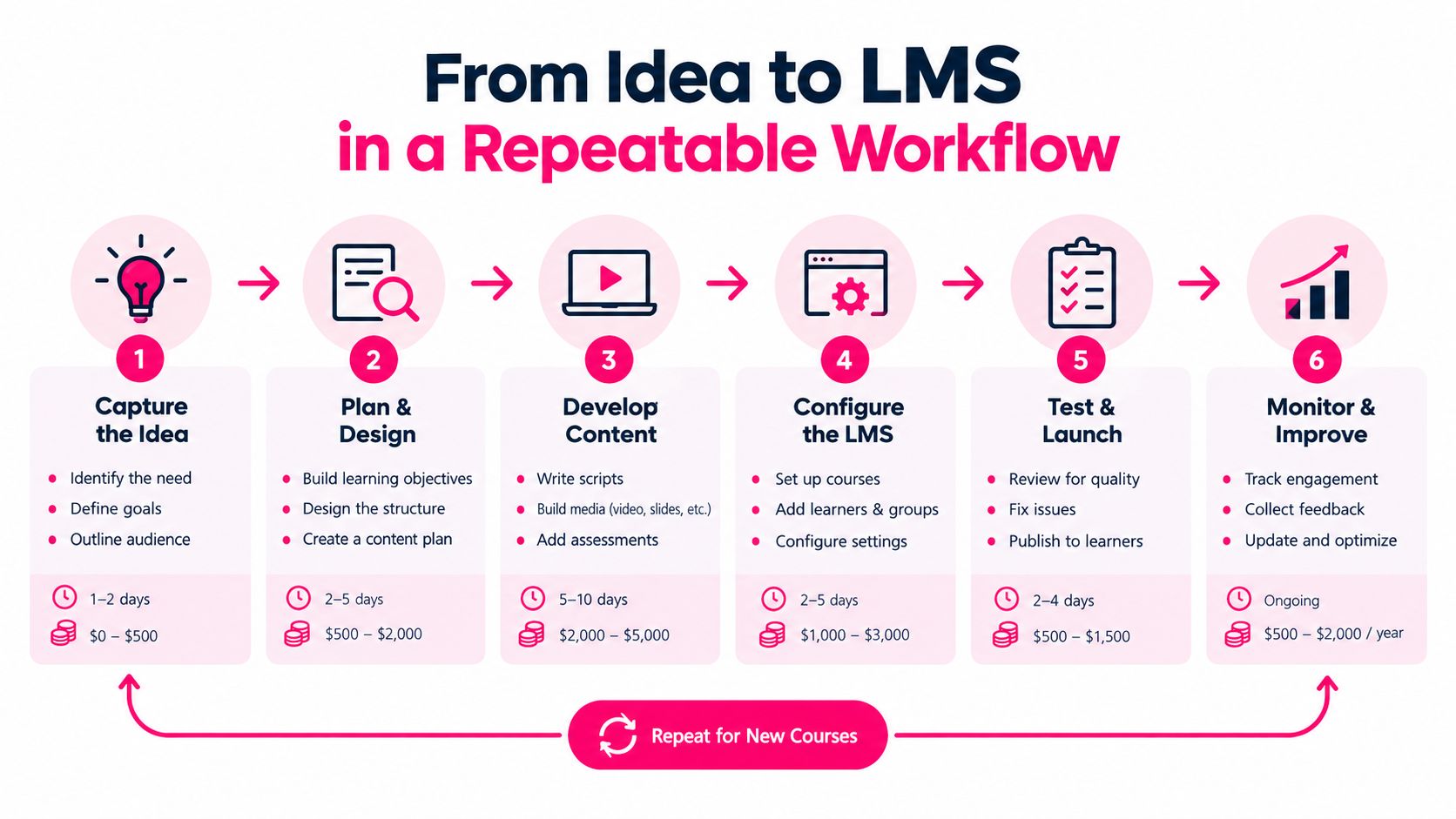
From Idea to LMS in a Repeatable Workflow
A reliable workflow begins with source truth, not with a blank video canvas. Before anyone writes narration, gather the approved product brief, current messaging, call examples, objection guidance, and compliance requirements. Assign an owner who can approve claims and an expiry condition for content that will change.
Build the lesson around a sales moment
Choose one observable behavior. “Understand the new product” is too broad. “Explain the product's value after a buyer describes a workflow problem” gives the writer, producer, manager, and learner a shared target.
Then draft the smallest useful unit:
- Context: Who is the buyer, and what has just happened?
- Model: What does a strong rep say or do?
- Decision: What response should the learner choose?
- Practice: How will the learner produce their own response?
- Evidence: What will show whether the behavior improved?
The length should serve the task. Research summarized in this discussion of sales enablement statistics describes stronger engagement for videos under three minutes, lower engagement for videos from three to six minutes, and moderate engagement for longer videos. That finding doesn't mean every lesson should be forced below a fixed threshold. It means duration should follow cognitive and practical purpose, not a desire to produce short videos for its own sake.
Add governance before publishing
A content library becomes difficult to trust when teams can't tell which lesson is current. Add a title that describes the skill, tags for role and product, a transcript, an owner, an approval date, a review date, and regional variants where needed.
Before publishing to the LMS, test the learner path on mobile and desktop. Confirm that captions display correctly, links work, assessment results are captured, and completion metadata reaches the expected destination. Teams building or refreshing a broader library can also use guidance on training video productions to organize the production side without losing the instructional workflow.
Keep the library alive
After launch, review search behavior, missed questions, manager feedback, and product changes. Retire obsolete lessons rather than leaving them beside current ones. Link coaching assignments directly to the relevant segment so a rep can move from “improve objection handling” to the exact demonstration and practice task.
A maintainable library is not a large folder of short videos. It is governed sales knowledge that reps can locate, trust, and apply during work.
Real World Use Cases for Onboarding and Enablement
A new hire doesn't need a long catalog on the first day. They need a path that answers the questions they'll face soon.
Start with a product-positioning lesson. Show a buyer describing a business problem, then model how the rep connects that problem to one approved capability. Follow with a prompt asking the learner to explain the connection in their own words. The manager can score whether the response is accurate, relevant, and free of unsupported claims.
Onboarding can then build outward from that foundation:
- First conversation: Open the call, establish context, and ask a useful discovery question.
- Product explanation: Connect a capability to the buyer's stated need.
- Objection handling: Acknowledge the concern, clarify it, and respond with approved language.
- Next step: Confirm mutual action and ownership before ending the conversation.
Turn common calls into practice
A manager reviews a call and notices that several reps answer “Your price is high” by discounting immediately. The L&D lead turns that pattern into a short scenario. The video models a better response, pauses before the rep answers, and asks the learner to record a version that explores the buyer's comparison.
The lesson can then become part of onboarding, a coaching assignment, or a reinforcement sequence after a product launch. The same asset serves different moments because the behavior remains specific.
Use microlearning for compliance without treating it as a checkbox
A compliance refresher should show the moment where a rep could make a risky claim, not only display a policy paragraph. The learner can choose which statement is approved, explain why another statement creates risk, and practice redirecting the buyer toward a safe answer.
An experimental mobile microlearning study compared 40 learners with a 40-person control group. The video group showed significantly better delayed practical performance and procedural knowledge, fewer procedural errors, and faster task completion than conventional practice instruction, as described in the study of procedure-based mobile microlearning.
The lesson for sales enablement is practical. Encode the procedure, not just the information. Show the opening, diagnosis, value mapping, objection response, and next-step confirmation. Then let reps revisit the exact segment before a call or coaching session.
Legacy materials can follow the same path. A deck becomes a sequence of focused lessons. A recorded webinar becomes searchable segments. A manager's explanation becomes a modeled conversation with a retrieval prompt. The transformation is valuable only when each piece gains an objective and a way to practice it.
Measuring ROI and Choosing a Vendor With Confidence
Video engagement is an input, not the final outcome. A rep may watch an objection-handling lesson and still concede too quickly on the next call. L&D needs a measurement chain that connects exposure to practice, performance, and business-relevant behavior.
Research summarized by Didask reports that passive learning can reduce performance, while video works better when combined with active practice, retrieval, and feedback. In the same source, scenario-based learning was rated at 69%, post-training activities at 66%, and video at 66% as engaging instructional methods. These figures come from the Didask analysis of video in training.
Build a behavior evidence chain
For a lesson about pricing objections, track more than completion:
1. Exposure: Did the rep access the lesson? 2. Recall: Did they answer the knowledge check accurately? 3. Practice: Could they produce an acceptable response in a scenario? 4. Observation: Did a manager or call-review rubric see the behavior in a real conversation? 5. Retention: Could the rep perform the skill after time had passed? 6. Business connection: Did relevant CRM or opportunity signals improve in a way the team can reasonably interpret?
Useful operational measures include procedural-error rate, response latency, rubric score, delayed assessment results, and performance by skill category. These measures help distinguish a content problem from a transfer problem. If reps fail the knowledge check, the explanation may be unclear. If they pass the check but fail the role-play, they need more practice. If they pass practice but struggle live, managers may need to inspect context, coaching, or process friction.
A practical framework for selecting measures is outlined in this guide to measuring training effectiveness.
Choose the platform that supports the evidence
Compare tools such as Synthesia, HeyGen, VEED, and Camtasia alongside dedicated training platforms, but compare the workflow rather than the marketing category. A general editor may support precise production. A presenter-focused tool may accelerate narrated lessons. A learning platform may provide assignments and completion reporting. The right combination depends on whether your main gap is creation, distribution, practice, governance, or measurement.
VideoLearningAI is one option for teams that want to turn existing sales materials into structured, bite-sized training videos, with templates for onboarding, compliance, sales enablement, and customer education, plus LMS-oriented publishing workflows. The important question is whether the platform can support your complete loop, from approved source material to practice and evidence of changed behavior.
Run a focused pilot with one sales moment, one audience, and one rubric. Give managers a simple observation method, ask reps to practice before live calls, and review delayed performance rather than celebrating watch time alone. Then scale the lessons that reps can find, trust, practice, and use.
---
VideoLearningAI helps L&D teams convert sales materials into structured microlearning videos with narration, captions, visuals, and reusable training workflows. Use VideoLearningAI to explore a practical way to build searchable, LMS-ready lessons that support onboarding, objection handling, product positioning, and reinforcement.