
Quality Assurance Training Videos: Plan to Publish
Mario Cabral
Nov 02, 2026 • 9 min read
Build quality assurance training videos with clear lengths, embedded checks, ISO-aligned lessons, and LMS release gates.
In 2024, 72% of U.S. employees surveyed by TalentLMS said short-video training made them more engaged, according to the TalentLMS learning and development trends research. That number is useful, but it's also easy to misread. Engagement doesn't prove an inspector can spot a defect, contain a nonconformity, or file evidence an auditor can trace.
That's the trap in many libraries of quality assurance training videos. Teams invest in polished tool demos, celebrate completion rates, and still can't show a behavior changed. The useful clips do something narrower and harder. They teach one observable behavior, pause while the learner makes a decision, and prove transfer to a real task before release.
Table of Contents
- Build Five Starter Titles - Match the Clip to Its Job - Match the Picture to the Task - The Seven Moves Before You Record - Two Slips That Waste the Shoot - Use a One-Page Script Template - The Three Controls in Practice - What the Evidence Actually Says - Build the Check Into the Clip - Set the Gates Before Filming - Fix the Segment, Not the Learner - Four Scenarios Worth Filming - Score the Scenario With a RubricChoose the Behavior to Teach First
Start with the behavior, not the topic. "Quality overview" isn't teachable in a short clip, and you can't assess it either. "Record the lot number, gauge reading, and disposition on the incoming inspection form" is teachable, because a reviewer can watch for it and a learner can practice it.
Your anchor is the quality system you're already audited against. The PECB ISO 9001 overview describes ISO 9001 requirements for quality-management systems centered on customer satisfaction, conformity with customer and applicable statutory or regulatory requirements, process control, and continual improvement, and notes ISO reports more than 1 million ISO 9001 certificates across 189 countries. That scale is why consistent terminology matters when the same lesson runs in more than one plant or country.
Build Five Starter Titles
Pick five behaviors that cover the daily life of the system. You'll get more value from five finished, auditable clips than from twenty broad topics nobody can test.
Starter video titles mapped to observable behaviors
| Video title | Observable behavior | ISO 9001 requirement area | |---|---|---| | Incoming inspection | Follow the approved procedure and record evidence | Process control | | In-process check | Recognize a nonconformity and contain it | Conformity of product | | Customer complaint | Name the process owner and open a corrective action | Customer satisfaction and continual improvement | | Internal-audit prep | Show where records live and retrieve them | Documented information | | Supplier issue | Document the nonconformity and the supplier response | Conformity with customer requirements |
Keep the wording identical to the quality manual. If the procedure says "nonconformity," don't let the narration say "defect issue" in one clip and "quality problem" in the next. An auditor should hear the training and the procedure say the same thing. You can swap in local examples, line photos, and captions for a specific site, but don't change the control itself.
If you're unsure how to phrase the behavior as a measurable outcome, work through how to write learning objectives before you title more clips. Then do a simple gap check. List each current SOP, map it to one of the five behaviors above, and mark where no video exists yet. That's your production queue, in priority order.
> Practical rule: If you can't name the evidence the learner leaves behind, you haven't picked a behavior yet.
Pick the Length and Check for Each Lesson
Pick the length from the lesson's job, not from the topic's size. A big topic like corrective action doesn't need a long video. It needs several short ones, each ending in a check the learner can pass or fail.
Learner preference points the same way. In a December 2024 survey, 70% of SAI360 Learning Content Survey respondents preferred microlearning, while 65% preferred live-action videos, as reported in the SAI360 microlearning survey summary. So your default is a short, realistic clip, not a recorded all-hands lecture with slides.
Match the Clip to Its Job
Give every clip one observable objective tied to a job behavior. Name a defect. Follow one approved step. Record the evidence. If the objective needs the word "and" twice, split the lesson.
QA video length and the check that belongs with it
| Lesson job | Learner action | Use it when | |---|---|---| | Defect-code refresher | Name the defect from a still or short clip | Daily floor or inbox reminders | | Single SOP step | Choose the next approved step, then see feedback | New-hire procedure training | | Nonconformity scenario | Decide to contain, escalate, or document | CAPA and audit practice | | Tool or gauge walkthrough | Complete one task with pauses at hard steps | Software, fixture, or instrument use | | Quality judgment case | Frame the risk and pick what to escalate | Release pressure or ambiguous requirements |
Notice what the table doesn't do. It doesn't assign minutes first. A defect-code refresher can run very short because the check is a single identification. A tool or gauge walkthrough needs more room, so plan roughly 6 to 8 minutes as a working example and build in learner-controlled pauses at the hard steps, such as zeroing the gauge or reading the dial, so the learner can finish without losing the thread.
Match the Picture to the Task
Use live action or screen capture for gauges, production lines, fixtures, and test tools, because the learner has to recognize the actual equipment later. Use a presenter with on-screen labels for policy points, where the face and voice carry the "why" and the labels carry the terms. Don't film a person reading a procedure at a desk when the skill happens at a bench.
Here's the confusion to avoid. A two-minute clip can be finished and still teach nothing. Short isn't the same as effective, and finishing isn't the same as learning. The check at the end of each clip decides whether the length worked, not the runtime alone.
Do this now, before anyone writes a script:
- Choose one row: Pick the lesson job that matches the behavior you selected.
- Write the objective: State it in one sentence with a verb you can observe.
- Name the check: Write the exact action the learner takes at the pause or at the end.
Only then open a script document. If you can't write the check, the lesson isn't scoped yet, and making it shorter won't fix that.
How to Plan and Script One Lesson
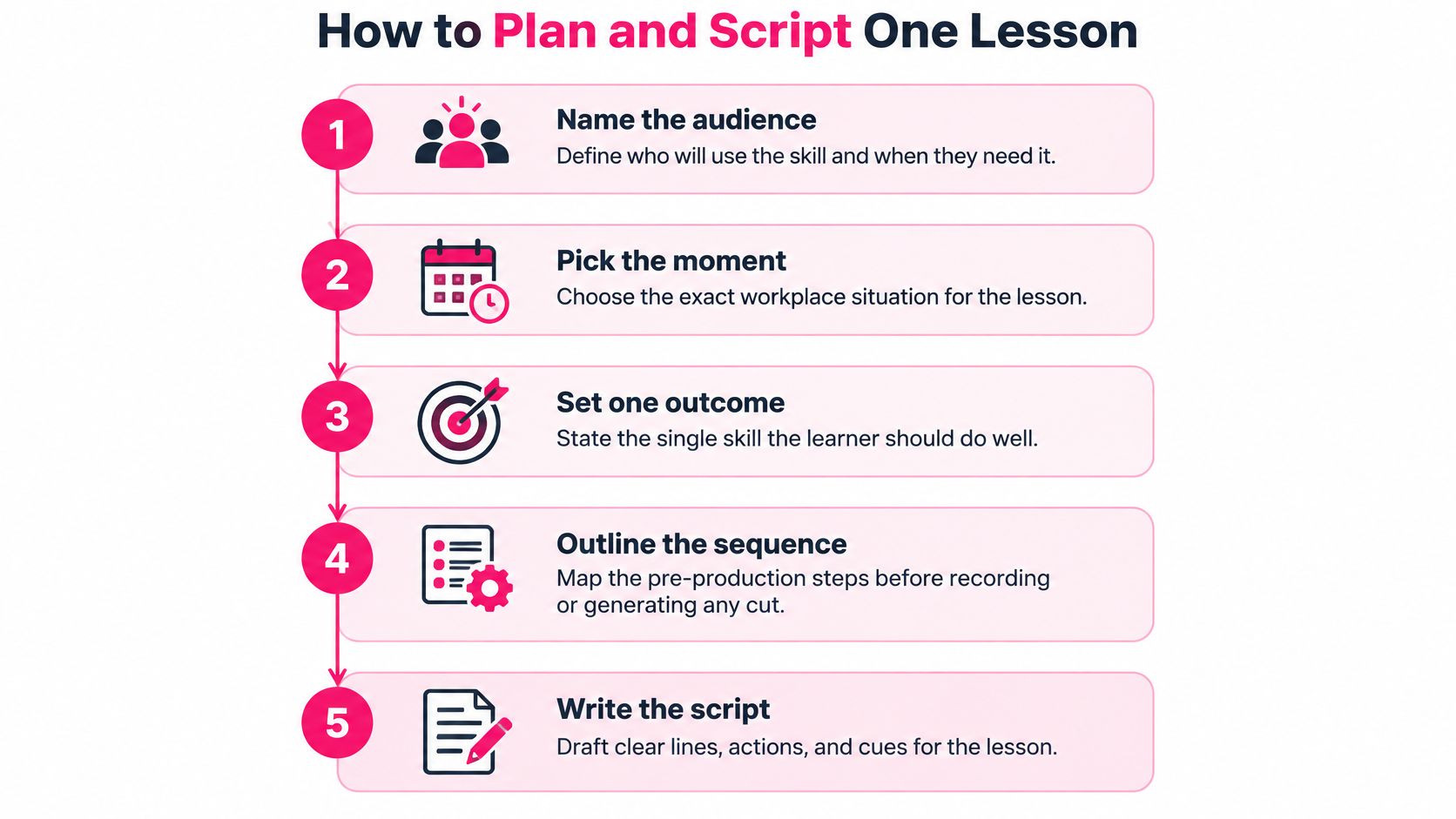
Most weak quality assurance training videos fail before recording starts. The script tries to cover a whole procedure, the source document isn't named, and nobody decided where the learner stops to think. Run this pre-production sequence first, every time, even for a short clip.
The five planning moves below give you the shape of the work before you write a line of narration.
The Seven Moves Before You Record
1. Name the audience and the moment. Write down who watches and when they'll use the skill. A new inspector on a first shift needs different pacing than an internal auditor in the week before a surveillance visit. The moment tells you which details matter and which ones are noise.
2. Write one learning objective as a behavior. Our implementation checklist recommends defining one clear learning objective per lesson before production. "Understand nonconformity handling" is a topic label. "Tag the suspect lot, move it to the hold area, and open the nonconformity record" is a behavior you can film and test.
3. List the approved source and its revision. Name the current SOP, work instruction, or customer requirement, and note the revision number on the script. This is the step teams skip, and it's why videos drift from documents. Six months later nobody knows which procedure version the narration came from.
4. Storyboard three beats only. Beat one is the situation. Beat two is the correct action. Beat three is the evidence left behind. If a fourth beat appears, you probably have a second lesson hiding inside the first.
5. Place the pause at the decision point. Put the question where the learner would have to choose on the job, such as the moment a reading falls outside tolerance. A quiz after the credits tests memory of the narration. A pause at the decision tests judgment.
6. Standardize the structure. Our implementation checklist recommends standardizing script and visual structure so reviewers can approve faster. Use the same headings, lower-thirds, and terms in every script, so a process owner can approve content without re-reading the whole procedure to find the relevant step.
7. Time a read-aloud. Read the narration out loud at a natural pace. If it overruns the length row you picked, split the lesson. Don't speed up the narration, because learners will repay you with rewinds.
Two Slips That Waste the Shoot
The first slip is teaching a tool menu instead of the decision. Showing where to click in a QMS or test tool isn't the same as teaching when to escalate. Learners leave able to use screens and unable to act. Script the decision first, then show only the clicks that serve it.
The second slip is pasting the procedure as on-screen text while the voice reads the same words. Learners can't read a paragraph, listen to it, and watch a gauge at the same time. Put short labels on screen, let the narration explain, and leave the full procedure in the document system where it belongs.
> A script a process owner can't sign in one sitting is a script that's trying to teach too much.
Use a One-Page Script Template
Keep the approval document to one page with these fields:
- Objective: The single observable behavior, in one sentence.
- Source and revision: The SOP or requirement the lesson teaches, with its revision.
- Three beats: Situation, correct action, evidence left behind.
- Pause location: The timestamp or storyboard frame where the learner decides.
- On-screen labels: The exact terms that appear, checked against the procedure.
- Reviewer and sign-off date: The process owner who approved it, and when.
Record the document revision in the LMS release note when you publish. Then a later audit can trace each lesson to the procedure it trains, and a changed SOP triggers a script review before the next assignment goes out. That's the difference between a video library and a controlled training record.
Produce Clips Learners Can Control
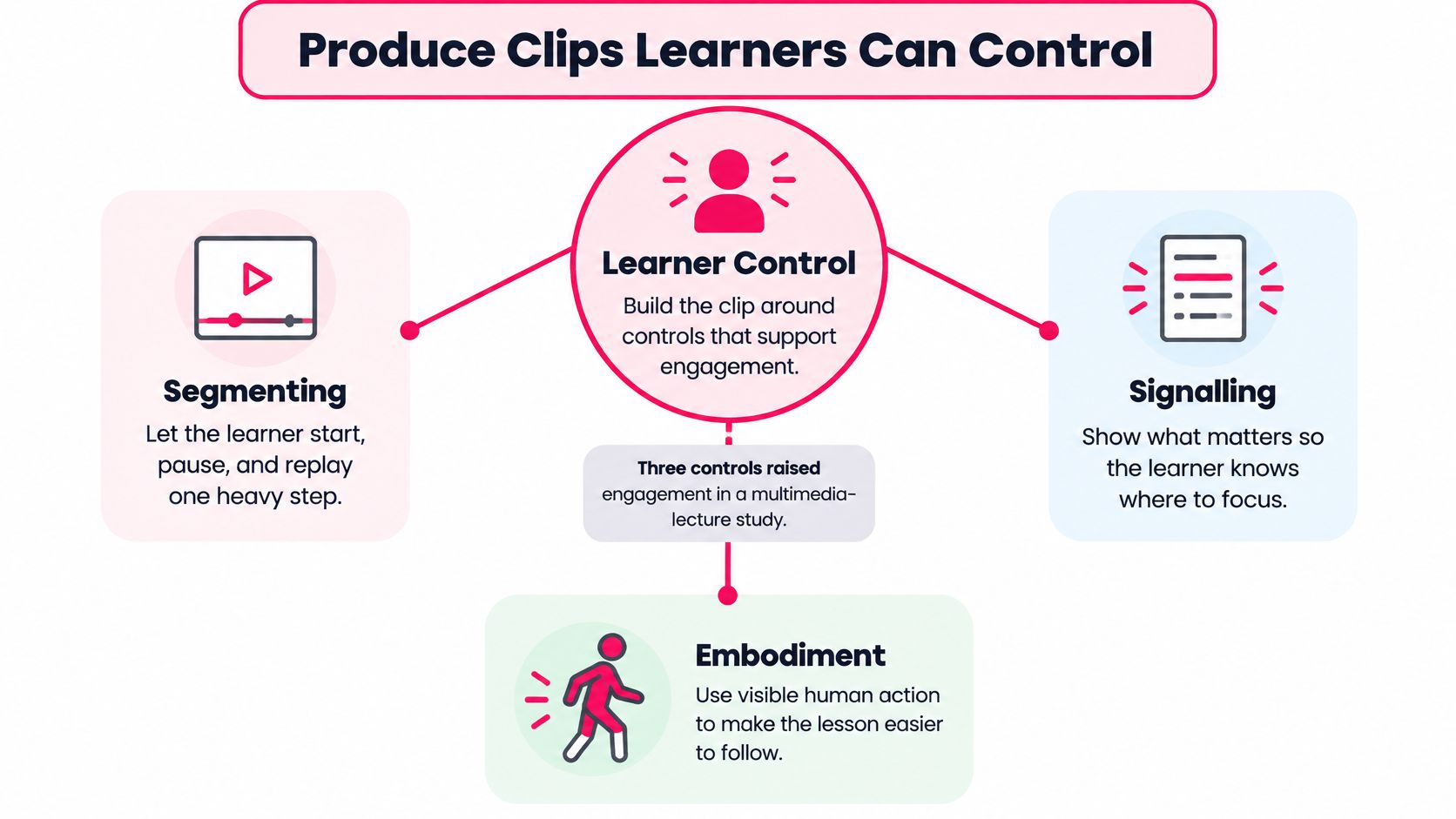
A learner who can't pause, replay, or find the important detail on screen isn't in control of the lesson. They're just present for it. Three production controls fix that, and each one is a concrete choice you make in the edit, not a style preference.
The diagram below maps the three controls before we walk through shop-floor examples of each.
The Three Controls in Practice
Segmenting breaks content into shorter, learner-controlled units. Say you're teaching a torque check. Instead of one continuous take, you end a segment right after the wrench is set, and the learner presses continue when they're ready for the pull and reading. They can replay the heavy step without scrubbing through setup they've already understood.
Signalling puts a label or visual cue beside the exact element being discussed. When the narrator says "check the witness mark," the label sits next to the witness mark on the part, not in a caption block at the bottom of the frame. The learner's eye shouldn't have to commute between the text and the thing the text is about.
Embodiment means a visible person or expressive presenter carries the explanation. When a step matters for safety or customer risk, show the inspector doing it and saying why. A faceless slide deck with a voiceover is weaker for procedural buy-in, because learners take cues about importance from a person, not from a bullet point.
What the Evidence Actually Says
In a study of multimedia lectures described in the PMC study on multimedia lecture design features, these three features significantly increased engagement indicators including total watch time, survey submissions, and quiz attempts (p<0.05)< /strong>, and the regression model explained 56% of the variance in audience retention (adjusted R²=0.56). Those are real gains, and they're worth designing for.But read the limit carefully. Those results measure engagement, not learning. The same features didn't reliably translate into better test performance, which means a clip can hold attention beautifully and still leave the learner unable to perform the step. Treat watch time and completion as production feedback, and judge the clip itself against pass gates built on actual performance.
> Rough-cut check: Your cut should show a pause, a label, and a person at the exact points where the learner needs them. If any of the three is missing at the hardest step, fix the edit before you polish anything else.
Use one objective per micro-lesson and place a pause at the most demanding step, so the learner decides before the answer appears. If your team doesn't have in-house production capacity for live-action shoots on the floor, a corporate video production company can handle filming while your process owners keep control of the script, the labels, and the pauses. That division of labor works well. What's outsourced is the camera work, not the instructional decisions.
One more production habit protects you later. Keep narration, captions, and on-screen wording checked against the signed script, word for word, before export. Terminology drift between the voice track and the caption file is exactly the kind of small inconsistency that confuses learners and bothers auditors.
Set Pass Gates Before You Release
A video is ready to release when learners can perform the target behavior, not merely when they finish watching. A polished clip can still fail to change behavior. Test the decision or task the lesson teaches, and treat viewing data as a signal about the video, not proof of learning.
In a workplace-learning experiment with 99 employees, participants watched an 8-minute-20-second training video. The Visla guide to training video best practices summarizes the results: people who answered questions embedded in the video remembered 26% more of the material when tested 20 to 35 hours later than people who only watched. Structured discussion also improved memory by 25%. A 2025 meta-analysis of active-learning studies found that learners who respond actively retain and comprehend more, and transfer learning to new situations more effectively than those who only watch. The evidence draws mostly from adult learners, making it relevant to workplace training.
Build the Check Into the Clip
For inspection, corrective action, and audit preparation, pause at the decision. Ask the learner to identify the defect or choose the next approved step. Then explain why the answer works, or where the reasoning went wrong. A red X and the correct answer alone do not teach the decision.
For example, show a part with a scratch near a sealing surface, then pause and ask, “Accept, rework, or raise a nonconformity?” If the learner chooses “accept,” explain that damage on the sealing surface risks a leak path, so the part should be contained and documented. The explanation connects the visible defect to the required action. Use these checks for understanding to find question formats that can be adapted to QA scenarios.
Set the Gates Before Filming
Write release thresholds into the sign-off checklist before production. That way, the team agrees on what counts as evidence before a polished cut creates pressure to approve it.
Release gates before a QA video goes live
| Gate | Threshold | Evidence source | |---|---|---| | Embedded item accuracy | About 80% | Answers captured in the LMS | | Delayed retest | Passed one day later | Reworded items from the same objective | | Job task | Error-free filing of a nonconformity with required evidence fields | Scenario observed by the process owner | | Completion rate | Not a release gate | Analytics only |
The delayed retest checks whether learners understand the decision rather than remember the wording. Rephrase the items and test the next day, in line with the delayed timing in the workplace-learning experiment. The job task checks transfer: learners must file a nonconformity with the required evidence fields while the process owner observes. That is the behavior the training is meant to support.
Completion rate still has a use, just not as a pass gate. It shows whether people reached the end of the video, not whether they can perform the task. A learner can give a video five stars and still miss the defect. Collect clarity ratings as feedback, but do not treat them as evidence of competence.
Fix the Segment, Not the Learner
When learners miss a check, look for a pattern before blaming attention. If several people rewind the same few seconds or miss the same embedded item, treat that as evidence that the segment needs work. Slow the sequence, move the label closer to the relevant visual, or split a difficult step into smaller actions. Adding another block of on-screen text can make the decision harder by asking learners to read while they are already processing the visual.
Record each gate result against the document revision in the release file. That links sign-off to the procedure the video teaches. When the procedure changes, the record shows which lessons need retesting before they are used again.
Teach Judgment Calls Not Only Tools
Tool demonstrations show where to click. Judgment training shows what to do when the result is unclear, such as explaining to a product manager why a release is not ready. QA video libraries often devote more time to tool tours and completion tracking than to these decisions. Yet a polished video can still fail to change behavior if learners never practise making and defending a call.
A useful format is a guided walkthrough: present the evidence, pause at the decision point, and ask the learner to choose a response before showing the reasoning.
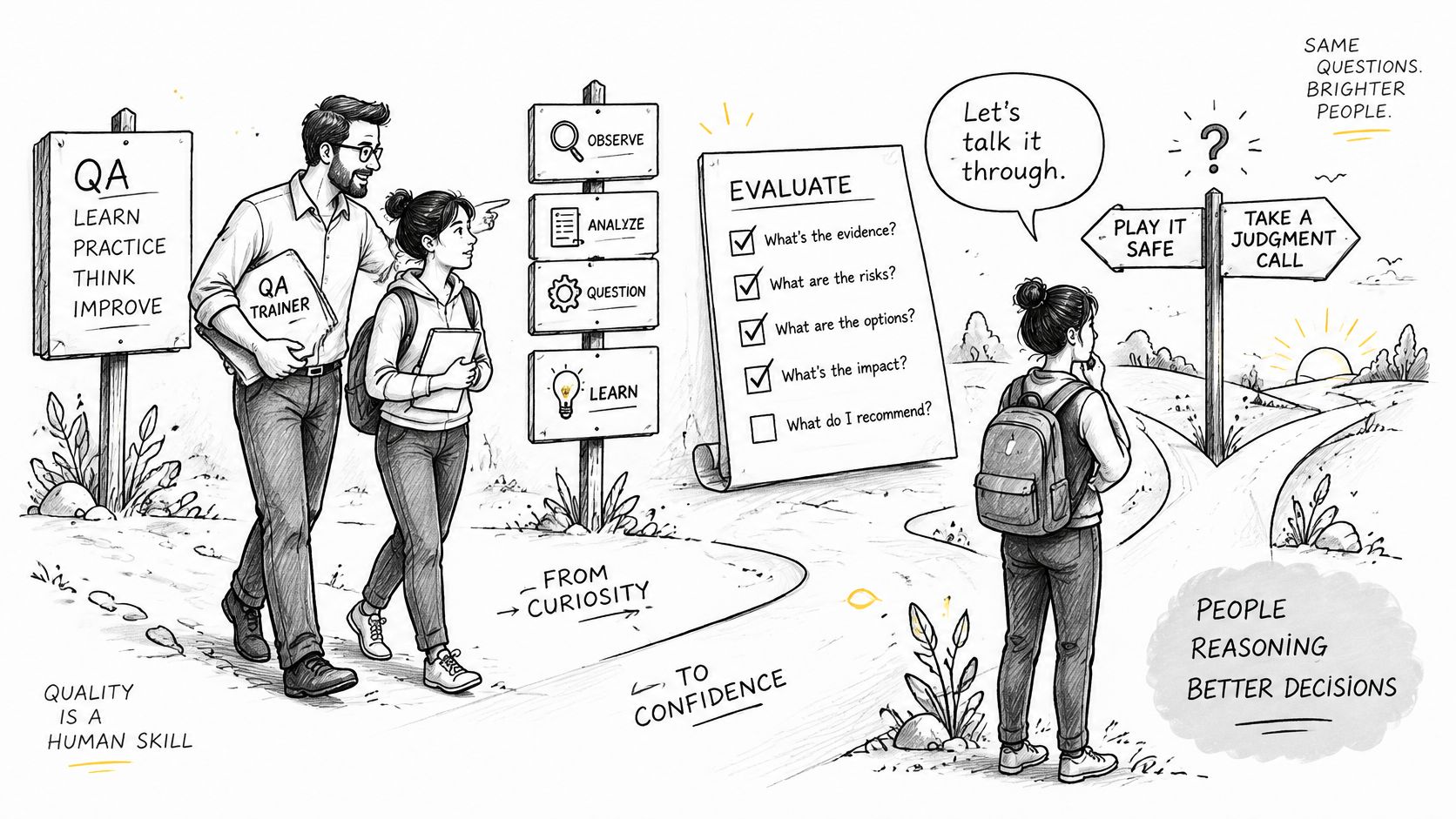
The 2025 State of Testing report found communication skills became the top priority, rising from 59% in 2024 to 75% in 2025, while programming, API testing, and functional-test automation declined as differentiators. The shift suggests that technical skills are increasingly treated as baseline competencies. Strong QA work also calls for curiosity, clear communication, and critical thinking. Tool skill helps a tester operate the system; judgment helps others understand and act on the risk.
Four Scenarios Worth Filming
Choose situations where a learner must make an observable decision, not just repeat a procedure. Keep each scenario focused on one behavior:
- State the release risk in one sentence. Present a vague update, then ask the learner to rewrite it as a clear risk statement for a product manager.
- Challenge an ambiguous requirement. Pause on a phrase such as “the system should respond quickly.” Ask which question would make the requirement testable.
- Prioritize defects under a freeze. Show five open defects and a ship date. Have the learner choose which defects block release and explain why.
- Document why a test is sufficient. Ask for a brief rationale that lets a reviewer understand the coverage without rerunning the test.
For each scenario, show a weak answer beside a stronger one. For example, “there are some bugs” gives little direction. “Checkout fails for saved cards, which affects returning buyers, so this blocks release” names the failure, its impact, and the decision. That comparison makes the standard visible; the pause gives learners a chance to apply it themselves.
The video below models an evaluation and decision-making approach you can adapt when staging these scenarios.
Score the Scenario With a Rubric
Give managers observable evidence to look for, rather than asking whether a learner “seemed confident.” Keep the criteria tied to the behavior the scenario is designed to teach.
Judgment-call rubric for managers
| Mark | Observable evidence | |---|---| | Risk framed | Release risk stated in one sentence to the product manager | | Question asked | Ambiguous requirement challenged with a specific question | | Collaborator looped in | Relevant owner contacted before the decision | | Exploration noted | Coverage gaps and exploratory paths recorded |
Apply the same decision-making practice to AI-assisted work. Ask learners to distinguish a deterministic bug, which fails the same way each time, from a model that is only sometimes right. Make clear who signs off and where the escalation line sits before go-live, so a concern has an owner and a next step.
A library that demonstrates tool use still needs clips where learners interpret evidence, explain risk, and choose what to do. Build those judgment calls into the training, then check whether learners can make and defend the decision in the work itself.
Publish the Series and Revise Every Two Weeks
Ship a small series, then tighten it on a two-week cycle instead of waiting for a full curriculum. Our implementation checklist recommends publishing, measuring completion, and iterating every two weeks, and that cadence is short enough to fix problems while the first cohort still remembers the lesson. If you need help holding a realistic rhythm across a whole library, this guide on how to build a manageable content schedule is a sensible companion.
Choose the export by the job. VideoLearningAI allows users to export videos in MP4 format and SCORM packages for learning management systems. Use MP4 when people need a file they can watch immediately, such as a line-side refresher. Use a SCORM package when completion and embedded answers must be recorded.
Test the SCORM package in your actual LMS before assigning it, following the checks in our LMS video publishing guide. A file that plays is not proof that completion reports correctly, and you don't want to discover a reporting failure during an audit. Confirm the score, the completion status, and the resume behavior with a test account.
Publish only after a process owner has checked the procedure revision, the embedded answers, and any generated narration against the source document. Our AI-generated videos may not be factually accurate and should not be relied upon as a source of truth, and users are solely responsible for reviewing, editing, and validating all generated videos before use. The reviewer owns factual sign-off, not the tool. Keep the signed script, the revision number, and the sign-off date with the file, so the audit trail survives re-exports.
On the first two-week cycle, review completion, the questions people miss, and any step several learners replayed. On the next cycle, fix or split that segment and measure again. Start with the single objective you scoped first, not twenty unfinished modules, and keep the measure-and-revise habit even when the first cut looks polished.
---
Turn one approved SOP into a short, checkable lesson this week. VideoLearningAI helps you draft quality assurance training videos from your existing materials, add the pauses and checks that prove learning, and export in MP4 or SCORM for your LMS. Start with a single observable behavior, set your pass gates, and publish a clip you can defend in an audit.
Share this article:
Go deeper with VideoLearningAI
AI Training Video Generator
Generate training videos with AI in minutes. Turn scripts and lesson ideas into polished educational videos.
LMS Video Publishing
Publish course videos in LMS platforms with stronger playback, tracking, and learner experience.
Microlearning Video Creator
Create microlearning videos with AI for onboarding, training, and reinforcement. Build focused lessons with clear outcomes.
Keep reading
Competency Based Training: An L&D Implementation Guide
Use competency based training when proof of skill matters more than seat time, with a six-step L&D rollout and transfer checks.
Nov 01, 2026
How to Conduct Training Needs Analysis Step by Step
How to conduct training needs analysis with a decision map, evidence methods, gap scores, and a clear publish plan.
Oct 31, 2026