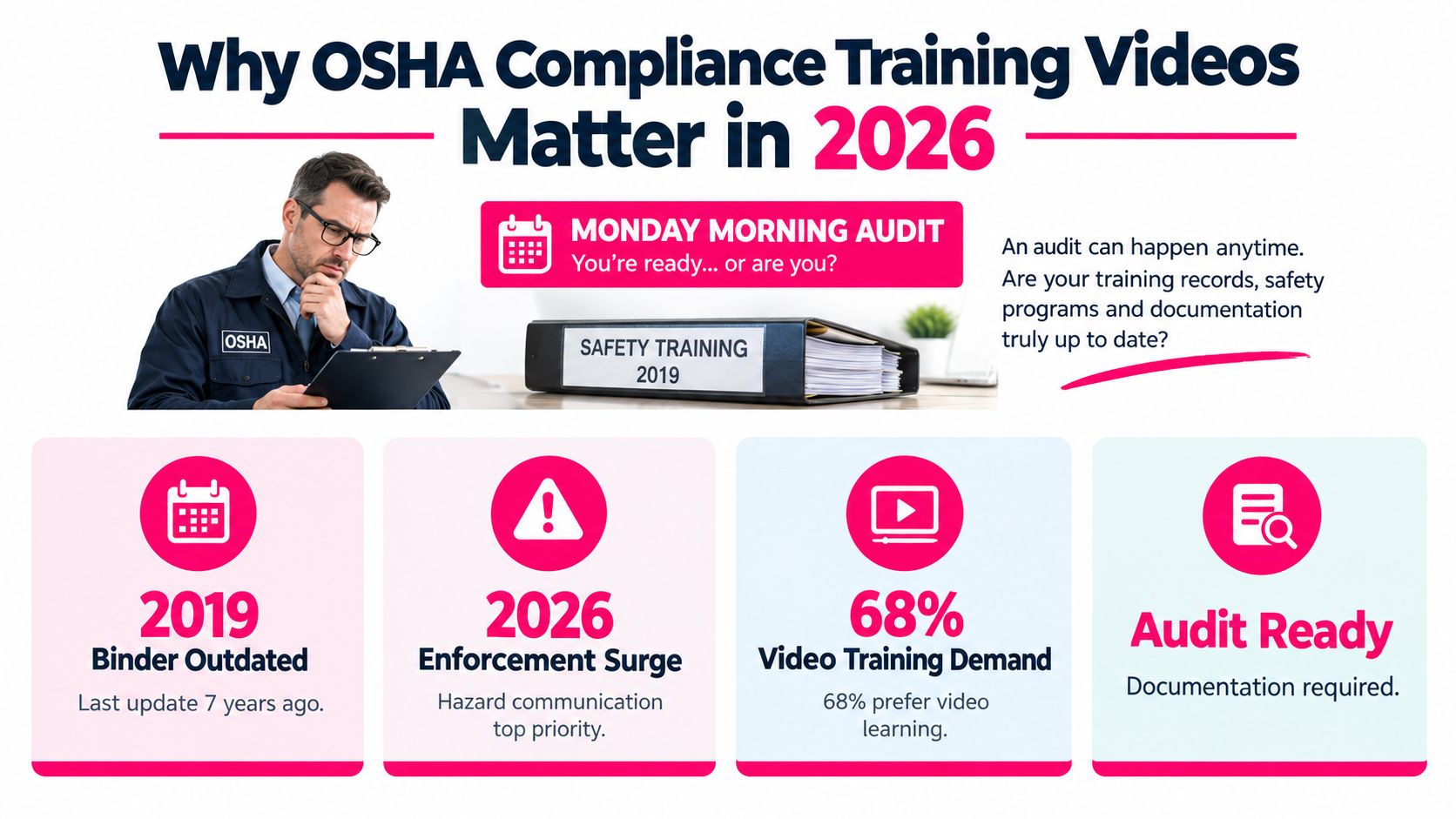
You've got an OSHA audit notice in your inbox, a training binder that hasn't been opened since 2019, and supervisors asking whether a video library can solve the gap before the next shift starts. Your workforce is spread across sites, languages, and schedules, so gathering everyone in one room isn't realistic.
OSHA compliance training videos can help you refresh knowledge, standardize core messages, and reach workers quickly. They can't replace qualified instruction, site-specific guidance, supervised practice, or evidence that employees can perform a task safely. The useful question isn't “Which video should we buy?” It's “What part of this competency can video handle, and what must happen after the screen goes dark?”
Table of Contents
- Use video where consistency matters - Hazard identification - Protective equipment and procedures - Emergency response - Supervisor competence - Separate information from proof - Build the first seconds around the hazard - Localize the work, not just the script - 1. Source the requirement - 2. Script the scenario - 3. Record and edit - 4. Localize in parallel - 5. Package and test - Configure the reporting layerWhy OSHA Compliance Training Videos Matter in 2026
Workplace safety training has never been only a paperwork exercise. The modern foundation traces to the Occupational Safety and Health Act of 1970, signed by President Richard M. Nixon on December 29, 1970. The Act authorizes enforcement standards as well as research, information, education, and training in occupational safety and health, as described in OSHA's history of the agency. OSHA strengthened that training capacity by establishing the OSHA Training Institute in 1972 for compliance officers, federal personnel, and the public.
That history gives trainers a practical lens. A video supports the education-and-training mission when it explains a hazard clearly, reflects current procedures, and reaches the people who need it. It doesn't make an outdated program current merely because the content plays in a modern player.
Use video where consistency matters
A short video is particularly useful when workers need the same explanation across shifts, locations, or seasonal hiring waves. It can show the correct inspection sequence, pause at a hazard, display a translated term, and provide a repeatable starting point for a supervisor-led discussion.
OSHA standards also create recurring training work. For example, 29 CFR 1910.30 requires training before employees are exposed to fall hazards, delivery by a qualified person, retraining when workplace changes make earlier instruction obsolete, and retraining when workers show insufficient understanding. The standard says training must be understandable to each employee, which makes captioned and localized video useful for dispersed or multilingual teams.
> Practical rule: Treat the video as the knowledge-transfer layer. Treat the demonstration, questioning, observation, and record as the compliance evidence.
A defensible program therefore has three parts: current content, an appropriate learning activity, and records that connect each worker to the activity. If one part is missing, the video may still be useful, but it doesn't close the compliance obligation by itself.
What OSHA Actually Requires of Your Training Program
Start with the regulation, not the production format. OSHA doesn't require an attractive video for its own sake. It requires employers to train affected employees on relevant hazards and safe work practices, use a qualified person where the standard calls for one, deliver instruction employees can understand, and retrain when conditions or comprehension make previous instruction inadequate.
For a trainer working this week, translate that baseline into four deliverables.
Hazard identification
Workers need to recognize the hazards present in their jobs, not just repeat a general definition. A fall-protection video can introduce common risks, while a site walk can identify the unprotected edge, access route, or equipment condition the worker will encounter. For hazard communication, the deliverable may include a plain-language explanation of labels, safety data sheets, and the facility's chemical handling process.
Protective equipment and procedures
A video can demonstrate the intended sequence for selecting, inspecting, donning, using, and storing equipment. The trainer still needs to verify that the worker can repeat the sequence with the equipment used at that site. The same principle applies to procedures such as lockout/tagout, respiratory protection, bloodborne-pathogen controls, and fall protection. The applicable standard determines the required content and practice.
Emergency response
Emergency instruction must connect general rules to the facility's actual alarms, exits, muster points, communication methods, and escalation process. A polished generic clip can introduce the topic, but it can't tell a new employee which route is blocked today or who has authority to stop work.
Supervisor competence
Supervisors need more than attendance records. They must know how to reinforce the procedure, answer questions, identify unsafe acts, and escalate conditions that require correction. Give them a facilitator guide, observation checklist, and clear ownership for follow-up.
| Hazard Category | Triggering Standard | Who Must Be Trained | Required Deliverable | |---|---|---|---| | Fall hazards | 29 CFR 1910.30 and applicable fall-protection requirements | Employees exposed to fall hazards | Understandable instruction, qualified delivery, retraining when conditions or comprehension change, and a competency check | | Hazard communication | Applicable OSHA hazard-communication requirements | Employees who may encounter hazardous chemicals | Hazard recognition content, label and SDS guidance, site-specific handling instruction, and comprehension evidence | | Powered equipment | The standard applicable to the equipment and worksite | Employees assigned to operate or work around the equipment | Equipment-specific instruction, practical demonstration, and supervisor or qualified-person verification | | Emergency procedures | Applicable emergency-action and site requirements | Employees covered by the emergency plan | Facility-specific route and response instruction, drill or discussion evidence, and current records |
Keep the recordkeeping triad simple: dates, content outlines, and competency evidence. A certificate can show that a worker completed a module. It can't, on its own, show that the worker understood a site-specific hazard or performed the task correctly.
Why a Video Alone Is Not OSHA Compliance
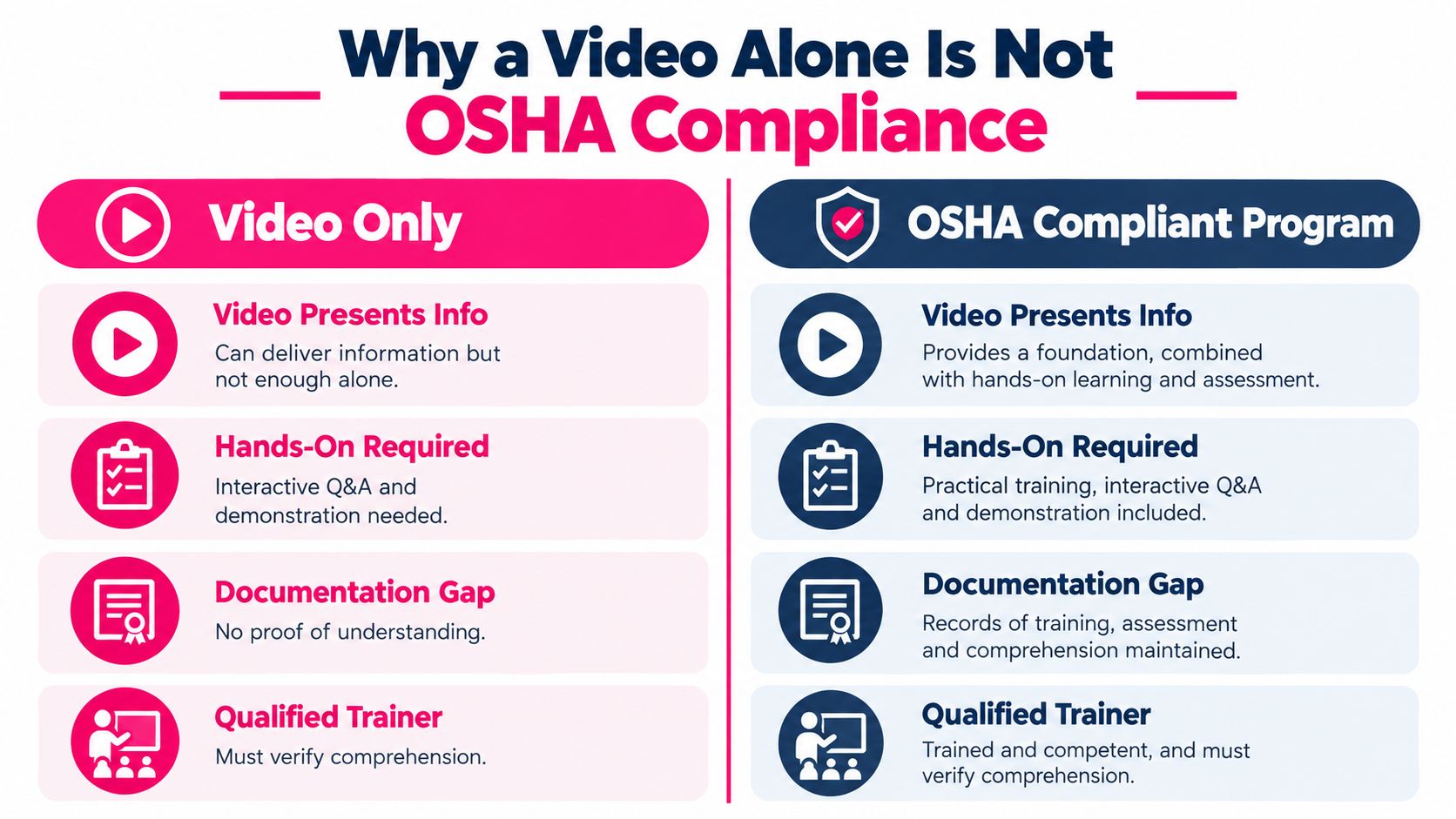
A recorded program can present information consistently. It can't watch an apprentice attach a lanyard, operate a machine, isolate an energy source, or respond to a chemical spill. OSHA guidance makes this distinction directly: a 20-minute videotape about fall protection or a similar topic isn't sufficient by itself where the standard requires demonstrated understanding. Compliance officers may assess effectiveness case by case through observation and employee interviews, as explained in OSHA training effectiveness guidance.
Separate information from proof
Video is strong at uniform explanation. Everyone receives the same definition, demonstration, warning, and terminology. It also gives supervisors a reusable starting point when schedules make a live lecture difficult.
Video is weak at diagnosis and verification. It won't reveal that a worker misunderstood “de-energized,” skipped a pre-use inspection, or believes a nearby employee is responsible for the control. A multiple-choice question can test recognition, but a practical observation tests behavior.
Use a blended sequence:
1. Watch: Present the hazard, procedure, and decision points in a concise video. 2. Discuss: Let workers ask questions and connect the content to the jobsite. 3. Demonstrate: Have a qualified person model the required task with the actual equipment. 4. Practice: Give the worker a supervised opportunity to perform the task. 5. Verify: Record the observation, correction, and final sign-off.
Construction, electrical work, and warehousing expose the weakness of video-only programs because workers must make physical decisions in changing environments. A warehouse employee may recognize a pedestrian exclusion zone on screen but still need to demonstrate how they'll position themselves around a moving vehicle.
For practical guidance on building the surrounding program, review these compliance training best practices. The audit question remains direct: would your records convince an inspector that each worker can perform the job safely, not merely that each worker pressed Play?
Designing Scannable Microlearning Videos That Stick
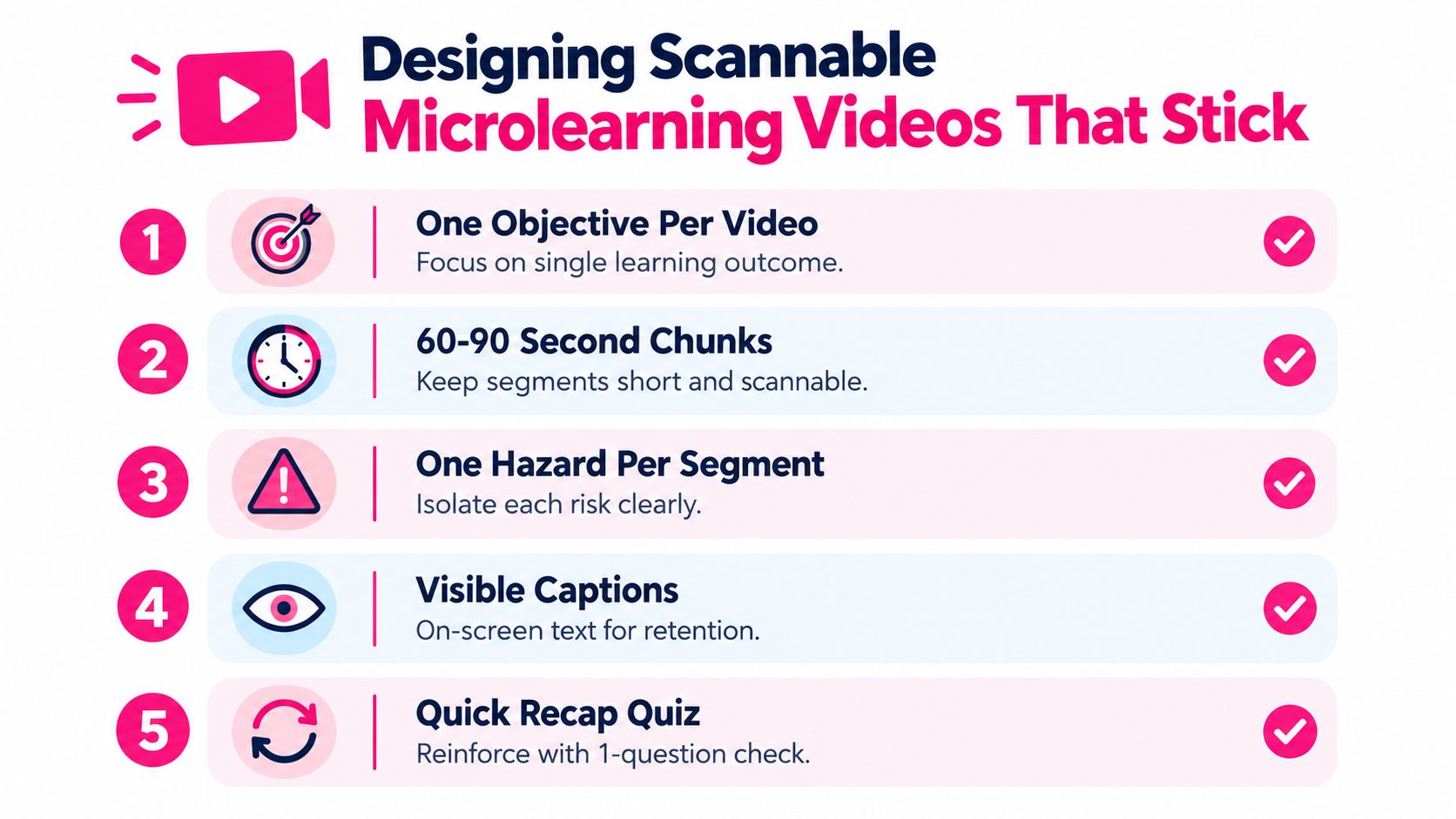
Frontline workers rarely need a miniature legal treatise. They need one clear answer to one immediate safety question. Build each segment around a single objective, such as “identify the three conditions that require a fall-protection inspection” or “choose the correct response when a chemical label is missing.”
A short format works best when the content has a narrow job to do. One industry summary reported that nearly 70% of employees prefer video over written materials, while it reported that up to 65% of non-video training content may be forgotten after one week and forgetfulness can reach 90% after six months. Those figures appear in this workplace learning summary on walking-working-surface training. Use them as a design rationale for concise refreshers, not as proof that video automatically produces competence.
Build the first seconds around the hazard
Open with the work problem, not a corporate logo. Show a wet loading dock, a damaged guard, a mislabeled container, or a worker approaching an exclusion zone. Then state the objective in plain language.
Use a consistent visual rhythm:
- One objective: Don't combine fall protection, ladder safety, and rescue planning in one clip.
- One hazard: Isolate the risk so the worker knows what to notice.
- Visible terminology: Spell out PPE, LOTO, and SDS the first time each appears.
- Captions always on: Captions should accurately match the spoken instruction and remain readable on a phone.
- No competing audio: Remove background music beneath warnings, equipment sounds, and emergency instructions.
- A final action: End with a sentence the worker can repeat, such as “I stop work and report a damaged guard before using the machine.”
Use a knowledge check when the objective is recognition or decision-making. Use a hands-on prompt when the objective involves movement, equipment, fit, sequence, or judgment under real conditions. A short quiz can ask which harness component requires inspection. It can't replace wearing the harness and showing the inspection to a qualified person.
For visual planning, a resource on how to create training video infographics can help your team turn a dense procedure into a scannable visual sequence.
Localizing Videos for Multilingual Frontline Teams
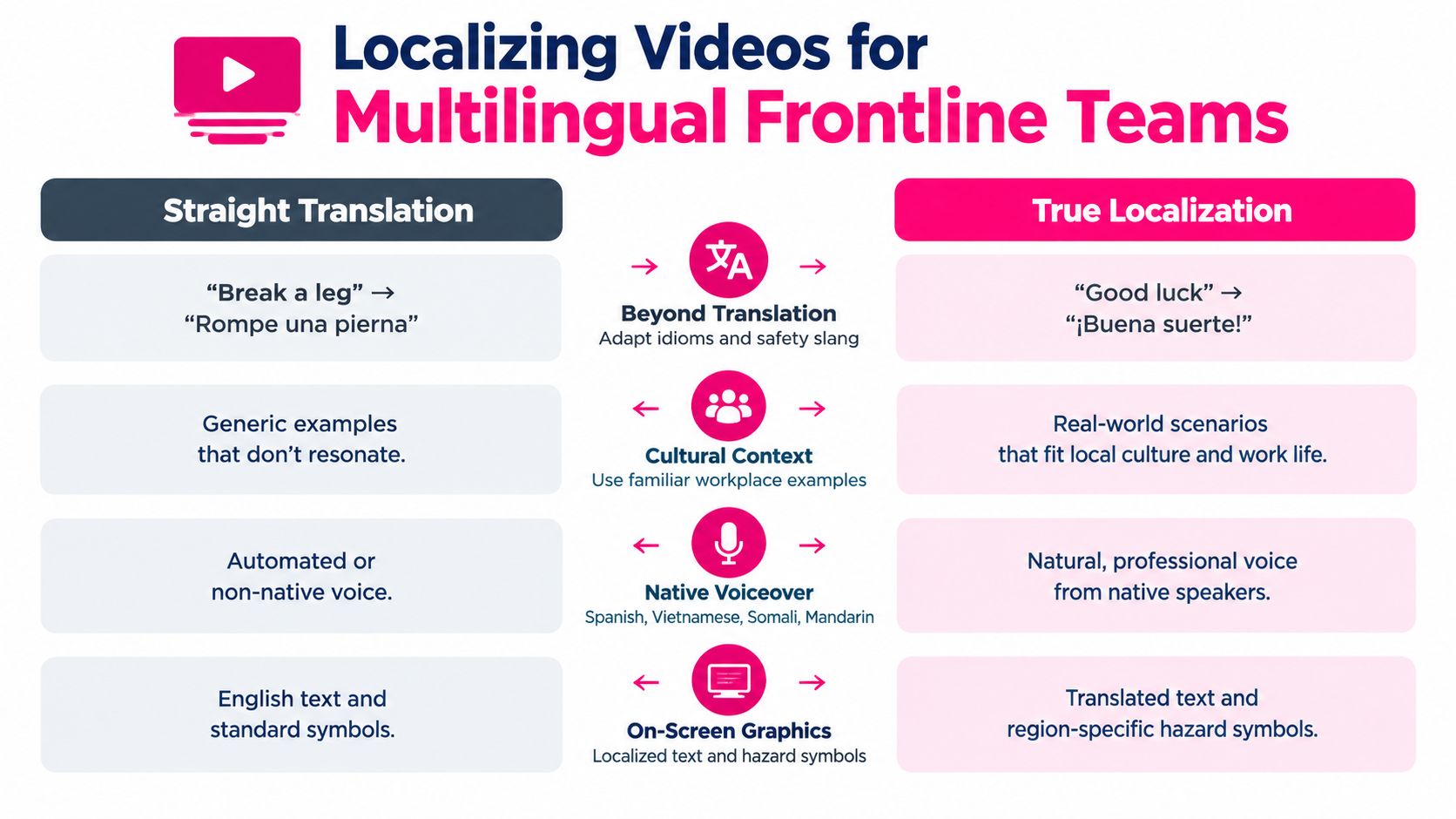
Translation is the floor, not the finished design. OSHA's training expectation is that instruction be understandable to the employee, and 29 CFR 1910.30 makes understandability explicit for fall-hazard training. That means a team should review not only the words, but also the examples, pace, visuals, terminology, and opportunity to ask questions.
OSHA's training library shows the practical value of accessible formats, with many short videos available in English and Spanish. A case study involving Latino construction workers reported that a culturally appropriate 5-minute computer-based video improved knowledge and was well-liked, as summarized in OSHA's training materials library. The lesson is not that every safety topic should be five minutes. It's that relevance and cultural fit influence whether workers can absorb and use the instruction.
Localize the work, not just the script
For Spanish, Vietnamese, Somali, Mandarin, or any other language group, have a fluent reviewer assess the actual job context. A literal translation of “stop the line” may confuse workers if the site uses another phrase for suspending production. OSHA-specific terms still need careful handling because workers may encounter them on labels, permits, equipment, or supervisor instructions.
Choose native voice talent or a trusted bilingual reviewer over an unreviewed automated dub. Replace English-heavy slides with concrete images, hazard symbols, short phrases, and demonstrations that don't assume strong English literacy. Show the gloves, eyewear, respirator, or machine controls workers will use.
A localized SCORM package should leave the studio with the translated audio, captions, on-screen text, transcript, knowledge checks, and reviewer sign-off connected to the correct language version. Keep the English source and each localized version under version control so a standard change doesn't leave one workforce watching an obsolete procedure.
Accessible captions also support employees who are deaf or hard of hearing. Your accessibility review can use this guidance on captions for deaf learners alongside language review.
A Reusable Production Workflow for L&D Teams
A production pipeline becomes reliable when every stage has an owner and a proof point. Don't let the editor become the accidental compliance owner. The safety subject-matter expert owns technical accuracy, the learning designer owns clarity, and the LMS administrator owns delivery and records.
1. Source the requirement
The compliance lead identifies the applicable OSHA standard, affected roles, exposure conditions, and retraining triggers. Save the exact citation, the approved policy, and the date reviewed. That citation is the artifact that prevents a well-produced video from drifting away from the rule.
2. Script the scenario
The instructional designer turns the requirement into a scenario with one objective and one observable behavior. A qualified SME reviews the script before recording, especially where equipment, emergency response, or protective measures are involved. Store the comments and approval in an SME review log.
3. Record and edit
The producer records the approved script, captures the relevant task, and edits each microlearning chunk for quick scanning. Add captions, on-screen terminology, accessible contrast, and a knowledge check where appropriate. The caption file and final review copy prove that accessibility and accuracy were considered.
4. Localize in parallel
The localization owner prepares translated scripts while the source version moves through production, then sends the audio, captions, and graphics to native reviewers. A translation sign-off sheet should identify the language, reviewer, version, unresolved terms, and approval date. Treat localization as a production track, not a final cosmetic check.
5. Package and test
The LMS administrator packages the approved module as SCORM 2004 4th Edition when that's the target environment, then tests completion, success, and suspend_data behavior in the actual LMS. The manifest, test results, source files, captions, translations, and approval records form the delivery packet.
Two shortcuts cause disproportionate damage. Skipping SME review to save a week can embed a technically unsafe instruction. Waiting until the end to localize can force rushed edits that break timing, captions, or on-screen text.
Teams that want to improve learner interaction can also review practical guidance on how to engage with training videos. The tool matters less than the handoff discipline. Delivery day should leave the LMS admin with a tested package, role assignments, language versions, release notes, and an archive of the superseded file.
Publishing and Tracking Compliance Videos in an LMS
An LMS record should answer four questions quickly: who completed the training, what version did they take, when did they take it, and how did they demonstrate understanding? A completion timestamp is useful, but it's only one part of the evidence packet. Add quiz results for hazard-recognition checks, supervisor observations for practical tasks, and retraining assignments tied to role or workplace changes.
SCORM can provide structured completion and assessment data inside an LMS. xAPI can capture learning events across systems, such as an observation recorded outside the LMS or a practical demonstration logged by a supervisor. Choose the tracking method your audit process can maintain. A data model is not helpful if supervisors don't record observations consistently.
Configure the reporting layer
Set role-based enrollment for new hires, transfers, temporary workers, and employees moving into jobs with different exposures. When a procedure changes, assign the updated module to the affected population and preserve the prior version for historical evidence. Don't overwrite an old video and assume the LMS record will explain what changed.
| LMS Output | OSHA Evidence | Cadence | |---|---|---| | User completion record with timestamp | Evidence that the assigned learning activity occurred | Review monthly | | Quiz or knowledge-check result | Evidence of hazard recognition or comprehension testing | Review after assignment and during audits | | Supervisor skill observation | Evidence that the worker can perform the task | Record after practice and whenever reassessment is triggered | | Version and assignment history | Evidence of which content the employee received | Review after every content change | | Exportable CSV or PDF packet | Evidence that can be presented to a compliance officer | Test exports periodically and before an audit |
Use monthly completion dashboards to catch overdue assignments and role mismatches. Send refresher reminders on a regular quarterly cycle where your program requires them, and configure automation for applicable retraining triggers rather than relying on memory. Don't label an annual refresher as a 29 CFR 1910.30 Powered Industrial Trucks requirement without checking the specific standard and equipment rules that apply to your operation.
For a deeper recordkeeping review, use this guide to audit trail requirements. Before an inspector arrives, export the roster, completion history, assessment results, observation records, current and prior versions, and the approval trail into a clearly named evidence folder.
A Practical Compliance Video Readiness Checklist
Before you publish, answer each question with yes or no. A “not yet” answer should create an owner and a due date, not disappear into a launch meeting.
- Legal scope: Have you identified the applicable OSH Act purpose, OSHA standard, affected roles, hazards, and retraining triggers?
- Current content: Has a qualified subject-matter expert approved the script, demonstration, warnings, and site-specific instructions?
- Understandable delivery: Can every affected employee understand the language, vocabulary, captions, visuals, and instructions?
- Blended design: Does the program include discussion, demonstration, supervised practice, or observation where the task requires more than recognition?
- Microlearning clarity: Does each video have one objective, one primary hazard, readable terminology, accurate captions, and a final action?
- Localization review: Have native or fluent reviewers approved voiceover, subtitles, graphics, idioms, and job-specific examples?
- LMS evidence: Can you export completion dates, assessment results, version history, retraining assignments, and supervisor sign-offs?
- Version control: Will an update create a new version while preserving the history of what earlier workers received?
- Supervisor readiness: Does each supervisor know how to answer questions, observe performance, correct unsafe behavior, and document the result?
Retraining isn't governed by one universal calendar for every topic. Assign it when the applicable standard requires it, when workplace or equipment changes make earlier instruction inadequate, or when a worker shows insufficient understanding. After an incident or near miss, pause and review the procedure, determine whether the event reveals a knowledge or skill gap, update the content if needed, and verify affected workers rather than reissuing the same certificate.
When a video changes, don't alter already-issued records. Archive the old version, document the reason for revision, assign the new version to affected workers, and define whether the change requires knowledge review, hands-on reassessment, or both. A general content audit checklist can help your team inspect the surrounding governance, but your OSHA-specific review still needs the applicable standard and competency evidence.
A video is ready when it teaches the right thing, in an understandable way, to the right worker, and your records show what happened next. That standard is more demanding than a completion badge, but it's also more useful because it connects training activity to safe performance.
---
VideoLearningAI helps trainers turn approved policy content into structured, bite-sized training videos with captions, localization support, and LMS-ready publishing workflows. Visit VideoLearningAI to create a draft for review, then pair it with qualified instruction, hands-on practice, and the records your compliance program requires.